
You have built a PayHere checkout, you open it in sandbox, type your own debit card, and the payment fails. Or every payment "works" but you have never seen what your server does with a declined card. PayHere sandbox test cards fix both problems: PayHere publishes one set of card numbers that always succeed and four sets that trigger specific declines (insufficient funds, limit exceeded, do not honor, network error). This guide lists them, explains why real cards and live merchant IDs fail in sandbox, and shows a tested Node.js notify_url handler plus a script that checks every status code before you go live.
Quick answer
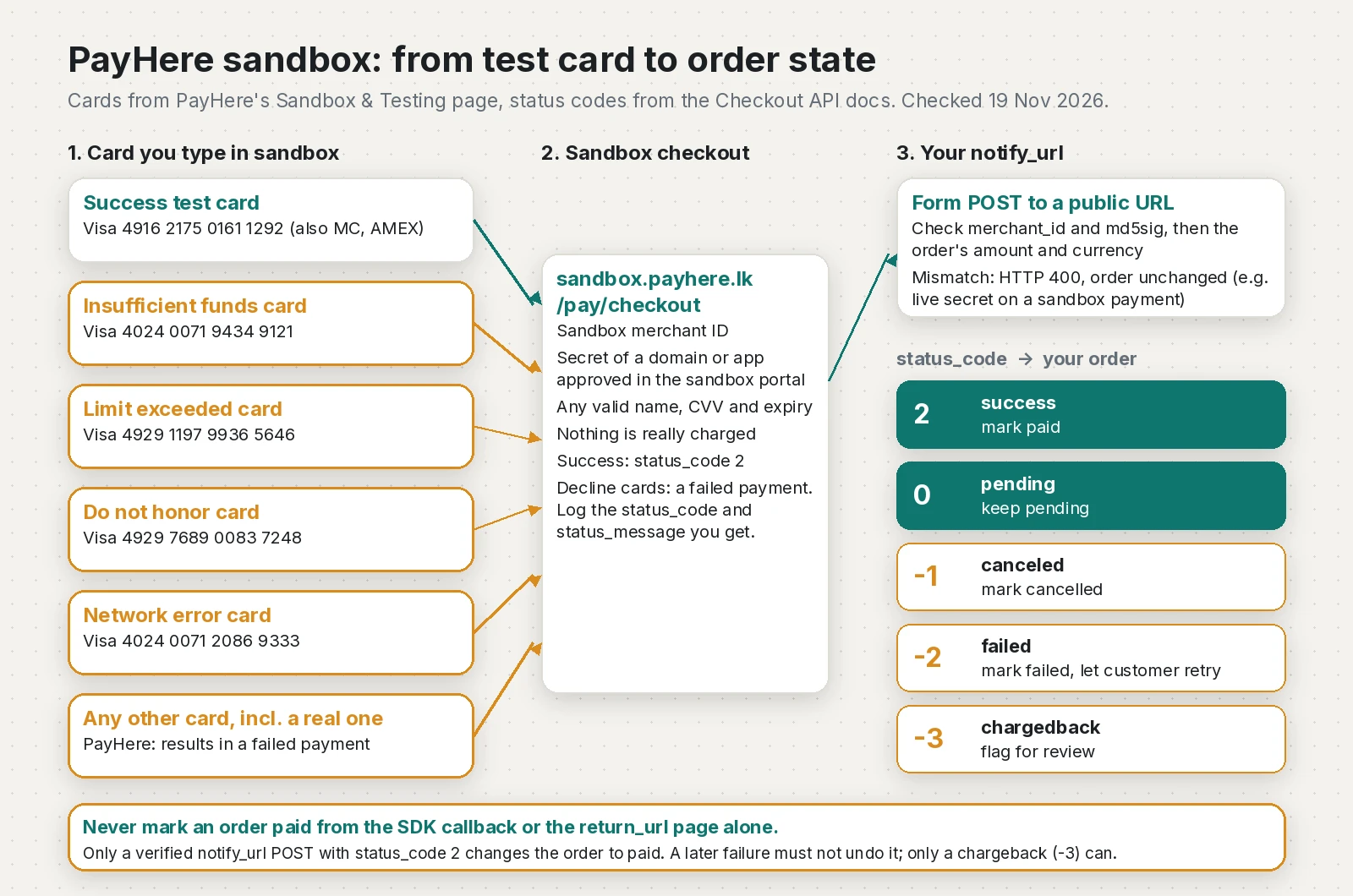
In PayHere sandbox, pay with Visa 4916217501611292, Mastercard 5307732125531191 or AMEX 346781005510225 and any valid name, CVV and expiry to get a successful test payment. PayHere also lists cards for insufficient funds, limit exceeded, do not honor and network error, and says any other card (including a real one) results in a failed payment. Use a sandbox merchant ID, a secret from a domain or app approved in the sandbox portal and https://sandbox.payhere.lk/pay/checkout, then confirm your notify_url verifies md5sig and updates the order for each status_code.
What this means for your app or business
Sandbox testing is free and nothing is charged. Skipping it is what costs money: the usual failures after launch are orders marked paid when the payment failed, paid orders stuck on "pending" because the server never handled the notification, and customers who get no clear message after a decline.
A proper sandbox pass takes about half a day for a website or app that already has PayHere wired in: run each test card, check the order in your database after each one, and fix what breaks. The risk sits in the server code, not in the checkout page, so ask your developer to show you the order record after a declined test payment, not just a success screen.
Bring in help if nobody can explain where notify_url is handled, if orders are marked paid from the app or the return page, or if the go-live date is close and the live account is not approved yet. If you are a freelancer looking for a way to get paid from abroad rather than a checkout for customers, PayHere is not the right tool; see my PayPal guide for Sri Lankan freelancers.
What are the PayHere sandbox test cards?
These are the PayHere sandbox card details from the official Sandbox & Testing page, copied on 19 November 2026. They only work on sandbox.payhere.lk. For "Name on Card", CVV and expiry date, PayHere says you can enter any valid data.
| Scenario | Visa | Mastercard | AMEX | What PayHere says happens |
|---|---|---|---|---|
| Success | 4916217501611292 | 5307732125531191 | 346781005510225 | Simulated successful payment |
| Insufficient funds | 4024007194349121 | 5459051433777487 | 370787711978928 | Decline scenario |
| Limit exceeded | 4929119799365646 | 5491182243178283 | 340701811823469 | Decline scenario |
| Do not honor | 4929768900837248 | 5388172137367973 | 374664175202812 | Decline scenario |
| Network error | 4024007120869333 | 5237980565185003 | 373433500205887 | Decline scenario |
| Any other card | Any | Any | Any | Failed payment |
Why does a real card or a live merchant ID fail in sandbox?
PayHere describes sandbox as "a separate clone of the Live PayHere platform" where no payment is actually processed. Three things follow from that:
- Real cards fail. The page says "Any card except the above test cards will result in a failed payment." Your own card is not broken; sandbox simply does not know it.
- Live and sandbox credentials do not mix. A live merchant ID does not exist on
sandbox.payhere.lk, and the merchant secret is issued per domain or app inside each account. Mixing them breaks thehashcheck at checkout, which usually shows up as PayHere "Unauthorized payment request". - Test cards fail on live. Once you switch to
www.payhere.lk, the test numbers are just invalid cards.
How is PayHere sandbox different from live?
Keep these values in separate environment variables and never let one environment read the other's:
- Login: sandbox portal at
https://sandbox.payhere.lk/merchant/sign-in(sign-up at/merchant/sign-up), live portal athttps://www.payhere.lk/merchant/sign-in. They are separate accounts. - Checkout action URL:
https://sandbox.payhere.lk/pay/checkoutfor sandbox,https://www.payhere.lk/pay/checkoutfor live. PayHere warns that the live URL withoutwwwcan cause error PH-0022. - Merchant ID: one per account, found under Integrations.
- Merchant secret: one per domain or app, created with "Add Domain/App" and approved by PayHere (the Checkout API page says this can take up to 24 hours).
- SDK flag: the JavaScript and Flutter SDKs take
"sandbox": true. The Flutter docs describe it as "true if using Sandbox Merchant ID".
A small config module makes the switch explicit:
// payhere-config.mjs: keep sandbox and live values apart
const ENV = process.env.PAYHERE_ENV === "live" ? "live" : "sandbox";

export const payhere = {
  env: ENV,
  checkoutUrl: ENV === "live"
    ? "https://www.payhere.lk/pay/checkout"      // live needs the www
    : "https://sandbox.payhere.lk/pay/checkout",
  merchantId: process.env[`PAYHERE_${ENV.toUpperCase()}_MERCHANT_ID`]?.trim(),
  merchantSecret: process.env[`PAYHERE_${ENV.toUpperCase()}_MERCHANT_SECRET`]?.trim(),
};

if (!payhere.merchantId || !payhere.merchantSecret) {
  throw new Error(`Missing PayHere ${ENV} merchant ID or secret`);
}
How do I set up a PayHere sandbox integration?
- Create an account at
sandbox.payhere.lk/merchant/sign-upand sign in. - Copy the merchant ID from Integrations.
- Click "Add Domain/App", enter the domain the checkout starts from (or your app package name for the mobile SDKs) and request approval.
- Once approved, copy the merchant secret shown next to that domain or app.
- Point your form or SDK at sandbox and set
notify_urlto a public HTTPS URL that reaches your server.
For a Flutter app, the only change from live is the flag and the sandbox values. This passed flutter analyze with payhere_mobilesdk_flutter 3.2.3:
import 'package:flutter/foundation.dart';
import 'package:payhere_mobilesdk_flutter/payhere_mobilesdk_flutter.dart';

// flutter run --dart-define=PAYHERE_SANDBOX=true --dart-define=PAYHERE_MERCHANT_ID=121XXXX ...
const bool kSandbox = bool.fromEnvironment('PAYHERE_SANDBOX', defaultValue: true);
const String kMerchantId = String.fromEnvironment('PAYHERE_MERCHANT_ID');
const String kAppSecret = String.fromEnvironment('PAYHERE_APP_SECRET'); // secret of this app record

void startTestPayment(String orderId) {
  final Map paymentObject = {
    "sandbox": kSandbox, // must match the account the merchant ID comes from
    "merchant_id": kMerchantId,
    "merchant_secret": kAppSecret,
    "notify_url": "https://your-tunnel.example.com/payhere/notify",
    "order_id": orderId,
    "items": "Sandbox test order",
    "amount": "1000.00",
    "currency": "LKR",
    "first_name": "Saman",
    "last_name": "Perera",
    "email": "samanp@gmail.com",
    "phone": "0771234567",
    "address": "No.1, Galle Road",
    "city": "Colombo",
    "country": "Sri Lanka",
  };

  PayHere.startPayment(
    paymentObject,
    (paymentId) => debugPrint("SDK success callback, payment $paymentId. Wait for notify_url."),
    (error) => debugPrint("SDK error: $error"),
    () => debugPrint("Customer closed the payment sheet"),
  );
}What does each test card send to my notify_url?
PayHere sends a server-to-server POST, form-encoded (application/x-www-form-urlencoded, not JSON), with merchant_id, order_id, payment_id, payhere_amount, payhere_currency, status_code, md5sig, method, status_message and masked card details. The documented status codes are 2 success, 0 pending, -1 canceled, -2 failed and -3 chargedback.
For the success cards, PayHere's own developer account published a sample sandbox notification with status_code=2, status_message=Successfully received the VISA payment, method=TEST and a card number ending in 1292, which matches the sandbox Visa test card.
For the decline cards, PayHere documents only that they test "specific decline scenarios" and that other cards give a failed payment. It does not publish the exact status_code or status_message each decline card sends, or whether every decline reaches notify_url. So treat that as something to observe: log the full body for each card, and expect -2 (failed) to be the code your handler most often deals with.
Every notification is signed the same way, so you can verify a decline exactly like a success:
md5sig = UPPER( md5( merchant_id + order_id + payhere_amount + payhere_currency
                     + status_code + UPPER( md5(merchant_secret) ) ) )
How should my server handle each status code?
This Express 5 handler checks the merchant ID and md5sig, compares the amount and currency with the order, maps each status_code to an order state, and never lets a late failure undo a paid order:
// notify.mjs: PayHere notify_url handler (Express 5, Node 24)
import express from "express";
import crypto from "node:crypto";

const md5 = (s) => crypto.createHash("md5").update(s, "utf8").digest("hex").toUpperCase();
const sameHex = (a, b) =>
  a.length === b.length && crypto.timingSafeEqual(Buffer.from(a), Buffer.from(b));

// PayHere status codes (Checkout API docs)
const STATUS = { "2": "paid", "0": "pending", "-1": "cancelled", "-2": "failed", "-3": "chargedback" };

export function createApp({ merchantId, merchantSecret, orders }) {
  const app = express();
  const secretHash = md5(merchantSecret);

  // PayHere posts application/x-www-form-urlencoded, not JSON.
  app.post("/payhere/notify", express.urlencoded({ extended: false }), (req, res) => {
    const b = req.body ?? {};
    const { order_id, payment_id, payhere_amount, payhere_currency,
            status_code, status_message, method } = b;
    console.log("payhere notify", { order_id, payment_id, status_code, status_message, method });

    const expected = md5(String(b.merchant_id) + order_id + payhere_amount +
                         payhere_currency + status_code + secretHash);
    if (b.merchant_id !== merchantId || !sameHex(expected, String(b.md5sig ?? "").toUpperCase())) {
      console.warn("rejected: merchant_id or md5sig does not match", order_id);
      return res.sendStatus(400);
    }

    const order = orders.get(order_id);
    if (!order || order.amount !== payhere_amount || order.currency !== payhere_currency) {
      console.warn("rejected: unknown order or amount/currency differs", order_id);
      return res.sendStatus(400);
    }

    const next = STATUS[status_code] ?? "unknown";
    // Never let a late failure overwrite a paid order. Only a chargeback can.
    if (order.status !== "paid" || next === "chargedback") {
      order.status = next;
    }
    order.history.push({ status_code, status_message, payment_id, method, at: new Date().toISOString() });
    res.sendStatus(200);
  });

  return app;
}
In production, pass in payhere.merchantId and payhere.merchantSecret from the config module and replace the Map with your database.
How do I test every status code without paying each time?
Sandbox gives you success and declines, but you cannot easily trigger pending or chargeback from the checkout. This script sends PayHere-style POSTs with a correctly computed md5sig for each code, plus the mistakes I most often find: a signature made with another secret, a different merchant ID, a wrong amount and a JSON body.
// simulate.mjs: send PayHere-style notify POSTs to the handler and check the result
import assert from "node:assert/strict";
import crypto from "node:crypto";
import { createApp } from "./notify.mjs";

const md5 = (s) => crypto.createHash("md5").update(s, "utf8").digest("hex").toUpperCase();
const MERCHANT_ID = "1211149";            // fake sandbox ID, as in PayHere's docs
const SECRET = "sandbox-test-secret";     // fake secret for this test only

const orders = new Map();
const newOrder = (id) => orders.set(id, { amount: "1000.00", currency: "LKR", status: "pending", history: [] });
const server = createApp({ merchantId: MERCHANT_ID, merchantSecret: SECRET, orders }).listen(0);
const url = `http://127.0.0.1:${server.address().port}/payhere/notify`;

function notifyBody(order_id, status_code, status_message,
                    { secret = SECRET, merchant_id = MERCHANT_ID, amount = "1000.00" } = {}) {
  const md5sig = md5(merchant_id + order_id + amount + "LKR" + status_code + md5(secret));
  return new URLSearchParams({ merchant_id, order_id, payment_id: "320025156250", payhere_amount: amount,
    payhere_currency: "LKR", status_code, md5sig, status_message, method: "TEST" });
}
const post = (body, type = "application/x-www-form-urlencoded") =>
  fetch(url, { method: "POST", headers: { "content-type": type }, body: String(body) }).then((r) => r.status);

for (const [id, code, state] of [["ORD-OK", "2", "paid"], ["ORD-PEND", "0", "pending"],
    ["ORD-CANC", "-1", "cancelled"], ["ORD-FAIL", "-2", "failed"], ["ORD-CB", "-3", "chargedback"]]) {
  newOrder(id);
  assert.equal(await post(notifyBody(id, code, "test")), 200);
  assert.equal(orders.get(id).status, state);
  console.log(`ok  status_code ${code.padStart(2)} -> order ${state}`);
}
assert.equal(await post(notifyBody("ORD-OK", "-2", "late failure")), 200);
assert.equal(orders.get("ORD-OK").status, "paid");
console.log("ok  late -2 after 2 keeps order paid");

newOrder("ORD-MIX");
assert.equal(await post(notifyBody("ORD-MIX", "2", "x", { secret: "live-secret" })), 400);
assert.equal(await post(notifyBody("ORD-MIX", "2", "x", { merchant_id: "1299999" })), 400);
assert.equal(await post(notifyBody("ORD-MIX", "2", "x", { amount: "1.00" })), 400);
assert.equal(await post(JSON.stringify(Object.fromEntries(notifyBody("ORD-MIX", "2", "x"))), "application/json"), 400);
assert.equal(orders.get("ORD-MIX").status, "pending");
console.log("ok  wrong secret, merchant_id, amount and JSON body -> HTTP 400, order stays pending");

server.close();
console.log("all checks passed");
Run it with node simulate.mjs next to notify.mjs (Node 18 or later for the built-in fetch). On Node 24.22.1 it printed (handler log lines removed):
ok  status_code  2 -> order paid
ok  status_code  0 -> order pending
ok  status_code -1 -> order cancelled
ok  status_code -2 -> order failed
ok  status_code -3 -> order chargedback
ok  late -2 after 2 keeps order paid
ok  wrong secret, merchant_id, amount and JSON body -> HTTP 400, order stays pending
all checks passed
If a real sandbox notification fails your signature check while this script passes, the problem is the secret or the values you hash, not the formula. My guide to PayHere notify_url and md5sig mismatches walks through that case.
How do I test PayHere notify_url on my own computer?
PayHere's docs are clear that you cannot test the notification on localhost; notify_url must be a public domain or IP. Run your server locally and expose it with a tunnel, for example cloudflared tunnel --url http://localhost:3000, then use the printed HTTPS address plus /payhere/notify as notify_url.
PayHere sandbox test checklist before going live
- One success payment each with the sandbox Visa, Mastercard and AMEX cards, and the order shows paid in your database.
- One payment with each decline set (insufficient funds, limit exceeded, do not honor, network error); log the
status_codeandstatus_messageyou receive and confirm the order is not marked paid. - A real card in sandbox fails and your page shows a clear message.
- The customer cancels on the checkout page; the order stays unpaid and
cancel_urlworks. - A notification with a wrong
md5sig, wrong merchant ID or changed amount is rejected. - The
return_urlpage reads status from your database and handles "still pending" for a few seconds. notify_urlis public HTTPS, has no login or CSRF check, and accepts form-encoded bodies.- For subscriptions: the laravel-payhere maintainer reports that sandbox charges the next recurring installment one minute after the first, so check that your handler records both notifications.
- Before launch: new live account, live merchant ID, a live-approved domain or app with its own secret,
PAYHERE_ENV=live, and thewwwcheckout URL. Then make one small real payment and refund it.
Frequently asked questions
What are the PayHere sandbox test card numbers?
For a successful sandbox payment PayHere lists Visa 4916217501611292, Mastercard 5307732125531191 and AMEX 346781005510225. Any valid name on card, CVV and expiry date can be used.
Which PayHere test cards simulate a declined payment?
PayHere publishes separate Visa, Mastercard and AMEX numbers for insufficient funds, limit exceeded, do not honor and network error on its Sandbox and Testing page. Any card that is not on the list also results in a failed payment.
Why does my real card fail in PayHere sandbox?
Sandbox does not process real payments. PayHere says any card except the listed test cards will result in a failed payment, so use the test numbers in sandbox and real cards only on the live checkout.
How do I log in to the PayHere sandbox?
Sign in at sandbox.payhere.lk/merchant/sign-in with a sandbox account created at sandbox.payhere.lk/merchant/sign-up. It is a separate account from your live PayHere login.
Can I convert a PayHere sandbox account to a live account?
No. PayHere says sandbox is a completely separate deployment, so you must apply for a live merchant account and use its own merchant ID and merchant secrets.
What is the PayHere sandbox checkout URL?
Sandbox payments post to https://sandbox.payhere.lk/pay/checkout and live payments to https://www.payhere.lk/pay/checkout. The JavaScript and Flutter SDKs use a sandbox true or false flag instead.
Can I test the PayHere notify_url on localhost?
No. PayHere must reach notify_url from the internet, so use a public domain or a tunnel such as a Cloudflare Quick Tunnel that forwards to your local server.
What status codes does PayHere send to notify_url?
PayHere documents 2 for success, 0 for pending, -1 for canceled, -2 for failed and -3 for chargedback. Verify md5sig before acting on any of them.
Sources
- Sandbox & Testing (PayHere Knowledge Base, 2024-03-29)
- Checkout API (PayHere Knowledge Base, 2026-09-04)
- JavaScript SDK (PayHere Knowledge Base, 2026-09-01)
- Flutter SDK (PayHere Knowledge Base, 2026-09-01)
- payhere_mobilesdk_flutter 3.2.3 (pub.dev, 2026-05-12)
- A correctly encoded version of the PayHere Payment Notification (PayHereDevs on GitHub, 2021-09-22)
- PayHere API FAQs (laravel-payhere issue #29) (laravel-payhere on GitHub, 2024-06-29)
- PayHere Sandbox merchant sign-in (PayHere)
- Cloudflare Quick Tunnels (Cloudflare Docs)
Keep reading
- PayHere Unauthorized Payment Request: How to Fix ItWhy PayHere shows "Unauthorized payment request" at checkout, how to build the hash correctly, and how to check domain, sandbox and Referer settings.
- PayHere notify_url Not Working or md5sig Mismatch: FixPayHere payment done but the order is still pending? Make notify_url reachable, verify md5sig with the right secret and raw amount. Tested code inside.
- Stripe 3D Secure Test Cards: Fix requires_action PaymentsThe Stripe 3D Secure test cards to use, why PaymentIntents get stuck in requires_action, and how to recover authentication_required off-session charges.
Comments
Share a question or note about this article.
Loading comments…