
If you are looking for Stripe 3D Secure test cards, you are probably also staring at a PaymentIntent that never finishes. It sits in requires_action, or an off-session charge fails with authentication_required, and the order is never paid. I see this in web checkouts and Flutter apps that work fine with 4242 4242 4242 4242 and then break as soon as a bank asks for 3D Secure (3DS). This post lists the exact test cards to use, explains why payments get stuck, and shows working Node, Stripe.js and Flutter code to fix it.
Quick answer
requires_action means the customer's bank wants 3D Secure and your client code has not shown the challenge yet. Call stripe.handleNextAction() (web) or Stripe.instance.handleNextAction() (Flutter) after a server-side confirm, or let PaymentSheet and confirmPayment() handle it with a return_url. Test with 4000002760003184 (always asks for 3DS) and 4000002500003155 (asks unless the card was set up for future use), and treat authentication_required on off-session charges as "bring the customer back to confirm".
What this means for your app or business
- Lost sales you cannot see. A payment stuck in
requires_actionis not a decline in the customer's eyes, it is a checkout that just hangs. Many people give up and never come back. - It matters most in Europe. Strong Customer Authentication (SCA) has been required for card payments in the European Economic Area since 14 September 2019, and Stripe's SCA guide says banks may decline payments that skip it. Issuers in other countries can also ask for 3DS on any payment.
- Lower fraud risk. Payments that pass 3DS usually move fraud dispute liability to the card issuer, so supporting it properly also protects you.
- The fix is small. In most projects it is a day of work: handle the next action on the client, add two webhook cases and a recovery path for saved cards, then test with the cards below.
- When to get help. If your Dashboard shows payments "Incomplete" for days, or subscription renewals fail with
authentication_required, have a developer review the flow before your next release.
What does requires_action mean in Stripe?
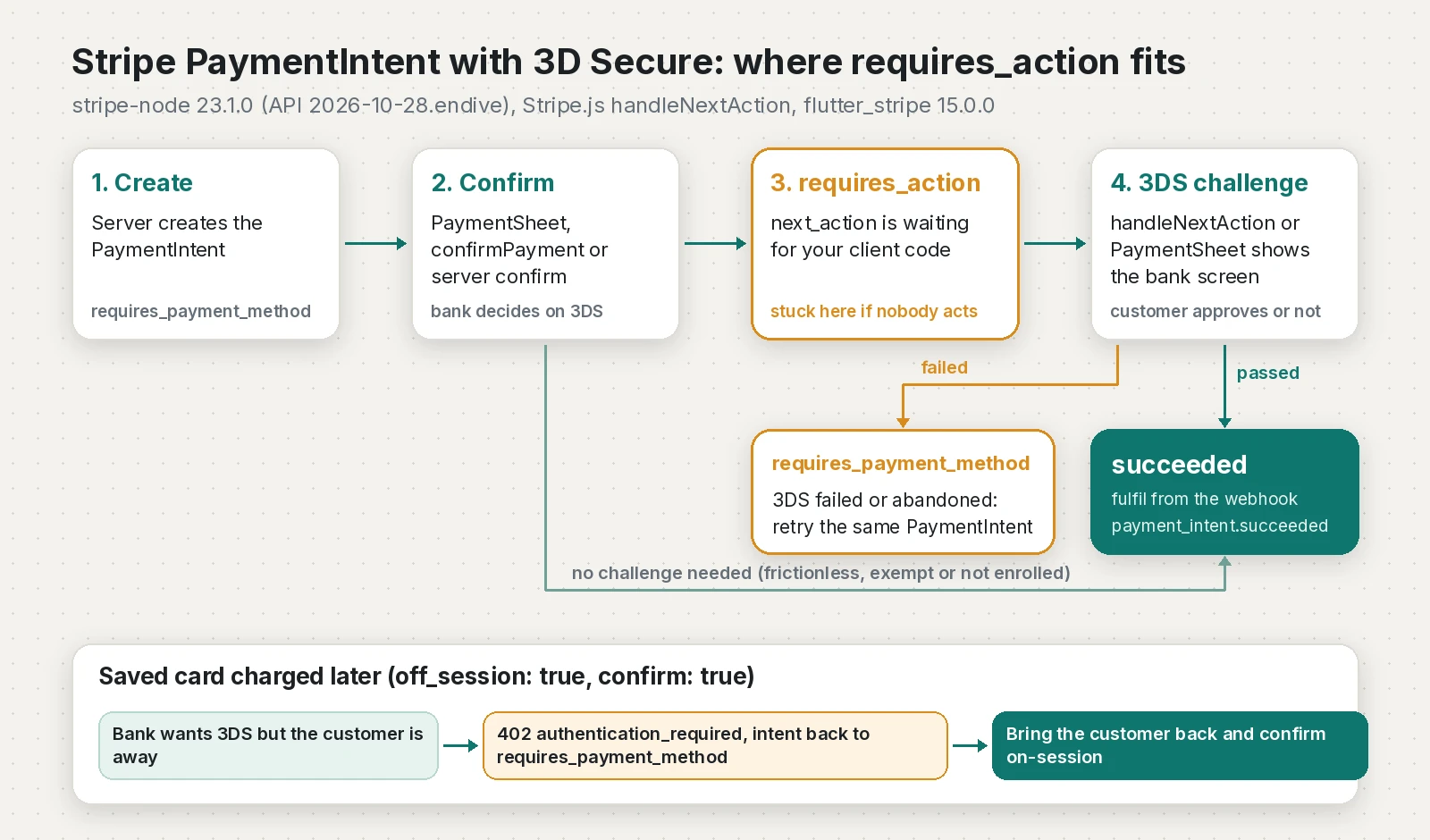
A PaymentIntent moves through statuses: requires_payment_method, requires_confirmation, requires_action, processing, succeeded or canceled. Stripe's docs say that if the payment needs extra steps, "such as authenticating with 3D Secure", the status is requires_action. The next_action field tells the client what to do, for example redirect_to_url or use_stripe_sdk.
Nothing on Stripe's side moves it forward. Your front end has to run the action. After 3DS, the authentication flow docs say a successful check moves the payment to processing and then succeeded, while a failed one sends it back to requires_payment_method, where you can retry with the same PaymentIntent.
Which Stripe 3D Secure test cards should I use?
These numbers come from the 3D Secure section of Stripe's testing page. Use any future expiry date (for example 12/34) and any 3-digit CVC, with test API keys only.
| Card number | Behaviour in test mode | When to use it |
|---|---|---|
| 4000002760003184 | Requires authentication on every transaction, however the card is set up | Basic 3DS challenge test for web and mobile |
| 4000002500003155 | Requires authentication for off-session payments unless set up first; on-session always asks | Testing saved cards and subscriptions |
| 4000003800000446 | Already set up: off-session payments succeed, on-session payments ask for 3DS | Checking your off-session success path |
| 4000008260003178 | Asks for 3DS, then declines with insufficient_funds | Error handling after a passed challenge |
| 4000000000003220 | 3DS required and succeeds, Ireland-issued (IE) | EU customer flow |
| 4000008400001629 | 3DS required, then declined with card_declined | Showing a decline after authentication |
| 4000000032200000 | 3DS required on all transactions, passes through a frictionless flow | Making sure you do not wait for a challenge that never appears |
| 4000000000003055 | 3DS supported but not required by default Radar rules | Normal payments from 3DS-capable cards |
| 4242424242424242 | Supports 3DS but is not enrolled, so no prompt | Your happy path only |
For server-side tests, Stripe recommends PaymentMethod IDs instead of raw numbers, for example pm_card_authenticationRequired, pm_card_authenticationRequiredOnSetup and pm_card_threeDSecure2Required. For native mobile challenge screens, the same page lists 4000582600000045 (one-time passcode UI) and 4000582600000094 (out-of-band UI).
Why do Stripe payments get stuck in requires_action?
These are the causes I find most often:
- The server confirms but the client never acts. You create and confirm the PaymentIntent on the server, return only a "pending" flag, and the client never calls
handleNextAction(). - Confirming on the server without a `return_url`. The 3DS docs say to pass a
return_urlwhen you confirm on the server, so redirect-based authentication can bring the customer back. - Off-session charges on cards that were never set up. With
off_session: true, the customer is not there to authenticate. If the bank still asks, the request fails with HTTP 402 and the decline code `authentication_required`, and the PaymentIntent goes back torequires_payment_method. Saving the card withsetup_future_usage: 'off_session'during an on-session payment makes this much less likely. - Webhooks only handle `payment_intent.succeeded`. Nobody notices
payment_intent.requires_actionorpayment_intent.payment_failed, so the customer is never asked to come back. - A missing URL scheme in a Flutter app. Without a matching
returnURL, bank redirects cannot return to the app.
How do I fix requires_action and authentication_required?
Step 1: Server (Node, stripe 23.1.0)
This Express 5 app creates on-session PaymentIntents that save the card for later, charges saved cards off-session, and recovers from authentication_required.
// server.mjs (Node 20+, stripe 23.1.0, express 5)
import express from 'express';
import Stripe from 'stripe';

const stripe = new Stripe(process.env.STRIPE_SECRET_KEY);
const app = express();

// Webhook route first: it needs the raw body.
app.post('/webhook', express.raw({ type: 'application/json' }), (req, res) => {
  let event;
  try {
    event = stripe.webhooks.constructEvent(
      req.body, req.headers['stripe-signature'], process.env.STRIPE_WEBHOOK_SECRET);
  } catch (err) {
    return res.status(400).send(`Webhook Error: ${err.message}`);
  }
  const pi = event.data.object;
  switch (event.type) {
    case 'payment_intent.succeeded':
      markOrder(pi.metadata.orderId, 'paid'); // fulfil here, not on the client
      break;
    case 'payment_intent.requires_action':
      markOrder(pi.metadata.orderId, 'awaiting_3ds'); // do not fulfil yet
      break;
    case 'payment_intent.payment_failed':
      markOrder(pi.metadata.orderId,
        pi.last_payment_error?.code === 'authentication_required' ? 'needs_customer' : 'failed');
      break;
  }
  res.json({ received: true });
});

app.use(express.json());

// On-session checkout: the client confirms and shows 3DS if the bank asks.
app.post('/checkout', async (req, res) => {
  const { customerId, amount, currency, orderId } = req.body;
  const pi = await stripe.paymentIntents.create({
    amount, currency, customer: customerId,
    automatic_payment_methods: { enabled: true },
    setup_future_usage: 'off_session', // authenticate now, charge later
    metadata: { orderId },
  });
  res.json({ clientSecret: pi.client_secret });
});

// Off-session charge with authentication_required recovery.
app.post('/charge-saved', async (req, res) => {
  const { customerId, paymentMethodId, amount, currency, orderId } = req.body;
  try {
    const pi = await stripe.paymentIntents.create({
      amount, currency, customer: customerId, payment_method: paymentMethodId,
      off_session: true, confirm: true, metadata: { orderId },
    });
    return res.json({ status: pi.status });
  } catch (err) {
    if (err.code === 'authentication_required' || err.decline_code === 'authentication_required') {
      markOrder(orderId, 'needs_customer'); // email or push a link back into your app
      return res.status(402).json({
        status: 'requires_authentication',
        clientSecret: err.payment_intent?.client_secret,
        paymentMethodId,
      });
    }
    if (err.type === 'StripeCardError') {
      return res.status(402).json({ status: 'requires_new_card', declineCode: err.decline_code });
    }
    throw err;
  }
});

function markOrder(orderId, state) { /* save to your database */ }

app.listen(4242);
Step 2: Web client (Stripe.js)
If your server confirmed and got requires_action, call handleNextAction. To recover an off-session failure, confirm the same PaymentIntent on-session with the saved card, as Stripe's save-and-reuse guide describes.
// recover.ts (@stripe/stripe-js 10.3.0)
import { loadStripe } from '@stripe/stripe-js';

const stripePromise = loadStripe('pk_test_...');

export async function finishServerConfirmedPayment(clientSecret: string) {
  const stripe = await stripePromise;
  if (!stripe) throw new Error('Stripe.js failed to load');
  const { error, paymentIntent } = await stripe.handleNextAction({ clientSecret });
  if (error) return `failed: ${error.message}`;
  return paymentIntent?.status ?? 'unknown'; // still wait for the webhook
}

export async function recoverOffSessionPayment(clientSecret: string, paymentMethodId: string) {
  const stripe = await stripePromise;
  if (!stripe) throw new Error('Stripe.js failed to load');
  const { error, paymentIntent } = await stripe.confirmPayment({
    clientSecret,
    confirmParams: { payment_method: paymentMethodId, return_url: 'https://example.com/orders/complete' },
    redirect: 'if_required',
  });
  if (error) return `failed: ${error.message}`; // ask for another card
  return paymentIntent.status;
}
Step 3: Flutter (flutter_stripe 15.0.0)
PaymentSheet shows the 3DS screen for you. The two other functions cover a server-side confirm and the off-session recovery.
// lib/stripe_payments.dart (flutter_stripe 15.0.0)
import 'package:flutter_stripe/flutter_stripe.dart';

const returnUrl = 'myapp://stripe-redirect'; // must match your URL scheme

Future<String> payWithPaymentSheet({
  required String clientSecret,
  required String customerId,
  required String ephemeralKey,
}) async {
  await Stripe.instance.initPaymentSheet(
    paymentSheetParameters: SetupPaymentSheetParameters(
      merchantDisplayName: 'My Shop',
      paymentIntentClientSecret: clientSecret,
      customerId: customerId,
      customerEphemeralKeySecret: ephemeralKey,
      returnURL: returnUrl,
    ),
  );
  try {
    await Stripe.instance.presentPaymentSheet();
    return 'submitted'; // fulfil after payment_intent.succeeded
  } on StripeException catch (e) {
    if (e.error.code == FailureCode.Canceled) return 'canceled';
    return 'failed: ${e.error.localizedMessage ?? e.error.message}';
  }
}

Future<String> finishServerConfirmed(String clientSecret) async {
  try {
    final pi = await Stripe.instance.handleNextAction(clientSecret, returnURL: returnUrl);
    return pi.status.name;
  } on StripeException catch (e) {
    return 'failed: ${e.error.localizedMessage ?? e.error.message}';
  }
}

Future<String> recoverOffSession(String clientSecret, String paymentMethodId) async {
  try {
    final pi = await Stripe.instance.confirmPayment(
      paymentIntentClientSecret: clientSecret,
      data: PaymentMethodParams.cardFromMethodId(
        paymentMethodData: PaymentMethodDataCardFromMethod(paymentMethodId: paymentMethodId),
      ),
    );
    return pi.status.name;
  } on StripeException catch (e) {
    return 'failed: ${e.error.localizedMessage ?? e.error.message}';
  }
}How do I verify the fix?
- Web checkout: pay with
4000002760003184. You should see the test authentication page; approve it and the PaymentIntent should reachsucceeded. Fail it and it should return torequires_payment_method. - Saved card: save
4000002500003155with an on-session payment, then charge it off-session. It should succeed. Chargepm_card_authenticationRequiredoff-session and your endpoint should returnrequires_authentication. - Webhooks: run
stripe listen --forward-to localhost:4242/webhook, thenstripe trigger payment_intent.requires_actionandstripe trigger payment_intent.payment_failed. Both fixtures exist in the Stripe CLI repo. If signature checks fail, see my post on Stripe webhook signature verification failed. - Dashboard: open the payment and check the events timeline for the 3DS attempt and its result.
I tested the Node server on Node 24.22.1 against a local mock of the Stripe API: checkout, off-session success, authentication_required recovery, a generic decline, and three signed webhook events all behaved as expected. The TypeScript passed tsc --strict and the Dart passed flutter analyze with flutter_stripe 15.0.0.
How do I prevent it from happening again?
- Return the PaymentIntent status and client secret to the client after every server-side confirm.
- Call
handleNextActionwhenever the status isrequires_action. - Pass a
return_urlon every confirm, and register a URL scheme in mobile apps. - Save cards with
setup_future_usage: 'off_session'or a SetupIntent during an on-session payment. - Catch
authentication_requiredon every off-session charge and send the customer a link back. - Handle
payment_intent.requires_actionandpayment_intent.payment_failedwebhooks, not onlysucceeded. - Fulfil orders from webhooks, never from the client result.
- Add the 3DS test cards above to your release checklist.
Summary
| Problem | Cause | Fix |
|---|---|---|
PaymentIntent stuck in requires_action | Client never ran the next action | handleNextAction (web or Flutter) or PaymentSheet |
| Bank redirect never comes back | No return_url or app URL scheme | Pass return_url on confirm, set returnURL in Flutter |
Off-session charge fails with authentication_required | Card not set up, or bank wants fresh 3DS | Bring the customer back and confirm on-session |
| 3DS never appears in tests | Using 4242 or the Dashboard | Use the 3DS test cards through your own checkout |
| Orders marked paid too early | Fulfilling from the client | Fulfil on payment_intent.succeeded |
Frequently asked questions
What is the Stripe 3D Secure test card number?
Use 4000002760003184 to require 3D Secure on every payment, or 4000002500003155 to require it unless the card was set up for future payments. Use any future expiry date and any 3-digit CVC with your test API keys.
Why is my Stripe PaymentIntent stuck in requires_action?
The customer's bank asked for 3D Secure and your client code has not shown the challenge. Call handleNextAction with the client secret, or confirm with PaymentSheet or confirmPayment so Stripe shows the challenge for you.
What does authentication_required mean in Stripe?
It is a decline code that means the bank wants the customer to authenticate, usually with 3D Secure. For off-session charges, bring the customer back to your app or site and confirm the same PaymentIntent on-session.
Why does 3D Secure not appear when I test in the Stripe Dashboard?
Stripe's testing docs say 3D Secure redirects do not happen for payments created directly in the Dashboard. Test through your own checkout or an API call, and use the cards from the 3D Secure section of the testing page.
Does 3D Secure apply outside Europe, for example in Sri Lanka or India?
Strong Customer Authentication is a European rule, but 3D Secure depends on the cardholder's bank and on Radar rules, so cards from any country can trigger it. Stripe does not list Sri Lanka as a supported business country, so Sri Lankan developers usually build on a client's Stripe account.
How do I test 3D Secure in Flutter with flutter_stripe?
Present PaymentSheet with a test PaymentIntent and enter 4000002760003184, or 4000582600000045 to see the one-time passcode challenge screen. Set returnURL to your app's URL scheme so bank redirects can return to the app.
Can I turn off 3D Secure in Stripe?
No. Stripe's docs say you cannot turn off 3D Secure through the API, and its mandatory authentication rules run regardless. request_three_d_secure only lets you ask for more authentication.
Sources
- Testing: Test 3D Secure authentication (Stripe Docs)
- How Payment Intents and Setup Intents work (Stripe Docs)
- Authenticate with 3D Secure (Stripe Docs)
- Save a customer's payment method without making a payment (Stripe Docs)
- Stripe decline codes (Stripe Docs)
- Strong Customer Authentication readiness (Stripe Docs)
- Stripe.js reference: handleNextAction (Stripe Docs)
- stripe-node changelog (23.1.0, API 2026-10-28.endive) (Stripe on GitHub, 2026-10-29)
- flutter_stripe 15.0.0 (pub.dev, 2026-11-13)
- flutter_stripe CHANGELOG (flutter-stripe on GitHub)
- Stripe CLI trigger fixtures (Stripe on GitHub)
- Stripe global availability (Stripe)
Keep reading
- Stripe Webhook Signature Verification Failed in Next.js: FixStripe webhooks returning 400 in Next.js? Read the raw body with req.text(), use the right whsec secret and stop redirects. Tested route inside.
- Flutter Stripe Integration: PaymentSheet, Webhooks and ConnectIntegrate Stripe in Flutter with flutter_stripe: PaymentSheet, Apple Pay and Google Pay, webhooks that fulfil orders, and Stripe Connect for marketplaces.
- PayHere notify_url Not Working or md5sig Mismatch: FixPayHere payment done but the order is still pending? Make notify_url reachable, verify md5sig with the right secret and raw amount. Tested code inside.
Comments
Share a question or note about this article.
Loading comments…