
Your customer paid through PayHere, the payment shows in the PayHere merchant portal, but your order is still "pending". In almost every case the problem sits at your notify_url: PayHere's server callback either never reaches your code, or it arrives and your PayHere md5sig check fails, so the order is never updated. This guide covers both, with a Node.js (Express) handler I tested on the box, a plain PHP handler, the Laravel CSRF fix, a tiny script that proves the md5sig formula, and a table of causes and fixes.
Quick answer
PayHere sends the payment result as a form-encoded POST (application/x-www-form-urlencoded) to your notify_url, which must be reachable on a public domain or IP, so localhost, CSRF middleware or a firewall can stop it silently. To verify it, compute strtoupper(md5(merchant_id + order_id + payhere_amount + payhere_currency + status_code + strtoupper(md5(merchant_secret)))) using the values exactly as received and the merchant secret of the domain or app that started the payment, then mark the order paid only when the signatures match and status_code is 2.
What this means for your business
When the notification fails, the customer has paid but your system does not know. Orders stay unpaid, nothing is delivered, and someone has to match payments in the PayHere portal against orders by hand.
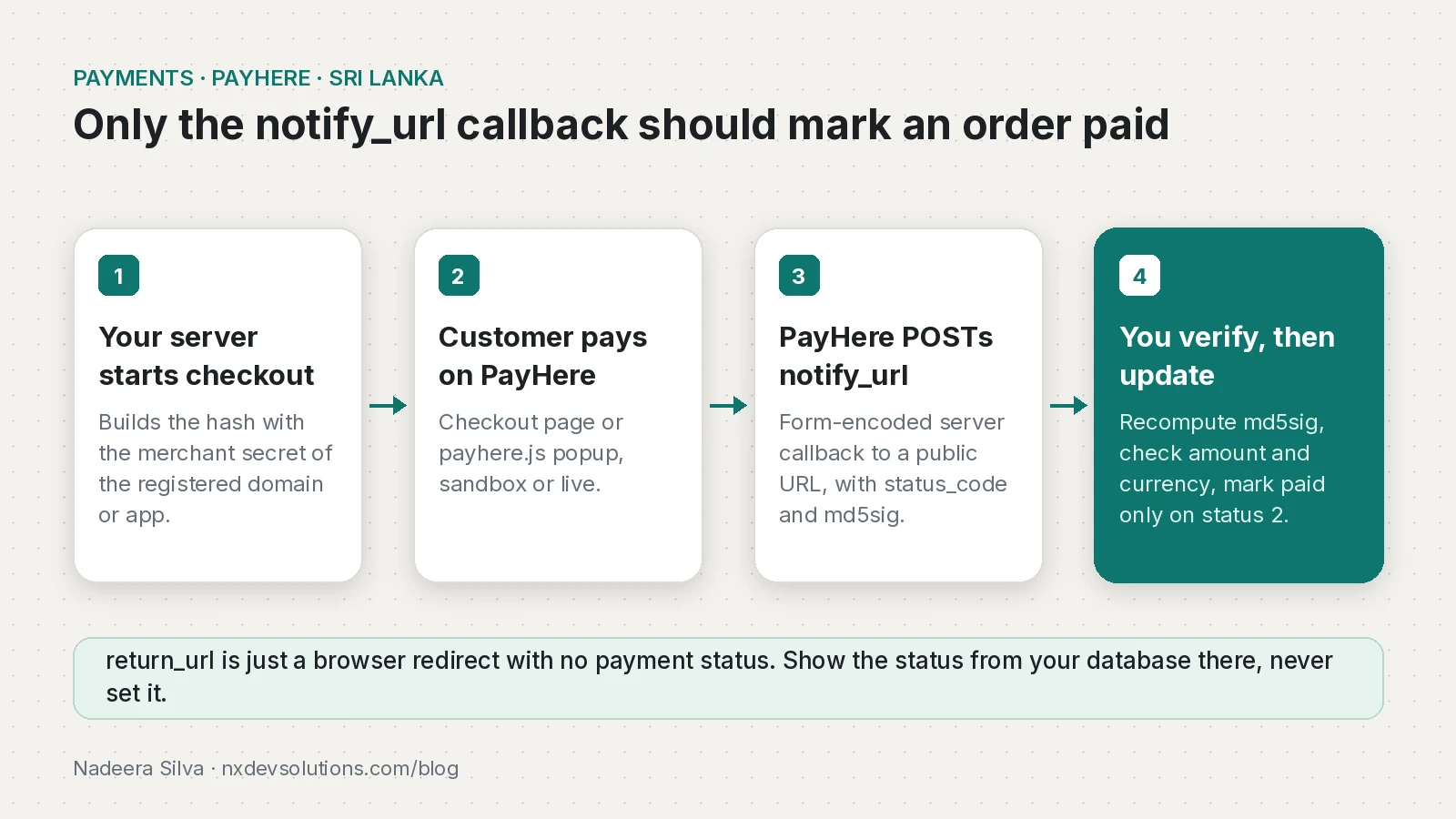
The opposite mistake is worse. If your site marks orders as paid when the customer lands on the "thank you" page, or accepts a notification without checking the md5sig, anyone who finds the URL can fake a successful payment. PayHere's own docs warn that skipping verification lets a third party send a manipulated notification that falsely says the payment succeeded.
The fix is usually a few hours: one server endpoint, one correctly stored secret and a sandbox test payment. If orders have been missed for days, or the site runs on a plugin nobody on your team understands, bring in someone who has wired PayHere before.
How does PayHere notify_url work?
Mixing up the three URLs causes most of the trouble:
return_url: where the customer's browser is sent after paying. PayHere passes no payment status to it.cancel_url: where the browser goes if the customer cancels.notify_url: a server to server POST from PayHere with the real result. Its body never loads in a browser, soechoorprintdebugging shows nothing.
The notification contains merchant_id, order_id, payment_id, payhere_amount, payhere_currency, status_code, md5sig, custom_1, custom_2, method and status_message, plus masked card details for card payments. The status codes are:
| status_code | Meaning | What your order should do |
|---|---|---|
| 2 | Success | Mark paid (after md5sig and amount checks) |
| 0 | Pending | Keep pending |
| -1 | Canceled | Mark cancelled or leave unpaid |
| -2 | Failed | Mark failed |
| -3 | Chargedback | Flag for review, revoke access if needed |
Why is my PayHere notify_url not being called?
Check these in order. Each one is a known cause:
- The URL is localhost or a private IP. PayHere's docs say plainly that you cannot test the notification on localhost and need a publicly accessible domain or IP.
- Your framework rejects the POST before your code runs. In Laravel, the CSRF middleware returns 419 because PayHere cannot send a CSRF token. A Stack Overflow answer confirms that excluding the notify route from CSRF fixed exactly this.
- A firewall or proxy blocks PayHere's server. One accepted answer traced a missing notification to Cloudflare, where the request showed up in the firewall logs, not in the app.
- Your handler expects JSON. The body is form-encoded.
express.json()orrequest.json()gives you an empty object, so the handler fails and nothing is saved. - The URL redirects or needs a login. An auth guard or a forced
wwwor HTTPS redirect can keep PayHere from reaching your handler.
Why does PayHere md5sig verification fail?
The md5sig is an MD5 of five notification fields plus the uppercase MD5 of your merchant secret. A mismatch means one of the inputs differs from what PayHere used:
- Wrong merchant secret. The Merchant ID belongs to the account, but the Merchant Secret is specific to each domain or app you add under Integrations. A secret from another domain, another app package, or the other environment will not match. Sandbox is a separate deployment from live, so sandbox details cannot be reused there.
- Whitespace in the secret. A trailing newline from an
.envfile or a secrets manager changes the hash completely. - Reformatted amount. PayHere's example notification sends
payhere_amount=397.00. If your code parses it to a number,397.00becomes397and the hash no longer matches. - Missing uppercase step or wrong body parser. Both MD5s must be uppercase hex, and a JSON parser leaves every field
undefined.
How do I prove the md5sig formula before going live?
This script recomputes the md5sig for a sample notification (same shape as PayHere's example, with a made-up secret) and shows how two common mistakes change the result:
// md5sig-check.mjs: recompute PayHere's md5sig for a sample notification
import crypto from "node:crypto";

const md5 = (s) => crypto.createHash("md5").update(s, "utf8").digest("hex").toUpperCase();

export function payhereMd5sig({ merchant_id, order_id, payhere_amount, payhere_currency, status_code }, secret) {
  return md5(merchant_id + order_id + payhere_amount + payhere_currency + status_code + md5(secret));
}

const secret = "MY_TEST_SECRET";
const n = { merchant_id: "1218158", order_id: "1631271478419_order",
            payhere_amount: "397.00", payhere_currency: "LKR", status_code: "2" };

console.log("raw string amount '397.00':", payhereMd5sig(n, secret));
console.log("parsed number 397        :", payhereMd5sig({ ...n, payhere_amount: String(parseFloat(n.payhere_amount)) }, secret));
console.log("secret with trailing \\n  :", payhereMd5sig(n, secret + "\n"));
Running node md5sig-check.mjs on Node.js 24.22.1 printed:
raw string amount '397.00': 5C114ADC5CF53315E9B6A8FC2D0CEE0A
parsed number 397        : 6DD05A78741C7E7D8852DD9AF25B624E
secret with trailing \n  : 9325AFE183E74A744AC51D54A0DBBCC5
A Python hashlib version gave the same first value. With your own secret and a real notification from your logs, the first line should equal the md5sig PayHere sent.
How do I fix PayHere notify_url and md5sig step by step?
Step 1: Store the right secret
Copy the Merchant Secret shown next to the exact domain or app under Integrations in the PayHere portal (sandbox and live each have their own). Load it from an environment variable and trim it. New domains can take up to 24 hours to be approved, so add staging domains early.
Step 2: Node.js (Express) notify handler
This handler reads the form body, verifies md5sig with a timing-safe compare, checks amount and currency against your order, and is safe to call twice. In my local test a forged md5sig got 400 and left the order pending, a correctly signed body got 200 and marked it paid, and a JSON body was rejected.
// server.mjs: PayHere notify_url handler for Express 5 (Node 24)
import express from "express";
import crypto from "node:crypto";

const app = express();
const MERCHANT_ID = process.env.PAYHERE_MERCHANT_ID.trim();
const MERCHANT_SECRET = process.env.PAYHERE_MERCHANT_SECRET.trim();

const md5 = (s) => crypto.createHash("md5").update(s, "utf8").digest("hex").toUpperCase();
const safeEqual = (a, b) =>
  a.length === b.length && crypto.timingSafeEqual(Buffer.from(a), Buffer.from(b));

// Stand-in for your database. Replace with real queries.
const orders = new Map([["ORD-1001", { amount: "397.00", currency: "LKR", status: "pending" }]]);

// PayHere posts application/x-www-form-urlencoded, not JSON.
app.post("/payhere/notify", express.urlencoded({ extended: false }), (req, res) => {
  const { merchant_id, order_id, payment_id, payhere_amount,
          payhere_currency, status_code, md5sig = "" } = req.body ?? {};
  console.log("PayHere notify", { order_id, payment_id, status_code, payhere_amount });

  // Use the values exactly as received. Do not parse or reformat the amount.
  const local = md5(merchant_id + order_id + payhere_amount + payhere_currency +
                    status_code + md5(MERCHANT_SECRET));

  if (merchant_id !== MERCHANT_ID || !safeEqual(local, String(md5sig).toUpperCase())) {
    console.warn("md5sig mismatch for order", order_id);
    return res.sendStatus(400);
  }

  const order = orders.get(order_id);
  if (!order || order.amount !== payhere_amount || order.currency !== payhere_currency) {
    console.warn("Order not found or amount/currency differs", order_id);
    return res.sendStatus(400);
  }

  const map = { "2": "paid", "0": "pending", "-1": "cancelled", "-2": "failed", "-3": "chargedback" };
  if (order.status !== "paid" || status_code === "-3") {
    order.status = map[status_code] ?? "unknown";
    order.paymentId = payment_id;
  }
  res.sendStatus(200);
});

app.listen(process.env.PORT ?? 3000);
Store order amounts as the same two-decimal string you sent to checkout (for example "397.00") so the comparison is exact.
Step 3: PHP notify handler
The same logic in plain PHP 8. Note that it uses hash_equals and does not touch the amount:
<?php
// notify.php: PayHere notify_url handler (plain PHP 8)
$merchantId     = trim((string) getenv('PAYHERE_MERCHANT_ID'));
$merchantSecret = trim((string) getenv('PAYHERE_MERCHANT_SECRET'));

$p = $_POST;
error_log('PayHere notify: ' . json_encode([
    'order_id' => $p['order_id'] ?? null,
    'status_code' => $p['status_code'] ?? null,
    'payhere_amount' => $p['payhere_amount'] ?? null,
]));

$local = strtoupper(md5(
    ($p['merchant_id'] ?? '') .
    ($p['order_id'] ?? '') .
    ($p['payhere_amount'] ?? '') .      // as received, e.g. "397.00"
    ($p['payhere_currency'] ?? '') .
    ($p['status_code'] ?? '') .
    strtoupper(md5($merchantSecret))
));

if (($p['merchant_id'] ?? '') !== $merchantId
    || !hash_equals($local, strtoupper($p['md5sig'] ?? ''))) {
    http_response_code(400);
    exit('invalid signature');
}

// Load the order from your database here and compare amount and currency.
if ($p['status_code'] === '2') {
    // markOrderPaid($p['order_id'], $p['payment_id']);  // make this idempotent
}
http_response_code(200);
echo 'OK';
Step 4: Laravel, exclude the route from CSRF
Put the route in routes/api.php, which is outside the web middleware group, or exclude it. In Laravel 13 the CSRF docs use preventRequestForgery in bootstrap/app.php (Laravel 11 and 12 use validateCsrfTokens with the same except array):
->withMiddleware(function (Middleware $middleware): void {
    $middleware->preventRequestForgery(except: [
        'payhere/notify',
    ]);
})
Exclude only the notify route, not * as some old answers suggest.
Step 5: Build the checkout hash on the server
Since 16 January 2023 every payment request needs a hash. If it is wrong, PayHere shows "Unauthorized payment request" before the customer can pay, so no notification is ever sent. PayHere's PHP sample formats the amount to two decimals:
<?php
// hash.php: build the checkout "hash" on the server, never in the browser
function payhereHash(string $merchantId, string $orderId, float $amount, string $currency, string $secret): string
{
    return strtoupper(md5(
        $merchantId .
        $orderId .
        number_format($amount, 2, '.', '') .   // 1000 -> "1000.00", no thousands separator
        $currency .
        strtoupper(md5($secret))
    ));
}
Send the same formatted amount in the form. PayHere's other listed causes of "Unauthorized payment request" are an unregistered domain, the secret of a different domain, a no-referrer policy that removes the Referer header, and duplicate Integration records for one domain. My PayHere Unauthorized payment request guide covers each of these step by step. The live action URL needs www (https://www.payhere.lk/pay/checkout), or you can get error PH-0022.
How do I test PayHere notify_url locally?
Expose your local server through a public tunnel and use that URL as notify_url in sandbox. With Cloudflare's Quick Tunnels (no account needed):
node server.mjs   # listens on port 3000
cloudflared tunnel --url http://localhost:3000
# use https://<random>.trycloudflare.com/payhere/notify as notify_url
The hostname changes on every restart, so update notify_url each session. PayHere's docs tie the domain check to where the payment is started and only require notify_url to be public; if sandbox rejects your setup, use a tunnel with a stable hostname and register it under Integrations.
Pay with a sandbox test card such as Visa 4916217501611292 (any valid name, CVV and expiry). Other numbers simulate declines, so you can test -2 too.
How do I verify the fix?
- Your access log shows a
POST /payhere/notifyfrom PayHere a few seconds after each sandbox payment, with status 200. - Your app log shows the order ID and status code, with no "md5sig mismatch" line, and the order is
paidin your database. - A request with a changed md5sig gets 400 and changes nothing.
- For any order that looks stuck, PayHere's Retrieval API (
/merchant/v1/payment/search?order_id=...) returns the payment status from PayHere's side.
How do I prevent it from happening again?
Generate a unique order_id per attempt, because the Retrieval API docs note that PayHere does not check order ID uniqueness. Keep sandbox and live IDs, secrets and action URLs in separate configs, add each new domain or app package to Integrations once and before launch, and run a small daily check of still-pending orders against the Retrieval API.
Common PayHere notify_url and md5sig problems
| Symptom | Likely cause | Fix |
|---|---|---|
| Paid in PayHere portal, order still pending | notify_url not reachable (localhost, firewall, Cloudflare WAF, redirect) | Public URL, allow the POST, check access and WAF logs |
| Laravel logs 419 for the notify route | CSRF middleware | Exclude only the notify route |
| All fields undefined in Node | JSON parser on a form-encoded body | express.urlencoded() or formData() |
| md5sig never matches | Wrong secret for this domain, app or environment | Copy the secret for the exact domain in Integrations |
| md5sig matches some orders only | Amount reformatted, or secret with whitespace | Use payhere_amount as received, trim the secret |
| "Unauthorized payment request" | Bad hash, unregistered domain, no Referer | Server-side hash with 2-decimal amount, registered domain |
| Orders marked paid without paying | Status set on return_url | Only notify_url updates status |
Checklist
notify_urlis a public URL that answers POST without login, CSRF or redirects.- The handler parses
application/x-www-form-urlencoded. - The merchant secret matches the domain or app and environment, and is trimmed.
- md5sig is computed from the raw received values and compared with a timing-safe function.
merchant_id, amount and currency are checked against your own order.- Only
status_code2marks an order paid, and repeated notifications do not double-process. return_urlonly reads the status from your database.- The checkout hash is generated on the server with the amount formatted to two decimals.
If you also take payments from abroad, my guide to PayPal for Sri Lankan freelancers covers the other side of getting paid. The same "verify before you trust" rule applies to card gateways too; see how I fix Stripe webhook signature verification failed in Next.js and the wider Stripe integration guide for mobile apps.
Frequently asked questions
Why is my PayHere notify_url not being called?
PayHere can only call a URL on a public domain or IP, so localhost never works. If the URL is public, check that CSRF middleware, a login guard, a redirect or a firewall such as Cloudflare is not blocking the POST, and look for it in your access and firewall logs.
How is the PayHere md5sig calculated?
md5sig is the uppercase MD5 of merchant_id, order_id, payhere_amount, payhere_currency and status_code joined together, followed by the uppercase MD5 of your merchant secret. Recompute it on your server and compare it with the md5sig PayHere sent.
Why does my PayHere md5sig not match?
Usually the merchant secret belongs to a different domain, app or environment, the secret has a trailing space or newline, or the amount was reformatted. Use payhere_amount exactly as received, for example 397.00, and the secret shown for the exact domain under Integrations.
Is the PayHere sandbox merchant secret the same as live?
No. Sandbox is a completely separate deployment from live, so you need the Merchant ID and the Merchant Secret from each environment, and the secret is specific to each domain or app you register.
Can I mark a PayHere order as paid on the return_url page?
No. PayHere passes no payment status to return_url. Update the order only from a verified notify_url callback and let the return page read the status from your database.
What do PayHere status codes 2, 0, -1, -2 and -3 mean?
2 is success, 0 is pending, -1 is canceled, -2 is failed and -3 is chargedback. Only status 2 with a valid md5sig should mark an order as paid.
What causes PayHere Unauthorized payment request?
An invalid hash or an unrecognised domain. Build the hash on the server with the amount formatted to two decimals, start the payment from the registered domain, use that domain secret, keep the Referer header and avoid duplicate Integration records.
How do I test PayHere notify_url on localhost?
Expose your local server with a public tunnel such as a Cloudflare Quick Tunnel and use the tunnel URL as notify_url in sandbox. Pay with a sandbox test card and check your logs for the POST.
Sources
- Checkout API (PayHere Knowledge Base)
- JavaScript SDK (PayHere Knowledge Base)
- Retrieval API (PayHere Knowledge Base)
- Sandbox & Testing (PayHere Knowledge Base)
- A correctly encoded version of the PayHere Payment Notification (PayHereDevs on GitHub Gist, 2021-09-22)
- CSRF Protection: Excluding URIs (Laravel Docs)
- Quick Tunnels (Cloudflare Docs)
- payhere payment gateway integration in laravel 5.5 (Stack Overflow)
- Why Payhere payment notification not receiving (Stack Overflow, 2021-05-30)
- express 5.3.0 (npm)
Keep reading
- PayHere Unauthorized Payment Request: How to Fix ItWhy PayHere shows "Unauthorized payment request" at checkout, how to build the hash correctly, and how to check domain, sandbox and Referer settings.
- Stripe Webhook Signature Verification Failed in Next.js: FixStripe webhooks returning 400 in Next.js? Read the raw body with req.text(), use the right whsec secret and stop redirects. Tested route inside.
- PayPal in Sri Lanka 2026: A Freelancer's Guide to What WorksPayPal in Sri Lanka is live for receiving from abroad via Sampath and ComBank. Here is how to set it up, what it costs, and how it compares.
Comments
Share a question or note about this article.
Loading comments…