
You press "Pay" on your website or app, PayHere's checkout opens, and instead of the card form it shows "Unauthorized payment request". No payment is attempted and the customer leaves. PayHere Unauthorized payment request means PayHere refused to start the checkout: the hash did not match, or the request came from a domain or app that is not approved for your account. This guide covers every cause PayHere documents, plus a few from public bug reports, with a tested Node.js hash generator, a PHP version and a script that tells you which field broke the hash.
Quick answer
PayHere shows "Unauthorized payment request" when the hash is invalid or the request comes from an unrecognised domain. Generate the hash on your server as strtoupper(md5(merchant_id + order_id + amount + currency + strtoupper(md5(merchant_secret)))) with the amount formatted to two decimals (1000.00) and sent in the form exactly as hashed, using the Merchant Secret of the approved domain or app the payment starts from. If the hash is right, check the browser still sends a Referer header, that sandbox and live credentials are not mixed, and that the domain has only one Integration record.
What this means for your business
This error appears when the customer has already decided to pay. Every attempt is a lost sale, and most customers will not try twice or tell you. If it started after a redesign, a new domain or a security update, it can hit every order until someone notices.
No card is charged, so no money is at risk. The risk is lost revenue and, if someone "fixes" it by moving the merchant secret into the browser, a security hole.
The fix is usually under an hour once you know the cause. Domain approval is the exception: PayHere says a new domain or app can take up to 24 hours, so plan launches around it. If it fails only on live, or nobody can see the server code that builds the hash, bring in someone who has wired PayHere before.
Why does PayHere say "Unauthorized payment request"?
PayHere's error handling section says the error "may occur due to an invalid hash value or an unrecognized domain" and lists five checks:
- The values used to generate the
hashexactly match the values submitted in the payment request. - The payment starts from the same domain registered in the Integration section of the merchant portal.
- You use the Merchant Secret that belongs to that registered domain.
- The browser request includes the Referer header. Policies such as
no-referrersuppress it. - Only one Integration record exists per domain. PayHere says duplicates are not supported.
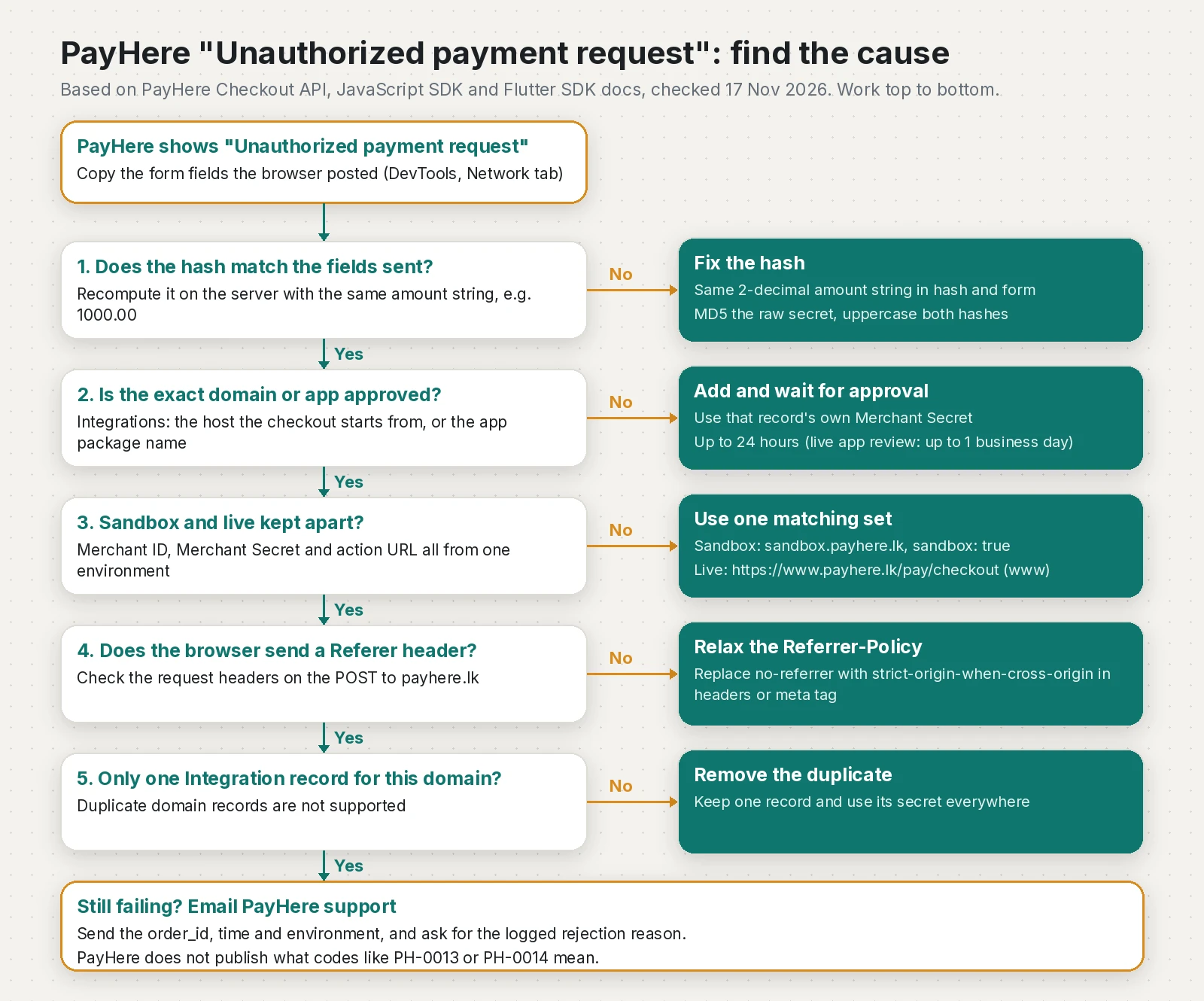
The Merchant ID is the same across your account, but each domain or app gets its own Merchant Secret. Copying the secret from your old site into a new one is enough to trigger this error.
How do I generate the PayHere hash correctly?
The formula is the same on the Checkout API, JavaScript SDK and Authorize API pages:
hash = to_upper_case(md5(merchant_id + order_id + amount + currency + to_upper_case(md5(merchant_secret))))Every PayHere sample (PHP, JavaScript, .NET and Java) formats the amount to two decimals before hashing, with no thousands separator. That is where most hash bugs come from: the server hashes 1000.00 while the form sends 1000, or a locale formatter produces 1,000.00. PayHere's own HTML form example posts amount as 1000, so do not copy that field as is. Format once, then use that same string in the hash and in the form.
I keep prices in integer cents to avoid float rounding, and build the hash in one place on the server:
// payhere-hash.mjs: build the PayHere checkout hash on the server (Node.js 20+)
import { createHash } from "node:crypto";

const md5Upper = (s) => createHash("md5").update(s, "utf8").digest("hex").toUpperCase();

// Keep money as integer cents. 100000 -> "1000.00", 150 -> "1.50"
export function formatAmount(cents) {
  if (!Number.isSafeInteger(cents) || cents < 0) throw new Error(`Bad amount in cents: ${cents}`);
  return `${Math.floor(cents / 100)}.${String(cents % 100).padStart(2, "0")}`;
}

export function payhereHash({ merchantId, orderId, amount, currency, merchantSecret }) {
  if (!/^\d+\.\d{2}$/.test(amount)) throw new Error(`Amount must look like 1000.00, got "${amount}"`);
  return md5Upper(
    String(merchantId).trim() + String(orderId) + amount + currency + md5Upper(merchantSecret.trim())
  );
}
The browser asks the server for the signed fields, so the secret never leaves the server:
// checkout-route.mjs: the browser asks your server for signed checkout fields
import express from "express";
import { formatAmount, payhereHash } from "./payhere-hash.mjs";

const SANDBOX = process.env.PAYHERE_SANDBOX === "true";
const MERCHANT_ID = process.env.PAYHERE_MERCHANT_ID;         // sandbox or live ID, never mixed
const MERCHANT_SECRET = process.env.PAYHERE_MERCHANT_SECRET; // the secret of THIS domain/app
const ACTION_URL = SANDBOX
  ? "https://sandbox.payhere.lk/pay/checkout"
  : "https://www.payhere.lk/pay/checkout"; // live needs www (PH-0022 without it)

// Stand-in for your database
const orders = new Map([["ORD-1001", { cents: 100000, currency: "LKR", title: "Door bell" }]]);

const app = express();
app.post("/api/payhere/checkout/:orderId", (req, res) => {
  const order = orders.get(req.params.orderId);
  if (!order) return res.sendStatus(404);

  const amount = formatAmount(order.cents); // the SAME string goes in the hash and the form
  const fields = {
    merchant_id: MERCHANT_ID,
    order_id: req.params.orderId,
    items: order.title,
    amount,
    currency: order.currency,
    hash: payhereHash({ merchantId: MERCHANT_ID, orderId: req.params.orderId,
                        amount, currency: order.currency, merchantSecret: MERCHANT_SECRET }),
    // plus return_url, cancel_url, notify_url and the customer fields
  };
  res.json({ action: ACTION_URL, fields });
});

app.listen(process.env.PORT ?? 3000);
The same thing in PHP (syntax-checked, no framework needed):
<?php
// hash.php: same hash in PHP. Keep amounts in cents and format once.
function payhere_amount(int $cents): string
{
    return number_format($cents / 100, 2, '.', '');   // 100000 -> "1000.00", never "1,000.00"
}

function payhere_hash(string $merchantId, string $orderId, string $amount, string $currency, string $secret): string
{
    if (!preg_match('/^\d+\.\d{2}$/', $amount)) {
        throw new InvalidArgumentException("Amount must look like 1000.00, got $amount");
    }
    return strtoupper(md5(
        trim($merchantId) . $orderId . $amount . $currency . strtoupper(md5(trim($secret)))
    ));
}

$amount = payhere_amount(100000);
$hash = payhere_hash(getenv('PAYHERE_MERCHANT_ID'), 'ORD-1001', $amount, 'LKR', getenv('PAYHERE_MERCHANT_SECRET'));
// Put $amount and $hash in the form. Do not reformat $amount anywhere after this line.
The Node function, Python's hashlib and PayHere's published crypto-js sample all give 67592FA10915DC796B49B21604867710 for merchant 1211149, order ItemNo12345, 1000.00, LKR and the made-up secret MySecret123.
Two more mistakes from public reports. One team Base64-decoded the secret because it looked like Base64, got this error, and fixed it by hashing the string exactly as shown and trimming only whitespace (pull request #94). And for Preapproval requests without an amount, PayHere's Preapproval API page now says to hash 10.00 for LKR or 0.51 for other currencies. Another team got PH-0014 Unauthorized payment request on live until they hashed 0.51 instead of 1.01, as PayHere support confirmed (pull request #585).
How do I find which field broke the hash?
In DevTools, Network tab, click "Pay" and copy the fields of the POST to payhere.lk/pay/checkout into fields.json. This script recomputes the hash and tries the usual mistakes to explain a mismatch:
// payhere-diagnose.mjs: explain why a PayHere checkout request is "Unauthorized"
// Usage: PAYHERE_MERCHANT_SECRET=... node payhere-diagnose.mjs fields.json [actionUrl]
// Optional: PAYHERE_OTHER_SECRETS="secretA,secretB" (secrets of your other domains/apps)
import { createHash } from "node:crypto";
import { readFileSync } from "node:fs";
import { pathToFileURL } from "node:url";

const md5U = (s) => createHash("md5").update(s, "utf8").digest("hex").toUpperCase();
const sign = (f, amount, hashedSecret) =>
  md5U(String(f.merchant_id) + f.order_id + amount + f.currency + hashedSecret);

export function diagnose(f, { secret, otherSecrets = [], actionUrl } = {}) {
  const out = [];
  const bad = (msg) => out.push(`FAIL ${msg}`);
  const warn = (msg) => out.push(`WARN ${msg}`);

  for (const k of ["merchant_id", "order_id", "amount", "currency", "hash"])
    if (f[k] === undefined || f[k] === "") bad(`missing field ${k}`);
  if (out.length) return out;

  const amount = String(f.amount);
  if (amount.includes(",")) bad(`amount "${amount}" has a thousands separator; send ${amount.replaceAll(",", "")}`);
  else if (!/^\d+\.\d{2}$/.test(amount)) warn(`amount "${amount}" is not 2 decimals; PayHere's samples hash ${Number(amount).toFixed(2)}, so send and hash that`);
  if (!["LKR", "USD"].includes(f.currency)) warn(`currency "${f.currency}": Checkout API lists LKR or USD, uppercase`);
  if (/[a-f]/.test(f.hash)) warn("hash contains lowercase letters; PayHere's formula uppercases it");
  if (secret !== secret.trim()) warn("merchant secret has leading or trailing whitespace");

  if (actionUrl) {
    const u = new URL(actionUrl);
    if (u.hostname === "payhere.lk") bad("live action URL without www: use https://www.payhere.lk/pay/checkout (PH-0022)");
    const urlSandbox = u.hostname.startsWith("sandbox.");
    if (f.sandbox !== undefined && String(f.sandbox) !== String(urlSandbox))
      bad(`sandbox flag is ${f.sandbox} but action URL is ${u.hostname}`);
  }

  const sent = String(f.hash).toUpperCase();
  const s = secret.trim();
  const expected = sign(f, amount, md5U(s));
  if (sent === expected) {
    out.push(out.length
      ? "OK   hash matches these exact values, but fix the lines above first"
      : "OK   hash matches. If PayHere still refuses: domain/app approval, Referer header, sandbox vs live, duplicate Integration records");
    return out;
  }
  bad(`hash mismatch: expected ${expected}, got ${sent}`);

  // Try the usual mistakes to explain the mismatch
  const num = Number(amount.replaceAll(",", ""));
  const tries = [
    ["the hash was built from a different amount string", [String(num), num.toFixed(2), num.toFixed(1)].filter((a) => a !== amount).map((a) => sign(f, a, md5U(s)))],
    ["the secret was not MD5-hashed first", [sign(f, amount, s)]],
    ["the hashed secret was not uppercased", [sign(f, amount, md5U(s).toLowerCase())]],
    ["the secret was Base64-decoded before hashing (hash the string exactly as shown)", (() => { try { return [sign(f, amount, md5U(Buffer.from(s, "base64").toString("utf8")))]; } catch { return []; } })()],
    ["the hash was made with another domain's or app's secret", otherSecrets.map((o) => sign(f, amount, md5U(o.trim())))],
  ];
  const hits = tries.filter(([, hashes]) => hashes.includes(sent)).map(([why]) => why);
  if (hits.length) hits.forEach((why) => out.push(`HINT ${why}`));
  else out.push("HINT no common mistake matched: check merchant_id/order_id are identical in the hash and the form, and that the secret belongs to this merchant and environment");
  return out;
}

if (import.meta.url === pathToFileURL(process.argv[1]).href) {
  const fields = JSON.parse(readFileSync(process.argv[2], "utf8"));
  const result = diagnose(fields, {
    secret: process.env.PAYHERE_MERCHANT_SECRET ?? "",
    otherSecrets: (process.env.PAYHERE_OTHER_SECRETS ?? "").split(",").filter(Boolean),
    actionUrl: process.argv[3],
  });
  console.log(result.join("\n"));
  process.exitCode = result.some((l) => l.startsWith("FAIL")) ? 1 : 0;
}PAYHERE_MERCHANT_SECRET='your-domain-secret' \
PAYHERE_OTHER_SECRETS='old-site-secret,app-secret' \
node payhere-diagnose.mjs fields.json https://sandbox.payhere.lk/pay/checkoutFor a hash built from 1000 while the form sent 1000.00, it prints:
FAIL hash mismatch: expected 67592FA10915DC796B49B21604867710, got C372572526FE0FFF56597ABEF1E5A3D5
HINT the hash was built from a different amount stringHow do I check domain or app approval in PayHere?
In the merchant portal, open Integrations (the Flutter and React Native pages call it Settings > Domains & Credentials). Each domain or app has its own row, status and Merchant Secret. Check three things:
- The exact host is listed and approved. PayHere asks for your top level domain, but in two public projects the fix was about subdomains: one had PayHere approve the subdomain the checkout ran on (ceylon-hop #402), another moved the launch page from the apex domain to the
app.subdomain that worked (turnout #101). If your checkout page lives onshop.orapp., compare that host with what is registered. - The secret in your server config comes from that row. Not from the old domain, not from the app row.
- There is one row per domain. Delete duplicates and keep the one whose secret you use.
For mobile apps, PayHere's Flutter and React Native docs say to add the app's package name as an "App" record, use the secret shown for it, and wait for a manual review of up to one business day on a live account. In the one public Flutter report, onError received Unauthorized domain and the cause was a package name in AndroidManifest.xml that did not match the whitelisted one. Check flavors and applicationIdSuffix too.
Why do I get "Unauthorized payment request" in PayHere sandbox?
Sandbox is a separate copy of PayHere. Its Sandbox & Testing page says nothing from a sandbox account can be used on live, so you need a full sandbox set:
| Item | Sandbox | Live |
|---|---|---|
| Merchant ID | From your sandbox account | From your live account |
| Domain or app record | Added and approved in the sandbox portal | Added and approved in the live portal |
| Merchant Secret | From the sandbox record | From the live record |
| Checkout action URL | https://sandbox.payhere.lk/pay/checkout | https://www.payhere.lk/pay/checkout |
| SDK flag | "sandbox": true | "sandbox": false |
Mix one item from the other column and the hash or domain check fails. On live, the URL without www gives a different error, PH-0022. One open report shows sandbox failing with localhost registered as the domain (Match-Mate #5), so I test from a public HTTPS staging URL or tunnel registered in sandbox. That is my habit, not a published PayHere rule.
Can a Referrer-Policy cause "Unauthorized payment request"?
Yes. PayHere's docs ask that the browser request includes the Referer header, and a page with Referrer-Policy: no-referrer sends none. The common trap in Node apps is Helmet: app.use(helmet()) sets Referrer-Policy: no-referrer by default (Helmet 8.3.0). One team fixed this exact error by changing their Vercel header from no-referrer to strict-origin-when-cross-origin (pull request #78).
// Keep Helmet, but send your origin to PayHere on cross-origin requests
app.use(helmet({ referrerPolicy: { policy: "strict-origin-when-cross-origin" } }));
strict-origin-when-cross-origin is the browser default (MDN) and sends other sites only your origin. Also look for <meta name="referrer" content="no-referrer"> in your HTML template and rel="noreferrer" on the checkout form or link.
What do PH-0013 and PH-0014 mean?
I could not find either code in PayHere's Knowledge Base, which explains only PH-0022. The only public evidence I found is one project: its PH-0013 turned out to be the domain, and for its PH-0014 PayHere support replied that the request "failed due to an invalid hash parameter" (ceylon-hop #587). Treat that as a hint, not a definition. Their best advice: email PayHere support with the order ID and time and ask for the logged rejection reason.
How do I verify the fix?
- Run
payhere-diagnose.mjson the fields your page really posts and getOK. - In DevTools, check that the POST to PayHere has a
Refererheader with your registered host. - In sandbox, complete a payment with PayHere's test Visa card
4916217501611292. - Confirm your
notify_urlreceives the result and your order turns paid. If the checkout works but orders stay pending, that is the notify side, covered in my PayHere notify_url and md5sig guide. - Repeat once on live with a small real payment, with live ID, live secret and the
wwwURL.
How do I prevent it?
| Cause | Symptom | Fix |
|---|---|---|
| Amount hashed differently from the form | Fails on every order, or only on some amounts | Format once to 2 decimals, no commas, reuse the string |
| Secret of another domain or app | Works on the old site, fails on the new one | Use the secret from this domain's Integration row |
| Domain, subdomain or package name not approved | Fails from one host or app build only | Add the exact host or package, wait for approval |
| Sandbox and live mixed | Works in one environment only | One complete set per environment |
no-referrer policy | Started after a security or hosting change | strict-origin-when-cross-origin |
| Duplicate Integration records | Valid hash, still refused | Keep one record per domain |
| Preapproval amount | Only card-saving or preapproval requests fail | Hash 10.00 (LKR) or 0.51 (other currencies) when no amount is sent |
Checklist before every launch or domain change:
- The hash is built only on the server, from integer cents formatted once.
- The Merchant Secret comes from the Integration row of the exact host or app package, and is trimmed but not decoded.
- Sandbox ID, secret, URL and SDK flag are never mixed with live ones; live uses
https://www.payhere.lk/pay/checkout. - New domains and app package names are added at least a day before launch.
- No
no-referrerpolicy on pages that start a payment (check Helmet,vercel.json, CDN rules and meta tags). - One Integration record per domain.
- A sandbox test payment runs after every deploy that touches checkout, headers or domains.
For getting paid from abroad instead, see my PayPal guide for Sri Lankan freelancers.
Frequently asked questions
What does PayHere Unauthorized payment request mean?
PayHere refused to open the checkout because the hash in the request is invalid or the request came from a domain or app that is not registered for your merchant account. No card is charged and no notification is sent to your notify_url.
How is the PayHere hash generated?
Uppercase the MD5 of merchant_id, order_id, amount, currency and the uppercase MD5 of your Merchant Secret, joined in that order. Format the amount to two decimals with no thousands separator, such as 1000.00, and send that same string in the payment form.
Why does PayHere sandbox say Unauthorized payment request?
Sandbox is a separate PayHere deployment, so you need a sandbox Merchant ID, a domain or app approved in the sandbox portal, that record's sandbox secret and the sandbox.payhere.lk action URL. Mixing any live value into a sandbox request makes the hash or domain check fail.
Can I use the same Merchant Secret on two websites?
No. The Merchant ID is the same for your account, but PayHere issues a separate Merchant Secret for each domain or app, and you must use the secret of the domain or app the payment starts from.
What is PayHere error PH-0014?
PayHere does not publish a definition for PH-0014. In one public case PayHere support said a PH-0014 Unauthorized payment request was caused by an invalid hash, so check the hash first and ask PayHere support for the logged reason if it persists.
Can a Referrer-Policy header cause the PayHere error?
Yes. PayHere asks that the browser sends the Referer header, and a no-referrer policy removes it. Helmet for Express sets no-referrer by default, so set it to strict-origin-when-cross-origin on pages that start a payment.
How long does PayHere take to approve a new domain or app?
PayHere says domain or app approval can take up to 24 hours. For a live account, mobile app package names are reviewed manually, which PayHere says can take up to one business day.
Sources
- Checkout API (Error Handling: Unauthorized Payment Request, PH-0022) (PayHere Knowledge Base, 2026-09-04)
- JavaScript SDK (PayHere Knowledge Base, 2026-09-01)
- Flutter SDK (PayHere Knowledge Base, 2026-09-01)
- React Native SDK (PayHere Knowledge Base, 2024-08-15)
- Preapproval API (PayHere Knowledge Base, 2026-09-04)
- Sandbox & Testing (PayHere Knowledge Base, 2024-03-29)
- payhere_mobilesdk_flutter 3.2.3 (pub.dev, 2026-05-12)
- @payhere/payhere-mobilesdk-reactnative 4.1.0 (npm, 2025-07-16)
- Unauthorized domain (issue #20) (PayHereLK on GitHub, 2024-06-03)
- Referrer-Policy header (MDN Web Docs, 2026-09-04)
- Helmet README: Referrer-Policy default (helmetjs on GitHub)
- fix(vercel): allow origin referrer for PayHere sandbox checkout (GitHub, 2026-10-25)
- fix(payments): use raw PayHere merchant secret for checkout hash (GitHub, 2026-10-12)
- fix(ride-board): hash a live preapproval over 0.51 (PH-0014) (GitHub, 2026-08-25)
- docs(known-bugs): PH-0014 record (GitHub, 2026-08-25)
- docs: close the PH-0013 row (subdomain approved) (GitHub, 2026-08-09)
- Fix PayHere PH-0013 on branded custom domains (GitHub, 2026-11-09)
- PayHere Sandbox rejects valid checkout as unauthorized (issue #5) (GitHub, 2026-08-29)
Keep reading
- PayHere notify_url Not Working or md5sig Mismatch: FixPayHere payment done but the order is still pending? Make notify_url reachable, verify md5sig with the right secret and raw amount. Tested code inside.
- PayHere Sandbox Test Cards: Success and Decline TestingUse these PayHere sandbox test cards to test success and each decline, see why real cards fail in sandbox, and check every notify_url status code.
- PayPal in Sri Lanka 2026: A Freelancer's Guide to What WorksPayPal in Sri Lanka is live for receiving from abroad via Sampath and ComBank. Here is how to set it up, what it costs, and how it compares.
Comments
Share a question or note about this article.
Loading comments…