
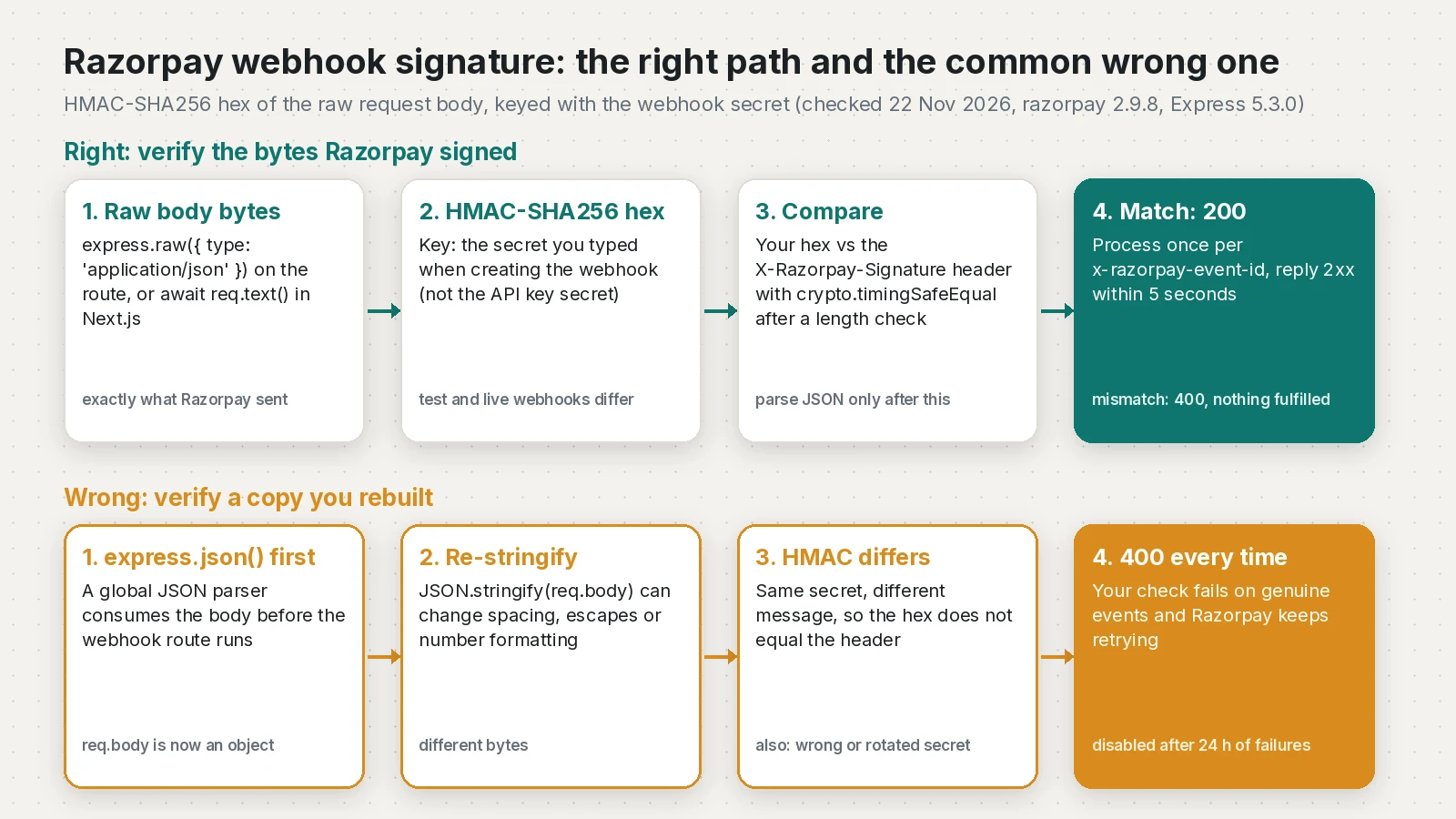
"Razorpay webhook signature verification failed" almost always means your server hashed different bytes, or used a different secret, than Razorpay did. Razorpay signs the exact raw request body with your webhook secret and sends the result in the X-Razorpay-Signature header. If your framework parses the JSON first, or you use the API key secret, your hash will never match. Below are the causes, a tested Express 5 handler, a Next.js version and a local test.
Quick answer
To verify a Razorpay webhook signature, compute an HMAC-SHA256 hex digest of the raw request body using the secret you entered when you created the webhook, then compare it with the X-Razorpay-Signature header using a constant-time comparison. In Express, put express.raw({ type: 'application/json' }) on the webhook route and register it before any global express.json(). In the Next.js App Router, read the body with await req.text(), not req.json().
What this means for your app or business
- Orders go unconfirmed. When verification fails, your server rejects real payment events. Customers pay, but your system does not mark the order as paid or unlock the plan.
- The webhook can switch itself off. Razorpay retries failed deliveries with exponential backoff for 24 hours, then disables the webhook and emails your alert address. After that, you get no events at all until someone turns it back on.
- Skipping the check is worse. Without verification, anyone who finds your URL can send a fake "payment captured" event.
- Fix time is short. Usually a few lines of code and a secret update; in my estimate an hour or two with testing. If payment status has been wrong for days, get help reconciling past orders too.
How does Razorpay sign a webhook?
Razorpay's docs say the signature "is calculated using HMAC with SHA256 algorithm; with your webhook secret set as the key and the webhook request body as the message." The header holds the hex digest. There is no timestamp in the signature, so you handle replays and duplicates with the x-razorpay-event-id header.
Why does Razorpay webhook signature verification fail?
| Cause | What you see | Fix |
|---|---|---|
Body parsed, then JSON.stringify used | Fails on some or all events | Hash the raw body (express.raw, req.text()) |
| API key secret used as the key | Fails on every event | Use the webhook secret from the webhook setup |
| Test mode secret on a live webhook, or the reverse | Works in test, fails live | Store separate secrets per mode |
| Secret rotated | Older retries fail | Keep the old secret for retries of older events |
express.json() registered before the route | req.body is an object, not a Buffer | Register the webhook route first |
| Extra whitespace or newline in the secret or header | Fails for no clear reason | Trim env values, copy the secret again |
Parsed body. Razorpay's FAQ is direct: re-encoding JSON is "not recommended as your method of JSON encoding can be different from ours." Any change in spacing, escaped characters or number format changes the hash.
Wrong secret. The webhook secret is a value you type into the dashboard when you add the webhook. Razorpay notes it "does not need to be the Razorpay API key secret." If you have forgotten it, edit the webhook and set a new one.
Test vs live. Test mode and Live mode webhooks are configured separately, each with its own URL and secret, so keep one secret per mode.
How do I verify the Razorpay webhook signature in Express 5?
After npm install express@5 razorpay@2.9.8, add the helpers. The second one is for checkout signatures, covered below.
// verify.mjs
import crypto from 'node:crypto';

// Webhooks: HMAC-SHA256 of the RAW body, keyed with the WEBHOOK secret.
export function verifyRazorpayWebhook(rawBody, signature, webhookSecret) {
  if (!Buffer.isBuffer(rawBody) || typeof signature !== 'string' || !webhookSecret) return false;
  const expected = crypto.createHmac('sha256', webhookSecret).update(rawBody).digest('hex');
  const a = Buffer.from(expected, 'utf8');
  const b = Buffer.from(signature.trim(), 'utf8');
  return a.length === b.length && crypto.timingSafeEqual(a, b);
}

// Checkout: HMAC-SHA256 of order_id + "|" + razorpay_payment_id, keyed with the API KEY secret.
export function verifyPaymentSignature(orderIdFromYourDb, paymentId, signature, keySecret) {
  const expected = crypto.createHmac('sha256', keySecret)
    .update(`${orderIdFromYourDb}|${paymentId}`).digest('hex');
  const a = Buffer.from(expected, 'utf8');
  const b = Buffer.from(String(signature), 'utf8');
  return a.length === b.length && crypto.timingSafeEqual(a, b);
}
The length check matters because crypto.timingSafeEqual throws if the two buffers differ in length. The app:
// server.mjs
import express from 'express';
import { verifyRazorpayWebhook } from './verify.mjs';

const WEBHOOK_SECRET = process.env.RAZORPAY_WEBHOOK_SECRET; // not the API key secret
const seen = new Set(); // use a DB table with a unique key in production

export async function handleEvent(event) {
  // e.g. mark the order paid when event.event === 'payment.captured' or 'order.paid'
}

export function createApp({ secret = WEBHOOK_SECRET, onEvent = handleEvent } = {}) {
  const app = express();

  // Webhook route FIRST, with a raw body parser, so req.body is a Buffer.
  app.post('/webhooks/razorpay', express.raw({ type: 'application/json' }), async (req, res) => {
    const signature = req.get('x-razorpay-signature');
    const eventId = req.get('x-razorpay-event-id');

    if (!Buffer.isBuffer(req.body) || !verifyRazorpayWebhook(req.body, signature, secret)) {
      return res.status(400).json({ error: 'invalid signature' });
    }
    if (eventId && seen.has(eventId)) {
      return res.status(200).json({ status: 'duplicate' });
    }

    const event = JSON.parse(req.body.toString('utf8')); // parse only after verifying
    try {
      await onEvent(event);
      if (eventId) seen.add(eventId);
      return res.status(200).json({ status: 'ok' });
    } catch (err) {
      console.error('webhook processing failed', err);
      return res.status(500).json({ error: 'retry later' }); // non-2xx makes Razorpay retry
    }
  });

  // JSON parser for every other route comes AFTER the webhook route.
  app.use(express.json());
  return app;
}

if (import.meta.url === `file://${process.argv[1]}`) {
  createApp().listen(3000, () => console.log('listening on :3000'));
}I ran 16 checks against this code. A body signed with the webhook secret returned 200. The same event ID sent again returned "duplicate" and was processed once. A body signed with the API key secret, a tampered body and a missing header all returned 400. Verifying JSON.stringify(JSON.parse(raw)) failed while the raw body passed, and the package's validateWebhookSignature from razorpay/dist/utils/razorpay-utils gave the same results as my function. In version 2.9.8 that helper compares with ===, not a constant-time compare, which is why I use my own.
How do I verify it in the Next.js App Router?
Route handlers get a standard Request, so read the text once and hash it. This file passed tsc --strict and returned 200 for a signed body and 400 for a re-stringified one.
// app/api/webhooks/razorpay/route.ts
import crypto from 'node:crypto';

export const runtime = 'nodejs'; // node:crypto needs the Node.js runtime

function isValid(rawBody: string, signature: string | null, secret: string): boolean {
  if (!signature) return false;
  const expected = crypto.createHmac('sha256', secret).update(rawBody, 'utf8').digest('hex');
  const a = Buffer.from(expected, 'utf8');
  const b = Buffer.from(signature.trim(), 'utf8');
  return a.length === b.length && crypto.timingSafeEqual(a, b);
}

export async function POST(req: Request): Promise<Response> {
  const secret = process.env.RAZORPAY_WEBHOOK_SECRET;
  if (!secret) return new Response('server misconfigured', { status: 500 });

  const rawBody = await req.text(); // NOT req.json()
  if (!isValid(rawBody, req.headers.get('x-razorpay-signature'), secret)) {
    return Response.json({ error: 'invalid signature' }, { status: 400 });
  }

  const eventId = req.headers.get('x-razorpay-event-id');
  // if (eventId && await alreadyProcessed(eventId)) return Response.json({ status: 'duplicate' });

  const event = JSON.parse(rawBody) as { event: string; payload: unknown };
  // await handleEvent(event); await markProcessed(eventId);
  return Response.json({ status: 'ok', event: event.event, eventId });
}
The same raw body rule applies to Stripe; my Stripe webhook signature post covers that side.
How is this different from payment signature verification?
The checkout signature uses a different message and key. After a successful checkout, Razorpay returns razorpay_payment_id, razorpay_order_id and razorpay_signature. Your server computes HMAC-SHA256 of order_id + "|" + razorpay_payment_id using your API key_secret. Razorpay's docs say to take order_id from your own server, not the one returned by checkout. The verifyPaymentSignature function above does this and matched the package's validatePaymentVerification in my test.
For Flutter apps using razorpay_flutter (1.4.7 on pub.dev), the success callback gives you a PaymentSuccessResponse with paymentId, orderId and signature. Send those to your backend and let the server verify. The app must never hold the key secret or the webhook secret, because anything shipped in an APK or IPA can be extracted. Treat the webhook as the reliable confirmation, since the user may close the app before the callback runs. PayHere follows a similar server-side pattern, explained in my PayHere md5sig mismatch guide.
How do I test Razorpay webhooks locally?
- In the Dashboard, switch to Test mode, go to Accounts & Settings, then Webhooks, and add a webhook with your public URL, a secret and the events you need. The test mode OTP is
754081. - Razorpay rejects localhost and blocks tunnel domains such as
ngrok.ioandloca.lt. Its docs suggest zrok, for examplezrok share public localhost:3000. - Make a payment in Test mode. Test events come from real test transactions; the payload structure is the same as live.
- Check the Developers then Webhooks log, which shows request and response headers for deliveries from the last 3 hours.
To test your handler without the Dashboard, sign a payload yourself with openssl:
SECRET='whsec_test_123'
BODY='{"entity":"event","event":"payment.captured","payload":{"payment":{"entity":{"id":"pay_test_1","amount":100,"currency":"INR"}}},"created_at":1767225600}'
SIG=$(printf '%s' "$BODY" | openssl dgst -sha256 -hmac "$SECRET" | sed 's/^.* //')
curl -s -w ' HTTP %{http_code}\n' -X POST http://localhost:3000/webhooks/razorpay \
  -H 'Content-Type: application/json' \
  -H "X-Razorpay-Signature: $SIG" \
  -H 'X-Razorpay-Event-Id: evt_local_1' \
  --data-raw "$BODY"
On my run this printed HTTP 200, then "duplicate" on the second call, and HTTP 400 with a wrong secret.
How do I prevent this from coming back?
- Register the webhook route with a raw body parser before any global JSON middleware.
- Keep
RAZORPAY_WEBHOOK_SECRETseparate fromRAZORPAY_KEY_SECRET, with one value per mode. - Store processed
x-razorpay-event-idvalues with a unique constraint. - Do not assume events arrive in order;
payment.capturedcan come beforepayment.authorized. - Return 2xx within 5 seconds and set an alert email on the webhook.
- Add a test that posts a signed fixture body to your route.
Sri Lankan developers building for Indian clients can read my PayPal guide for Sri Lankan freelancers for the getting-paid side.
Frequently asked questions
How does Razorpay webhook signature verification work?
Razorpay computes an HMAC-SHA256 hex digest of the raw webhook request body using your webhook secret as the key and sends it in the X-Razorpay-Signature header. Your server computes the same digest from the raw body and accepts the event only if the two values match.
How do I verify a Razorpay webhook signature in Node.js?
Read the body as raw bytes, for example with express.raw({ type: 'application/json' }) on the webhook route, and compute crypto.createHmac('sha256', webhookSecret).update(rawBody).digest('hex'). Compare it with the X-Razorpay-Signature header using crypto.timingSafeEqual after checking that both values have the same length.
What is the Razorpay webhook secret and where do I find it?
It is a value you choose and type into the Secret field when you add or edit a webhook in the Razorpay Dashboard. If you have forgotten it, edit the webhook in the Dashboard, set a new secret and update your server.
Is the Razorpay webhook secret key the same as the API key secret?
No. Razorpay says the webhook secret does not need to be the API key secret. Use the webhook secret for webhooks and the API key secret only for checkout payment signatures and API calls.
Why does verification fail even with the correct secret?
Usually the body was parsed as JSON and turned back into a string before hashing, which can change spacing and escaping. Hash the raw request body exactly as received, and make sure a global JSON parser does not run before the webhook route.
Where can I see Razorpay webhook logs?
In the Dashboard, open Developers and then Webhooks, and select the webhook. The log shows each delivery attempt with request and response headers, but only for the last 3 hours.
What is the webhook URL in Razorpay?
It is the public HTTPS endpoint on your server where Razorpay sends a POST request with a JSON payload when a subscribed event happens. Localhost and private IP addresses are rejected, and the URL must use port 80 or 443.
Why does Razorpay send the same webhook more than once?
Razorpay uses at-least-once delivery and retries any event that does not get a 2xx response within 5 seconds. Use the x-razorpay-event-id header to skip events you have already processed.
Sources
- Validate and Test Webhooks (Razorpay Docs, 2026-11-10)
- Webhooks Best Practices (Razorpay Docs, 2026-10-08)
- Webhooks Frequently Asked Questions (Razorpay Docs, 2026-10-16)
- Set Up and Edit Payments Webhooks (Razorpay Docs, 2026-10-08)
- About Webhooks (Razorpay Docs)
- Standard Checkout Integration Steps (Verify Payment Signature) (Razorpay Docs, 2026-10-08)
- Flutter Standard Integration Steps (Razorpay Docs)
- razorpay on npm (npm)
- razorpay-node utils (razorpay-utils.js) (GitHub (Razorpay))
- razorpay_flutter on pub.dev (pub.dev)
- PaymentSuccessResponse class (razorpay_flutter) (pub.dev)
- crypto.timingSafeEqual (Node.js)
- express.raw() (Express)
- Route Handlers (Next.js)
- zrok (GitHub (OpenZiti))
Keep reading
- Stripe Webhook Signature Verification Failed in Next.js: FixStripe webhooks returning 400 in Next.js? Read the raw body with req.text(), use the right whsec secret and stop redirects. Tested route inside.
- PayHere notify_url Not Working or md5sig Mismatch: FixPayHere payment done but the order is still pending? Make notify_url reachable, verify md5sig with the right secret and raw amount. Tested code inside.
- Stripe 3D Secure Test Cards: Fix requires_action PaymentsThe Stripe 3D Secure test cards to use, why PaymentIntents get stuck in requires_action, and how to recover authentication_required off-session charges.
Comments
Share a question or note about this article.
Loading comments…