
Your Flutter release build stops with "Keystore was tampered with, or password was incorrect", either on your laptop or only in GitHub Actions. Despite the wording, the file is almost never tampered with. The store password is wrong, the file isn't the one you think, or CI rebuilt it from a broken base64 secret. Here is how to tell which in a few minutes, with every variant reproduced on a real build.
Quick answer
The error means the keystore password (storePassword) did not open the file. Run keytool -list -v -keystore <your file> -alias <alias> with the same file and password Gradle uses. If keytool fails too, the password or the file is wrong. If it works locally but not in CI, your base64 secret decoded into a different file. If keytool works but Gradle still fails with "Cannot recover key" or "Given final block not properly padded", the keyPassword is wrong.
What this means for your app or business
- New releases are blocked, nothing is lost. Your live app and user data are untouched. You just can't build a signed update until signing works again.
- Usually a short fix. If the keystore and its passwords exist somewhere, it's typically under an hour of configuration work.
- The real risk is a lost password. Without it the keystore is unusable. With Play App Signing, Google can register a new upload key in days. Without Play App Signing, the app can't be updated at all.
- When to get help. If the passwords and CI secrets have been checked and it still fails, or nobody knows where the original keystore lives, get the signing setup audited before your next release date.
Which error do you have?
I triggered each of these on purpose with a real Flutter build:
| What Gradle prints | What it really means | Fix |
|---|---|---|
Keystore was tampered with, or password was incorrect | JKS store: wrong store password, or the file bytes changed | Check storePassword, then the file |
keystore password was incorrect | PKCS12 store: wrong store password | Check storePassword |
Cannot recover key | JKS store opened, but keyPassword is wrong | Fix keyPassword |
Get Key failed: Given final block not properly padded | PKCS12 store opened, but keyPassword is wrong | Set keyPassword to the store password |
DerInputStream.getLength(): lengthTag=..., too big or toDerInputStream rejects tag type 47 | The file is not a keystore: truncated or double base64 | Re-create the CI secret |
Keystore file '...' not found for signing config 'release' | storeFile path is wrong (task validateSigningRelease) | Fix the path |
For flutter build appbundle the full message comes from the :app:signReleaseBundle task:
Execution failed for task ':app:signReleaseBundle'.
> A failure occurred while executing com.android.build.gradle.internal.tasks.FinalizeBundleTask$BundleToolRunnable
   > Failed to read key upload from store "/path/upload-keystore.jks": Keystore was tampered with, or password was incorrect
flutter build apk fails in :app:packageRelease with the same text. With no key.properties at all, Flutter's documented snippet failed with an unhelpful java.lang.NullPointerException (no error message).
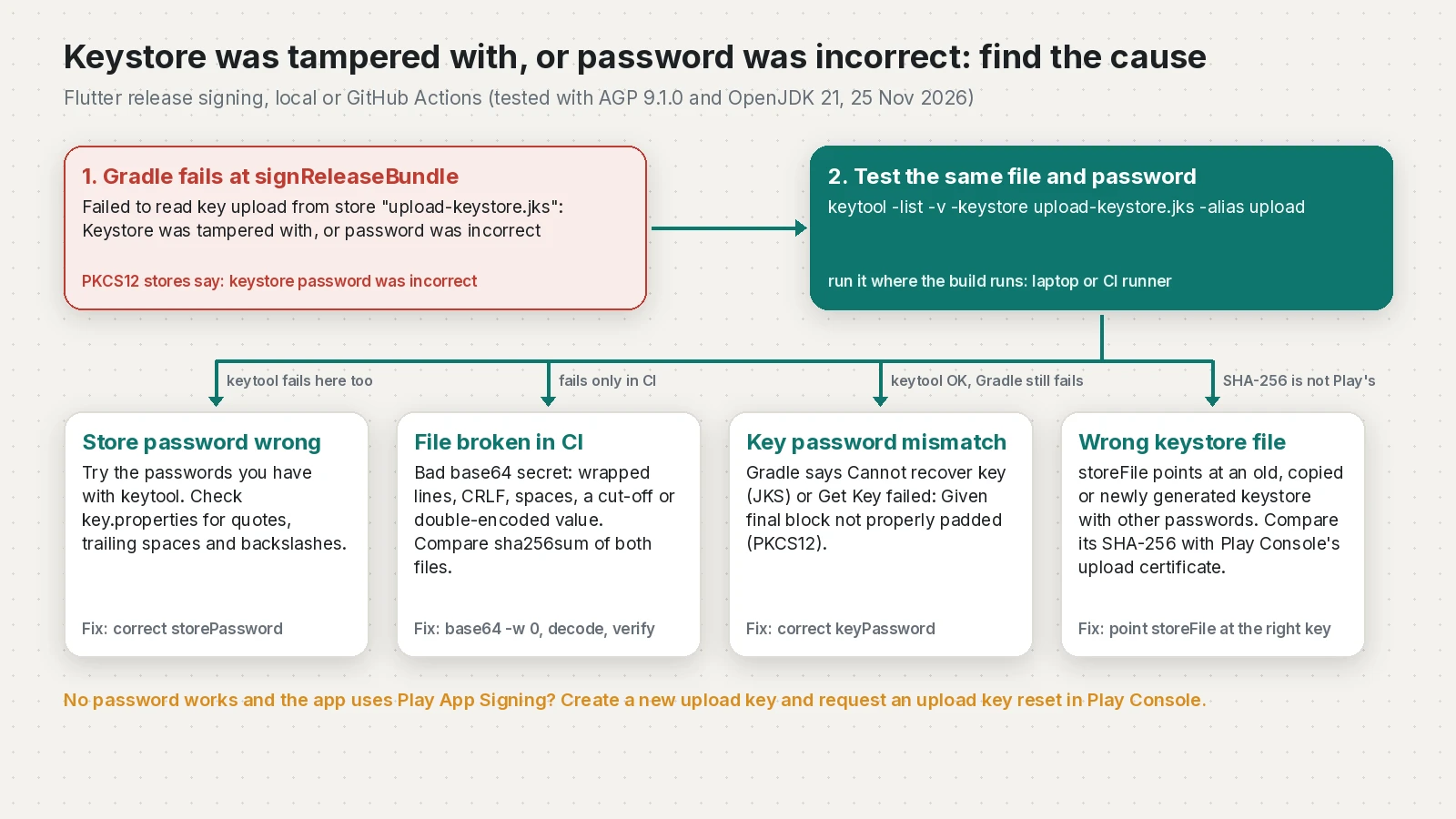
Why does it say "keystore was tampered with or password was incorrect"?
A JKS keystore stores a hash of the store password and the file contents. If the recomputed hash doesn't match, Java can't tell a wrong password from changed bytes, so it says both. Changing one byte in a valid JKS file gave me exactly this message with the correct password. PKCS12 keystores are more specific: "keystore password was incorrect" for a wrong password, "Integrity check failed" for a damaged file.
The causes, in the order I'd check them:
- Wrong store password, often an old one, or the password of a different copy.
- key.properties quirks. Java's
Propertiesloader keeps quotes and trailing spaces as part of the value, sostorePassword="secret"orstorePassword=secret(with a space) is a different password. - Backslashes. In
key.properties,\is an escape character. A passwordab\cdis read asabcd. A Windows path likeC:\Users\me\upload.jksbreaks completely:\ustarts a Unicode escape and the file fails to load withMalformed \uxxxx encoding. Flutter's docs ask for double backslashes; forward slashes also work. - A broken CI secret. The base64 text decoded into something that isn't your keystore.
- The wrong file: an old copy, or a new keystore someone generated with the same name.
How do I test the keystore password with keytool?
Run this with the exact file Gradle uses. Without -storepass, keytool prompts, so the password stays out of your shell history:
keytool -list -v -keystore ~/upload-keystore.jks -alias uploadIf it prints Alias name: upload and the fingerprints, the store password and file are good. Compare the SHA256: line with the Upload key certificate in Play Console (Protected with Play > Play Store protection > Manage Play app signing). If they differ, it's the wrong keystore even though the password works, which Play reports as an app bundle signed with the wrong key.
Aliases are not case sensitive (Upload worked too), and keytool -list doesn't test the key password. To test it, sign any small jar:
jar cf probe.jar pubspec.yaml
jarsigner -keystore ~/upload-keystore.jks probe.jar upload
A wrong key password fails with key associated with upload not a private key.
Keystore password vs key password: which one is wrong?
A keystore has a store password (storePassword) and each key has a key password (keyPassword). Since JDK 9, keytool creates PKCS12 keystores by default and uses one password for both. When I passed a separate -keypass to keytool -genkeypair, it printed Different store and key passwords not supported for PKCS12 KeyStores. Ignoring user-specified -keypass value. For a PKCS12 keystore, set keyPassword equal to storePassword, or Gradle fails with "Get Key failed: Given final block not properly padded". keytool -list shows the type at the top.
Why does it work locally but fail in GitHub Actions?
GitHub's docs suggest base64 secrets for small binary files. Every bad round trip I tested ended in a keystore error, not a clear message:
- CRLF line endings (pasted from a Windows editor):
base64 --decodeprintsinvalid inputbut still writes a partial file, and keytool fails withEOFException. - Spaces anywhere in the value:
invalid inputagain. - Wrapped lines and an unquoted echo.
base64wraps at 76 characters by default.base64 --decodehandles newlines, butecho $SECRET(unquoted, as in GitHub's own example) turns them into spaces. My 2,123-byte keystore came out as 57 bytes. - A cut-off or double-encoded value: the DER errors in the table above.
- `$` in passwords.
echo "storePassword=${{ secrets.STORE_PASSWORD }}"inserts the text before bash runs, so bash expands$wordinside it:pa$word9becamepa. Passing it throughenv:andprintfkept it intact.
Quick check: sha256sum upload-keystore.jks on the runner and on your machine should match.
How do I set up signing in CI so it fails clearly?
Encode the keystore on one line (base64 -w 0 upload-keystore.jks on Linux, base64 -i upload-keystore.jks -o keystore.base64 on macOS, per GitHub's docs) and add four secrets. This script decodes it, proves both passwords before Gradle runs, optionally checks the SHA-256, and writes key.properties safely:
#!/usr/bin/env bash
# scripts/restore-android-keystore.sh
# Needs: KEYSTORE_BASE64 STORE_PASSWORD KEY_PASSWORD KEY_ALIAS
# Optional: EXPECTED_UPLOAD_SHA256 (from Play Console), KEYSTORE_PATH
set -euo pipefail

for v in KEYSTORE_BASE64 STORE_PASSWORD KEY_PASSWORD KEY_ALIAS; do
  [[ -n "${!v:-}" ]] || { echo "::error::$v is empty or not set"; exit 1; }
done
ks="${KEYSTORE_PATH:-${RUNNER_TEMP:-/tmp}/upload-keystore.jks}"

# Remove spaces, CR and line breaks a copy-paste may have added, then decode.
printf '%s' "$KEYSTORE_BASE64" | tr -d '[:space:]' | base64 --decode > "$ks" \
  || { echo "::error::KEYSTORE_BASE64 is not valid base64"; exit 1; }

# 1. Store password (and that the file is a real, complete keystore).
if ! out=$(keytool -list -v -keystore "$ks" -alias "$KEY_ALIAS" -storepass:env STORE_PASSWORD 2>&1); then
  echo "::error::keytool cannot open the keystore: $(grep -m1 -o 'keytool error: .*' <<<"$out")"
  exit 1
fi

# 2. Key password: sign a throwaway jar with the alias.
tmp=$(mktemp -d)
printf 'probe' > "$tmp/probe.txt"
(cd "$tmp" && jar cf probe.jar probe.txt)
if ! sig=$(jarsigner -keystore "$ks" -storepass:env STORE_PASSWORD \
      -keypass:env KEY_PASSWORD "$tmp/probe.jar" "$KEY_ALIAS" 2>&1); then
  echo "::error::Key password does not unlock alias '$KEY_ALIAS': $sig"
  exit 1
fi
rm -rf "$tmp"

# 3. Optional: is this the upload key Play Console expects?
got=$(grep -m1 'SHA256:' <<<"$out" | sed 's/.*SHA256:[[:space:]]*//' | tr -d ' :\r' | tr '[:lower:]' '[:upper:]')
if [[ -n "${EXPECTED_UPLOAD_SHA256:-}" ]]; then
  want=$(printf '%s' "$EXPECTED_UPLOAD_SHA256" | tr -d ' :\r\n' | tr '[:lower:]' '[:upper:]')
  [[ "$got" == "$want" ]] || { echo "::error::Wrong upload key: SHA-256 $got, expected $want"; exit 1; }
fi

# 4. Write key.properties with printf: no shell expansion of $ in the values.
#    Backslashes are doubled because Java's Properties.load treats \ as an escape.
esc() { printf '%s' "${1//\\/\\\\}"; }
printf 'storePassword=%s\nkeyPassword=%s\nkeyAlias=%s\nstoreFile=%s\n' \
  "$(esc "$STORE_PASSWORD")" "$(esc "$KEY_PASSWORD")" "$KEY_ALIAS" "$ks" > android/key.properties
echo "Keystore OK: alias $KEY_ALIAS, SHA-256 $got"
The workflow step that uses it:
name: android-release
on:
  workflow_dispatch:
  push:
    tags: ["v*"]

jobs:
  build-aab:
    runs-on: ubuntu-latest
    defaults:
      run:
        shell: bash # bash -eo pipefail: a failed check stops the job
    steps:
      - uses: actions/checkout@v7
      - uses: actions/setup-java@v6
        with:
          distribution: temurin
          java-version: "17"
      - uses: subosito/flutter-action@v2
        with:
          channel: stable

      - name: Restore and verify upload keystore
        env:
          KEYSTORE_BASE64: ${{ secrets.ANDROID_KEYSTORE_BASE64 }}
          STORE_PASSWORD: ${{ secrets.ANDROID_STORE_PASSWORD }}
          KEY_PASSWORD: ${{ secrets.ANDROID_KEY_PASSWORD }}
          KEY_ALIAS: ${{ secrets.ANDROID_KEY_ALIAS }}
          EXPECTED_UPLOAD_SHA256: ${{ vars.EXPECTED_UPLOAD_SHA256 }}
        run: bash scripts/restore-android-keystore.sh

      - run: flutter build appbundle --release

      - name: Remove signing files
        if: always()
        run: rm -f android/key.properties "$RUNNER_TEMP/upload-keystore.jks"
I ran the script through 15 scenarios: valid JKS and PKCS12, wrapped and CRLF secrets (both decode correctly now), wrong passwords, wrong alias, truncated, invalid and empty secrets, the wrong key, and passwords containing $, " and \. Every bad case stopped with a one-line ::error::. Both files pass shellcheck 0.11.0 and actionlint 1.7.12, and the actions are today's majors (checkout v7.0.1, setup-java v6.3.0, flutter-action v2.23.0). If the Play upload then fails with a permission error, see The caller does not have permission in CI.
Make Gradle fail loudly with a clear message
Flutter's documented snippet reads key.properties silently, so a missing value surfaces later as a vague error. This version of the Flutter docs snippet for android/app/build.gradle.kts stops release builds with a plain message and leaves debug builds alone:
import java.io.FileInputStream
import java.util.Properties

val keystoreProperties = Properties()
val keystorePropertiesFile = rootProject.file("key.properties")
if (keystorePropertiesFile.exists()) {
    FileInputStream(keystorePropertiesFile).use { keystoreProperties.load(it) }
}
val isReleaseBuild = gradle.startParameter.taskNames.any { it.contains("Release", ignoreCase = true) }

fun signingValue(name: String): String? {
    val value = keystoreProperties.getProperty(name)
    if (!isReleaseBuild) return value
    if (value.isNullOrEmpty()) {
        throw GradleException("key.properties: '$name' is missing or empty (file: ${keystorePropertiesFile.path})")
    }
    if (value != value.trim() || value.startsWith("\"")) {
        throw GradleException("key.properties: '$name' has spaces or quotes around it. Remove them.")
    }
    return value
}

android {
    // ...
    signingConfigs {
        create("release") {
            keyAlias = signingValue("keyAlias")
            keyPassword = signingValue("keyPassword")
            storePassword = signingValue("storePassword")
            storeFile = signingValue("storeFile")?.let { path ->
                file(path).also {
                    if (isReleaseBuild && !it.isFile) throw GradleException("Keystore not found: ${it.absolutePath}")
                }
            }
        }
    }
    buildTypes {
        release {
            signingConfig = signingConfigs.getByName("release")
        }
    }
}
Built with AGP 9.1.0: a trailing space now fails with 'storePassword' has spaces or quotes around it, a missing file with Keystore not found, and debug builds still work without key.properties. A relative storeFile is resolved from android/app/.
Forgot the keystore password? Request an upload key reset
keytool has no recovery option. If no password works and the app uses Play App Signing (new apps are enrolled automatically), the Play Console Help steps are:
- Create a new upload key and export its certificate:
keytool -export -rfc -keystore upload-keystore.jks -alias upload -file upload_certificate.pem. - In Play Console, open Protected with Play > Play Store protection > Manage Play app signing.
- In Upload key certificate, click Request upload key reset, give a reason, upload the PEM file and click Request.
You need admin permission. Google doesn't publish a turnaround time; developers commonly report an email naming when the new key becomes valid, about 48 hours later. If the app was never enrolled in Play App Signing, the Android docs are clear: a lost key means you can't publish updates to that app.
How do I prevent it?
- Keep the keystore, both passwords and the alias in a password manager, plus one encrypted backup.
- Record the upload key SHA-256 in the README. It's public, not secret.
- Encode CI secrets with
base64 -w 0and verify the keystore in CI before Gradle runs. - Pass secrets through
env:and writekey.propertieswithprintf, neverecho "${{ secrets.X }}". - No quotes, spaces or single backslashes in
key.properties; use forward slashes in paths. - After
keytool -storepasswd, update every copy and CI secret the same day.
The same habits apply to iOS signing secrets; fastlane match "couldn't decrypt the repo" is the iOS cousin of this error.
Frequently asked questions
What does 'Keystore was tampered with, or password was incorrect' mean?
Java could not open the keystore with the store password it was given. For a JKS file it cannot tell a wrong password from a changed file, so it names both; in practice the password or the file is wrong, not tampered with.
What is the difference between the keystore password and the key password?
The keystore (store) password opens the file and the key password unlocks one key inside it. In key.properties they are storePassword and keyPassword; a wrong keyPassword shows Cannot recover key for JKS files or Given final block not properly padded for PKCS12 files.
Why does keytool say keystore password was incorrect for my PKCS12 file?
That is how PKCS12 keystores report a wrong store password; JKS keystores say Keystore was tampered with instead. PKCS12 keystores made by keytool also use one password for both the store and the key, so set keyPassword to the same value.
How do I check my Android keystore password?
Run keytool -list -v -keystore your-file.jks -alias your-alias and type the password when prompted. If it lists the alias and SHA-256 fingerprint, the store password and file are correct.
Why does signing work locally but fail in GitHub Actions?
Usually the base64 secret decoded into a different file because of line breaks, CRLF, spaces, truncation or double encoding, or a password with a dollar sign was expanded by the shell. Compare sha256sum of the decoded keystore with your original.
I forgot my keystore password. Can I recover it?
No, keytool has no recovery option. If the app uses Play App Signing, create a new upload key and request an upload key reset in Play Console; without Play App Signing the app cannot be updated.
How long does a Google Play upload key reset take?
Google does not publish a turnaround time. Developers commonly report an email naming when the new key becomes valid, about 48 hours after the request.
Where should key.properties and the keystore live in a Flutter project?
key.properties goes in the android folder and the keystore anywhere outside source control; Flutter's android .gitignore already excludes key.properties and jks files. A relative storeFile path is resolved from android/app.
Sources
- Build and release an Android app (Sign the app) (Flutter documentation)
- Sign your app (Android Developers, 2026-03-06)
- Use Play App Signing (Request an upload key reset) (Play Console Help)
- keytool command reference (JDK 21) (Oracle)
- Using secrets in GitHub Actions (Storing Base64 binary blobs as secrets) (GitHub Docs)
- Flutter SDK releases (3.50.1) (Flutter documentation, 2026-11-20)
- Flutter gradle_utils.dart template versions (AGP 9.3.1) (Flutter on GitHub)
- actions/setup-java v6.3.0 (GitHub, 2026-11-14)
- actions/checkout v7.0.1 (GitHub, 2026-07-20)
- subosito/flutter-action v2.23.0 (GitHub, 2026-03-25)
- keystore load: Keystore was tampered with, or password was incorrect (flutter#35178) (GitHub, 2019-06-27)
- How to request a new upload key (Google Play Developer Community, 2023-11-14)
Keep reading
- Android App Bundle Signed With the Wrong Key: Flutter FixFix the Play Console error that your Android App Bundle is signed with the wrong key: compare SHA-1 fingerprints, sign Flutter builds right, or reset the key.
- Google Play "The caller does not have permission": Fix CI UploadsYour AAB upload from GitHub Actions or fastlane fails with a 403? Invite the service account for that app in Play Console and verify it with a tested script.
- No Signing Certificate iOS Distribution Found: Flutter CI FixFlutter iOS builds failing in GitHub Actions with no signing certificate found? Import the .p12 and profile, sign manually and upload to TestFlight.
Comments
Share a question or note about this article.
Loading comments…