· 15 min read · Nadeera Silva
App Store Server API 401 Unauthenticated: How to Fix It
Getting an App Store Server API 401 Unauthenticated? Check the key type, JWT claims and environment, with a Node.js checker that flags each cause.

An App Store Server API 401 means Apple rejected your request before it looked at it. Your server calls Get Transaction Info, Get All Subscription Statuses or Request a Test Notification and gets back 401 with a plain-text body that just says Unauthenticated, with no JSON error code to tell you why. Almost every time, the cause is the JWT you signed, the key you signed it with, or the environment you sent it to. Here is how to find which one, with a Node.js checker that flags each cause.
Quick answer
Apple returns a 401 when the bearer JWT is invalid. Check that you signed it with an In-App Purchase key (not an App Store Connect API key) using ES256, that kid, iss (the issuer ID) and bid (your bundle ID) are right, that aud is appstoreconnect-v1, and that exp is no more than 60 minutes after iat. If the token is fine, check the host: production returns 401 until your app has had an App Store release, so TestFlight and sandbox purchases must go to api.storekit-sandbox.apple.com.
What this means for your app or business
- What breaks. Your server can't confirm purchases, look up subscriptions or receive test notifications, so paying users may not get what they paid for, and refunds go unnoticed.
- The risk. The error gives no reason, so teams lose days swapping keys at random, and some add a "try production, then sandbox" fallback that hides the real problem.
- Time to fix. In my experience it's usually a configuration fix, not a code rewrite: under an hour once you know which value is wrong.
- When to get help. If you're close to launch and still can't get a 200 from sandbox, or production fails after release, get someone who has set up StoreKit servers before to look at it.
What does an App Store Server API 401 look like?
This is the raw response I got today from both hosts with a correctly formed token signed by a throwaway key that Apple doesn't know:
HTTP/2 401
server: daiquiri/5
content-type: text/plain

Unauthenticated

Request ID: NI75SLHGG57Y7HCAPKH3X3AJKY.0.0
Apple's library 3.1.0 turns that into APIException with httpStatusCode: 401, apiError: null and errorMessage: null. The endpoint docs describe the 401 only as "The JSON Web Token (JWT) in the authorization header is invalid." So the response can't tell you the cause. You have to check the token yourself.
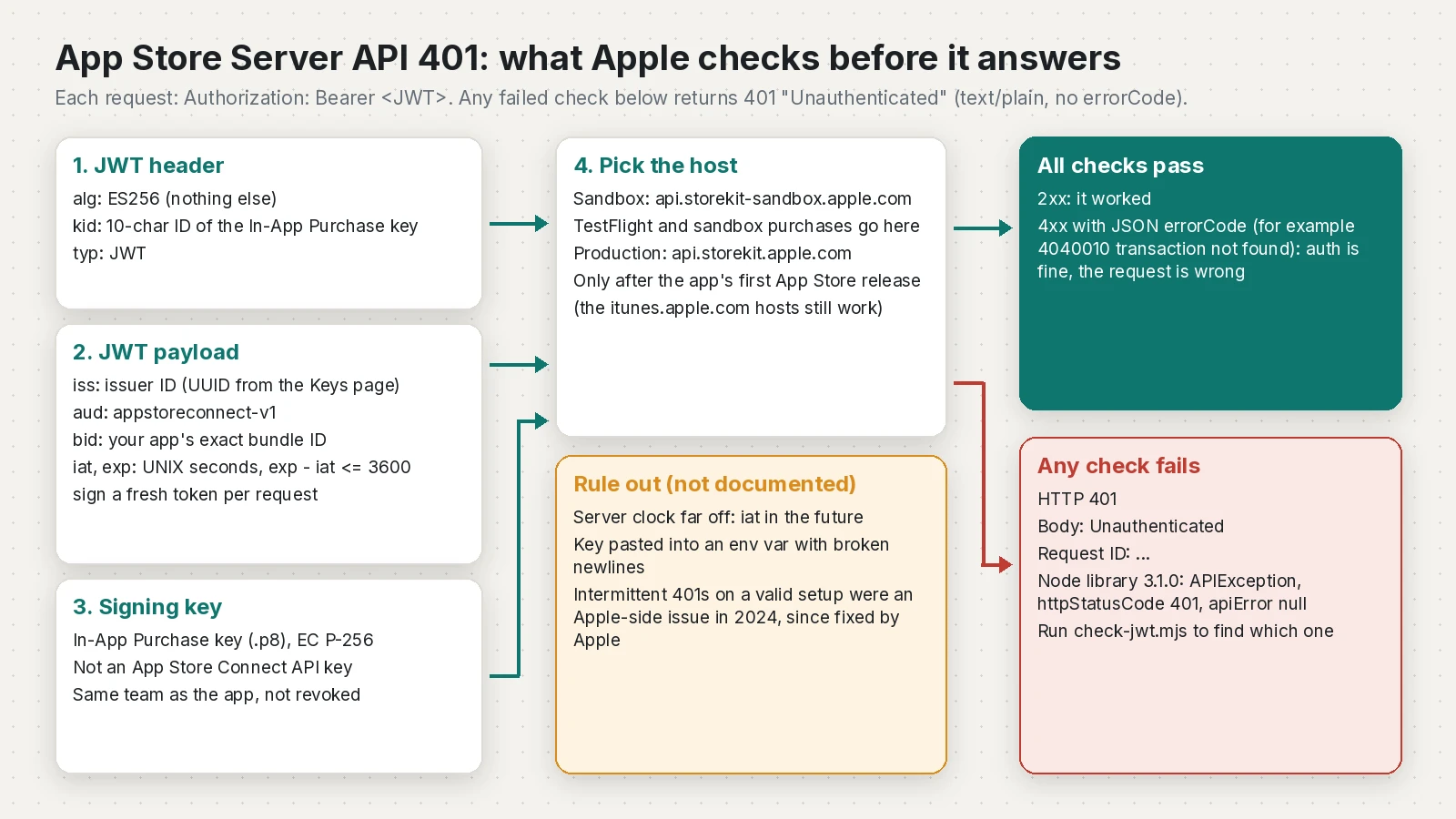
Why does the App Store Server API return 401 Unauthenticated?
These are the causes I could confirm in Apple's documentation or from Apple engineers on the official library repos:
| Cause | How to spot it | Fix |
|---|---|---|
| App Store Connect API key instead of an In-App Purchase key | Key ID is listed under App Store Connect API, not In-App Purchase | Generate a key under Users and Access > Integrations > In-App Purchase |
kid doesn't match the key that signed the token | Key file SubscriptionKey_XXXX.p8 or AuthKey_XXXX.p8 has a different ID | Use the key ID shown next to that key |
iss is wrong | Not a UUID, or the key ID pasted into it | Copy the issuer ID from the top of the Keys page |
bid missing or wrong | Token built with App Store Connect API code, which has no bid | Add your app's exact bundle ID |
aud wrong | Anything other than appstoreconnect-v1 | Use that exact string |
| Lifetime over 60 minutes | exp - iat above 3600, or times in milliseconds | Sign a fresh short token per request |
| Not ES256 | alg is RS256, HS256 or missing | Sign with the .p8 key using ES256 |
| Production host before the first App Store release | Sandbox works, production gives 401 | Send TestFlight and sandbox traffic to the sandbox host |
Two of these trip up most people. The first is the key type. Apple's docs say the In-App Purchase key works for the App Store Server API and "You can't use the key for other Apple services", and an Apple engineer answered one 401 report with "The App Store Server API uses the key under In-App Purchase" (issue 57). If you already set up an App Store Connect API key for CI (see my fastlane App Store Connect API key guide), that key is the wrong one here.
The second is the environment. An Apple engineer wrote: "Until you have a production release of your app, you will receive 401s from the production API" (issue 99), and confirmed in July 2025 that this includes apps still in TestFlight (issue 175).
How do I fix an App Store Server API 401 in Node.js?
Step 1: build the client in one place
Let the library sign the token. Version 3.1.0 signs with ES256, sets aud to appstoreconnect-v1, adds bid and uses a 5-minute expiry on every request, so you only have to pass the right values.
// apple-client.mjs
import { readFileSync } from 'node:fs';
import { AppStoreServerAPIClient, Environment } from '@apple/app-store-server-library';

export function loadPrivateKey() {
  // A file path is safest. Env vars often arrive with literal "\n" instead of newlines.
  if (process.env.APPLE_IAP_KEY_PATH) return readFileSync(process.env.APPLE_IAP_KEY_PATH, 'utf8');
  const raw = process.env.APPLE_IAP_KEY ?? '';
  return raw.includes('\\n') ? raw.replace(/\\n/g, '\n') : raw;
}

export function makeClient(env = process.env.APPLE_ENV ?? 'Sandbox') {
  const environment = env === 'Production' ? Environment.PRODUCTION : Environment.SANDBOX;
  return new AppStoreServerAPIClient(
    loadPrivateKey(),
    process.env.APPLE_KEY_ID,      // 10-character ID of the In-App Purchase key
    process.env.APPLE_ISSUER_ID,   // UUID shown at the top of the Keys page
    process.env.APPLE_BUNDLE_ID,   // goes into the "bid" claim
    environment,
  );
}
Step 2: make the smallest authenticated call
Request a Test Notification needs no transaction ID, so it's a clean auth test. A 401 here is always about credentials or environment.
// test-notification.mjs
import { APIException } from '@apple/app-store-server-library';
import { makeClient } from './apple-client.mjs';

const env = process.env.APPLE_ENV ?? 'Sandbox';
try {
  const res = await makeClient(env).requestTestNotification();
  console.log(`[${env}] authenticated. testNotificationToken:`, res.testNotificationToken);
} catch (e) {
  if (e instanceof APIException && e.httpStatusCode === 401) {
    // Apple sends a plain-text "Unauthenticated" body, so apiError is null here.
    console.error(`[${env}] 401 Unauthenticated. Apple rejected the JWT. Check, in order:`);
    console.error('  1. The key is an In-App Purchase key, not an App Store Connect API key');
    console.error('  2. APPLE_KEY_ID matches that key and APPLE_ISSUER_ID is the UUID from the Keys page');
    console.error('  3. APPLE_BUNDLE_ID is the exact bundle ID of an app in the same team');
    console.error('  4. Production only works after the app has had an App Store release');
    console.error('  Run: node check-jwt.mjs --sign   to inspect the token claims');
    process.exitCode = 1;
  } else {
    throw e;
  }
}
Run it against sandbox first:
npm install @apple/app-store-server-library@3.1.0
APPLE_IAP_KEY_PATH=./SubscriptionKey_2X9R4HXF34.p8 APPLE_KEY_ID=2X9R4HXF34 \
APPLE_ISSUER_ID=57246542-96fe-1a63-e053-0824d011072a \
APPLE_BUNDLE_ID=com.example.app APPLE_ENV=Sandbox node test-notification.mjs
Step 3: decode the token and flag each cause
If you sign tokens yourself (or use another language), this dependency-free script decodes a JWT and checks it against Apple's rules. With --sign it builds the same claims the library sends, from the same env vars, so you can inspect and curl with it. If you pass the key, it also proves the signature matches.
#!/usr/bin/env node
// check-jwt.mjs: decode an App Store Server API JWT and flag each known 401 cause.
// No dependencies. Usage:
//   node check-jwt.mjs <jwt>        check a token you captured from your logs or code
//   node check-jwt.mjs --sign       build a token from env vars (same claims as Apple's library) and check it
// Optional env: APPLE_IAP_KEY_PATH, APPLE_KEY_ID, APPLE_ISSUER_ID, APPLE_BUNDLE_ID, APPLE_ENV, APPLE_API_URL
import { createPrivateKey, createPublicKey, sign, verify } from 'node:crypto';
import { readFileSync } from 'node:fs';
import { basename } from 'node:path';

const E = process.env;
const results = [];
const add = (level, id, msg) => results.push({ level, id, msg });
const b64url = (b) => Buffer.from(b).toString('base64url');

function loadKey() {
  if (E.APPLE_IAP_KEY_PATH) return readFileSync(E.APPLE_IAP_KEY_PATH, 'utf8');
  if (E.APPLE_IAP_KEY) return E.APPLE_IAP_KEY.replace(/\\n/g, '\n');
  return null;
}

function signToken(pem) {
  const now = Math.floor(Date.now() / 1000);
  const header = { alg: 'ES256', kid: E.APPLE_KEY_ID, typ: 'JWT' };
  const payload = { bid: E.APPLE_BUNDLE_ID, iat: now, exp: now + 300, aud: 'appstoreconnect-v1', iss: E.APPLE_ISSUER_ID };
  const input = `${b64url(JSON.stringify(header))}.${b64url(JSON.stringify(payload))}`;
  const sig = sign('sha256', Buffer.from(input), { key: createPrivateKey(pem), dsaEncoding: 'ieee-p1363' });
  return `${input}.${b64url(sig)}`;
}

const pem = loadKey();
const arg = process.argv[2] ?? E.APPLE_JWT;
if (!arg) { console.error('usage: node check-jwt.mjs <jwt> | --sign'); process.exit(2); }
const token = arg === '--sign' ? (pem ? signToken(pem) : (console.error('--sign needs APPLE_IAP_KEY_PATH'), process.exit(2))) : arg.replace(/^Bearer\s+/i, '').trim();

const parts = token.split('.');
if (parts.length !== 3) { console.error('FAIL format: a JWT has 3 dot-separated parts, this has', parts.length); process.exit(1); }
let header, payload;
try {
  header = JSON.parse(Buffer.from(parts[0], 'base64url'));
  payload = JSON.parse(Buffer.from(parts[1], 'base64url'));
} catch { console.error('FAIL format: header or payload is not base64url JSON'); process.exit(1); }
if (arg === '--sign') console.log('token  ', token);
console.log('header ', JSON.stringify(header));
console.log('payload', JSON.stringify(payload));

// Header
header.alg === 'ES256' ? add('PASS', 'alg', 'ES256') : add('FAIL', 'alg', `alg is ${header.alg}; Apple requires ES256`);
if (header.typ !== 'JWT') add('WARN', 'typ', `typ is ${header.typ}; Apple's docs use "JWT"`);
const KID = /^[A-Z0-9]{10}$/;
if (!header.kid) add('FAIL', 'kid', 'kid missing from the header');
else if (!KID.test(header.kid)) add('FAIL', 'kid', `kid "${header.kid}" is not a 10-character key ID`);
else if (E.APPLE_KEY_ID && header.kid !== E.APPLE_KEY_ID) add('FAIL', 'kid', `kid ${header.kid} != APPLE_KEY_ID ${E.APPLE_KEY_ID}`);
else add('PASS', 'kid', header.kid);
const fileKid = E.APPLE_IAP_KEY_PATH && basename(E.APPLE_IAP_KEY_PATH).match(/^(?:AuthKey|SubscriptionKey)_([A-Z0-9]{10})\.p8$/)?.[1];
if (fileKid && header.kid && fileKid !== header.kid) add('FAIL', 'kid', `key file is for ${fileKid} but kid is ${header.kid}`);

// Payload
const UUID = /^[0-9a-f]{8}-[0-9a-f]{4}-[0-9a-f]{4}-[0-9a-f]{4}-[0-9a-f]{12}$/i;
if (!payload.iss) add('FAIL', 'iss', 'iss (issuer ID) missing');
else if (KID.test(payload.iss)) add('FAIL', 'iss', 'iss looks like a key ID; key ID and issuer ID are swapped');
else if (!UUID.test(payload.iss)) add('FAIL', 'iss', `iss "${payload.iss}" is not a UUID (individual-key user IDs do not work here)`);
else if (E.APPLE_ISSUER_ID && payload.iss !== E.APPLE_ISSUER_ID) add('FAIL', 'iss', `iss != APPLE_ISSUER_ID`);
else add('PASS', 'iss', payload.iss);
payload.aud === 'appstoreconnect-v1' ? add('PASS', 'aud', 'appstoreconnect-v1')
  : add('FAIL', 'aud', `aud is ${JSON.stringify(payload.aud)}; must be the string "appstoreconnect-v1"`);
if (!payload.bid) add('FAIL', 'bid', 'bid (bundle ID) missing; the App Store Server API needs it, the App Store Connect API does not');
else if (E.APPLE_BUNDLE_ID && payload.bid !== E.APPLE_BUNDLE_ID) add('FAIL', 'bid', `bid ${payload.bid} != APPLE_BUNDLE_ID ${E.APPLE_BUNDLE_ID}`);
else add('PASS', 'bid', payload.bid);
if ('scope' in payload) add('WARN', 'scope', 'scope is an App Store Connect API claim; this may be the wrong kind of token');

// Times
const now = Math.floor(Date.now() / 1000);
const { iat, exp } = payload;
if (!Number.isInteger(iat) || !Number.isInteger(exp)) add('FAIL', 'time', 'iat and exp must be integer UNIX seconds');
else {
  if (iat > 1e11 || exp > 1e11) add('FAIL', 'time', 'iat/exp look like milliseconds; use seconds');
  else {
    exp - iat <= 3600 ? add('PASS', 'lifetime', `exp - iat = ${exp - iat}s (max 3600)`)
      : add('FAIL', 'lifetime', `exp - iat = ${exp - iat}s; Apple rejects tokens valid for more than 60 minutes`);
    if (exp <= iat) add('FAIL', 'lifetime', 'exp is not after iat');
    if (exp <= now) add('FAIL', 'exp', `token expired ${now - exp}s ago; sign a new JWT per request`);
    if (iat > now + 60) add('WARN', 'clock', `iat is ${iat - now}s in the future. Not a documented 401 cause, but rule it out: sync the server clock (NTP)`);
  }
}

// Key: type and signature
if (pem) {
  try {
    const key = createPrivateKey(pem);
    const d = key.asymmetricKeyDetails ?? {};
    if (key.asymmetricKeyType !== 'ec' || d.namedCurve !== 'prime256v1') add('FAIL', 'keytype', `key is ${key.asymmetricKeyType} ${d.namedCurve ?? ''}; Apple .p8 keys are EC P-256`);
    else {
      const ok = verify('sha256', Buffer.from(`${parts[0]}.${parts[1]}`), { key: createPublicKey(key), dsaEncoding: 'ieee-p1363' }, Buffer.from(parts[2], 'base64url'));
      ok ? add('PASS', 'signature', 'signed by this private key') : add('FAIL', 'signature', 'signature does not match this private key (wrong key, or the token was edited)');
    }
  } catch (e) { add('FAIL', 'keytype', `cannot parse the private key (${e.code ?? e.message}); check the BEGIN/END lines and newlines`); }
}
add('CHECK', 'keytype', 'In App Store Connect, confirm this key ID is under Users and Access > Integrations > In-App Purchase, not App Store Connect API');

// Environment and host
const HOSTS = { 'api.storekit.apple.com': 'Production', 'api.storekit.itunes.apple.com': 'Production',
  'api.storekit-sandbox.apple.com': 'Sandbox', 'api.storekit-sandbox.itunes.apple.com': 'Sandbox' };
const env = E.APPLE_ENV;
if (E.APPLE_API_URL) {
  const host = new URL(E.APPLE_API_URL).host;
  if (!HOSTS[host]) add('FAIL', 'host', `${host} is not an App Store Server API host`);
  else if (env && HOSTS[host] !== env) add('FAIL', 'host', `${host} is ${HOSTS[host]} but APPLE_ENV is ${env}`);
  else add('PASS', 'host', `${host} (${HOSTS[host]})`);
}
if ((env ?? (E.APPLE_API_URL && HOSTS[new URL(E.APPLE_API_URL).host])) === 'Production')
  add('CHECK', 'release', 'Production returns 401 until the app has an App Store release; TestFlight and sandbox purchases belong on the sandbox host');

for (const r of results) console.log(`${r.level.padEnd(5)} ${r.id.padEnd(9)} ${r.msg}`);
const fails = results.filter((r) => r.level === 'FAIL').length;
console.log(fails ? `\n${fails} problem(s) found` : '\nNo token problems found. If Apple still says 401, work through the CHECK lines.');
process.exitCode = fails ? 1 : 0;
Here are the key lines of its output for a token built from App Store Connect API instructions (no bid, two-hour lifetime) aimed at production:
FAIL  bid       bid (bundle ID) missing; the App Store Server API needs it, the App Store Connect API does not
FAIL  lifetime  exp - iat = 7200s; Apple rejects tokens valid for more than 60 minutes
PASS  signature signed by this private key
CHECK keytype   In App Store Connect, confirm this key ID is under Users and Access > Integrations > In-App Purchase, not App Store Connect API
PASS  host      api.storekit.apple.com (Production)
CHECK release   Production returns 401 until the app has an App Store release; TestFlight and sandbox purchases belong on the sandbox host
The script can't see which list a key sits under in App Store Connect or whether your app is released, so those two stay as manual CHECK lines.
Step 4: route each transaction to the right environment
Don't guess the environment, and don't call production and then fall back to sandbox on a 401. On iOS 16 and later, StoreKit 2 exposes the environment, and Apple's engineer recommends sending it to your server with the transaction's jwsRepresentation. On the server, SignedDataVerifier reads the environment from the signed transaction, which I covered in the App Store Server Notifications V2 guide.
How do I verify the fix with curl?
Run node check-jwt.mjs --sign with your real env vars. It prints a fresh token (valid for 5 minutes) and checks it. Then call the new hosts directly:
TOKEN="eyJhbGciOiJFUzI1NiIsImtpZCI6..."

# Sandbox: ask Apple to send a TEST notification to your sandbox URL
curl -i -X POST -H "Authorization: Bearer $TOKEN" \
  https://api.storekit-sandbox.apple.com/inApps/v1/notifications/test

# Production: look up a real transaction from a released app
curl -i -H "Authorization: Bearer $TOKEN" \
  https://api.storekit.apple.com/inApps/v1/transactions/2000000123456789
A fixed setup returns 200 with a testNotificationToken, or a JSON error such as {"errorCode":4040010,...} (transaction not found), which proves authentication worked. A 404 with error code 4040007 on the test endpoint means you have no notification URL for that environment, not an auth problem. Still 401 with Unauthenticated? Go back to the checker.
How do I stop the 401 coming back?
- Keep the In-App Purchase key, key ID and issuer ID together in one secret, labelled as an In-App Purchase key.
- Load the
.p8from a file or secret mount, not a one-line env var. - Let the library sign a new token for every request; never cache a long-lived token.
- Store the environment with every transaction ID and pick the host from it.
- Run the test notification call in sandbox in CI or at deploy time.
- When you revoke a key, update every server that used it the same day.
- Before launch, plan for production to return 401 until release day, then test it straight after release.
If you also restore purchases from the app, my post on restore purchases not working in Flutter covers the client side.
Summary
| Check | Correct value |
|---|---|
| Key type | In-App Purchase key (.p8, EC P-256), Account Holder or Admin generates it, downloadable once |
| Header | alg: ES256, kid: <key ID>, typ: JWT |
| Payload | iss: <issuer UUID>, aud: appstoreconnect-v1, bid: <bundle ID>, iat, exp in seconds |
| Lifetime | exp - iat 3600 seconds or less; one token per request |
| Sandbox host | api.storekit-sandbox.apple.com (TestFlight and sandbox purchases) |
| Production host | api.storekit.apple.com, only after the first App Store release |
| Node library | @apple/app-store-server-library 3.1.0 |
| 401 body | Unauthenticated plus a request ID, no error code |
Frequently asked questions
How do I fix API error 401 from the App Store Server API?
Check that the JWT is signed with an In-App Purchase key using ES256, that kid, iss and bid are correct, that aud is appstoreconnect-v1 and that exp is at most 60 minutes after iat. If the token is right, make sure you are calling the sandbox host for TestFlight and sandbox purchases, because production returns 401 until the app is released.
What does a 401 error mean in the App Store Server API?
Apple documents a 401 as an invalid JSON Web Token in the authorization header. The response body is plain text that says Unauthenticated with a request ID, so it does not tell you which part of the token or setup is wrong.
Can I use my App Store Connect API key for the App Store Server API?
No. The App Store Server API needs an In-App Purchase key from Users and Access, Integrations, In-App Purchase in App Store Connect. A team key made for the App Store Connect API gets a 401.
Why does sandbox work but production returns 401?
Production rejects requests until your app has had a release on the App Store, and that includes apps that are only in TestFlight. Send TestFlight and sandbox transactions to api.storekit-sandbox.apple.com and use production after release.
How long can an App Store Server API JWT be valid?
Apple says tokens that expire more than 60 minutes after iat are not valid, and both times must be UNIX seconds. Apple also recommends signing a new token for each request; the Node library uses a 5-minute expiry.
Does the App Store Server API JWT need the bid claim?
Yes. The payload must include bid with your app's bundle ID. Code written for the App Store Connect API leaves bid out, which is a common cause of 401 responses.
Which App Store Server API base URL should I use in 2026?
Since Apple's 5 May 2026 server update the recommended hosts are api.storekit.apple.com for production and api.storekit-sandbox.apple.com for sandbox. The older itunes.apple.com hosts are still supported, and Node library 3.1.0 uses the new ones.
Can clock skew cause an App Store Server API 401?
Apple does not list clock skew as a cause. If your server clock is far off, iat can end up in the future, so it is worth syncing the clock with NTP to rule it out, but check the key and claims first.
Sources
- Generating JSON Web Tokens for API requests (Apple Developer)
- Creating API keys to authorize API requests (Apple Developer)
- Generate keys for in-app purchases (App Store Connect Help)
- App Store Server API changelog (Apple Developer, 2026-11-17)
- Request a Test Notification (Apple Developer)
- Get Transaction Info (Apple Developer)
- app-store-server-library-node releases (Apple on GitHub, 2026-05-06)
- Issue 57: 401 when calling the API (In-App Purchase key answer) (GitHub, 2024-02-01)
- Issue 99: test notification 401 in production (GitHub, 2024-06-17)
- Issue 175: production API before App Store release (GitHub, 2025-07-21)
- Issue 96: intermittent 401 with apiError null (GitHub, 2024-07-10)
- AppStore.Environment (Apple Developer)
Keep reading
- App Store Server Notifications V2 in Node.js: Verify and FixVerify App Store Server Notifications V2 in Node.js with Apple's library, fix each VerificationStatus error, and recover missed notifications.
- Fastlane 2FA on CI: Use an App Store Connect API Keyfastlane hangs on CI asking for a 2FA code? Switch match and TestFlight uploads to an App Store Connect API key, with a tested Fastfile and workflow.
- StoreKit 2 Subscriptions in Flutter: Restore Purchases and Server NotificationsStoreKit 2 subscriptions in a Flutter app: server verification, App Store Server Notifications V2, restore purchases and one access record across gateways.
Comments
Share a question or note about this article.
Loading comments…