
Your iOS build passes locally, but on GitHub Actions or Codemagic fastlane prints "Two-factor Authentication (6 digits code) is enabled for account" and then the job hangs until it times out. The fix is to stop logging in with an Apple ID on CI and use a fastlane App Store Connect API key instead. This guide shows the exact Fastfile, the CI secrets and the mistakes that make the key fail.
Quick answer
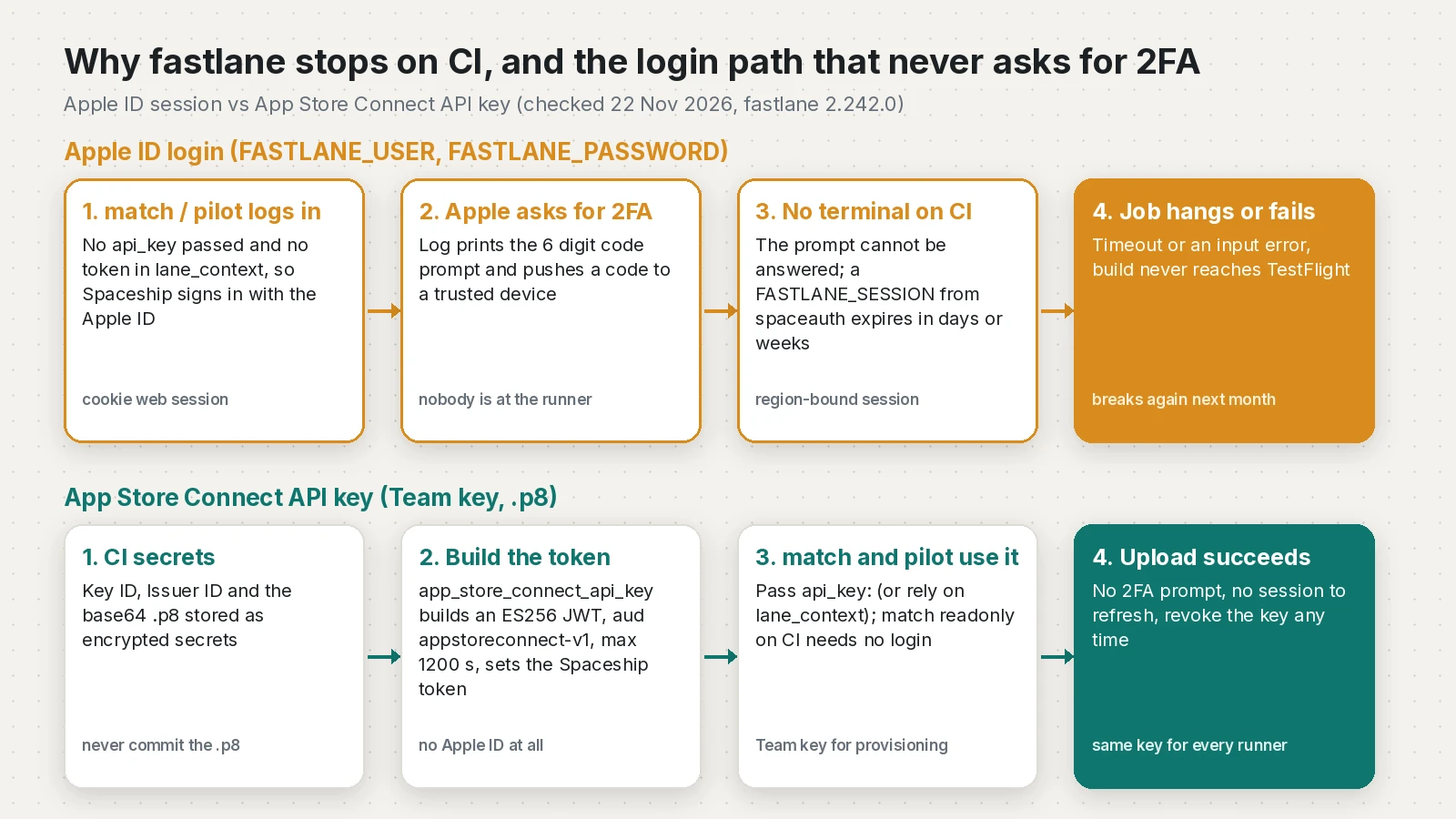
fastlane asks for a 2FA code on CI because match, pilot or deliver are signing in with an Apple ID (FASTLANE_USER), and a CI runner has no one to type the code. Create a Team API key in App Store Connect (Users and Access, Integrations, App Store Connect API), store the key ID, issuer ID and base64 .p8 as CI secrets, call app_store_connect_api_key at the start of the lane and pass the result as api_key: to match and upload_to_testflight. The API key path never triggers 2FA.
What this means for your app or business
When the release pipeline depends on someone's Apple ID, every build waits for that person's phone. Sessions created with fastlane spaceauth also expire, so the pipeline breaks again a few weeks later, usually on release day.
- Cost of the problem: delayed TestFlight builds, a developer babysitting releases, and sometimes a shared Apple ID password sitting in CI.
- Risk: low once fixed. An API key can be revoked in one click and does not expose anyone's Apple ID.
- Time to fix: about an hour for a developer who already uses fastlane, including creating the key and updating secrets.
- When to get help: if your signing also uses
matchand nobody remembers the repo password or which certificates exist, it is worth having someone sort out signing and CI together.
Why does fastlane ask for a 2FA code on CI?
Without an API key, fastlane's Spaceship client logs in to Apple's web session with your Apple ID. Apple has required two-factor authentication for developer Apple IDs since 2021, as the fastlane authentication docs explain, so that login always ends in a code prompt. In fastlane 2.242.0 the log looks like this:
Two-factor Authentication (6 digits code) is enabled for account 'you@example.com'
More information about Two-factor Authentication: https://support.apple.com/en-us/HT204915

If you're running this in a non-interactive session (e.g. server or CI)
check out https://github.com/fastlane/fastlane/tree/master/spaceship#2-step-verification
Please enter the 6 digit code:
On a runner there is no terminal to answer, so the job sits there or fails. The old workarounds each have a catch:
| Method | Works on CI? | Catch |
|---|---|---|
| Apple ID + 2FA prompt | No | Needs a person to type the code |
FASTLANE_SESSION from fastlane spaceauth | For a while | Valid between about 1 day and 1 month, and tied to a region |
| App-specific password | Uploads only | Only for the binary upload; no metadata or tester changes |
| App Store Connect API key | Yes | Team key needed for provisioning; some actions (produce, pem) not supported |
The session limits come straight from the fastlane docs. The supported-actions table on the fastlane App Store Connect API page lists match, sigh, cert, pilot and deliver as working with an API key.
How do I create an App Store Connect API key for fastlane?
Apple's guide on creating API keys covers the screens. The short version:
- Sign in to App Store Connect with an Admin account (only Admins can create Team keys).
- Open Users and Access, then the Integrations tab, then App Store Connect API, and stay on Team Keys.
- Click the add button, give the key a name like "CI fastlane" and pick a role. I use Admin for the key that lets
matchcreate certificates and profiles, because Apple's roles table limits who can create distribution certificates. - Download the
.p8file right away. Apple does not keep a copy, and the download link disappears. - Note the Key ID and the Issuer ID shown on the page.
How do I store the key as CI secrets?
Base64 the .p8 so it survives as a single-line secret:
# macOS
base64 -i AuthKey_ABC123DEFG.p8 | tr -d '\n' > key.b64
# Linux
base64 -w0 AuthKey_ABC123DEFG.p8 > key.b64

# GitHub CLI (or paste into Settings > Secrets and variables > Actions)
gh secret set ASC_KEY_ID --body "ABC123DEFG"
gh secret set ASC_ISSUER_ID --body "your-issuer-uuid"
gh secret set ASC_KEY_P8_BASE64 < key.b64
rm key.b64
Never commit the .p8 to the app repo or the match repo. Apple's docs say to revoke the key at once if it leaks.
The fixed Fastfile
app_store_connect_api_key reads the key and builds the token. It also sets it for every later action in the lane through lane_context, but I pass api_key: explicitly so it is obvious in review.
default_platform(:ios)

platform :ios do
  # Builds a signed IPA on CI and uploads it to TestFlight without an Apple ID login.
  lane :beta do
    setup_ci if is_ci

    api_key = app_store_connect_api_key(
      key_id: ENV.fetch("ASC_KEY_ID"),
      issuer_id: ENV.fetch("ASC_ISSUER_ID"),
      key_content: ENV.fetch("ASC_KEY_P8_BASE64"),
      is_key_content_base64: true,
      duration: 1200,
      in_house: false
    )

    match(
      type: "appstore",
      api_key: api_key,
      readonly: is_ci
    )

    build_app(
      workspace: "ios/Runner.xcworkspace",
      scheme: "Runner",
      export_method: "app-store"
    )

    upload_to_testflight(
      api_key: api_key,
      skip_waiting_for_build_processing: true
    )
  end
end
A few details matter here:
duration: 1200is the maximum. fastlane caps the token at 20 minutes (MAX_TOKEN_DURATION = 1200in the token class) because that is Apple's limit. The default is 500 seconds.in_house: falseavoids the error "Cannot determine if team is App Store or Enterprise via the App Store Connect API (yet)", whichmatchandsighcan raise when it is left unset.readonly: is_cimeans the CI run only downloads existing certificates and profiles. In readonly modematchskips the Developer Portal entirely, so it needs no login at all. Create or renew certificates from a separate manual workflow withreadonly: false, still using the same API key.setup_cicreates a temporary keychain so the runner can import the certificate.
GitHub Actions workflow for a Flutter app
This is the job I use for Flutter iOS releases. SPACESHIP_ONLY_ALLOW_INTERACTIVE_2FA with FASTLANE_IS_INTERACTIVE=false makes fastlane raise "2FA can only be performed in interactive mode" straight away instead of hanging, so a missed Apple ID login fails in seconds rather than at the timeout.
name: ios-testflight

on:
  workflow_dispatch:
  push:
    tags: ["v*"]

jobs:
  testflight:
    runs-on: macos-26
    timeout-minutes: 45
    env:
      ASC_KEY_ID: ${{ secrets.ASC_KEY_ID }}
      ASC_ISSUER_ID: ${{ secrets.ASC_ISSUER_ID }}
      ASC_KEY_P8_BASE64: ${{ secrets.ASC_KEY_P8_BASE64 }}
      MATCH_PASSWORD: ${{ secrets.MATCH_PASSWORD }}
      MATCH_GIT_BASIC_AUTHORIZATION: ${{ secrets.MATCH_GIT_BASIC_AUTHORIZATION }}
      SPACESHIP_ONLY_ALLOW_INTERACTIVE_2FA: "true"
      FASTLANE_IS_INTERACTIVE: "false"
      LANG: en_US.UTF-8
      LC_ALL: en_US.UTF-8
    steps:
      - uses: actions/checkout@v7
      - uses: subosito/flutter-action@v2
        with:
          channel: stable
      - run: flutter pub get
      - run: flutter build ios --release --no-codesign
      - uses: ruby/setup-ruby@v1
        with:
          ruby-version: "3.3"
          bundler-cache: true
          working-directory: ios
      - name: Build and upload to TestFlight
        working-directory: ios
        run: bundle exec fastlane beta
For the signing side of this job, see my earlier guides on the "No signing certificate" error in GitHub Actions and fastlane match "couldn't decrypt the repo".
Why does the API key still fail?
I tested fastlane 2.242.0's token class with a generated key to confirm what each mistake looks like (12 of 12 checks passed):
| Symptom | Cause | Fix |
|---|---|---|
ArgumentError: string contains null byte | Secret holds the raw PEM but is_key_content_base64: true | Store the base64 text, or set the flag to false |
OpenSSL::PKey::ECError | Secret is base64 but the flag is false ("invalid curve name") | Match the flag to the secret format |
| "App Store Connect API key JSON is missing field(s): key_id" | api_key_path JSON without key_id or key | Use the documented JSON fields |
| "Cannot determine if team is App Store or Enterprise" | in_house not set | Set in_house: false |
| Still prompts for 2FA | An action did not get the key and FASTLANE_USER is set | Pass api_key: everywhere, remove Apple ID secrets |
| 401 from Apple | Wrong key ID or issuer ID, or a revoked key | Recheck the three values in App Store Connect |
The token also tells you which kind of key you have: with an issuer ID the JWT carries iss (Team key), without one it carries sub: "user" (Individual key), and in_house: true switches the audience from appstoreconnect-v1 to apple-developer-enterprise-v1.
How do I verify the fix?
- The log shows "Creating authorization token for App Store Connect API" from
match(or "Using existing authorization token") and no "Two-factor Authentication" line. matchends with "All required keys, certificates and provisioning profiles are installed".- The build appears in TestFlight under the right version and build number.
- Remove
FASTLANE_USER,FASTLANE_PASSWORDandFASTLANE_SESSIONfrom the CI secrets and run again. If it still passes, nothing depends on the Apple ID any more.
How do I keep it from breaking again?
- Use one Team key per pipeline, named after it, so revoking one does not break the others.
- Keep
readonly: trueon every automatic run and renew certificates on purpose. My post on the distribution certificate limit covers what happens when CI creates certificates by accident. - Keep fastlane pinned in
Gemfile.lockand update it on purpose. - Record who holds the downloaded
.p8and where the backup lives, since Apple cannot give it back.
Frequently asked questions
Why does fastlane ask for a 6 digit code on CI?
Because match, pilot or deliver are logging in with an Apple ID, and Apple requires two-factor authentication for developer accounts. A CI runner has no one to type the code, so the job hangs or fails. An App Store Connect API key avoids the Apple ID login completely.
Does fastlane match support App Store Connect API keys?
Yes. The fastlane docs list match, sigh, cert, pilot and deliver as supporting API keys. Pass the result of app_store_connect_api_key as the api_key option, or use api_key_path with a JSON key file.
Should I use a Team key or an Individual key?
Use a Team key. Apple's documentation says Individual keys cannot use the Provisioning endpoints, so match and sigh cannot create or fix certificates and profiles with them.
How long does the fastlane API token last?
fastlane signs a JWT that lasts 500 seconds by default and at most 1200 seconds, which is Apple's 20 minute limit. The action creates a fresh token each run, so you never refresh anything by hand.
Is FASTLANE_SESSION from fastlane spaceauth still a good option?
Only as a stopgap. The fastlane docs say the session can last anywhere from a day to a month and is tied to the region where it was created, so CI breaks again when it expires.
Can I upload to TestFlight with an app-specific password instead?
Only for the binary upload. The fastlane docs note that app-specific passwords do not work for metadata changes or distributing to testers, so an API key is the more complete fix.
What does in_house do in app_store_connect_api_key?
It tells fastlane whether the team is an Enterprise team, because the API cannot report that. Set it to false for normal App Store teams to avoid the Cannot determine if team is App Store or Enterprise error.
Sources
- Using App Store Connect API (fastlane docs)
- app_store_connect_api_key action (fastlane docs)
- Authenticating with Apple services (fastlane docs)
- Continuous Integration (fastlane docs)
- match action (fastlane docs)
- Creating API Keys for App Store Connect API (Apple Developer)
- Program roles (Apple Developer)
- fastlane 2.242.0 on RubyGems (RubyGems, 2026-11-16)
- spaceship two_step_or_factor_client.rb (fastlane on GitHub)
- spaceship connect_api token.rb (fastlane on GitHub)
Keep reading
- fastlane match password: Fix "Couldn't decrypt the repo"Why fastlane match says "Couldn't decrypt the repo" on GitHub Actions when your passphrase is right, and how to fix MATCH_PASSWORD for Flutter iOS builds.
- Apple Distribution Certificate Limit: Fix It in CI/CDFix the Apple Distribution certificate limit in CI: free a slot safely, then make fastlane, GitHub Actions or Codemagic reuse one shared certificate.
- No Signing Certificate iOS Distribution Found: Flutter CI FixFlutter iOS builds failing in GitHub Actions with no signing certificate found? Import the .p12 and profile, sign manually and upload to TestFlight.
Comments
Share a question or note about this article.
Loading comments…