
Your iOS build was fine yesterday, and today CI stops at code signing with "You already have a current Distribution certificate or a pending certificate request", or Xcode tells you "Maximum number of certificates generated". Both mean the same thing: your Apple team has used up its Apple Distribution certificate slots, and something in your pipeline keeps trying to create another one. This guide shows how to free a slot without breaking live apps, and how to make CI reuse one shared certificate so it never happens again.
Quick answer
Apple allows only a small number of Apple Distribution certificates per team (Codemagic documents 3 for a standard Apple Developer Program team and 2 for Enterprise), and CI tools that cannot find a matching private key on a fresh runner create a new certificate every time until the limit is hit. Revoke the certificates nothing uses, keep one certificate whose private key you control, and make CI fetch it read-only with match(readonly: true) or by importing an exported .p12. Revoking an App Store distribution certificate does not remove your live App Store apps.
What this means for your app or business
- What breaks: no new TestFlight builds and no App Store updates until signing works again. Your app already on the App Store keeps working.
- Cost and time: usually one to two hours for someone with Account Holder or Admin access to the Apple Developer account. Longer if nobody knows which certificate each pipeline, agency or teammate uses.
- Risk: revoking the wrong certificate breaks another team's pipeline, invalidates the provisioning profiles that contain it and stops Ad Hoc test builds from installing. For an Enterprise in-house app, revoking its certificate stops the installed app from running.
- When to get help: if several agencies or freelancers have touched your Apple account, if you use the Enterprise program, or if a release date is close. Mapping certificates to pipelines first is cheaper than guessing.
What does the "maximum number of certificates" error look like?
You see the same limit with different wording depending on the tool:
# Codemagic automatic signing (App Store Connect API)
Did not find any Signing Certificates for given private key
Creating new Signing Certificate: certificate type: DISTRIBUTION
POST https://api.appstoreconnect.apple.com/v1/certificates returned 409:
You already have a current Distribution certificate or a pending certificate request.

# Codemagic UI, "Generate certificate"
There is a problem with the request entity - You already have a current Distribution certificate or a pending certificate request.

# fastlane cert / get_certificates
Could not create another Distribution certificate, reached the maximum number of available Distribution certificates.

# Xcode / developer portal
Maximum number of certificates generated.
The fastlane line comes straight from cert/lib/cert/runner.rb in 2.242.0: when Apple's response contains "You already have a current", fastlane rewrites it into the "maximum number" message.
Why does CI keep creating new distribution certificates?
Apple's Certificates overview says distribution certificates belong to the team, not to a person, that the number of each distribution type per team is limited (Developer ID is the exception), and that only the Account Holder or Admin can create them. Apple's page does not print the number. Codemagic's signing docs and its knowledge base put it at 3 Apple Distribution certificates for a standard account and 2 for Enterprise, which matches what developers have reported on the Apple Developer Forums since 2018.
A certificate is only useful together with the private key that created it, and that key lives in the keychain of the machine that made the request. CI runners are thrown away after each job, so:
- fastlane `get_certificates` (cert) lists the team's certificates and looks for one that is installed in the local keychain or cached with its
.p12. On a clean GitHub Actions runner it finds none, so it creates a new one. Three runs later the slots are gone. - Codemagic automatic signing looks for a certificate that matches
CERTIFICATE_PRIVATE_KEY. If each app or workflow uses a different key, Codemagic creates a new certificate for each one. - fastlane match without `readonly` creates a certificate when its storage has none for that type, for example a new empty repo or a different branch, or when
renew_expired_certs: truefinds the stored one expired. Pointing two projects at two empty match repos uses two slots. - People: each developer who clicks "Create" in Xcode or the portal on their own Mac uses a slot too.
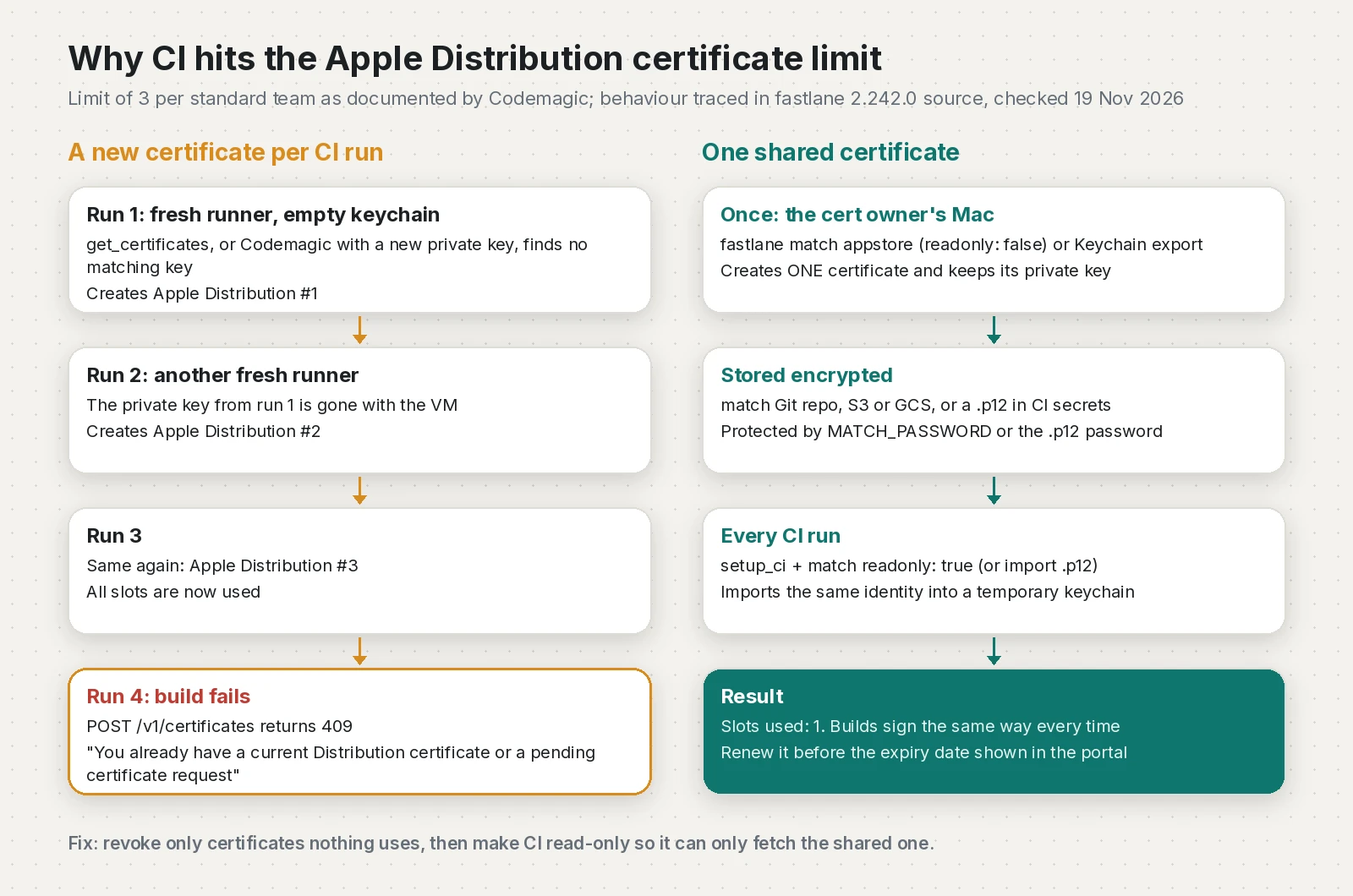
"Pending certificate request" in Apple's wording refers to a certificate request that has not been issued yet. In CI the message almost always means the slots are full.
How do I fix the Apple Distribution certificate limit safely?
Step 1: list the distribution certificates on the team
Open Certificates, Identifiers & Profiles and filter by Distribution, or use the App Store Connect API. This script calls GET /v1/certificates with filter[certificateType]=DISTRIBUTION,IOS_DISTRIBUTION (both values are in Apple's list of certificate types) and signs the request with an ES256 JWT, as Apple's token docs require:
#!/usr/bin/env python3
"""List Apple Distribution and iOS Distribution certificates for a team.

Uses the App Store Connect API (GET /v1/certificates) with an ES256 JWT.
Needs: pip install cryptography requests
Env: ASC_KEY_ID, ASC_ISSUER_ID, ASC_KEY_PATH (path to AuthKey_XXXX.p8)
"""
import base64, json, os, sys, time

import requests
from cryptography.hazmat.primitives import hashes, serialization
from cryptography.hazmat.primitives.asymmetric import ec
from cryptography.hazmat.primitives.asymmetric.utils import decode_dss_signature

API = "https://api.appstoreconnect.apple.com/v1/certificates"
TYPES = "DISTRIBUTION,IOS_DISTRIBUTION"


def b64url(data: bytes) -> str:
    return base64.urlsafe_b64encode(data).rstrip(b"=").decode()


def make_token(key_id: str, issuer_id: str, pem: bytes, now: int | None = None) -> str:
    now = int(now if now is not None else time.time())
    header = {"alg": "ES256", "kid": key_id, "typ": "JWT"}
    # Apple rejects tokens that expire more than 20 minutes in the future.
    payload = {"iss": issuer_id, "iat": now, "exp": now + 15 * 60, "aud": "appstoreconnect-v1"}
    signing_input = f"{b64url(json.dumps(header).encode())}.{b64url(json.dumps(payload).encode())}"
    key = serialization.load_pem_private_key(pem, password=None)
    der = key.sign(signing_input.encode(), ec.ECDSA(hashes.SHA256()))
    r, s = decode_dss_signature(der)  # JWT wants raw r||s, not DER
    sig = r.to_bytes(32, "big") + s.to_bytes(32, "big")
    return f"{signing_input}.{b64url(sig)}"


def summarize(body: dict) -> list[dict]:
    rows = []
    for item in body.get("data", []):
        a = item.get("attributes", {})
        rows.append({
            "id": item.get("id"),
            "type": a.get("certificateType"),
            "name": a.get("displayName"),
            "expires": a.get("expirationDate"),
            "serial": a.get("serialNumber"),
        })
    return sorted(rows, key=lambda r: r["expires"] or "")


def main() -> int:
    pem = open(os.environ["ASC_KEY_PATH"], "rb").read()
    token = make_token(os.environ["ASC_KEY_ID"], os.environ["ASC_ISSUER_ID"], pem)
    resp = requests.get(
        API,
        params={"filter[certificateType]": TYPES, "limit": 200},
        headers={"Authorization": f"Bearer {token}"},
        timeout=30,
    )
    resp.raise_for_status()
    rows = summarize(resp.json())
    for r in rows:
        print(f'{r["type"]:<17} {r["expires"] or "?":<26} {r["id"]}  {r["name"]}')
    print(f"{len(rows)} distribution certificate(s) on this team")
    return 0


if __name__ == "__main__":
    sys.exit(main())
DISTRIBUTION is the modern Apple Distribution type and IOS_DISTRIBUTION is the older iOS Distribution type that Apple labels "For use with Xcode 11 and earlier".
Step 2: decide which certificate to keep
Keep the one whose private key you can actually use: it is in your match storage, or someone has its .p12 export. A certificate whose private key exists nowhere cannot sign anything, so it is the safest one to revoke. Codemagic notes that certificates its builds created are labelled "Created via API" in the portal, and that their private keys cannot be recovered from Apple.
Before you revoke anything, ask every person and pipeline that signs for this team which certificate they use. A quick way is to compare serial numbers from the script with security find-identity -v -p codesigning on each Mac that signs.
Step 3: revoke the unused certificates
Apple's Revoke a certificate steps: in Certificates, Identifiers & Profiles, click Certificates, select the certificate, click Revoke and confirm. It needs the Account Holder or Admin role. What Apple says happens when an App Store distribution certificate is revoked:
- Your existing App Store apps are not affected while your membership is valid.
- You can no longer upload new apps or updates signed with that certificate.
- Provisioning profiles that contain it become invalid and must be regenerated.
Step 4: make CI reuse one certificate
With match, create the certificate once on the owner's Mac, then let CI only read it. setup_ci creates a temporary keychain and sets MATCH_READONLY=true on CI, and the explicit readonly: true keeps it read-only even if someone removes setup_ci:
default_platform(:ios)

def asc_key
  app_store_connect_api_key(
    key_id: ENV["ASC_KEY_ID"],
    issuer_id: ENV["ASC_ISSUER_ID"],
    key_content: ENV["ASC_KEY_P8_BASE64"],
    is_key_content_base64: true
  )
end

platform :ios do
  before_all do
    setup_ci # temporary keychain + MATCH_READONLY=true on CI, no-op on a laptop
  end

  desc "Owner only: create or refresh the shared distribution certificate"
  lane :certs_owner do
    UI.user_error!("Run certs_owner on the owner's Mac, not on CI") if is_ci
    match(type: "appstore", readonly: false, api_key: asc_key)
  end

  desc "CI: sign with the shared certificate and upload to TestFlight"
  lane :beta do
    api_key = asc_key
    match(type: "appstore", readonly: true, api_key: api_key)
    build_app(workspace: "Runner.xcworkspace", scheme: "Runner", export_method: "app-store")
    upload_to_testflight(api_key: api_key, skip_waiting_for_build_processing: true)
  end

  desc "CI: sign with an exported .p12 instead of match"
  lane :beta_p12 do
    p12_path = File.join(ENV.fetch("RUNNER_TEMP", "/tmp"), "dist.p12")
    File.binwrite(p12_path, Base64.decode64(ENV.fetch("DIST_P12_BASE64")))
    import_certificate(
      certificate_path: p12_path,
      certificate_password: ENV.fetch("DIST_P12_PASSWORD"),
      keychain_name: ENV.fetch("MATCH_KEYCHAIN_NAME", "fastlane_tmp_keychain"),
      keychain_password: ""
    )
    api_key = asc_key
    get_provisioning_profile(api_key: api_key, app_identifier: ENV.fetch("APP_ID"), readonly: true)
    build_app(workspace: "Runner.xcworkspace", scheme: "Runner", export_method: "app-store")
    upload_to_testflight(api_key: api_key, skip_waiting_for_build_processing: true)
  end
end
The beta_p12 lane is for teams without match: export the kept certificate from Keychain Access as a .p12, store it base64-encoded as a secret, and import it into the keychain that setup_ci created (fastlane 2.242.0 creates it with an empty password). If your password secret uses a dollar sign or comes from a dotenv file, read the match password post first.
The GitHub Actions job then only fetches:
name: iOS TestFlight
on:
  workflow_dispatch:
  push:
    branches: [main]
concurrency:
  group: ios-release
  cancel-in-progress: false
jobs:
  ios:
    runs-on: macos-26
    timeout-minutes: 45
    env:
      MATCH_READONLY: "true"   # match can never create a certificate here
      MATCH_PASSWORD: ${{ secrets.MATCH_PASSWORD }}
      MATCH_GIT_BASIC_AUTHORIZATION: ${{ secrets.MATCH_GIT_BASIC_AUTHORIZATION }}
      ASC_KEY_ID: ${{ secrets.ASC_KEY_ID }}
      ASC_ISSUER_ID: ${{ secrets.ASC_ISSUER_ID }}
      ASC_KEY_P8_BASE64: ${{ secrets.ASC_KEY_P8_BASE64 }}
    steps:
      - uses: actions/checkout@v7
      - uses: subosito/flutter-action@v2
        with:
          channel: stable
          flutter-version: 3.50.0
          cache: true
      - uses: ruby/setup-ruby@v1
        with:
          ruby-version: "3.3"
          bundler-cache: true
          working-directory: ios
      - run: flutter pub get
      - run: flutter build ios --release --no-codesign
      - name: Sign and upload with the shared certificate
        working-directory: ios
        run: bundle exec fastlane beta
      - name: Show which signing identity was used
        if: always()
        run: bash scripts/check-signing-identity.sh
If you import the .p12 with plain security commands instead of fastlane, GitHub's macOS signing guide has the full keychain script, and I walk through it for Flutter in the "No signing certificate iOS Distribution found" fix.
Step 5: the Codemagic version
On Codemagic, either upload the kept .p12 under Code signing identities and reference it in ios_signing, or keep automatic signing and set CERTIFICATE_PRIVATE_KEY to that certificate's private key. Codemagic's knowledge base recommends storing the key once as a team-level global secret and reusing it in every app, so all apps match the same certificate instead of each creating one. If profiles then fail to match, see the Codemagic "No matching profiles found" fix.
Which fix should I use?
| Option | Where the private key lives | What CI does | Creates certificates on CI? |
|---|---|---|---|
| fastlane match, readonly on CI | Encrypted match repo or bucket | match(readonly: true) imports it | No |
| Exported .p12 in CI secrets | GitHub or CI secret, base64 | import_certificate or security import | No |
| Codemagic uploaded certificate | Codemagic Code signing identities | ios_signing fetches it | No |
| Codemagic shared CERTIFICATE_PRIVATE_KEY | Team-level Codemagic secret | Finds the matching certificate | Only if none matches yet |
| get_certificates on a fresh runner | Nowhere after the job ends | Creates a new certificate | Yes, until the limit |
How do I verify the fix?
- Run the lane locally in read-only mode.
fastlane match appstore --readonlyshould install the identity without asking for Apple credentials or creating anything. - Check the keychain on the CI runner. This script, run in the last workflow step, fails the job when no distribution identity is present:
#!/usr/bin/env bash
# Lists valid code signing identities and fails if there is no
# Apple Distribution (or legacy iPhone Distribution) identity.
set -euo pipefail

identities="$(security find-identity -v -p codesigning || true)"
printf '%s\n' "$identities"

count="$(printf '%s\n' "$identities" | grep -cE '"(Apple|iPhone) Distribution: ' || true)"
if [ "$count" -eq 0 ]; then
  echo "No distribution identity in the keychain. Did match run with readonly: true?" >&2
  exit 1
fi
echo "Found $count distribution identity(ies)."- Run the pipeline two or three times, then run the listing script again. The count of distribution certificates should not change.
How do I stop it happening again?
- Use
readonly: true(orreadonly: is_ci, which fastlane's docs recommend) on every CI match call, and callsetup_ciinbefore_all. - Never call
get_certificatesin a CI lane. - Pick one certificate owner, ideally the Account Holder or one Admin, who creates and renews the certificate and nobody else.
- Use an App Store Connect API key for CI so no personal Apple Account or 2FA code sits in your pipeline.
- Put the renewal date in a calendar. When it expires, the owner runs the owner lane once and CI picks up the new certificate.
- On Codemagic, store one
CERTIFICATE_PRIVATE_KEYas a team-wide secret.
Checklist before the next release:
- One distribution certificate in use, private key stored encrypted
- Unused certificates revoked, profiles regenerated
- CI match calls read-only, no
get_certificatesin CI lanes - Identity check step passes on CI
- Renewal owner and date written down
Frequently asked questions
How many Apple Distribution certificates can a team have?
Apple's help pages say the number of each distribution certificate type per team is limited but do not print the number. Codemagic documents the limit as 3 Apple Distribution certificates for a standard Apple Developer Program team and 2 for an Enterprise team.
What does "You already have a current Distribution certificate or a pending certificate request" mean?
Apple refused to create another distribution certificate because the team has no free slot left. In CI it usually means a tool kept creating a new certificate on every fresh runner.
Does revoking a distribution certificate remove my app from the App Store?
No. Apple says existing App Store apps are not affected while your membership is valid. You can no longer upload builds signed with that certificate, and profiles that contain it become invalid.
Will revoking a distribution certificate break TestFlight builds?
fastlane's docs say builds already on TestFlight keep working. Apple warns that builds uploaded but not yet submitted for App Review may be marked Invalid Binary, so submit or discard those before revoking.
Which distribution certificate should I revoke?
Revoke certificates whose private key nobody has, such as ones created by old CI runs, after checking that no other person or pipeline signs with them. Keep the one stored in your match repo or exported as a .p12.
How do I stop fastlane from creating new certificates on CI?
Call setup_ci in before_all and pass readonly: true to match on CI, and never call get_certificates in a CI lane. In readonly mode match only fetches existing certificates and profiles.
Can I fix this error on Codemagic without revoking anything?
Yes, if you have the private key of an existing certificate. Upload its .p12 under Code signing identities, or set CERTIFICATE_PRIVATE_KEY to that key as a shared team secret so every app reuses the same certificate.
Is fastlane match nuke a safe way to free a certificate slot?
No. By default it revokes every distribution certificate it finds on the team and deletes their profiles, which breaks other pipelines. Revoke the single unused certificate in the developer portal instead.
Sources
- Certificates overview (Apple Developer)
- Revoke a certificate (Apple Developer)
- List and download certificates (GET /v1/certificates) (Apple Developer Documentation)
- Generating tokens for API requests (Apple Developer Documentation)
- Maximum number of certificates generated (forum thread) (Apple Developer Forums)
- match (fastlane docs)
- fastlane 2.242.0 (RubyGems, 2026-11-16)
- cert/lib/cert/runner.rb at 2.242.0 (fastlane on GitHub, 2026-11-16)
- fastlane/lib/fastlane/actions/setup_ci.rb at 2.242.0 (fastlane on GitHub, 2026-11-16)
- match/lib/match/nuke.rb at 2.242.0 (fastlane on GitHub, 2026-11-16)
- Signing iOS apps (Codemagic Docs)
- Why is my iOS build failing with "You already have a current Distribution certificate or a pending certificate request"? (Codemagic Knowledge Base)
- Why am I getting "Cannot save Signing Certificates without certificate private key"? (Codemagic Knowledge Base)
- Installing an Apple certificate on macOS runners for Xcode development (GitHub Docs)
- Could not create another Distribution certificate, reached the maximum number of available Distribution certificates (Stack Overflow)
Keep reading
- fastlane match password: Fix "Couldn't decrypt the repo"Why fastlane match says "Couldn't decrypt the repo" on GitHub Actions when your passphrase is right, and how to fix MATCH_PASSWORD for Flutter iOS builds.
- Codemagic iOS Code Signing: No Matching Profiles Found FixWhy Codemagic says no matching profiles were found for your bundle identifier, and how to set up iOS code signing for a Flutter app that ships to TestFlight.
- No Signing Certificate iOS Distribution Found: Flutter CI FixFlutter iOS builds failing in GitHub Actions with no signing certificate found? Import the .p12 and profile, sign manually and upload to TestFlight.
Comments
Share a question or note about this article.
Loading comments…