· 6 min read · Nadeera Silva
StoreKit 2 Subscriptions in Flutter: Restore Purchases and Server Notifications
StoreKit 2 subscriptions in a Flutter app: server verification, App Store Server Notifications V2, restore purchases and one access record across gateways.

On FilmyBox, a movie and web-series streaming platform, I built the Flutter app's iOS in-app purchases with StoreKit, including purchase and restore flows, and the webhook logic that keeps subscriptions in sync with a Laravel backend. The app also supports other payment gateways, so the backend has to answer one question consistently: does this user have access right now? This post covers how to get StoreKit 2 subscriptions, restore purchases and App Store Server Notifications V2 right in a Flutter app.
Why streaming apps on iOS need in-app purchase
If an iOS app sells access to digital content such as movies and series, Apple's App Review Guidelines (3.1.1) generally require In-App Purchase. Card payments through a web gateway are fine on the web or for physical goods. For a streaming subscription inside the iOS app, StoreKit is the path to approval. A typical streaming product therefore ends up with more than one way to pay, and the app's access logic can't care which one the user chose.
StoreKit 2 in Flutter: what's changed
- Apple has deprecated app receipts and the
verifyReceiptendpoint. in_app_purchase_storekit0.4.0 (May 2025) made StoreKit 2 the default. In current versions ofin_app_purchase,serverVerificationDataon iOS is a signed JWS transaction.- Your server verifies that JWS with the App Store Server API or Apple's App Store Server Library, available for Swift, Java, Python and Node.js.
Starting a purchase is the easy part. Most subscription bugs live after it: confirming the purchase is real, handling renewals, failures and refunds while the app is closed, and restoring access on a new device. My Flutter in-app purchase guide has the purchase code; this post is about what happens next.
Verify on the server, not in the app
The app should never be the source of truth. After a purchase, it sends the signed transaction to the backend, which verifies it with Apple before marking the subscription active. My rule: the app can show "purchase in progress", but only the server can say "subscribed". That protects against tampered clients and gives you one place to record product, expiry date and status.
App Store Server Notifications V2
Subscriptions change without the user opening the app. A renewal goes through, a card fails, the user cancels in Settings, or Apple issues a refund. App Store Server Notifications V2 tell your server about each of these.
Setup
- In App Store Connect, open your app's App Information and set the production and sandbox server URLs under App Store Server Notifications, choosing Version 2.
- Make the endpoint public over HTTPS and fast to return 200.
- Ask Apple to send a test notification with the App Store Server API's Request a Test Notification endpoint to confirm it arrives.
The notification types that matter for a subscription
notificationType | What happened | What I do |
|---|---|---|
SUBSCRIBED | New subscription or resubscribe | Set active, store expiry |
DID_RENEW | Successful renewal | Extend expiry |
DID_FAIL_TO_RENEW | Billing problem | Keep access if in a grace period, otherwise let it lapse at expiry |
GRACE_PERIOD_EXPIRED | Grace period ended without payment | End access |
DID_CHANGE_RENEWAL_STATUS | Auto-renew turned off or on | Record it; access continues until expiry |
EXPIRED | Subscription ended | End access |
REFUND / REVOKE | Refunded, or Family Sharing access removed | End access now |
A notification handler
FilmyBox's backend is Laravel, and Apple doesn't publish a PHP library, so in PHP you verify the JWS and its certificate chain yourself. In Node, Apple's library does it:
import { SignedDataVerifier, Environment } from "@apple/app-store-server-library";

const verifier = new SignedDataVerifier(
  appleRootCAs, true, Environment.PRODUCTION, "com.example.app", APP_APPLE_ID
);

app.post("/apple/notifications", async (req, reply) => {
  const n = await verifier.verifyAndDecodeNotification(req.body.signedPayload);
  if (await alreadyHandled(n.notificationUUID!)) return reply.send(); // retries happen

  const tx = await verifier.verifyAndDecodeTransaction(n.data!.signedTransactionInfo!);
  await subscriptions.upsertByOriginalTransactionId(tx.originalTransactionId!, {
    source: "app_store",
    productId: tx.productId,
    expiresAt: tx.expiresDate ? new Date(tx.expiresDate) : null,
    revokedAt: tx.revocationDate ? new Date(tx.revocationDate) : null,
    lastEvent: n.notificationType,
  });
  await markHandled(n.notificationUUID!);
  return reply.send();
});
Two design choices make this reliable:
- Idempotency. Notifications can be retried and arrive more than once. Processing the same one twice must leave the record unchanged.
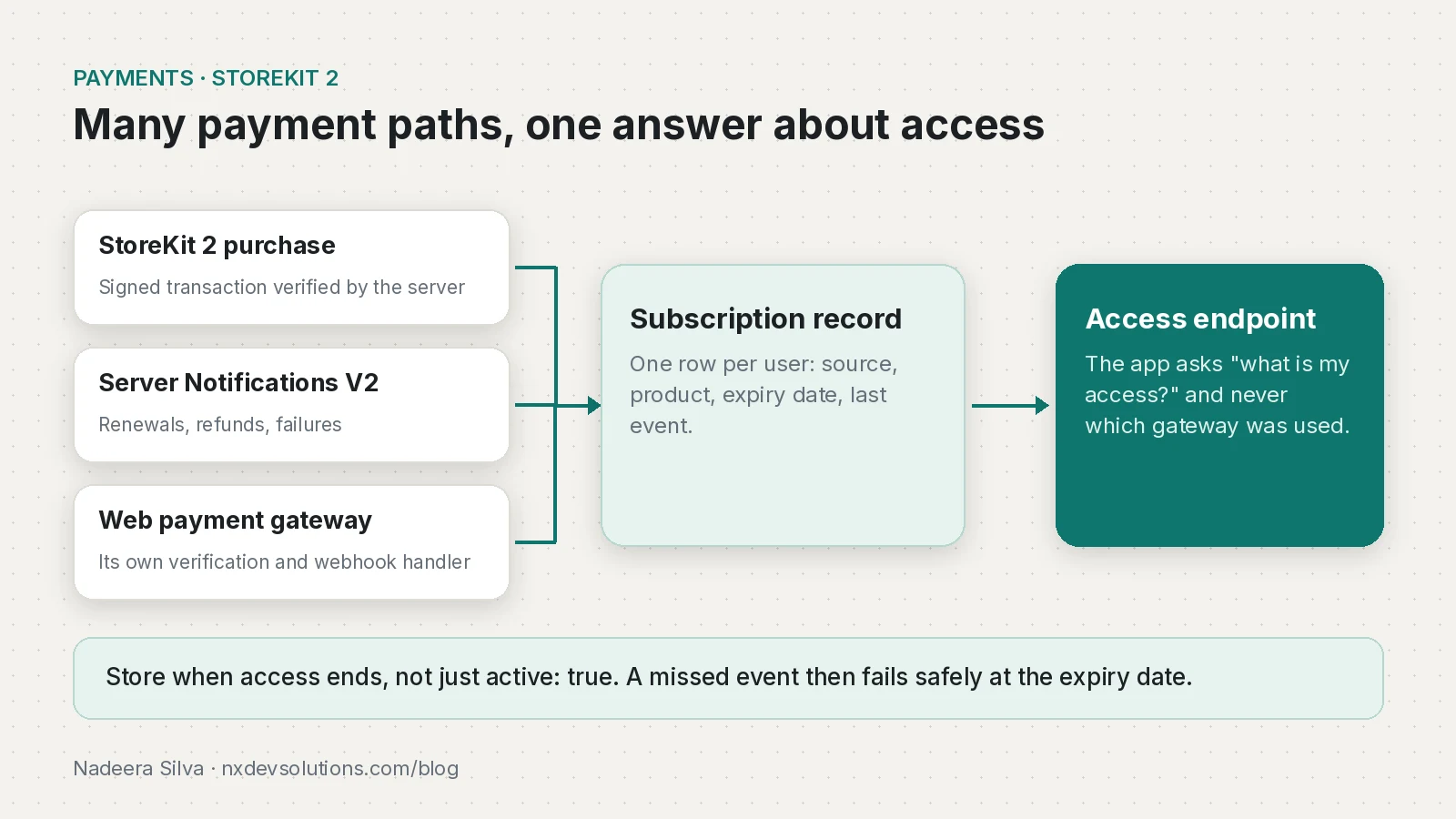
- Expiry dates over flags. Store when access ends, not just
active: true. Access becomes a date comparison, and a missed event fails safely at the expiry date.
StoreKit 2 restore purchases
Apple expects apps with restorable purchases to offer a restore option, and reviewers check. Real users need it too: a new phone shouldn't mean paying again.
- In StoreKit 2,
Transaction.currentEntitlements(iOS 15+) lists what the user owns right now, without prompting. AppStore.sync()forces a sync with the App Store and can show a sign-in prompt, so Apple says to call it only from an explicit user action, such as a Restore Purchases button.- The old
restoreCompletedTransactions()is deprecated as of iOS 18.
In Flutter, InAppPurchase.instance.restorePurchases() handles this. Restored purchases arrive on purchaseStream with status restored, and you send them to the server like new ones.
Combining several payment gateways
When a user can pay through StoreKit or a web gateway:
- Each gateway has its own verification and webhook handler.
- Every handler writes to the same subscription record with a
sourcefield. - The app asks one endpoint, "what is my access?", and never which gateway was used.
The same pattern works when one source is Google Play, which has its own Billing Library deadline on 1 November 2026.
Testing StoreKit subscriptions before release
Sandbox purchases work in builds run from Xcode and in TestFlight builds, with a Sandbox Apple Account. Sandbox subscriptions renew on an accelerated schedule, so you can watch renewals and expiry in minutes. Test at least:
- A fresh purchase on a clean install.
- Restore on a second device or after reinstalling.
- An expired subscription losing access.
- Auto-renew turned off: access continues until the end of the paid period.
- A refund: access ends when
REFUNDarrives. - The same notification delivered twice changing nothing.
The FilmyBox case study has more on the project.
Frequently asked questions
How do I set up App Store Server Notifications V2?
In App Store Connect, set production and sandbox URLs under App Store Server Notifications in App Information and choose Version 2. Then use Request a Test Notification to check delivery.
Which notification types matter for subscriptions?
SUBSCRIBED, DID_RENEW, DID_FAIL_TO_RENEW, GRACE_PERIOD_EXPIRED, DID_CHANGE_RENEWAL_STATUS, EXPIRED, REFUND and REVOKE cover most access changes.
How do I restore purchases with StoreKit 2?
Read Transaction.currentEntitlements for what the user owns. Call AppStore.sync() only from a Restore Purchases button. In Flutter, restorePurchases() covers this.
Can I still use verifyReceipt?
No for new work. Apple has deprecated app receipts and verifyReceipt. Verify signed transactions or use the App Store Server API.
Is there an App Store Server Library for PHP?
Apple publishes it for Swift, Java, Python and Node.js. On PHP you verify the signed payload and its certificate chain yourself.
Can I test subscriptions in TestFlight?
Yes. TestFlight builds use the sandbox with a Sandbox Apple Account, and sandbox subscriptions renew on an accelerated schedule.
Sources
- App Review Guidelines (3.1.1 In-App Purchase) (Apple)
- App Store Server Notifications (Apple)
- App Store Server API (Apple)
- App Store Receipts (deprecated) (Apple)
- AppStore.sync() (Apple)
- in_app_purchase_storekit changelog (pub.dev)
- notificationType (Apple)
- Request a Test Notification (Apple)
- Transaction.currentEntitlements (Apple)
- Testing In-App Purchases with sandbox (Apple)
- App Store Server Library for Node.js (GitHub)
Keep reading
- Flutter In-App Purchase Guide: StoreKit 2, Play Billing and RevenueCatA Flutter in-app purchase guide for 2026: a subscription example, server verification on Firebase, testing, cancelling, and when RevenueCat is the better call.
- Play Billing Library Deadline: Updating Flutter IAP AppsGoogle Play's extension for Billing Library 7 and target API 36 ends on 1 Nov 2026. Here's how to upgrade Flutter in_app_purchase and retest it.
- Taking Over an Existing Flutter App and PHP Backend: My PlaybookHow I take over a live Flutter app with a legacy PHP backend: a first-week checklist, reproducing bugs, PHP security fixes and a safe move to token auth.
Comments
Share a question or note about this article.
Loading comments…