· 10 min read · Nadeera Silva
App Store Server Notifications V2 in Node.js: Verify and Fix
Verify App Store Server Notifications V2 in Node.js with Apple's library, fix each VerificationStatus error, and recover missed notifications.

Your App Store Server Notifications V2 endpoint is live, but nothing reaches your database: either verifyAndDecodeNotification throws, or no request reaches your Node.js server. The usual causes are a wrong root certificate, a missing appAppleId, a sandbox notification at a production verifier, a missing URL, or a server that doesn't return 200. Here is how to verify the signedPayload and find which one you have.
Quick answer
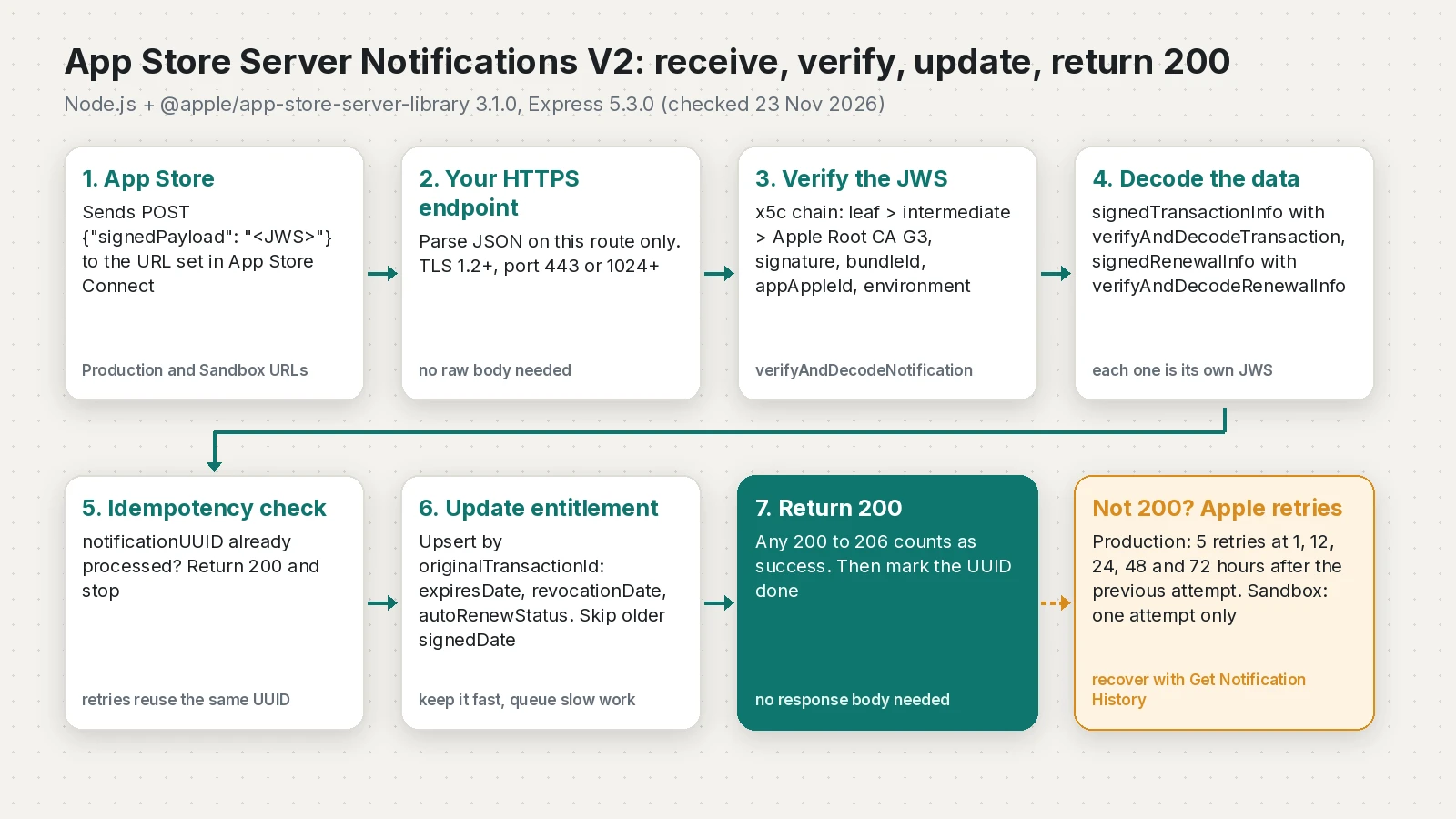
App Store Server Notifications V2 send a JSON body of {"signedPayload": "<JWS>"}. Verify it with Apple's SignedDataVerifier using Apple Root CA G3, your bundle ID, the right environment and, in production, your numeric app Apple ID, then return HTTP 200 fast. If nothing arrives, call Request a Test Notification and read the result with Get Test Notification Status; it tells you exactly why Apple's attempt failed.
What this means for your app or business
- Missed notifications mean wrong access. Paying users get locked out, or people who got a refund keep premium features.
- Apple retries, but not forever. In production a failed notification is retried five times over about a week, then only your developer can recover it from the history.
- Time and cost. In my estimate, half a day to a day for a tested endpoint on an existing backend, about an hour to fix a broken one.
- When to get help. If you can't say where renewals and refunds are recorded, have it checked before your next release.
What does an App Store Server Notifications V2 request look like?
Apple POSTs to the URL set under App Information > App Store Server Notifications in App Store Connect, with one field:
{ "signedPayload": "eyJhbGciOiJFUzI1NiIsIng1YyI6WyJNSUlF..." }The `signedPayload` is a JWS whose payload has notificationType, subtype, notificationUUID, signedDate and data. Inside data are two more JWS strings, signedTransactionInfo and signedRenewalInfo, plus bundleId, environment and appAppleId, which isn't present in the sandbox.
Why isn't jwt.decode enough?
jwt.decode() checks nothing, so anyone who finds your URL can POST a made-up SUBSCRIBED event. The JWS header carries an x5c array of three certificates. The library proves the leaf signed the JWS and the chain ends at the Apple root you loaded, checks Apple's certificate extension OIDs, validity dates and (with online checks on) OCSP revocation, then the bundle ID, app Apple ID and environment.
Why are my App Store Server Notifications V2 not working in Node?
Each failure throws a VerificationException whose status is a VerificationStatus. These are the 3.1.0 names, with causes from the source:
| Status or symptom | What causes it | Fix |
|---|---|---|
VERIFICATION_FAILURE | Chain doesn't lead to the roots you passed, a bad signature, alg: none, or a string that isn't a JWS | Load AppleRootCA-G3.cer as DER bytes; never edit the payload |
INVALID_CERTIFICATE | Unreadable or missing x5c, a certificate outside its validity dates, or no OCSP URL | Pass the raw signedPayload string untouched |
INVALID_CHAIN_LENGTH | x5c doesn't have 3 certificates | In 3.1.0 this surfaces as INVALID_CERTIFICATE (see below) |
INVALID_APP_IDENTIFIER | Wrong bundleId, or a wrong or missing appAppleId in a Production verifier | Use the numeric Apple ID from App Information |
INVALID_ENVIRONMENT | Production notification checked by a Sandbox verifier, or the reverse | Keep one verifier per environment |
RETRYABLE_VERIFICATION_FAILURE | The OCSP request to Apple failed or timed out | Return 5xx so Apple retries |
FAILURE | Payload fields have the wrong types, or OCSP returned a bad status | Log it and check the library version |
| No request at all | No URL for that environment, TLS below 1.2, port not 443 or 1024+, IP allow list without 17.0.0.0/8 | Run the test notification below |
In 3.1.0 an inner catch wraps INVALID_CHAIN_LENGTH into INVALID_CERTIFICATE, and the constructor throws appAppleId is required when the environment is Production if you leave it out. And if you set no Sandbox URL, Apple sends both environments to your Production URL, which is how sandbox events reach a production-only verifier.
How do I verify the signedPayload? (Node.js example)
Step 1: Install the library and download the root
npm install @apple/app-store-server-library@3.1.0 express
mkdir -p certs
curl -o certs/AppleRootCA-G3.cer https://www.apple.com/certificateauthority/AppleRootCA-G3.cer
It's DER, which SignedDataVerifier expects as a Buffer. Don't convert it to PEM.
Step 2: One verifier per environment
// src/verifiers.mjs
import { readFileSync } from "node:fs";
import { SignedDataVerifier, Environment } from "@apple/app-store-server-library";

export const loadRootCAs = (paths) => paths.map((p) => readFileSync(p));

export function createVerifiers({ rootCAs, bundleId, appAppleId, enableOnlineChecks = true }) {
  return {
    [Environment.PRODUCTION]: new SignedDataVerifier(
      rootCAs, enableOnlineChecks, Environment.PRODUCTION, bundleId, appAppleId),
    [Environment.SANDBOX]: new SignedDataVerifier(
      rootCAs, enableOnlineChecks, Environment.SANDBOX, bundleId),
  };
}

// Only picks a verifier; a forged payload still fails the chain
export function claimedEnvironment(signedPayload) {
  try {
    const body = JSON.parse(Buffer.from(signedPayload.split(".")[1], "base64url").toString("utf8"));
    const env = body.data?.environment ?? body.summary?.environment ?? body.appData?.environment;
    return env === Environment.SANDBOX ? Environment.SANDBOX : Environment.PRODUCTION;
  } catch {
    return Environment.PRODUCTION;
  }
}
Step 3: The Express route
// src/app.mjs
import express from "express";
import { VerificationException, VerificationStatus } from "@apple/app-store-server-library";
import { claimedEnvironment } from "./verifiers.mjs";

export function createApp({ verifiers, store, log = console }) {
  const app = express();
  app.post("/apple/notifications",
    express.json({ type: () => true, limit: "1mb" }), // JSON on this route only
    async (req, res) => {
      const signedPayload = req.body?.signedPayload;
      if (typeof signedPayload !== "string") return res.sendStatus(400);

      const verifier = verifiers[claimedEnvironment(signedPayload)];
      let n, tx, renewal;
      try {
        n = await verifier.verifyAndDecodeNotification(signedPayload);
        if (n.data?.signedTransactionInfo)
          tx = await verifier.verifyAndDecodeTransaction(n.data.signedTransactionInfo);
        if (n.data?.signedRenewalInfo)
          renewal = await verifier.verifyAndDecodeRenewalInfo(n.data.signedRenewalInfo);
      } catch (e) {
        if (!(e instanceof VerificationException)) throw e;
        log.warn("ASN v2 rejected:", VerificationStatus[e.status], e.cause?.message ?? "");
        const retryable = e.status === VerificationStatus.RETRYABLE_VERIFICATION_FAILURE;
        return res.sendStatus(retryable ? 503 : 400);
      }

      if (await store.isProcessed(n.notificationUUID)) return res.sendStatus(200);
      try {
        if (n.notificationType !== "TEST" && tx) {
          await store.applyEntitlement({ // upsert by originalTransactionId
            originalTransactionId: tx.originalTransactionId,
            productId: tx.productId,
            expiresAt: tx.expiresDate ?? null,
            graceUntil: renewal?.gracePeriodExpiresDate ?? null,
            revoked: Boolean(tx.revocationDate),
            signedDate: n.signedDate, // skip if older than the stored row
          });
        }
        await store.markProcessed(n.notificationUUID);
      } catch (e) {
        log.error("ASN v2 processing failed", n.notificationUUID, e);
        return res.sendStatus(500); // Apple will retry
      }
      return res.sendStatus(200);
    });
  return app;
}
Why it's written this way:
- No raw body needed. Unlike Stripe, the signature is inside the JWS, so parsed JSON is fine. What breaks it is a global
express.raw()orexpress.text()that runs first. - Idempotency. Apple says to use `notificationUUID` to ignore duplicates. Give it a unique index, and upsert entitlements by
originalTransactionIdso a second run is harmless. - Respond fast. Apple's
TIMED_OUTresult says to check "that your server isn't processing messages in line". Queue emails and analytics. - Status codes. Apple treats 200 to 206 as success and retries on 40x or 50x, so a config mistake answered with 400 recovers through retries after your fix.
Which notification types should a subscription app handle?
notificationType | Common subtype | What I do |
|---|---|---|
SUBSCRIBED | INITIAL_BUY, RESUBSCRIBE | Grant access, store expiresDate |
DID_RENEW | none, BILLING_RECOVERY | Extend access |
DID_FAIL_TO_RENEW | GRACE_PERIOD or none | Keep access through grace only |
GRACE_PERIOD_EXPIRED | none | End access |
DID_CHANGE_RENEWAL_STATUS | AUTO_RENEW_DISABLED, AUTO_RENEW_ENABLED | Record it; access runs to expiry |
EXPIRED | VOLUNTARY, BILLING_RETRY, PRICE_INCREASE, PRODUCT_NOT_FOR_SALE | End access |
REFUND, REVOKE | none | End access now |
REFUND_REVERSED | none | Restore access |
TEST | none | Return 200 only |
Apple's notificationType list also has ONE_TIME_CHARGE for one-time purchases and newer types such as UNCLAIM_SEATS that the 3.1.0 enum lacks. The library validates them as plain strings, so they still decode; log anything you don't handle.
How do I test it and find missed notifications?
With an In-App Purchase key (Users and Access > Integrations > In-App Purchase), this script calls Request a Test Notification (POST /inApps/v1/notifications/test), then Get Test Notification Status, then Get Notification History for failures:
// scripts/test-notification.mjs  (APPLE_ENV=Sandbox or Production)
import { readFileSync } from "node:fs";
import { AppStoreServerAPIClient, Environment, APIException } from "@apple/app-store-server-library";

const env = process.env.APPLE_ENV === "Production" ? Environment.PRODUCTION : Environment.SANDBOX;
const client = new AppStoreServerAPIClient(
  readFileSync(process.env.APPLE_IAP_KEY_PATH, "utf8"),
  process.env.APPLE_KEY_ID, process.env.APPLE_ISSUER_ID, process.env.APPLE_BUNDLE_ID, env);

try {
  const { testNotificationToken } = await client.requestTestNotification();
  await new Promise((r) => setTimeout(r, 10_000));
  const status = await client.getTestNotificationStatus(testNotificationToken);
  console.log(status.sendAttempts?.map((a) => a.sendAttemptResult));

  const history = await client.getNotificationHistory(null, {
    startDate: Date.now() - 7 * 24 * 3600 * 1000, endDate: Date.now(), onlyFailures: true });
  for (const item of history.notificationHistory ?? [])
    console.log(item.sendAttempts?.at(-1)?.sendAttemptResult);
} catch (e) {
  if (e instanceof APIException) console.error(e.httpStatusCode, e.apiError, e.errorMessage);
  else throw e;
}
The sandbox API sends the test to your Sandbox URL, the production API to your Production URL, and a 404 means Apple has no URL for that environment. sendAttemptResult names the cause, such as TLS_ISSUE, TIMED_OUT, NO_RESPONSE, CIRCULAR_REDIRECT or UNSUCCESSFUL_HTTP_RESPONSE_CODE. History covers 180 days in production and 30 in sandbox, 20 records per page (follow paginationToken while hasMore). Replay each history signedPayload through your handler; the UUID check makes it safe.
How do I verify the fix?
I tested this code with Node's test runner and a self-signed three-certificate chain carrying Apple's extension OIDs. With 3.1.0, every status in the table above came out as described, the real Apple Root CA G3 rejected my chain with VERIFICATION_FAILURE (what a forged webhook gets), a retried UUID was processed once, and an older EXPIRED event didn't overwrite a newer renewal.
With a real app, run the test script per environment, look for SUCCESS, then check that a sandbox purchase creates a row.
How do I prevent it from breaking again?
- Commit
AppleRootCA-G3.cerand load it as DER bytes. - Build both verifiers at startup, with
appAppleIdon Production. - Set Production and Sandbox URLs in App Store Connect, both Version 2.
- Keep
enableOnlineCheckson and return 5xx onRETRYABLE_VERIFICATION_FAILURE. - Log
VerificationStatus[e.status], not just "invalid". - Unique index on
notificationUUID; upsert byoriginalTransactionId. - Run the test notification after each deploy.
- Query history with
onlyFailures: truedaily.
Summary
| Question | Answer |
|---|---|
| Library | @apple/app-store-server-library 3.1.0 |
| Root certificate | Apple Root CA G3, DER |
| Production needs | Numeric appAppleId |
| Duplicates | Ignore repeated notificationUUID |
| Success codes | 200 to 206 |
| Retries | Production only: 1, 12, 24, 48, 72 hours |
| Missed events | Get Notification History |
Frequently asked questions
Why are my App Store Server Notifications V2 not working in Node?
Either verification fails or Apple never reaches your server. Log the VerificationStatus name from the exception, and if no request arrives, call Request a Test Notification and read the sendAttemptResult from Get Test Notification Status.
Is there an App Store Server Notifications V2 example for Node.js?
Yes. Apple's @apple/app-store-server-library for Node.js includes SignedDataVerifier, and its verifyAndDecodeNotification method verifies and decodes the signedPayload. Create one verifier per environment with Apple Root CA G3 and your bundle ID, and add your numeric app Apple ID for production.
Can I just decode the signedPayload with jwt.decode?
No. Decoding does not check the signature, so anyone could post a fake purchase event to your endpoint. You need to verify the x5c certificate chain against Apple's root certificate and then check the signature, bundle ID and environment.
What does INVALID_APP_IDENTIFIER mean in the App Store Server Library?
The notification's bundle ID or app Apple ID does not match your verifier. It also appears when a sandbox notification reaches a Production verifier, because sandbox payloads have no app Apple ID.
How often does Apple retry App Store Server Notifications V2?
In production Apple retries five times, at 1, 12, 24, 48 and 72 hours after the previous attempt, when your server doesn't return a success code. In the sandbox it sends each notification only once.
How do I get notifications my server missed?
Call the Get Notification History endpoint of the App Store Server API, optionally with onlyFailures set to true. It covers the past 180 days in production and 30 days in the sandbox.
How do I handle duplicate App Store notifications?
Store each notificationUUID and ignore any notification whose UUID you have already processed. Apple documents this field as the way to identify duplicate notifications.
Which root certificate do I need for App Store Server Notifications?
Download Apple Root CA G3 from the Apple PKI page and pass it to SignedDataVerifier as DER bytes. Apple's library README says to load the certificates from the Apple Root Certificates section of that page.
Sources
- App Store Server Library for Node.js (README and source, v3.1.0) (Apple on GitHub, 2026-05-06)
- @apple/app-store-server-library on npm (npm, 2026-05-06)
- Responding to App Store Server Notifications (Apple Developer)
- Enabling App Store Server Notifications (Apple Developer)
- Enter server URLs for App Store Server Notifications (App Store Connect Help)
- signedPayload (Apple Developer)
- responseBodyV2DecodedPayload (Apple Developer)
- data (App Store Server Notifications) (Apple Developer)
- notificationType (Apple Developer)
- notificationUUID (Apple Developer)
- Request a Test Notification (Apple Developer)
- Get Test Notification Status (Apple Developer)
- Get Notification History (Apple Developer)
- sendAttemptResult (Apple Developer)
- Apple PKI (Apple Root CA - G3) (Apple)
Keep reading
- StoreKit 2 Subscriptions in Flutter: Restore Purchases and Server NotificationsStoreKit 2 subscriptions in a Flutter app: server verification, App Store Server Notifications V2, restore purchases and one access record across gateways.
- Google Play Real Time Developer Notifications for FlutterSet up Google Play real time developer notifications with Pub/Sub, pass the Play Console test, and handle them in a tested Node.js endpoint.
- RevenueCat Offerings Empty in Flutter: Fix Error 23Why RevenueCat offerings come back empty or current is null in Flutter, what error 23 means, and how to find and fix the store setup behind it.
Comments
Share a question or note about this article.
Loading comments…