· 14 min read · Nadeera Silva
Google Play Real Time Developer Notifications for Flutter
Set up Google Play real time developer notifications with Pub/Sub, pass the Play Console test, and handle them in a tested Node.js endpoint.
Google Play real time developer notifications (RTDN) are how your server finds out that a subscription renewed, went on hold, was canceled or was refunded, without waiting for the user to open your Flutter app. If they are missing or quietly broken, your backend keeps stale access data. In this guide I set up the Pub/Sub topic and push subscription, give Google Play permission to publish, use the Play Console test message, and build a tested Node.js handler that verifies the request, decodes the message and asks the Google Play Developer API for the real state.
Quick answer
Create a Pub/Sub topic in your Google Cloud project, grant google-play-developer-notifications@system.gserviceaccount.com the Pub/Sub Publisher role on it, add an authenticated push subscription to your HTTPS endpoint, then paste the full topic name (projects/{project_id}/topics/{topic}) into Play Console under Monetize, Monetization setup and press Send Test Message. Your endpoint should verify the Pub/Sub OIDC token, base64-decode message.data, call purchases.subscriptionsv2.get with the purchase token, update your database and return a 2xx status quickly.
What this means for your app or business
- Money leaks in both directions. Without RTDN, a user who is refunded or charges back can keep paid features. A user whose payment recovers from account hold may stay locked out and leave a bad review.
- Fix time is short. The Google Cloud and Play Console setup is about an hour. A handler with verification, tests and database updates is, in my estimate, one to two days of developer work.
- When to hire help. If you sell Android subscriptions and nothing on your server receives Play notifications, or the Play Console test message fails, get it fixed before your next promotion or price change.
How do real time developer notifications work on Google Play?
Google Play publishes a small message to a Cloud Pub/Sub topic you own whenever a purchase changes state. Pub/Sub pushes it as an HTTPS POST to your URL, or your server pulls it. Google suggests push if you are unsure.
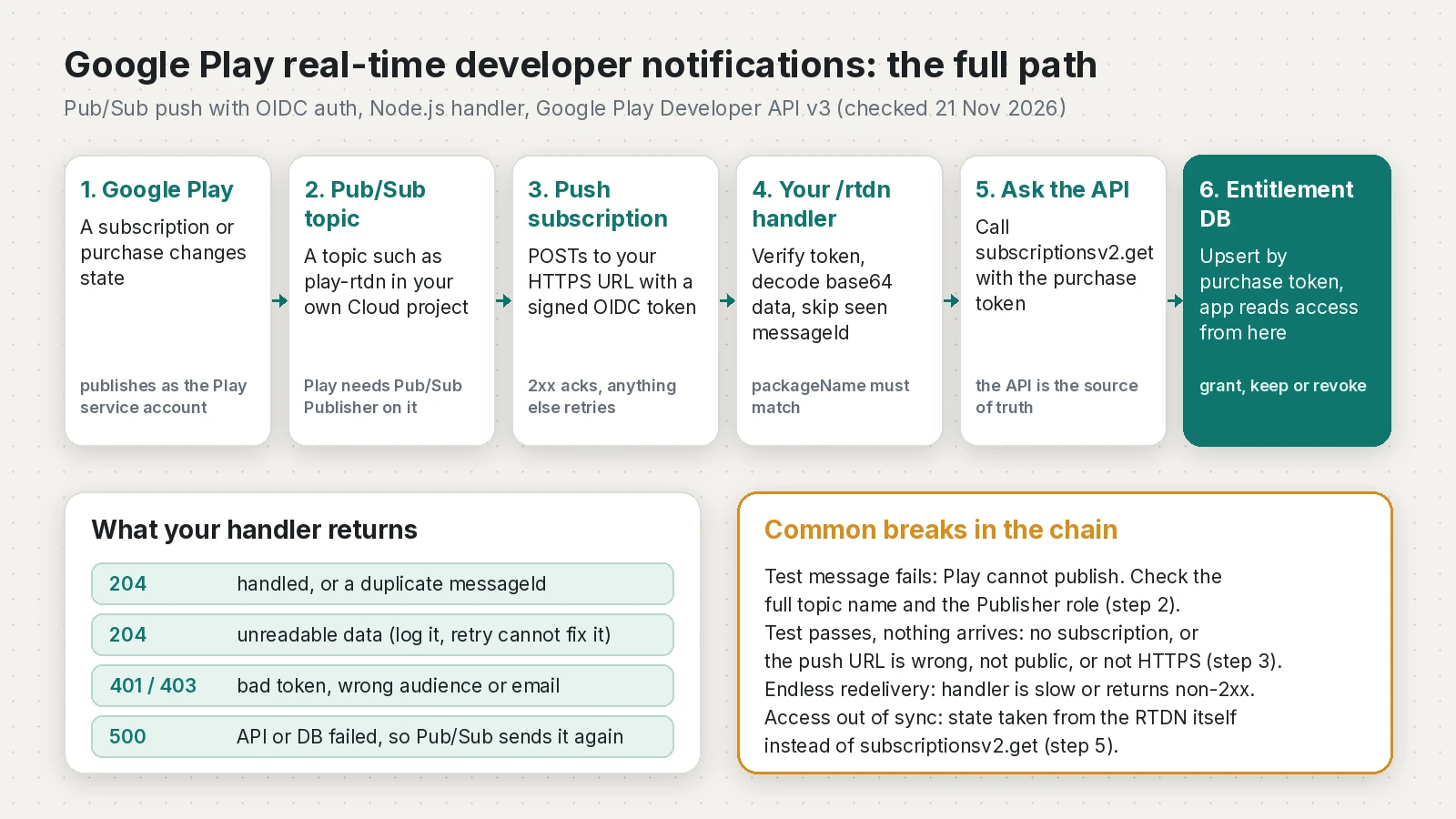
Each push body wraps one base64-encoded data field. Decoded, it is a DeveloperNotification with version, packageName, eventTimeMillis and exactly one of subscriptionNotification, oneTimeProductNotification, voidedPurchaseNotification, pendingRefundReviewNotification or testNotification.
How do I set up the Pub/Sub topic, permissions and subscription?
Replace the project ID and URL. I syntax-checked these with Google Cloud CLI 594.0.0 on 21 November 2026; all arguments parsed, but I did not run them against a real project.
PROJECT_ID=my-play-project
TOPIC=play-rtdn
PUSH_URL=https://api.example.com/rtdn
PROJECT_NUMBER=$(gcloud projects describe "$PROJECT_ID" --format='value(projectNumber)')

# 1. Pub/Sub API and the topic
gcloud services enable pubsub.googleapis.com --project="$PROJECT_ID"
gcloud pubsub topics create "$TOPIC" --project="$PROJECT_ID"

# 2. Let Google Play publish to it
gcloud pubsub topics add-iam-policy-binding "$TOPIC" --project="$PROJECT_ID" \
  --member="serviceAccount:google-play-developer-notifications@system.gserviceaccount.com" \
  --role="roles/pubsub.publisher"

# 3. A service account that signs the push OIDC token
gcloud iam service-accounts create rtdn-push --project="$PROJECT_ID"
gcloud projects add-iam-policy-binding "$PROJECT_ID" \
  --member="serviceAccount:service-${PROJECT_NUMBER}@gcp-sa-pubsub.iam.gserviceaccount.com" \
  --role="roles/iam.serviceAccountTokenCreator"

# 4. Authenticated push subscription to your backend
gcloud pubsub subscriptions create play-rtdn-push --project="$PROJECT_ID" \
  --topic="$TOPIC" \
  --push-endpoint="$PUSH_URL" \
  --push-auth-service-account="rtdn-push@${PROJECT_ID}.iam.gserviceaccount.com" \
  --ack-deadline=30 \
  --min-retry-delay=10s --max-retry-delay=600s

# 5. Optional pull subscription to see raw messages while debugging
gcloud pubsub subscriptions create play-rtdn-debug --project="$PROJECT_ID" --topic="$TOPIC"
gcloud pubsub subscriptions pull play-rtdn-debug --project="$PROJECT_ID" --auto-ack --limit=5
Then in Play Console, open your app, go to Monetize > Monetization setup, turn on Enable real-time notifications, enter projects/my-play-project/topics/play-rtdn and click Send Test Message. Choose whether you also want one-time product events, and save.
A few points that are easy to miss:
- RTDN is configured per app. Each app can use its own Cloud project for the topic, as the getting ready guide explains.
- The server that calls the API needs its own service account, invited in Play Console Users and permissions with View financial data, orders, and cancellation survey responses and Manage orders and subscriptions, according to the Play Developer API setup guide.
- When
--push-auth-token-audienceis not set, the gcloud reference says the token audience is the push endpoint URL. Your handler must check the same value.
Why does the Play Console test message fail?
| Symptom | Likely cause | Fix |
|---|---|---|
| Test publish shows an error | Topic name not in projects/{id}/topics/{name} form, or a typo | Copy the full name from Cloud Console |
| Test publish shows an error | Play service account lacks Pub/Sub Publisher on the topic | Run the add-iam-policy-binding command above |
| Cannot add the Play service account | Domain restricted sharing policy | Add an exception for the Play account |
| Test succeeds, endpoint gets nothing | No subscription on that topic | gcloud pubsub topics list-subscriptions play-rtdn |
| Push requests fail or 403 | URL not public HTTPS with a valid certificate, or a firewall | Use a public HTTPS endpoint |
| Handler returns 401 on every message | Audience or email check does not match the subscription | Compare with gcloud pubsub subscriptions describe |
| Same message arrives again and again | Handler is slow or returns non-2xx | Return 204 within the ack deadline |
| Subscription create fails with permission denied | You lack iam.serviceAccounts.actAs on the push service account | Grant yourself Service Account User on it |
A topic in the wrong project usually happens when the Firebase, Play Developer API and RTDN projects differ. Google allows that, but the project ID in the topic name and the Publisher grant must both match the project where the topic lives.
On response codes, Pub/Sub acknowledges on 102, 200, 201, 202 or 204. Anything else, or no answer before the deadline (10 seconds by default, per the subscription properties page), means the message comes back.
What does each notificationType mean and what should my server do?
Numbers and names come from the RTDN reference on 21 November 2026; the last column is my summary. In every case, first call subscriptionsv2.get and store the result.
| Number | Name | What to do |
|---|---|---|
| 1 | SUBSCRIPTION_RECOVERED | Restore access (back from account hold or pause) |
| 2 | SUBSCRIPTION_RENEWED | Extend access to the new expiry time |
| 3 | SUBSCRIPTION_CANCELED | Keep access until expiry, stop treating it as renewing |
| 4 | SUBSCRIPTION_PURCHASED | Link to the user, grant access, make sure it is acknowledged |
| 5 | SUBSCRIPTION_ON_HOLD | Remove access, ask the user to fix payment |
| 6 | SUBSCRIPTION_IN_GRACE_PERIOD | Keep access, show a payment reminder |
| 7 | SUBSCRIPTION_RESTARTED | Mark as renewing again |
| 8 | SUBSCRIPTION_PRICE_CHANGE_CONFIRMED | Deprecated, refresh state only |
| 9 | SUBSCRIPTION_DEFERRED | Move expiry to the new date |
| 10 | SUBSCRIPTION_PAUSED | Remove access until it resumes |
| 11 | SUBSCRIPTION_PAUSE_SCHEDULE_CHANGED | Refresh state |
| 12 | SUBSCRIPTION_REVOKED | Remove access now |
| 13 | SUBSCRIPTION_EXPIRED | Remove access |
| 17 | SUBSCRIPTION_ITEMS_CHANGED | Refresh which items the user has |
| 18 | SUBSCRIPTION_CANCELLATION_SCHEDULED | Installment plan ends after commitment, refresh state |
| 19 | SUBSCRIPTION_PRICE_CHANGE_UPDATED | Refresh price change details |
| 20 | SUBSCRIPTION_PENDING_PURCHASE_CANCELED | Drop the pending purchase, check linkedPurchaseToken |
| 21 | SUBSCRIPTION_PLAN_TRANSITION_UPDATED | Refresh the scheduled plan change |
| 22 | SUBSCRIPTION_PRICE_STEP_UP_CONSENT_UPDATED | Refresh consent state |
For one-time products, type 1 is ONE_TIME_PRODUCT_PURCHASED and type 2 is ONE_TIME_PRODUCT_CANCELED. A voidedPurchaseNotification carries productType (1 subscription, 2 one-time) and refundType (1 full, 2 quantity-based partial). A pendingRefundReviewNotification asks you to respond to a chargeback through the ReviewRefund API within 24 hours.
How do I write the Node.js RTDN handler?
It needs Node.js 22 or newer (required by googleapis 190.0.0 and google-auth-library 11.3.4) and follows Google's push authentication guide: verify the token signature and audience, then check email and email_verified yourself, because the library does not.
// rtdn.mjs: Google Play RTDN push handler (Node.js 22+, Express 5)
import express from 'express';
import { OAuth2Client } from 'google-auth-library';
import { google } from 'googleapis';

const ENTITLED = new Set([
  'SUBSCRIPTION_STATE_ACTIVE',
  'SUBSCRIPTION_STATE_IN_GRACE_PERIOD',
  'SUBSCRIPTION_STATE_CANCELED', // canceled but paid until expiryTime
]);

export function createRtdnApp({
  packageName,      // e.g. 'com.example.app'
  audience,         // the push endpoint URL, or your --push-auth-token-audience
  pushSaEmail,      // service account set on the push subscription
  publisher = google.androidpublisher({
    version: 'v3',
    auth: new google.auth.GoogleAuth({
      scopes: ['https://www.googleapis.com/auth/androidpublisher'],
    }),
  }),
  authClient = new OAuth2Client(),
  store,            // your DB layer, see the in-memory version in the test
  log = console,
}) {
  const app = express();

  app.post('/rtdn', express.json({ limit: '64kb' }), async (req, res) => {
    // 1. Is this really Pub/Sub? Check the OIDC token signature, audience and email.
    try {
      const token = (req.get('authorization') ?? '').replace(/^Bearer /, '');
      const ticket = await authClient.verifyIdToken({ idToken: token, audience });
      const claims = ticket.getPayload();
      if (claims.email !== pushSaEmail || claims.email_verified !== true) {
        return res.status(403).end();
      }
    } catch {
      return res.status(401).end();
    }

    // 2. Decode message.data (base64 JSON DeveloperNotification).
    const msg = req.body?.message;
    let n;
    try {
      n = JSON.parse(Buffer.from(msg.data, 'base64').toString('utf8'));
    } catch {
      log.error('rtdn: unreadable message', msg?.messageId);
      return res.status(204).end(); // ack it: retrying will never fix bad data
    }
    if (n.packageName !== packageName) {
      log.warn('rtdn: other package', n.packageName);
      return res.status(204).end();
    }

    // 3. Skip messages we already handled (Pub/Sub delivers at least once).
    if (await store.seen(msg.messageId)) return res.status(204).end();

    try {
      if (n.testNotification) {
        log.info('rtdn: test notification OK');
      } else if (n.subscriptionNotification) {
        await syncSubscription(n.subscriptionNotification.purchaseToken);
      } else if (n.voidedPurchaseNotification) {
        const v = n.voidedPurchaseNotification;
        await store.revoke(v.purchaseToken, { orderId: v.orderId, refundType: v.refundType });
        if (v.productType === 1) await syncSubscription(v.purchaseToken);
      } else if (n.oneTimeProductNotification) {
        const { purchaseToken } = n.oneTimeProductNotification;
        const { data } = await publisher.purchases.productsv2.getproductpurchasev2({
          packageName, token: purchaseToken,
        });
        await store.saveOneTime(purchaseToken, data);
      } else {
        log.info('rtdn: unhandled type', Object.keys(n));
      }
      await store.markSeen(msg.messageId);
      return res.status(204).end(); // 2xx = ack
    } catch (err) {
      log.error('rtdn: processing failed, Pub/Sub will retry', err.message);
      return res.status(500).end(); // non-2xx = nack, redelivered later
    }
  });

  // RTDN only says "something changed". The API response is the truth.
  async function syncSubscription(purchaseToken) {
    const { data: sub } = await publisher.purchases.subscriptionsv2.get({
      packageName, token: purchaseToken,
    });
    const expiry = Math.max(0, ...(sub.lineItems ?? []).map((li) => Date.parse(li.expiryTime) || 0));
    await store.upsertSubscription(purchaseToken, {
      state: sub.subscriptionState,
      entitled: ENTITLED.has(sub.subscriptionState) && expiry > Date.now(),
      expiryTime: expiry ? new Date(expiry).toISOString() : null,
      userId: sub.externalAccountIdentifiers?.obfuscatedExternalAccountId ?? null,
      linkedPurchaseToken: sub.linkedPurchaseToken ?? null,
    });
    if (sub.linkedPurchaseToken) await store.supersede(sub.linkedPurchaseToken);
    // Backstop: acknowledge if the app never did (only when we know the user).
    if (sub.acknowledgementState === 'ACKNOWLEDGEMENT_STATE_PENDING' &&
        sub.subscriptionState === 'SUBSCRIPTION_STATE_ACTIVE' &&
        sub.externalAccountIdentifiers?.obfuscatedExternalAccountId) {
      await publisher.purchases.subscriptions.acknowledge({
        packageName, token: purchaseToken, requestBody: {},
        subscriptionId: sub.lineItems[0].productId, // the Node client still requires it
      });
    }
  }

  return app;
}
Start it with your own database layer:
// server.mjs
import { createRtdnApp } from './rtdn.mjs';
import { store } from './store.mjs'; // your DB code: seen, markSeen, upsertSubscription, revoke, supersede, saveOneTime

createRtdnApp({
  packageName: 'com.example.app',
  audience: 'https://api.example.com/rtdn',
  pushSaEmail: 'rtdn-push@my-play-project.iam.gserviceaccount.com',
  store,
}).listen(process.env.PORT ?? 8080);
Why it is built this way:
- Idempotent. The write is "store whatever the API says", so a message processed twice gives the same result. The
messageIdcheck, which Google's backend guide recommends, saves API quota. - Seen only after success. A failed API call returns 500, and the retry is not skipped as a duplicate.
- Upgrades. A
linkedPurchaseTokenmeans the old token is replaced, per the subscription lifecycle guide. - Acknowledgement backstop. One thing I found while testing: the Node client still requires
subscriptionIdforpurchases.subscriptions.acknowledge, even though the REST docs say it is optional since May 2025. If you have had refunds from missed acknowledgements, read how to stop 3-day refunds. - Fast. One API call and one upsert before responding. Put emails or analytics on a queue.
How do I link a notification to the right user from Flutter?
RTDN contains a purchase token, not your user ID, so pass an opaque user ID when buying. In in_app_purchase 3.3.1, applicationUserName maps to the obfuscated account ID on Android, and subscriptionsv2.get returns it as externalAccountIdentifiers.obfuscatedExternalAccountId. Also send the token to your server straight after purchase, so you do not depend on the notification alone. This file passed flutter analyze with Flutter 3.47.7.
// lib/purchases/subscribe.dart
import 'dart:convert';
import 'package:http/http.dart' as http;
import 'package:in_app_purchase/in_app_purchase.dart';

/// Start the purchase with an opaque user id so RTDN can be matched to the user.
/// On Android, applicationUserName becomes obfuscatedExternalAccountId in subscriptionsv2.
Future<void> buySubscription(ProductDetails product, String hashedUserId) {
  final param = PurchaseParam(
    productDetails: product,
    applicationUserName: hashedUserId, // a one-way hash, never an email
  );
  return InAppPurchase.instance.buyNonConsumable(purchaseParam: param);
}

/// Call this from your purchaseStream listener for purchased or restored items.
Future<bool> sendToBackend(PurchaseDetails p, String idToken) async {
  final res = await http.post(
    Uri.parse('https://api.example.com/play/purchases'),
    headers: {
      'Authorization': 'Bearer $idToken',
      'Content-Type': 'application/json',
    },
    body: jsonEncode({
      'productId': p.productID,
      // On Android this is the Play purchase token, the same value RTDN sends.
      'purchaseToken': p.verificationData.serverVerificationData,
      'source': p.verificationData.source,
    }),
  );
  return res.statusCode == 200;
}
If you handle iOS too, the App Store side works the same way with App Store Server Notifications, which I covered in the StoreKit subscriptions and webhooks guide.
How do I verify RTDN is working?
- Press Send Test Message in Play Console. Your logs should show
rtdn: test notification OK. - Buy a test subscription with a license tester. Expect a
SUBSCRIPTION_PURCHASED(4) message and a new row for that purchase token. - Cancel it from the Play Store subscriptions screen. Expect
SUBSCRIPTION_CANCELED(3) andSUBSCRIPTION_STATE_CANCELEDfrom the API, with access still active until expiry. - When an order is refunded or charged back, expect a
voidedPurchaseNotificationand access removed for that purchase token.
I tested the handler with simulated push bodies and a locally signed RS256 token: test notification, renewal, duplicate messageId, voided purchase, upgrade, one-time product, malformed data, wrong package, an API failure then retry, and six bad-token cases. All 15 passed, and a second test confirmed the googleapis client calls the documented subscriptionsv2/tokens/{token} path.
How do I keep RTDN from breaking again?
- Topic name in Play Console is the full
projects/{id}/topics/{name}form google-play-developer-notifications@system.gserviceaccount.comhas Pub/Sub Publisher on that topic- Push subscription uses authentication with your own service account
- Handler checks signature, audience,
emailandemail_verified - Handler compares
packageNamewith your app - 2xx for handled, duplicate and unreadable messages; 500 only for retryable failures
messageIdstored after successful processing- State comes from
purchases.subscriptionsv2.get, not from the notification - Server service account invited in Play Console with financial and order permissions
- Alert when the subscription's oldest unacked message age keeps growing
- Run Send Test Message after any change to the project, topic or endpoint
If you would rather not run this server at all, RevenueCat can connect to Google's notifications through its dashboard and track the state for you. My Flutter IAP guide comparing Firebase and RevenueCat covers that choice.
Frequently asked questions
What are Google Play real time developer notifications?
They are messages Google Play publishes to a Cloud Pub/Sub topic you own whenever a subscription or purchase changes state, such as a renewal, cancellation, account hold or refund. Your backend receives them by push or pull and then updates its own records.
Which service account needs access to the Pub/Sub topic?
Grant google-play-developer-notifications@system.gserviceaccount.com the Pub/Sub Publisher role on the topic. Without it, the Send Test Message button in Play Console shows an error.
Why does the Play Console test notification fail?
Usually the topic name is not the full projects/PROJECT_ID/topics/TOPIC form, or the Google Play service account does not have Pub/Sub Publisher on that topic. An organization policy that restricts sharing to your domain can also block the grant until you add an exception.
The test message succeeds but my server receives nothing. Why?
Play only publishes to the topic. You also need a subscription on that topic, and for push it must point to a public HTTPS URL with a valid certificate that returns a 2xx status.
Do RTDN messages contain the full subscription status?
No. Google says they only tell you the purchase state changed. Call purchases.subscriptionsv2.get with the purchase token to get the current state and store that.
How do I verify that a push request really came from Pub/Sub?
Turn on authentication for the push subscription, then verify the Bearer token signature and audience with google-auth-library and check that the email claim matches your push service account and email_verified is true.
What status code should my RTDN endpoint return?
Return 102, 200, 201, 202 or 204 to acknowledge. Any other code, or no response before the acknowledgement deadline, makes Pub/Sub deliver the message again.
How do I stop duplicate RTDN messages from being processed twice?
Store each messageId after it is processed successfully and skip IDs you have seen. Also make the database update idempotent by always writing the state returned by the API.
Sources
- Real-time developer notifications reference guide (Android Developers, 2026-11-20)
- Getting ready (Configure Real-time developer notifications) (Android Developers, 2026-11-13)
- Backend integration with Google Play's billing system (Android Developers, 2026-10-20)
- About the subscription lifecycle (Android Developers, 2026-11-20)
- Method: purchases.subscriptionsv2.get (Google for Developers, 2025-06-02)
- REST Resource: purchases.subscriptionsv2 (Google for Developers, 2026-11-18)
- Method: purchases.subscriptions.acknowledge (Google for Developers, 2025-11-19)
- Getting started with the Google Play Developer API (Google for Developers, 2025-12-18)
- Authenticate push subscriptions (Google Cloud, 2026-11-10)
- Push subscriptions (Google Cloud, 2026-11-10)
- Create push subscriptions (Google Cloud, 2026-11-12)
- Subscription properties (Google Cloud, 2026-11-10)
- gcloud pubsub subscriptions create (Google Cloud, 2026-05-27)
- googleapis on npm (npm)
- google-auth-library on npm (npm)
- PurchaseParam.applicationUserName (in_app_purchase) (pub.dev (flutter.dev))
- Google Real-Time Developer Notifications (RevenueCat)
Keep reading
- Google Play Purchase Not Acknowledged: Stop 3-Day RefundsGoogle Play refunds purchases that are not acknowledged within 3 days. Fix completePurchase() in Flutter and add a server backstop that acknowledges.
- Google Play ITEM_ALREADY_OWNED in Flutter: fix consumablesGoogle Play says "You already own this item" when a Flutter consumable was never consumed. Here is why it happens and a tested fix that clears it.
- Flutter In-App Purchase Guide: StoreKit 2, Play Billing and RevenueCatA Flutter in-app purchase guide for 2026: a subscription example, server verification on Firebase, testing, cancelling, and when RevenueCat is the better call.
Comments
Share a question or note about this article.
Loading comments…