· 9 min read · Nadeera Silva
Google Play ITEM_ALREADY_OWNED in Flutter: fix consumables
Google Play says "You already own this item" when a Flutter consumable was never consumed. Here is why it happens and a tested fix that clears it.

Your Flutter app sells coins, credits or another consumable, the first purchase works, and the second tap on the same product shows Google Play's "You already own this item" sheet. In code you get ITEM_ALREADY_OWNED (response code 7), which the in_app_purchase plugin reports as BillingResponse.itemAlreadyOwned. This post explains why a consumable gets stuck as "owned" and gives you a tested Dart fix that clears it on the next launch.
Quick answer
Google Play returns ITEM_ALREADY_OWNED for a consumable when the previous purchase of that product was never consumed. Fix it by querying past purchases on every app launch, delivering each unconsumed consumable once (keyed by purchase token on your server), and then consuming it with consumePurchase() or the Play Developer API purchases.products.consume endpoint. For subscriptions and non-consumables the error is correct: hide the buy button for items the user already has.
What this means for your app or business
This bug blocks your best customers: the people who already paid once and want to pay again. Every stuck user is a lost repeat sale, and many of them will leave a one-star review saying "I can't buy coins". In the worst case the user was charged, never got the coins, and now can't buy more, so you also get refund requests.
The good news is that it's usually a half-day fix in the app plus a small server change, and it doesn't need a new Play Console setup. If your app sells consumables and you have reports like this, or you don't have a server that records purchase tokens, it's worth getting a developer to review the whole purchase flow, not just this error.
Why does Google Play say "You already own this item"?
Google Play treats a one-time product as owned until your app consumes it. Google's integration guide says consuming "enable[s] your app to make the one-time product corresponding to the input purchase token available for repurchase", and that consuming also counts as the acknowledgement that stops the 3-day automatic refund.
So the error is Play working as designed. Something in your app skipped the consume step. I traced the plugin source (in_app_purchase_android 0.5.5) to find the ways that happens in Flutter:
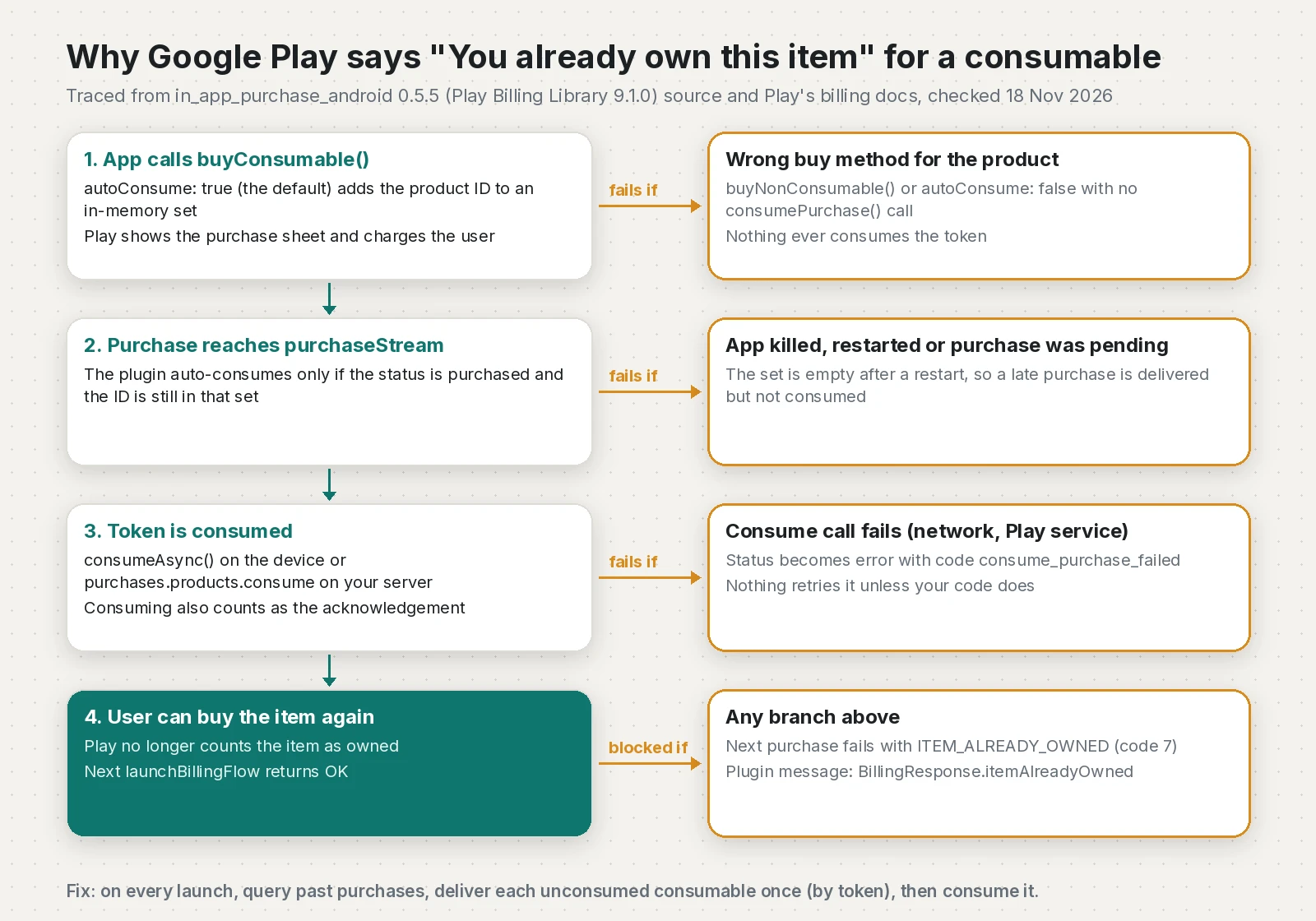
Cause 1: the wrong buy method, or autoConsume turned off
buyConsumable() has an autoConsume parameter that defaults to true. If you buy a consumable with buyNonConsumable(), or pass autoConsume: false and never call consumePurchase() yourself, nothing consumes the token.
Cause 2: the app restarted before the purchase finished
This is the one most people miss. On Android, buyConsumable(autoConsume: true) only adds the product ID to a static, in-memory set. The plugin consumes a purchase when it arrives on purchaseStream with status purchased and the ID is still in that set. If the purchase was pending (cash payment, slow card, a family approval) and completes after the app was killed, or the app crashed mid-flow, the set is empty and the purchase is delivered without being consumed.
Cause 3: the consume call failed
If auto-consume fails, the plugin sets the purchase status to error with the code consume_purchase_failed. Nothing retries it unless your code does.
Cause 4: a stale Play cache
Google's errors guide says ITEM_ALREADY_OWNED is usually not transient, "except when it is caused by a stale Google Play's cache". Getting the error refreshes the cache, so Google recommends calling queryPurchasesAsync() and retrying the purchase if the user doesn't actually own the item.
How do I fix ITEM_ALREADY_OWNED in Flutter?
The fix is a small recovery routine that runs on launch and after the error. It uses queryPastPurchases() from InAppPurchaseAndroidPlatformAddition, which calls Play's queryPurchases for in-app products and subscriptions. Consumed purchases are not returned, so anything consumable that comes back is stuck.
Step 1: add the recovery class
// lib/iap/consumable_recovery.dart
import 'package:in_app_purchase/in_app_purchase.dart';
import 'package:in_app_purchase_android/billing_client_wrappers.dart';
import 'package:in_app_purchase_android/in_app_purchase_android.dart';

/// Verifies the purchase on your server and grants the item.
/// Must be idempotent per purchase token: return true if the item was
/// granted now OR had already been granted for this token.
typedef DeliverPurchase = Future<bool> Function(PurchaseDetails purchase);

/// True when Google Play answered ITEM_ALREADY_OWNED (response code 7).
bool isItemAlreadyOwned(PurchaseDetails purchase) =>
    purchase.status == PurchaseStatus.error &&
    purchase.error?.message == BillingResponse.itemAlreadyOwned.toString();

class ConsumableRecovery {
  ConsumableRecovery({
    required this.consumableIds,
    required this.deliver,
    required Future<QueryPurchaseDetailsResponse> Function() queryPastPurchases,
    required Future<BillingResultWrapper> Function(PurchaseDetails) consumePurchase,
  })  : _queryPastPurchases = queryPastPurchases,
        _consumePurchase = consumePurchase;

  /// Production wiring. Call only on Android.
  factory ConsumableRecovery.android({
    required Set<String> consumableIds,
    required DeliverPurchase deliver,
  }) {
    final InAppPurchaseAndroidPlatformAddition android = InAppPurchase.instance
        .getPlatformAddition<InAppPurchaseAndroidPlatformAddition>();
    return ConsumableRecovery(
      consumableIds: consumableIds,
      deliver: deliver,
      queryPastPurchases: () => android.queryPastPurchases(),
      consumePurchase: android.consumePurchase,
    );
  }

  final Set<String> consumableIds;
  final DeliverPurchase deliver;
  final Future<QueryPurchaseDetailsResponse> Function() _queryPastPurchases;
  final Future<BillingResultWrapper> Function(PurchaseDetails) _consumePurchase;

  /// Finds consumables Google Play still thinks the user owns, makes sure
  /// they were delivered, then consumes them so they can be bought again.
  /// Returns the product IDs that were consumed.
  Future<List<String>> recoverUnconsumed() async {
    final QueryPurchaseDetailsResponse response = await _queryPastPurchases();
    if (response.error != null) {
      throw StateError('queryPastPurchases failed: ${response.error!.message}');
    }

    final List<String> consumed = <String>[];
    for (final PurchaseDetails purchase in response.pastPurchases) {
      if (!consumableIds.contains(purchase.productID)) continue; // not a consumable
      if (purchase.status != PurchaseStatus.purchased) continue; // pending: wait

      final bool granted = await deliver(purchase);
      if (!granted) continue; // never consume what you could not deliver

      final BillingResultWrapper result = await _consumePurchase(purchase);
      if (result.responseCode == BillingResponse.ok) {
        consumed.add(purchase.productID);
      }
    }
    return consumed;
  }
}
The class takes its two Play calls as functions so you can unit test it. I ran flutter analyze (no issues, for both snippets in this post) and three unit tests against a fake Play response on Flutter 3.47.7: a delivered consumable is consumed, a pending one and one the server refused are skipped, a non-consumable is ignored, and a failed query throws.
Step 2: run it on launch and when the error appears
const Set<String> kConsumables = <String>{'coins_100', 'coins_500'};

late final ConsumableRecovery recovery;

Future<void> initPurchases() async {
  InAppPurchase.instance.purchaseStream.listen(onPurchases);
  if (!Platform.isAndroid) return;
  recovery = ConsumableRecovery.android(
    consumableIds: kConsumables,
    deliver: verifyAndGrantOnServer, // your API call, keyed by purchase token
  );
  await recovery.recoverUnconsumed(); // clears anything stuck from earlier sessions
}

Future<void> buyCoins(ProductDetails product) async {
  final bool started = await InAppPurchase.instance.buyConsumable(
    purchaseParam: PurchaseParam(productDetails: product),
  );
  if (!started && Platform.isAndroid) {
    await recovery.recoverUnconsumed();
  }
}

Future<void> onPurchases(List<PurchaseDetails> purchases) async {
  for (final PurchaseDetails purchase in purchases) {
    if (Platform.isAndroid && isItemAlreadyOwned(purchase)) {
      final List<String> fixed = await recovery.recoverUnconsumed();
      showMessage(fixed.isEmpty
          ? 'Please try again in a moment.'
          : 'We restored your earlier purchase. You can buy again now.');
      continue;
    }
    // ...your normal purchased / pending / error handling,
    // then completePurchase() when pendingCompletePurchase is true.
  }
}
buyConsumable() returns false when Play rejects the launch, and an error can also arrive on purchaseStream, so I handle both. An empty result after the error matches Google's stale-cache case, where a retry is the documented fix.
Step 3: make delivery idempotent on the server
The recovery code may hand your server a token it has already granted (for example, the grant worked but the consume failed). Store each purchase token with a unique constraint and return success for a token you've already processed, without granting twice. Google's guide makes the same point: consumption can fail, so check your backend before granting.
Step 4 (better): consume from your server
Google recommends that apps with a backend consume through the Play Developer API and check consumptionState from purchases.products.get first. The consume endpoint takes an empty POST body:
curl -X POST \
  "https://androidpublisher.googleapis.com/androidpublisher/v3/applications/com.example.app/purchases/products/coins_100/tokens/PURCHASE_TOKEN:consume" \
  -H "Authorization: Bearer $ACCESS_TOKEN"
The token needs the androidpublisher scope, from a service account invited in Play Console. If that call returns 403, see my post on the Play "caller does not have permission" error. When the server consumes, call buyConsumable(..., autoConsume: false) in the app so the two don't race.
ITEM_ALREADY_OWNED by product type
| Product type | What the error means | Right fix |
|---|---|---|
| Consumable (coins, credits) | Last purchase was never consumed | Deliver once by token, then consume |
| Non-consumable (remove ads) | User really owns it | Hide the buy button, offer restore |
| Subscription, same plan | User is already subscribed | Show "manage subscription" instead |
| Any type, user owns nothing | Stale Play cache | Query purchases, then retry once |
| iOS (StoreKit) | No such error | Unfinished transactions block repeat buys; call completePurchase() |
The iOS row comes from the plugin README, which warns that unfinished transactions are re-delivered on every launch and block a new purchase of the same product ID.
How do I verify the fix?
- Use a license tester account and an internal testing build, as covered in my product not found checklist.
- Reproduce the bug on purpose: temporarily call
buyConsumable(..., autoConsume: false)without consuming, buy once, then confirm the second purchase shows "You already own this item". - Restore the normal code and relaunch.
recoverUnconsumed()should return['coins_100']and your server should log one grant for that token, not two. - Buy again. The Play sheet should open normally.
- Check Order management in Play Console: the order should not be refunded after 3 days, because consuming counts as acknowledgement.
How do I prevent it?
- Use
buyConsumable()for consumables and keep one list of consumable product IDs in code. - Run
recoverUnconsumed()on every launch, not only after the error, so pending and interrupted purchases are cleaned up. - Handle
PurchaseStatus.pendingwith a "waiting for payment" message, and let the launch recovery finish the job. - Record every purchase token on your server before consuming.
- Log
consume_purchase_failederrors to Crashlytics or your backend so you notice failures before users do. - Keep
in_app_purchase_androidcurrent: 0.5.5 moved to Play Billing Library 9.1.0 and now reportsbillingUnavailablewhere it used to reporterrorin some cases, per its changelog.
If you're on RevenueCat instead of the raw plugin, the SDK consumes for you, and empty paywalls are a different problem covered in RevenueCat offerings empty in Flutter.
Frequently asked questions
What does ITEM_ALREADY_OWNED mean in Google Play Billing?
It is BillingResponseCode 7. Google Play refuses the purchase because the user already owns that one-time product or subscription. For a consumable it means the previous purchase was never consumed.
Why does Google Play say you already own this item for coins or credits?
Consumables stay owned until the app consumes the purchase token. If the app used the wrong buy method, restarted before a pending purchase finished, or the consume call failed, the item stays owned and the next purchase is blocked.
How do I fix you already own this item in a Flutter app?
On Android, call queryPastPurchases on every launch, deliver each returned consumable once on your server keyed by purchase token, then call consumePurchase. After that the user can buy the item again.
Does buyConsumable with autoConsume true prevent this error?
Not always. The plugin only auto-consumes purchases whose product ID it remembers in memory from the current session, so a purchase that completes after an app restart is delivered without being consumed.
Should I consume Google Play purchases on the device or on my server?
Google recommends consuming from a secure backend with the Play Developer API purchases.products.consume endpoint after checking consumptionState. Client-only apps can use consumeAsync, which the Flutter plugin calls through consumePurchase.
Does consuming a purchase also acknowledge it?
Yes. Google's integration guide says consuming fulfills the acknowledgement requirement, so a consumed purchase is not refunded automatically after three days.
Can ITEM_ALREADY_OWNED happen on iOS?
No, it is a Google Play response code. On iOS the similar problem is an unfinished StoreKit transaction, which blocks a new purchase of the same product until completePurchase is called.
What if the user does not actually own the item?
Google says the error can come from a stale Play cache. Receiving the error refreshes the cache, so query the user's purchases and retry the purchase once.
Sources
- Handle BillingResult response codes (Android Developers)
- Integrate the Google Play Billing Library into your app (Android Developers, 2026-11-13)
- BillingClient.BillingResponseCode reference (Android Developers)
- Method: purchases.products.consume (Google for Developers, 2025-06-02)
- in_app_purchase 3.3.1 (pub.dev, 2026-09-18)
- in_app_purchase_android changelog (0.5.5) (pub.dev, 2026-10-19)
- in_app_purchase_android platform source (buyConsumable and auto-consume) (flutter/packages on GitHub)
- [in_app_purchase] Android "You already own this item" and errors out (issue #82645) (flutter/flutter on GitHub)
- in_app_purchase 3.0.8: You already own this item (issue #116111) (flutter/flutter on GitHub)
Keep reading
- Google Play Purchase Not Acknowledged: Stop 3-Day RefundsGoogle Play refunds purchases that are not acknowledged within 3 days. Fix completePurchase() in Flutter and add a server backstop that acknowledges.
- Flutter In-App Purchase Product Not Found: Fix ChecklistFlutter in_app_purchase returning notFoundIDs or an empty paywall? Work through the App Store and Google Play setup checks in the right order.
- RevenueCat Offerings Empty in Flutter: Fix Error 23Why RevenueCat offerings come back empty or current is null in Flutter, what error 23 means, and how to find and fix the store setup behind it.
Comments
Share a question or note about this article.
Loading comments…