· 8 min read · Nadeera Silva
Flutter In-App Purchase Product Not Found: Fix Checklist
Flutter in_app_purchase returning notFoundIDs or an empty paywall? Work through the App Store and Google Play setup checks in the right order.
You call queryProductDetails() in your Flutter app, and every ID comes back in notFoundIDs. The paywall is empty, there is no error, and the code looks exactly like the docs. In my experience the cause is almost never the Dart code. It is a store setup step: an inactive agreement on the App Store side, or a build that Google Play has never seen on the Android side. This guide gives you the checklist in the order I work through it, with the logging code that tells you which store is unhappy.
Quick answer
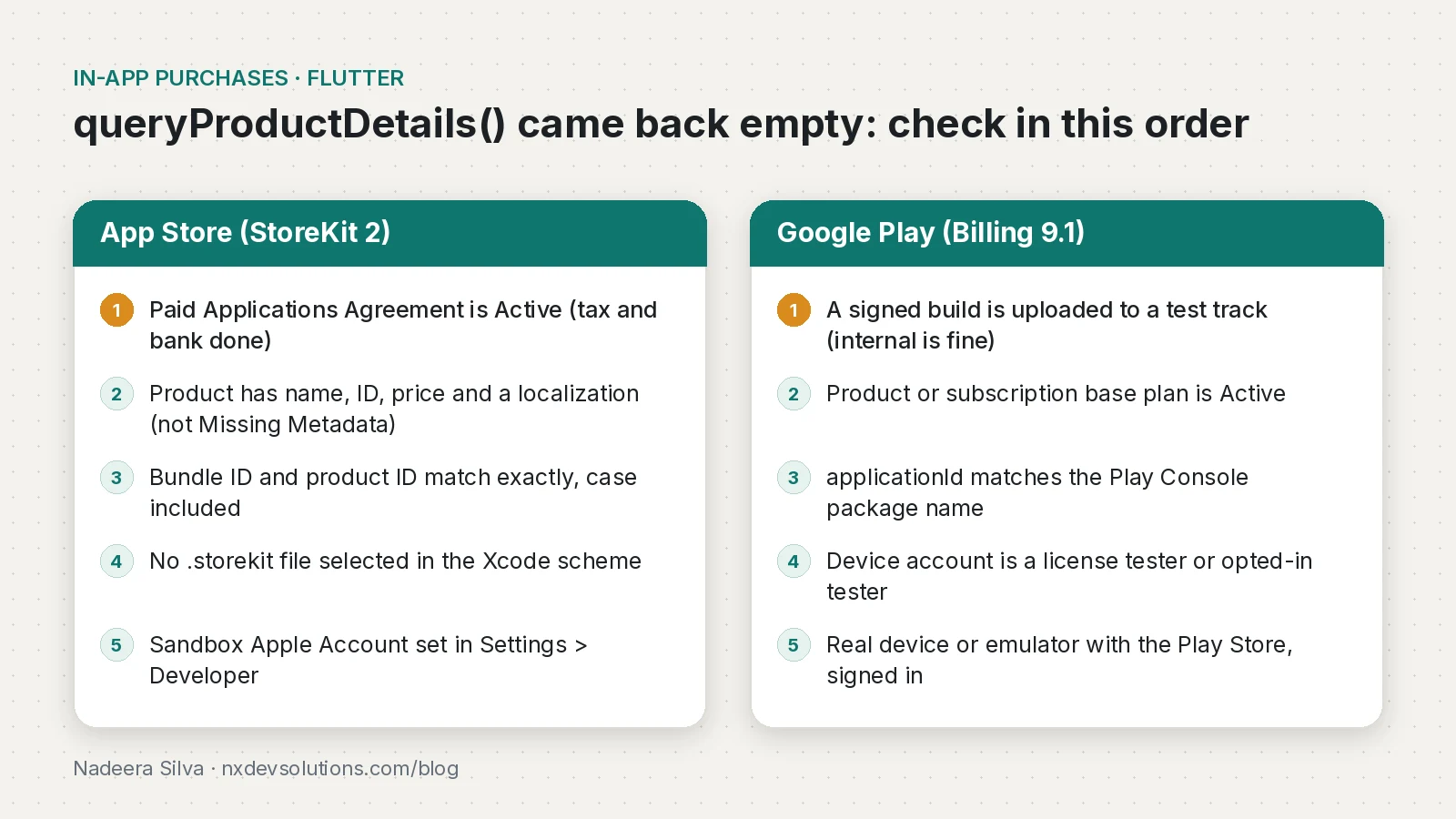
If Flutter's in_app_purchase returns your product IDs in notFoundIDs, the store is refusing to show those products to this build. On iOS, check that the Paid Applications Agreement is Active, that each product has full metadata, and that the bundle ID and product IDs match exactly. On Android, upload a signed build to a test track, make sure the product (or subscription base plan) is Active, and test with a Google account that is a license tester or an opted-in tester.
What this means for your app or business
An empty paywall means zero revenue from that build, and it often shows up at the worst time: the day before launch, or in an App Review rejection that says "we could not locate the in-app purchase". Each round trip with review costs days.
The good news is that most of the fixes are settings in App Store Connect or Play Console, not code. A business owner can often fix the agreement or banking step themselves in minutes. If your team has checked the list below and products are still missing, or you are also seeing purchases that do not unlock, that is when an experienced IAP developer saves you time.
Why does queryProductDetails return notFoundIDs?
The plugin is a thin layer over each store. On iOS it uses StoreKit 2 by default (you can fall back to StoreKit 1 with enableStoreKit1()), and on Android it uses Google Play Billing Library 9.1.0 as of in_app_purchase_android 0.5.5. When the store does not recognise a product for this app, user and environment, it simply leaves it out. The plugin then reports it in notFoundIDs. No exception is thrown, which is why this problem eats so many hours.
Step 1: log what the store actually returned
Before touching any setting, make the app tell you what happened. I add this to every project during setup:
import 'dart:io' show Platform;
import 'package:flutter/foundation.dart';
import 'package:in_app_purchase/in_app_purchase.dart';

const _productIds = <String>{'pro_monthly', 'pro_yearly', 'remove_ads'};

Future<List<ProductDetails>> loadProducts() async {
  final iap = InAppPurchase.instance;

  final available = await iap.isAvailable();
  if (!available) {
    // Android: no Play Store, or the Play Store is blocked on this device.
    // iOS: the device cannot make payments (for example, Screen Time limits).
    debugPrint('IAP not available on ${Platform.operatingSystem}');
    return const [];
  }

  final response = await iap.queryProductDetails(_productIds);

  if (response.error != null) {
    debugPrint('IAP query error: ${response.error!.code} ${response.error!.message}');
  }
  if (response.notFoundIDs.isNotEmpty) {
    debugPrint('Store did not return: ${response.notFoundIDs.join(', ')}');
  }
  for (final p in response.productDetails) {
    debugPrint('Found ${p.id} ${p.price}');
  }
  return response.productDetails;
}
Read the result like this:
| What you see | What it means | Where to look |
|---|---|---|
isAvailable() is false | The store service is not reachable on this device | Emulator without Play Store, kids mode, payment restrictions |
response.error is set | The query itself failed | Network, billing service, account state |
| Some IDs found, some not | Setup is fine, those products are not | Product IDs, status, metadata of the missing ones |
All IDs in notFoundIDs | The store does not link this build to your app's products | Agreements, bundle or package name, upload, tester account |
Why are my products not found on iOS?
Work through these in order. Apple's sandbox testing guide lists the first ones as prerequisites.
- Paid Applications Agreement. In App Store Connect, open Business and confirm the Paid Applications Agreement is Active, with tax and banking complete. Until the Account Holder signs it, StoreKit returns no products for any app on the account. It also expires, so check it even on an old account. After fixing it, give the sandbox time to catch up (anything from minutes to a few hours) and force quit the app before retrying.
- Product metadata. Apple's minimum is a reference name, product ID, a localized name and a price. Subscriptions also need a subscription group and duration. A product stuck in Missing Metadata is not returned.
- Bundle ID and product IDs. The bundle identifier of the Runner target must match the App Store Connect app record exactly, and the product IDs must match exactly.
- StoreKit configuration file. If a
.storekitfile is selected in the Xcode scheme (Edit Scheme, Run, Options), products come from that local file, not from App Store Connect. That is great for local testing, but it hides sandbox problems, and it does not apply when you start the app withflutter runfrom the terminal. - Sandbox account. On iOS the sandbox account sits in Settings, Developer, after your first purchase attempt in a development-signed build. For TestFlight builds, Apple's guide explains signing out of Media & Purchases first to use sandbox controls.
Why are my products not found on Android?
Google's testing guide states the key rule plainly: the Play Billing Library is blocked for apps that are not signed and uploaded to Google Play, unless the Google account on the device is a license tester. Check these in order:
- Upload a signed build to a test track. An internal testing release is enough. It also lets Play Console know your app uses billing so you can create products.
- Products are Active. One-time products must be active, and subscriptions need at least one active base plan. A subscription with no active base plan will not come back from the query.
- Package name matches. The
applicationIdinandroid/app/build.gradle.ktsmust match the Play Console app. A.devflavor suffix is a different app to Play. - The right Google account. Add the account under License testing in Play Console, or opt it in to your test track. License testers can sideload debug builds as long as the package name matches. If the device has several accounts, Play uses the one that installed the app.
- A real Play environment. Use a physical device or an emulator image that includes the Play Store, signed in, with an up-to-date Play Store app.
How do I verify the fix?
Run the logging function again on a real device. You want every ID in Found ... lines with a localized price, and notFoundIDs empty. Then do one full sandbox or license-tester purchase and confirm that your purchase stream receives it and that you call completePurchase(). On Android, a purchase that is not acknowledged within three days is refunded automatically, so "products load" is only half the test.
How do I prevent it next time?
- Keep a short store setup checklist in the repo: agreement status, product IDs, base plans, tester accounts.
- Load product IDs from one Dart constant, and copy them into the stores from that list.
- Upload an internal test build on day one of any Android IAP project, before writing purchase code.
- Use a
.storekitfile for fast local iOS tests, but always repeat the test against the sandbox before submitting. - Verify purchases on your server and keep entitlements there, as I explain in Flutter in-app purchases with Firebase and RevenueCat. If you use RevenueCat, its "offerings empty" error has the same root causes as above.
For the Android billing deadline and library upgrade path, see the Play Billing Library deadline guide, and for iOS subscription server events, StoreKit subscriptions and webhooks in Flutter.
Frequently asked questions
Why does queryProductDetails return notFoundIDs in Flutter?
The store did not recognise those product IDs for this app, account and environment. It is almost always a store setup issue such as an inactive Paid Applications Agreement, missing product metadata, a package name mismatch or a build that was never uploaded to Google Play.
Why are my in-app products empty on iOS sandbox?
Check that the Paid Applications Agreement is Active with tax and banking complete, that each product has a reference name, ID, localized name and price, and that the bundle ID and product IDs match exactly. Changes can take some time to reach the sandbox, so force quit the app before retrying.
Do I need to upload my app to Google Play to test in-app purchases?
Yes, unless the device account is a license tester. Google says Play Billing is blocked for apps that are not signed and uploaded to Google Play; an internal testing release is enough.
Do in-app purchases need App Review approval before they load?
No. Products with complete metadata load in sandbox and TestFlight before review. Your first in-app purchase must still be submitted together with a new app version.
Which Play Billing Library does the Flutter in_app_purchase plugin use?
in_app_purchase_android 0.5.5, released in October 2026, uses Google Play Billing Library 9.1.0 and needs Android SDK 23 or higher.
Does the Flutter in_app_purchase plugin use StoreKit 2?
Yes. On iOS and macOS the generic API uses StoreKit 2 by default, and you can fall back to StoreKit 1 with enableStoreKit1().
Why do products load in Xcode but not in TestFlight?
A StoreKit configuration file selected in the Xcode scheme serves local test products. TestFlight uses the real sandbox, so App Store Connect setup problems only show up there.
Sources
- in_app_purchase 3.3.1 (pub.dev, 2026-09-18)
- in_app_purchase_android changelog (0.5.5, Billing Library 9.1.0) (pub.dev, 2026-10-19)
- in_app_purchase_storekit 0.4.17 (pub.dev, 2026-11-04)
- in_app_purchase example app setup (flutter/packages on GitHub)
- Testing Apple In-App Purchases with sandbox (Apple Developer)
- Test your Google Play Billing Library integration (Android Developers, 2026-10-23)
- Integrate the Google Play Billing Library: processing purchases (Android Developers)
- Troubleshooting empty products and offerings (RevenueCat)
Keep reading
- Flutter In-App Purchase Guide: StoreKit 2, Play Billing and RevenueCatA Flutter in-app purchase guide for 2026: a subscription example, server verification on Firebase, testing, cancelling, and when RevenueCat is the better call.
- Play Billing Library Deadline: Updating Flutter IAP AppsGoogle Play's extension for Billing Library 7 and target API 36 ends on 1 Nov 2026. Here's how to upgrade Flutter in_app_purchase and retest it.
- StoreKit 2 Subscriptions in Flutter: Restore Purchases and Server NotificationsStoreKit 2 subscriptions in a Flutter app: server verification, App Store Server Notifications V2, restore purchases and one access record across gateways.
Comments
Share a question or note about this article.
Loading comments…