
Android developer verification is Google's new rule that every app installed on a certified Android phone must be registered by a developer whose identity Google has checked. It has been enforced since 30 September 2026 in four countries, and Google says it goes global in 2027. If you ship APKs outside Google Play (client test builds, a POS app for a shop, an internal tool), this is the part of Android that changes for you. Here is what is live today, what the Android Developer Console and Google Play Console each do, how sideloading still works, and what I would set up now from Sri Lanka.
What Android developer verification actually checks
Google's guide describes it as linking "real-world entities (individuals and organizations) with their Android applications". In practice it is three things:
- A verified developer account. Either your existing Google Play Console account or a new Android Developer Console (ADC) account.
- A registered package name. Your
applicationIdis tied to the SHA-256 fingerprint of the certificate you sign with. - A device-side check. A system service Google rolled out to most devices in June 2026 checks the registration at install time (Android Developers Blog, June 2026).
The check runs on certified Android devices, which covers most phones sold with Google apps. It is about who signed the app, not what the app does. Google's FAQ says verification does not collect information about your app's content or functionality.
Developer verification timeline and rollout
This is the official rollout as of today:
| Date | What happens | Source |
|---|---|---|
| June 2026 | Verification system service rolled out to most devices | Android Developers Blog |
| July 2026 | Android Developer ID Status API available globally; early access to the ADC API and limited distribution | Android Developers Blog |
| August 2026 | Developer APIs, limited distribution accounts and the advanced flow launch globally | developer.android.com |
| 30 September 2026 | Protections begin in Brazil, Indonesia, Singapore and Thailand for installs from participating stores, on certified devices running Android 7+ | developer.android.com |
| 2027 and beyond | Expanded globally for all apps on certified Android devices | developer.android.com |
The participating stores in the first phase are Google Play, HONOR App Market, OPPO App Market, Samsung Galaxy Store, Transsion Palm Store, vivo V-Appstore and Xiaomi GetApps (guide).
Sri Lanka is not in the first wave. Google has not said anything specific about Sri Lanka, so my reading is that apps installed here are affected from the global rollout in 2027. Treat that as an inference, not an announcement. Android Authority and The Verge covered the 30 September start if you want the news angle.
Android Developer Console vs Google Play Console
These are the two most searched names around this topic, and the rule for which one you use is simple:
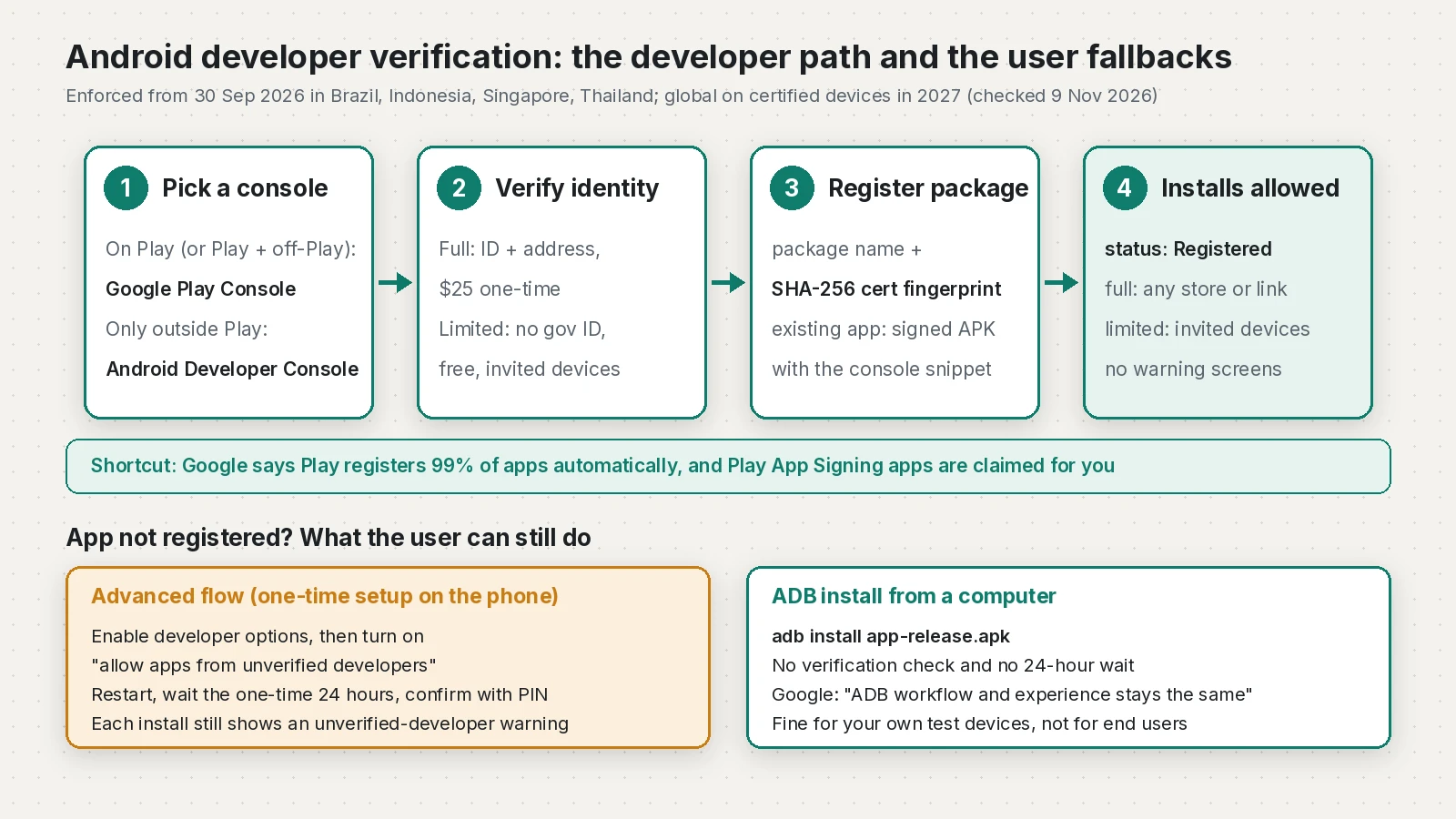
- Only on Google Play: use your existing Play Console. Google says Play automatically registers 99% of apps, and apps using Play App Signing are claimed for you (overview).
- On Play and outside Play: still use Play Console. It has a new Android developer verification page to register the off-Play apps and extra signing keys.
- Only outside Play: create an account in the Android Developer Console.
You can see the status of each package in three places: the Android developer verification page in Play Console, the Package names tab in the ADC (Registered, Not registered or Draft), and Android Studio when you generate a signed APK or AAB (Android Studio Panda 4 and later, per the FAQ).
Full distribution vs limited distribution
Inside the ADC you choose an account type. This is where most freelancers need to think for a minute.
| Item | Full distribution | Limited distribution | Not registered |
|---|---|---|---|
| Identity check | Government photo ID and proof of address (organizations also need a D-U-N-S number and a website verified in Search Console) | No government ID; a Google Account with 2-Step Verification and a Google payments profile | None |
| Fee | 25 USD one-time | Free | Free |
| Who can install | Anyone, from any store or link | Only devices you authorize | Users who go through the advanced flow, or ADB |
| User experience | Same as today | User accepts your invite (QR code or link) | Extra steps and warnings |
Sources: full distribution, limited distribution, ADC Help: choose a distribution.
A few details that matter for real projects:
- Google says the full identity check typically takes about 10 minutes if your documents are ready. A D-U-N-S number is free but can take up to 28 days, so start early if you register as a company.
- Limited distribution only works for brand-new package names that have never been seen on Android. You can't move a package from a Play account into it.
- Device invites by shared link expire after 7 days. Removing a device stops installs and updates on it, and Google says that can't be undone.
- The document examples on the full distribution page are US examples. I could not find a list of accepted Sri Lankan documents, and the FAQ only says Google is "actively working to support multiple forms of payment" for the fee. Check the console yourself before you promise a client a timeline.
The 20 vs 50 devices discrepancy
At Android Dev Summit 2026 (28 to 29 October), Google said it would "raise the limit today from 20 to 50, and that will roll out pretty soon" (talk page). The limited distribution guide and ADC Help 17131204 now say 50 devices. The overview page, the main guide and Help 16640817 still say 20.
There is a second small conflict. The FAQ says a limited account can be migrated to full distribution (not the other way). Help 16640817 says the plan can't be changed after creation and you create a new account instead. If you think you will need full distribution later, the safe move is to start with full.
Register a package name with its SHA-256 fingerprint
Registration needs the package name, the SHA-256 fingerprint of your signing certificate and, for an existing package name, proof that you hold the private key. The ADC gives you a small snippet to place in your app's assets folder; you build an APK signed with your key and upload it (ADC guide).
Get the fingerprint from your keystore:
keytool -list -v -keystore upload-keystore.jks -alias upload
# look for the line starting with "SHA256:"
Or read it straight from a signed APK, which is the safer check because it proves what you actually shipped:
apksigner verify --print-certs build/app/outputs/flutter-apk/app-release.apk
# "Signer #1 certificate SHA-256 digest: ..."
For a Flutter project, the snippet file goes in android/app/src/main/assets/ (create the folder if it does not exist), then:
flutter build apk --releaseWhen the same package name has been signed by different keys, Google gives priority to the key behind more than 50% of known installs. Otherwise any key with a sizeable cluster (50+ installs) can register, and after that it is first come, first served. Everyone else needs a new package name or an exception request. If you use Play App Signing, note that the key users see is Google's app signing key, not your upload key; Play handles that registration for you.
Sideloading developer verification: the advanced flow
For apps that stay unregistered, users get the advanced flow, which Google previewed in its March 2026 post. The setup is one-time per device:
- Turn on developer options: Settings, About phone, tap Build number seven times.
- In System, Developer options, turn on "allow apps from unverified developers".
- Confirm nobody is coaching you through it, restart the phone and sign back in.
- Wait the one-time 24-hour period, then confirm with your fingerprint, face or PIN.
- Choose to allow it for 7 days or indefinitely.
After that, each install of an unregistered app still shows an unverified developer warning with an Install Anyway button. Developer options do not need to stay on. If the user turns the advanced flow off, updates to unregistered apps fail.
This is fine for a power user. It is not something I would ask a shop owner to do for their POS app.
Does ADB still work?
Yes. Google's guide says "ADB workflow and experience stays the same". Installs over ADB need no verification and skip the 24-hour wait:
adb devices
adb install -r build/app/outputs/flutter-apk/app-release.apk
There is no ADB command to skip the 24-hour wait for the on-device advanced flow, though (FAQ). ADB is for your own test devices and a client device you have in your hands, not for distributing to users.
What this means for Sri Lankan freelancers
Freelance Android work in Sri Lanka usually goes out three ways: Play Store releases, test APKs to clients over WhatsApp or Drive, and private builds such as a POS or staff app installed directly. Here is how each one lands in 2027:
- Play Store apps: little changes. Check the Android developer verification page in Play Console and make sure each app shows as registered.
- Client test builds: either ship them through Play internal testing (covered by your Play account) or register the package in your account. A limited distribution account suits only brand-new package names and a small, fixed set of devices.
- POS and private APKs: these need a registered package under a full distribution account, either yours or the client's. Decide who owns the account before launch, because the account holds the identity and the keys.
- Managed company devices: Google says enterprise apps installed from an organization's managed store on managed devices don't need verification, though registering is still recommended.
If you are also sorting out how to get paid for this kind of work, my PayPal in Sri Lanka guide covers that side. For the other Play changes this year, see the Google Play policy update for October 2026 and Flutter 3.50's stricter Android intent verification.
Checklist before the 2027 rollout
- List every app you have shipped outside Play, with its package name and who owns it.
- Find and back up each signing keystore. Note the alias and the SHA-256 fingerprint.
- Play apps: open the Android developer verification page in Play Console and confirm status.
- Off-Play only: create an Android Developer Console account and choose full or limited distribution.
- Organizations: request a D-U-N-S number now and verify the company website in Search Console.
- Register each package name, adding the console snippet to
assetsand uploading a signed APK. - Check status in the ADC Package names tab or in Android Studio when you build a signed APK.
- For testers, check the device limit your own ADC shows (20 or 50).
- Tell clients who install APKs directly that from 2027 unregistered builds need the advanced flow or ADB.
Frequently asked questions
What is Android developer verification?
It is a Google requirement that apps installed on certified Android devices are registered by a developer whose identity Google has verified. Each package name is tied to the SHA-256 fingerprint of the signing certificate.
When does Android developer verification start?
It started on 30 September 2026 for installs from participating stores in Brazil, Indonesia, Singapore and Thailand. Google says it expands globally to all apps on certified devices in 2027 but has not published an exact date.
What is the difference between the Android Developer Console and Google Play Console?
Use Google Play Console if any of your apps are on Google Play, including apps you also distribute elsewhere. Use the Android Developer Console only if you distribute exclusively outside Google Play.
Can I still sideload apps after Android developer verification?
Yes. Registered apps install normally from any source. Unregistered apps need the one-time advanced flow on the phone, which includes a 24-hour wait and a warning on each install, or an ADB install from a computer.
Does ADB install still work with developer verification?
Yes. Google says the ADB workflow stays the same, and ADB installs need no verification and skip the 24-hour advanced flow wait.
How many devices does a limited distribution account allow?
Google announced an increase from 20 to 50 devices at Android Dev Summit 2026, and the limited distribution guide now says 50. Some Google pages still say 20, so check the limit shown in your own console.
How much does Android developer verification cost?
Full distribution in the Android Developer Console has a one-time fee of 25 USD. Limited distribution accounts are free, and Play developers use their existing Play Console account.
Sources
- Android developer verification (Android Developers)
- Android developer verification guide (Android Developers)
- Android developer verification FAQ (Android Developers, 2026-09-30)
- Android Developer Console guide (Android Developers, 2026-09-30)
- Limited distribution (Android Developers)
- Full distribution (Android Developers)
- Limited distribution accounts (Android Developer Console Help)
- Choose a distribution type (Android Developer Console Help)
- Android developer verification update (March 2026) (Android Developers Blog)
- Android developer verification update (June 2026) (Android Developers Blog)
- Android developer verification: Paths for Play, third party app distributors, and hobbyists (Android Dev Summit 2026)
- Android sideloading developer verification first wave rollout (Android Authority, 2026-10-01)
- Android's developer verification rules just took effect for the first time (The Verge, 2026-10-02)
Keep reading
- Flutter 3.50: Stricter Android Intent VerificationFlutter 3.50 ignores route and entrypoint Intent extras from other apps in release builds. Here is who is affected and how to migrate.
- Target API Level 36: A Flutter Guide to the Play DeadlineGoogle Play's target API level 36 extension ends on 1 Nov 2026. Here is how to bump targetSdk in Flutter and what to fix and test before you upload.
- Google Play policy update (October 2026): what Flutter apps must do and by whenEvery deadline from the 29 Oct 2026 Google Play policy update, how to audit your Flutter app's permissions, and what to change before each date.
Comments
Share a question or note about this article.
Loading comments…