· 11 min read · Nadeera Silva
Google Play policy update (October 2026): what Flutter apps must do and by when
Every deadline from the 29 Oct 2026 Google Play policy update, how to audit your Flutter app's permissions, and what to change before each date.

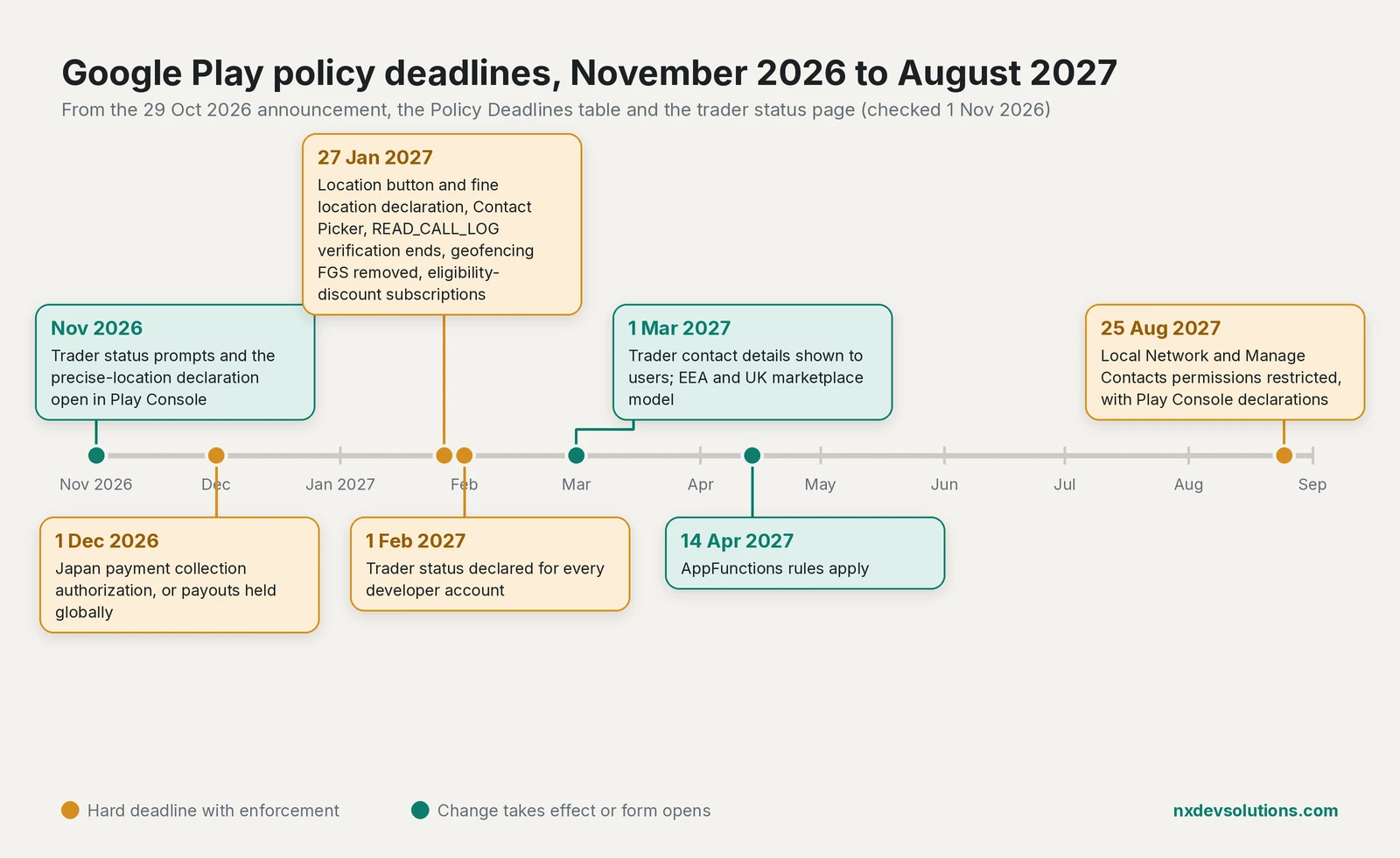
Google published its latest Google Play policy update on 29 October 2026, and it touches more Flutter apps than the headline items suggest. Two new permission rules (Local Network and Manage Contacts), stricter location and contacts rules that become mandatory on 27 January 2027, a new disclosure rule for discounted subscriptions, and a trader status declaration that every developer account must complete in Play Console by 1 February 2027. I went through the announcement, the Policy Deadlines table and the linked help pages, and this post puts the dates in one place, shows how to find out which permissions your Flutter build actually ships, and lists what to change before each deadline.
Google Play policy deadlines at a glance
The announcement says you have "at least 30 days from October 29, 2026" to comply, but the Policy Deadlines table gives a specific date for each item, and most are months away. Plan against the table, not the 30 days.
| Deadline | What changes | Who is affected |
|---|---|---|
| 1 Dec 2026 | Japan payment collection authorization | Developers selling into or out of Japan |
| 27 Jan 2027 | Location: minimum scope, location button, fine location declaration | Apps that request location |
| 27 Jan 2027 | Contacts: Android Contact Picker unless you need broad access | Apps that read contacts |
| 27 Jan 2027 | READ_CALL_LOG no longer allowed for phone-call account verification | Apps that verify accounts by phone call |
| 27 Jan 2027 | Geofencing removed as a foreground service use case | Apps running geofencing in a foreground service |
| 27 Jan 2027 | Eligibility-based subscription discounts must be fully disclosed | Apps with student or similar plans |
| 1 Feb 2027 | Trader status declared in Play Console | Every active developer account |
| 14 Apr 2027 | AppFunctions must follow all Play policies | Apps that expose AppFunctions |
| 25 Aug 2027 | Local Network permission restricted, declaration for API 37+ | Apps that talk to devices on the LAN |
| 25 Aug 2027 | Manage Contacts permission restricted, declaration required | Apps that write or manage contacts |
First, audit the permissions your Flutter app really ships
Most of these rules are about permissions, and in a Flutter app the manifest you edit is not the one Google reviews. Plugins add their own <uses-permission> entries, and Gradle merges them into the final manifest, so get the real list first.
Build a release APK, then dump its permissions with aapt2, which ships with the Android SDK build tools:
flutter build apk --release
aapt2 dump permissions build/app/outputs/flutter-apk/app-release.apk
You can also read the merged manifest Gradle produced. The folder name differs between Android Gradle Plugin versions, so search for it rather than hard-coding a path:
find build/app/intermediates -name AndroidManifest.xml -path "*merged_manifest*release*" \
  -exec grep -HoE 'android:name="android\.permission\.[A-Z_]+"' {} \; | sort -u
Then check the output for the permissions this update cares about:
aapt2 dump permissions build/app/outputs/flutter-apk/app-release.apk \
  | grep -E "ACCESS_FINE_LOCATION|ACCESS_COARSE_LOCATION|READ_CONTACTS|WRITE_CONTACTS|MANAGE_CONTACTS|READ_CALL_LOG|ACCESS_LOCAL_NETWORK|NEARBY_WIFI_DEVICES|FOREGROUND_SERVICE_LOCATION|MANAGE_EXTERNAL_STORAGE"
In Android Studio, the Merged Manifest tab on android/app/src/main/AndroidManifest.xml shows the same result and tells you which library added each line, as described in Google's manifest merging guide.
Removing a permission a plugin adds
If a plugin declares a permission your app does not use, remove it in your own manifest with the manifest merger's tools:node="remove" rule. Your app manifest has a higher priority than library manifests, so the entry is dropped from the merged result:
<manifest xmlns:android="http://schemas.android.com/apk/res/android"
    xmlns:tools="http://schemas.android.com/tools">

    <!-- Drop permissions that a plugin declares but this app never uses -->
    <uses-permission android:name="android.permission.READ_CALL_LOG"
        tools:node="remove" />
    <uses-permission android:name="android.permission.WRITE_CONTACTS"
        tools:node="remove" />

    <application ...>
    </application>
</manifest>
Only do this when no code path needs the permission. If the plugin calls an API that requires it, the feature will fail at runtime, so test the flow after removing it and run the aapt2 check again.
Location: the location button and a fine location declaration
This policy was announced in April and becomes mandatory on 27 January 2027. Google's Location help page sets out two separate requirements:
- Every app that requests `ACCESS_FINE_LOCATION` must complete a Play Console declaration that explains why coarse location or the location button is not enough. The declaration becomes available in November 2026.
- Apps targeting Android 17 (API 37) or higher must use the Android location button for one-time or infrequent precise location, such as "near me" search, sharing a location once, tagging a post or filling in an address.
The Android location button guide describes it as an experimental Jetpack library with a Compose LocationButton, and the Play page shows the manifest flag for apps that only get precise location through the button:
<uses-permission
    android:name="android.permission.ACCESS_FINE_LOCATION"
    android:usesPermissionFlags="onlyForLocationButton" />
The practical question for a Flutter app is whether it needs fine location at all. The Play page lists nearby stores, regional weather and city-level feeds as coarse location examples, and requesting only ACCESS_COARSE_LOCATION avoids the declaration. Keep fine location for tracking, navigation or fitness, and write the declaration around that feature.
Contacts: Contact Picker now, Manage Contacts later
Two contacts changes land on different dates.
27 January 2027. Apps that do not need broad access to the address book must use the Android Contact Picker, available on Android 17 and higher. It needs no permission, returns only the contacts and fields the user selects, and for apps targeting API 37 the system automatically upgrades the existing Intent.ACTION_PICK to the new picker.
25 August 2027. The new MANAGE_CONTACTS permission is restricted to apps whose core functionality needs it, with a Play Console declaration. Android's contacts blog post from 21 October explains the background: apps that target the next Android release lose direct write access through WRITE_CONTACTS and should use the ACTION_INSERT, ACTION_EDIT and ACTION_INSERT_OR_EDIT intents, which need no permission.
If your app only lets users invite friends, split a bill or save one contact from a chat, the table in that blog post says you do not need MANAGE_CONTACTS.
SMS, call log and account verification
From 27 January 2027, account verification by phone call is no longer a permitted use of READ_CALL_LOG. The Deadlines table points to the Digital Credentials API or the SMS Retriever API, and the 29 October update adds the SMS User Consent API as another option. With SMS Retriever, your server sends the one-time code in a message that contains a string identifying your app, and Play services passes that message to your app, so it doesn't read the inbox.
If your OTP screen uses a plugin that reads the call log or the SMS inbox, switch to one built on these APIs, then check the merged manifest to confirm READ_CALL_LOG and the SMS permissions are gone.
Local Network permission for apps that talk to the LAN
Android 17 blocks local network traffic by default for apps that target API 37 or higher, according to the local network permission guide. Those apps must either use a system picker (the output switcher for casting, or the NsdManager service picker for mDNS) or request the runtime permission ACCESS_LOCAL_NETWORK. The Play policy adds a declaration for API 37+ apps that use the permission, enforced from 25 August 2027.
This affects Flutter apps that control printers, smart home devices, IoT hardware or anything found by mDNS or SSDP, including plain HTTP calls to a 192.168.x.x address. The guide says apps targeting API 36 or lower keep implicit access through INTERNET and should not declare ACCESS_LOCAL_NETWORK yet. As I covered in the target API level 36 guide, current Flutter releases default to API 36, so this starts when you raise targetSdk to 37.
Subscriptions, geofencing and AppFunctions
- Eligibility-based discounts (27 Jan 2027). Student plans and similar offers must clearly disclose eligibility criteria, how eligibility is verified, and the price and benefits after eligibility ends. That is paywall copy, not code. If you are also updating your billing plugin, the Play Billing Library deadline post covers the version side.
- Geofencing (27 Jan 2027). Geofencing is no longer an approved foreground service use case. Use the Geofence API instead of keeping a location foreground service alive.
- AppFunctions (14 Apr 2027). If your app exposes AppFunctions to AI agents, they must follow all Play policies and must not deceive or manipulate agents, bypass security controls or interfere with other apps. If you haven't added AppFunctions in your Android code, nothing changes for you.
Which Flutter plugins map to which policy
This mapping is our own analysis, not something Google publishes. Plugin manifests change between versions, so always confirm with the aapt2 check above.
| Plugin type (examples) | Policy to check | Likely action |
|---|---|---|
| Location (geolocator, location) | Location, 27 Jan 2027 | Use coarse location where possible, or prepare the fine location declaration |
| Contacts (flutter_contacts and similar) | Contacts, 27 Jan 2027 and 25 Aug 2027 | Picker for reads, contact intents for writes |
| SMS and call log (telephony, call log readers) | SMS and Call Log, 27 Jan 2027 | Move OTP to SMS Retriever or SMS User Consent |
| Background location services | Foreground service, 27 Jan 2027 | Replace geofencing FGS with the Geofence API |
| Discovery and casting (mDNS, NSD, cast plugins) | Local Network, 25 Aug 2027 | Use system pickers or plan the declaration for API 37 |
| In-app purchases (in_app_purchase) | Subscriptions, 27 Jan 2027 | Update paywall disclosures for discounted plans |
Trader status declaration in Play Console
This one applies to every developer, including solo developers in Sri Lanka who never sell in Europe. The trader status page says all active developer accounts must declare whether they are a trader or non-trader under EEA and UK law by 1 February 2027. If you don't distribute in the EEA or the UK, you can declare as a non-trader.
The steps are:
- In Play Console, go to Manage account > Account details > About you and declare status for the account.
- If you are a trader, open each app and go to Monitor and improve > Policy and programs > App content to confirm the app's status.
- As a trader, self-certify that your products comply with applicable laws and provide a terms of service link for each app.
Missing the deadline can lead to update blocks and global removal. Declaring non-trader when you are one is also an enforcement risk, and Google notes its page is not legal advice.
Japan payment authorization by 1 December 2026
If you sell into Japan from elsewhere, or out of Japan, Google's Japan verification guide says you must complete a payment collection authorization. Missing the deadline in your invitation means Google holds your earnings in every region, not just Japan. The announcement gives 1 December 2026 as the date. Check your email, Play Console and Payments Center for the invitation now.
Checklist
- Run
aapt2 dump permissionson a release build and keep the output with your release notes. - Remove plugin permissions you don't use with
tools:node="remove", then retest. - Switch to coarse location where it is enough; otherwise prepare the fine location declaration.
- Replace contact reads with the Contact Picker and contact writes with the contact intents.
- Move OTP flows off
READ_CALL_LOGand SMS permissions. - Replace any geofencing foreground service with the Geofence API.
- Update paywall text for student or other eligibility-based discounts.
- Declare trader status before 1 February 2027.
- Complete the Japan authorization before 1 December 2026 if it applies.
- Re-check local network use before you move to target API 37.
Frequently asked questions
What is in the Google Play policy update of October 29, 2026?
It adds restrictions for the Local Network and Manage Contacts permissions, new rules for AppFunctions, and a disclosure rule for subscriptions with eligibility-based discounts. It also clarifies the location, call log and other policies and reminds developers about trader status and the Japan payment authorization.
When do I have to comply with the new Google Play policies?
Each item has its own date in the Policy Deadlines table. Location, contacts, call log, geofencing and subscription rules apply from 27 January 2027, AppFunctions from 14 April 2027, and the Local Network and Manage Contacts rules from 25 August 2027.
Do I need to declare trader status in Play Console if I don't sell in Europe?
Yes. Every active developer account must declare by 1 February 2027. If you don't distribute apps in the EEA or the UK, Google says you can declare as a non-trader.
Which apps need a Play Console declaration for precise location?
Google's location help page says all apps that request ACCESS_FINE_LOCATION must complete a declaration explaining why coarse location or the location button is not enough. The declaration becomes available in November 2026 and compliance is mandatory from 27 January 2027.
Does the October 2026 update change the Google Play privacy policy requirement?
The 29 October announcement does not list a change to the privacy policy requirement. The new item that affects your store listing is a terms of service link, which traders provide for each app as part of the trader status declaration.
How do I see which permissions my Flutter app requests?
Build a release APK and run aapt2 dump permissions on it, or open the Merged Manifest tab in Android Studio. Both show permissions added by plugins as well as your own.
Sources
- Policy announcement: October 29, 2026 (Google Play Console Help, 2026-10-29)
- Policy Deadlines (Google Play Console Help)
- Trader status declaration (Google Play Console Help)
- Minimum Scope: Foreground Location Access and the Location Button (Google Play Console Help)
- Permissions and APIs that Access Sensitive Information (Google Play Console Help)
- How to verify as a developer selling into or out of Japan (Google Payments Center Help)
- Request session-based location access with the location button (Android Developers, 2026-09-08)
- Contact picker (Android Developers, 2026-10-28)
- A more reliable way to add and edit contacts on Android (Android Developers Blog, 2026-10-21)
- Local network permission (Android Developers, 2026-10-02)
- Request SMS verification in an Android app (SMS Retriever API) (Android Developers, 2026-10-28)
- Manage manifest files (Android Developers)
- aapt2 (Android Developers)
Keep reading
- Target API Level 36: A Flutter Guide to the Play DeadlineGoogle Play's target API level 36 extension ends on 1 Nov 2026. Here is how to bump targetSdk in Flutter and what to fix and test before you upload.
- Play Billing Library Deadline: Updating Flutter IAP AppsGoogle Play's extension for Billing Library 7 and target API 36 ends on 1 Nov 2026. Here's how to upgrade Flutter in_app_purchase and retest it.
- Flutter 3.50: Stricter Android Intent VerificationFlutter 3.50 ignores route and entrypoint Intent extras from other apps in release builds. Here is who is affected and how to migrate.
Comments
Share a question or note about this article.
Loading comments…