· 11 min read · Nadeera Silva
Target API Level 36: A Flutter Guide to the Play Deadline
Google Play's target API level 36 extension ends on 1 Nov 2026. Here is how to bump targetSdk in Flutter and what to fix and test before you upload.
Google Play's target API level 36 rule has applied to new apps and app updates since 31 August 2026, and the extension Google offered for it ends on 1 November 2026. If your Flutter app still targets Android 15 or lower, you can't ship an update until you move to target API level 36 (Android 16). That bump also switches on three Android 16 behaviour changes that can break a Flutter UI: edge-to-edge without an opt-out, predictive back, and tablets ignoring orientation locks. This post covers what Google requires, how to check and bump targetSdk in a Flutter project, what to test, and what to do if you missed the deadline.
What the target API level 36 rule says
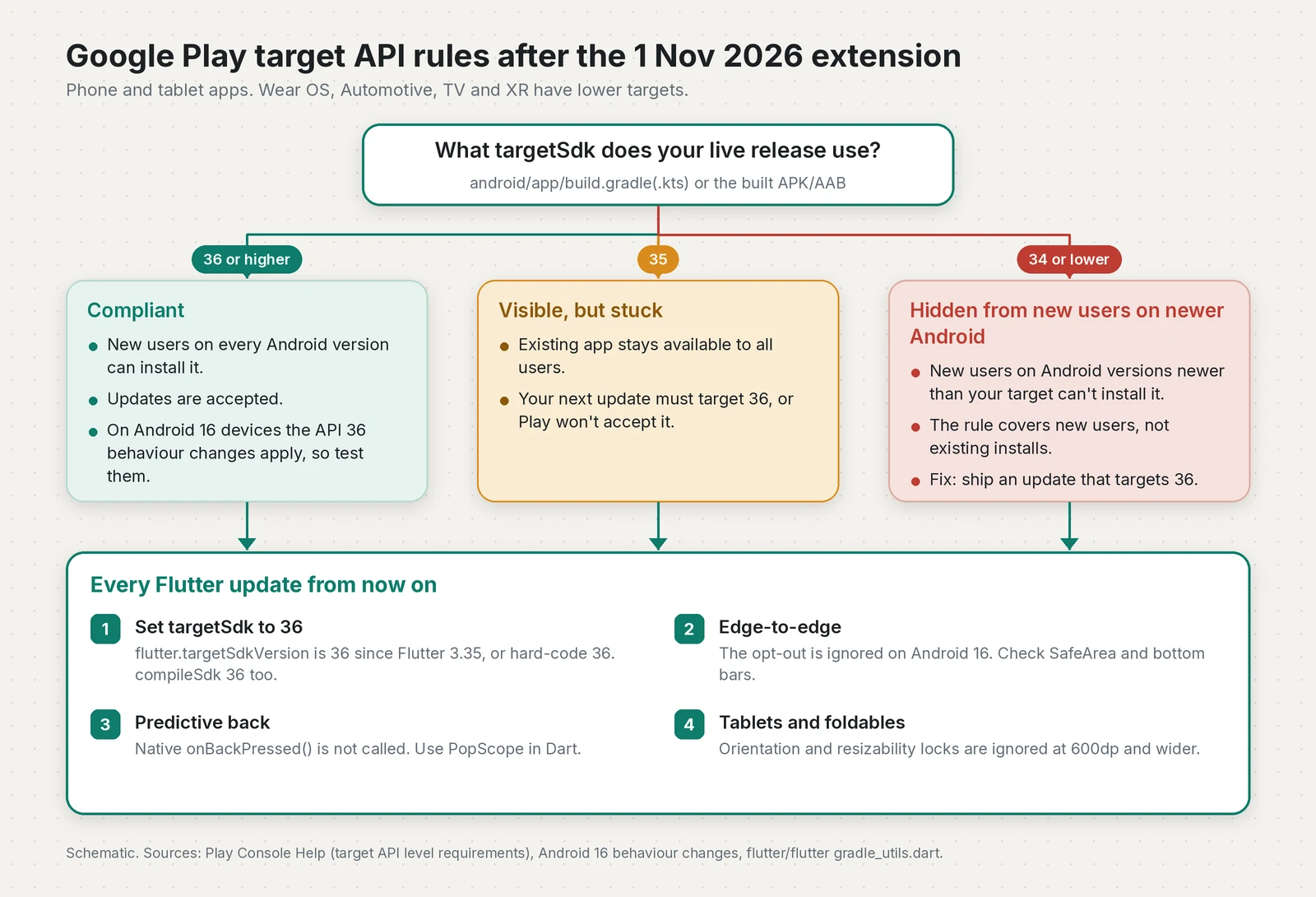
Google's target API level requirements page sets two separate rules. One decides whether Play accepts your upload. The other decides who can still find your existing app.
| Situation | Requirement since 31 Aug 2026 | What happens if you don't meet it |
|---|---|---|
| New app (phone, tablet) | Target API 36 or higher | Play won't accept the submission |
| App update (phone, tablet) | Target API 36 or higher | Play won't accept the update |
| Existing app, no update planned | Target API 35 or higher | Hidden from new users on devices running a newer Android version than your target |
| Wear OS, Android Automotive OS | Target API 35 for new apps and updates | Same as above, with their own availability levels |
| Android TV, Android XR | Target API 34 for new apps and updates | Same as above, with their own availability levels |
The only exception Google lists is permanently private apps that are restricted to one organisation and distributed internally.
How to check your Flutter app's target SDK version
Run this from the project root:
grep -rnE "targetSdk|compileSdk" android/app/build.gradle*
flutter --version
If the line reads targetSdk = flutter.targetSdkVersion, the value comes from your Flutter SDK. If it reads targetSdk = 34 or targetSdkVersion 34, someone pinned it, and it won't move until you change it.
To be certain, check the built artifact. apkanalyzer from the Android SDK command-line tools prints an APK's target SDK:
flutter build apk --release
apkanalyzer manifest target-sdk build/app/outputs/flutter-apk/app-release.apk
In Play Console, non-compliant apps get a warning on the Policy status page.
Change the target SDK version to 36 in Flutter
The current Flutter app template, android/app/build.gradle.kts, reads both values from the Flutter Gradle plugin:
android {
    namespace = "com.example.myapp"
    compileSdk = flutter.compileSdkVersion

    defaultConfig {
        applicationId = "com.example.myapp"
        minSdk = flutter.minSdkVersion
        targetSdk = flutter.targetSdkVersion
        versionCode = flutter.versionCode
        versionName = flutter.versionName
    }
}
On Flutter 3.35 and later, flutter.targetSdkVersion and flutter.compileSdkVersion are both 36 (see gradle_utils.dart). So the cleanest fix for most apps is to upgrade Flutter and switch any pinned values back to the flutter.* properties.
If you can't upgrade Flutter this weekend, pin the numbers yourself:
android {
    compileSdk = 36

    defaultConfig {
        minSdk = flutter.minSdkVersion
        targetSdk = 36
    }
}
Older projects use Groovy in android/app/build.gradle. The same change there is compileSdkVersion 36 and targetSdkVersion 36 (or compileSdk = 36 and targetSdk = 36 on newer Android Gradle Plugin versions).
Which Flutter versions default to API 36
| Flutter stable | flutter.targetSdkVersion |
|---|---|
| 3.27 to 3.32.x | 35 |
| 3.35 and later | 36 |
| 3.47.9 (current stable, 30 Oct 2026 Colombo time) | 36 |
I checked these against the Flutter source at each release tag. The 3.27 row comes from Flutter's edge-to-edge breaking-change page, which says apps that use flutter.targetSdkVersion have targeted Android 15 since 3.27.
What changes when a Flutter app targets Android 16
Raising the number is the easy part. Google's Android 16 behaviour changes page lists what changes once you target 36. These three matter most for Flutter apps.
| Change | Who is affected | Fix | Temporary opt-out |
|---|---|---|---|
| Edge-to-edge enforced | Apps that relied on windowOptOutEdgeToEdgeEnforcement | Handle insets with SafeArea and MediaQuery | None on Android 16 devices |
| Predictive back | Native onBackPressed() overrides, KEYCODE_BACK handlers, WillPopScope | PopScope, NavigatorPopHandler | android:enableOnBackInvokedCallback="false" |
| Orientation and resizability ignored at 600dp and wider | Portrait-locked apps on tablets and foldables | Adaptive layouts based on window size | PROPERTY_COMPAT_ALLOW_RESTRICTED_RESIZABILITY (goes away at API 37) |
Edge-to-edge can't be turned off
Android 15 made edge-to-edge the default, but you could opt out with windowOptOutEdgeToEdgeEnforcement in your styles. Many Flutter apps did exactly that to avoid a redesign. For apps targeting 36, Google says that attribute "is deprecated and disabled, and your app can't opt-out of going edge-to-edge" on Android 16 devices. It still works on Android 15 devices.
Flutter's breaking-change page warns that using the opt-out on Android 16 "might cause your app to crash". Remove the attribute and fix the layout.
In practice, Scaffold with an AppBar already pads the top, and Material's NavigationBar and BottomNavigationBar already pad the bottom. The screens that break are the custom ones: a pinned checkout button, a bottom sheet, or a full-screen page with no app bar. Wrap them in SafeArea:
class CheckoutBar extends StatelessWidget {
  const CheckoutBar({super.key, required this.onPay});

  final VoidCallback onPay;

  @override
  Widget build(BuildContext context) {
    return Material(
      elevation: 8,
      child: SafeArea(
        top: false, // only pad the bottom (and sides in landscape)
        minimum: const EdgeInsets.all(16),
        child: FilledButton(onPressed: onPay, child: const Text('Pay now')),
      ),
    );
  }
}
To get the same look on Android 15 and 16, opt in from Dart and make the system bars transparent:
void main() {
  WidgetsFlutterBinding.ensureInitialized();
  SystemChrome.setEnabledSystemUIMode(SystemUiMode.edgeToEdge);
  SystemChrome.setSystemUIOverlayStyle(
    const SystemUiOverlayStyle(
      statusBarColor: Colors.transparent,
      systemNavigationBarColor: Colors.transparent,
      systemNavigationBarContrastEnforced: false,
    ),
  );
  runApp(const MyApp());
}
Predictive back gesture: onBackPressed is not called
For apps targeting 36 on Android 16 devices, the back-to-home, cross-task and cross-activity animations are on by default. More importantly, Google says "onBackPressed is not called and KeyEvent.KEYCODE_BACK is not dispatched anymore".
Flutter's own back handling survives this. I read the embedder source: FlutterActivity registers an OnBackInvokedCallback on Android 13 and later, and FlutterFragmentActivity uses the AndroidX OnBackPressedDispatcher. Both pass the gesture to the framework. What breaks is native code: an onBackPressed() override in MainActivity.kt, or a plugin that listens for the back key. Move that logic into Dart.
On the Dart side, WillPopScope has been deprecated since Flutter 3.16, and its deprecation message says predictive back "will not work with WillPopScope". PopScope replaces it. You decide ahead of time whether back is allowed, then react afterwards:
class _EditAddressScreenState extends State<EditAddressScreen> {
  bool _dirty = false;

  @override
  Widget build(BuildContext context) {
    return PopScope<Object?>(
      canPop: !_dirty, // true = let the system animate back normally
      onPopInvokedWithResult: (bool didPop, Object? result) async {
        if (didPop) return; // the route already closed
        final bool discard = await _confirmDiscard();
        if (discard && context.mounted) {
          Navigator.of(context).pop(result);
        }
      },
      child: Scaffold(
        appBar: AppBar(title: const Text('Edit address')),
        body: TextField(
          onChanged: (_) {
            if (!_dirty) setState(() => _dirty = true);
          },
        ),
      ),
    );
  }

  Future<bool> _confirmDiscard() async {
    final bool? discard = await showDialog<bool>(
      context: context,
      builder: (context) => AlertDialog(
        title: const Text('Discard changes?'),
        actions: [
          TextButton(
            onPressed: () => Navigator.pop(context, false),
            child: const Text('Keep editing'),
          ),
          TextButton(
            onPressed: () => Navigator.pop(context, true),
            child: const Text('Discard'),
          ),
        ],
      ),
    );
    return discard ?? false;
  }
}
For nested navigators, such as tabs that each keep their own stack, use NavigatorPopHandler instead of a hand-written WillPopScope.
If you need time, Google allows a temporary opt-out: android:enableOnBackInvokedCallback="false" on the <application> or <activity> tag in AndroidManifest.xml.
Large screens ignore orientation and resizability locks
On displays with a smallest width of 600dp or more, Android 16 ignores screenOrientation, resizeableActivity, minAspectRatio, maxAspectRatio and setRequestedOrientation() for apps targeting 36. Flutter's SystemChrome.setPreferredOrientations calls setRequestedOrientation() under the hood, so a portrait lock in Dart is ignored on tablets and most unfolded foldables. Phones under 600dp are not affected, and neither are games that set android:appCategory.
Choose layouts by window width, not by orientation:
final bool wide = MediaQuery.sizeOf(context).width >= 600;
return Scaffold(
  appBar: AppBar(title: const Text('Orders')),
  body: wide
      ? Row(
          children: [
            SizedBox(width: 360, child: ordersList),
            const VerticalDivider(width: 1),
            const Expanded(child: Center(child: Text('Select an order'))),
          ],
        )
      : ordersList,
);
Rotation also means more Activity recreation. Flutter's default manifest handles orientation|screenSize|smallestScreenSize in configChanges, but check any native screens or plugins that start their own activities. As a stopgap, add <property android:name="android.window.PROPERTY_COMPAT_ALLOW_RESTRICTED_RESIZABILITY" android:value="true" /> to the activity or application.
Smaller changes worth a look
elegantTextHeightis ignored. It is aTextViewattribute, and Flutter paints its own text, so I'd only expect this to matter in native views and platform views.scheduleAtFixedRatenow runs at most one missed execution when the app comes back. This only matters for native Kotlin or Java code.- APIs that needed
BODY_SENSORSnow need granularandroid.permissions.healthpermissions, for exampleREAD_HEART_RATE. Check any health or wearable plugin you use.
How to test before you upload
My routine for a Flutter app moving to target API level 36:
- Run the app on an Android 16 (API 36) emulator with gesture navigation, then again with 3-button navigation. Look at every screen's top and bottom edges, including sheets, dialogs and the keyboard.
- Swipe back on each screen that has unsaved state. On the root screen, the back-to-home preview should appear.
- Run an Android 16 tablet or foldable emulator and rotate it. Nothing should be stretched, cut off or reset. Google also documents a compat flag for this:
adb shell am compat enable UNIVERSAL_RESIZABLE_BY_DEFAULT <package>. - Run your widget tests at a wide size too.
tester.view.physicalSize = const Size(1200, 800)is enough for a first check. - Upload to internal testing first, then release and check the Policy status page again.
If your app uses Play Billing, check our Play Billing Library deadline guide as well, because that extension also ends on 1 November 2026.
Missed the deadline? What happens now
If your app targets 35, it stays available to everyone, but Play won't accept your next update until it targets 36. Bump the target, test, and ship. There is nothing else to request.
If your app targets 34 or lower and the extension has ended (or you never had one), Google says the app "will stop being available to all new users whose devices run Android OS versions higher than your apps' target API levels". Someone on Android 16 who follows your store link is told the app "is not available to install on their device because it was made for an older version of Android". The fix is the same: ship an update that targets 36, and the restriction no longer applies.
That announcement does set the next dates to put in your calendar. Eligibility-based subscription discounts such as student plans must disclose their rules by 27 January 2027. The Local Network permission declaration applies to apps targeting API 37 from 25 August 2027. Both are on the Policy Deadlines page.
Checklist
targetSdkandcompileSdkare 36, either throughflutter.*on Flutter 3.35 or later or set by hand- AGP, Gradle and plugins are upgraded, and a release build succeeds
windowOptOutEdgeToEdgeEnforcementis removed, and custom bars and sheets useSafeArea- No native
onBackPressed()logic, andWillPopScopeis replaced withPopScopeorNavigatorPopHandler - Layouts work at 600dp and wider in both orientations
- Health, sensor and other native plugins are checked against the Android 16 list
- Tested on Android 16 with both navigation modes, uploaded to internal testing, and the Policy status warning is cleared
If you are also on the Flutter 3.50 beta, read our Android Intent verification guide before your next release. It is a separate change, but it lands in the same part of the app.
Frequently asked questions
What is the Google Play target API level requirement in 2026?
Since 31 August 2026, new apps and app updates for phones and tablets must target Android 16 (API level 36) or higher. Wear OS and Android Automotive OS apps need API 35, and Android TV and Android XR apps need API 34.
When is the Android 16 target SDK deadline?
The target SDK 36 (Android 16) requirement has applied to new apps and app updates since 31 August 2026. Google let developers request an extension to 1 November 2026. The form was only offered to non-compliant apps through the warning on the Policy status page in Play Console, and it was not automatic.
What happens if my app does not target API level 36?
Play will not accept new apps or updates that target lower than API 36. An existing app that targets API 35 stays available to everyone, but an app that targets API 34 or lower is no longer offered to new users on devices running a newer Android version than its target.
What target SDK version does Flutter use by default?
On Flutter 3.35 and later, flutter.targetSdkVersion and flutter.compileSdkVersion are both 36. Flutter 3.27 to 3.32 used 35, so projects on those versions need a Flutter upgrade or a hard-coded targetSdk of 36.
Can I opt out of edge-to-edge on Android 16?
No. For apps targeting API 36, the windowOptOutEdgeToEdgeEnforcement attribute is disabled on Android 16 devices and only still works on Android 15 devices. Handle insets with SafeArea and MediaQuery instead.
Why is onBackPressed not called on Android 16?
For apps targeting API 36 on Android 16 devices, predictive back is on by default, so onBackPressed is not called and KEYCODE_BACK is not dispatched. In Flutter, move back handling into Dart with PopScope or NavigatorPopHandler.
Can I get another extension after 1 November 2026?
As of 31 October 2026, Google's target API help page and the 29 October policy announcement do not mention any extension beyond 1 November 2026. The fix is to ship an update that targets API 36.
Sources
- Target API level requirements for Google Play apps (Play Console Help)
- Behavior changes: Apps targeting Android 16 or higher (Android Developers, 2026-10-28)
- Policy announcement: October 29, 2026 (Play Console Help, 2026-10-29)
- Policy Deadlines (Play Console Help)
- Set default of SystemUiMode to edge-to-edge (Flutter docs)
- Android predictive back (breaking change) (Flutter docs)
- Add the predictive back gesture (Flutter docs)
- PopScope class (Flutter API docs)
- gradle_utils.dart (Flutter tool Android defaults) (flutter/flutter on GitHub)
- Bumping Framework Default TargetSdk to 36 (PR #168577) (flutter/flutter on GitHub, 2025-05-12)
- Flutter app template: android/app/build.gradle.kts (flutter/flutter on GitHub)
- FlutterActivity.java (Android embedder back handling) (flutter/flutter on GitHub)
- FlutterFragment.java (AndroidX back callback) (flutter/flutter on GitHub)
- Flutter SDK releases feed (Linux) (Flutter)
- apkanalyzer (Android Developers)
Keep reading
- Play Billing Library Deadline: Updating Flutter IAP AppsGoogle Play's extension for Billing Library 7 and target API 36 ends on 1 Nov 2026. Here's how to upgrade Flutter in_app_purchase and retest it.
- Flutter 3.50: Stricter Android Intent VerificationFlutter 3.50 ignores route and entrypoint Intent extras from other apps in release builds. Here is who is affected and how to migrate.
- Flutter 3.47.8: Fixing the eMudhra TLS VulnerabilityFlutter 3.47.8 fixes a TLS man-in-the-middle risk from the eMudhra CA compromise. Here is who is affected and how to upgrade, rebuild and ship.
Comments
Share a question or note about this article.
Loading comments…