
You build a Flutter iOS release, upload it to App Store Connect, and a few minutes later Apple sends an email with ITMS-91061: Missing privacy manifest. The build either never reaches TestFlight review or you can't submit it. This is one of the most common App Store upload errors I fix for Flutter clients, and it is almost always caused by an old Flutter SDK or an old plugin version that does not ship its own privacy manifest. This guide shows how to read the email, find the package that owns the problem, fix it, and prove the fix before you upload again.
Quick answer
ITMS-91061 means your app bundle contains an SDK from Apple's list of commonly used third-party SDKs, and that SDK has no PrivacyInfo.xcprivacy file inside it. In a Flutter app, fix it by upgrading the Flutter SDK (if Apple names Flutter.framework) or the plugin that owns the named framework, then running pod update so the new native versions actually land in Podfile.lock. Do not add the SDK's declarations to your own Runner manifest, because Apple says that does not fix it.
What this means for your app or business
If you own the app, here is the short version:
- The cost: your update or new app cannot go live until the build is fixed. Nothing is wrong with your users' data, and nothing is removed from the store. It only blocks new uploads.
- The risk: the longer a project goes without dependency updates, the more packages need upgrading at once, and big jumps can break other features. That is where most of the real work goes.
- How long it takes: on a project that is up to date, about an hour including a rebuild and upload. On an app that has not been touched for a year or two, plan for one to three days, because the Flutter upgrade often drags other changes with it.
- When to get help: if the email names a package nobody on your team recognises, if
pod updatefails, or if the app has not been updated since 2023. That is the point where an experienced Flutter developer saves you time.
What does the ITMS-91061 email actually say?
The email names the file path and the SDK. It looks like this (path and SDK vary):
ITMS-91061: Missing privacy manifest - Your app includes
"Frameworks/path_provider_foundation.framework/path_provider_foundation",
which includes path_provider, an SDK that was identified in the documentation
as a privacy-impacting third-party SDK. Starting February 12, 2025, if a new
app includes a privacy-impacting SDK, or an app update adds a new
privacy-impacting SDK, the SDK must include a privacy manifest file.
Two pieces matter: the path tells you which framework inside your .app is missing the file, and the SDK name tells you which entry on Apple's list it matched. If the email lists several SDKs, treat each one as a separate fix. Apple's developer forums guidance for ITMS-91061 says the same thing: contact the SDK provider for an updated version, repeat for every SDK listed, and keep your own manifest limited to your own app.
Why does a Flutter app get ITMS-91061?
Apple keeps a list of SDKs that must include a privacy manifest. It covers "any version of a listed SDK" and any SDK that repackages one, and it applies to new apps and to updates that add a listed SDK. The list includes Flutter itself and many popular plugins, such as path_provider, shared_preferences_ios, url_launcher, image_picker_ios, sqflite, connectivity_plus, device_info_plus, package_info_plus, share_plus, file_picker, flutter_local_notifications, fluttertoast, flutter_inappwebview and webview_flutter_wkwebview, plus native pods like the Firebase SDKs, GoogleSignIn and GoogleUtilities.
The packages fixed this long ago, but only in newer versions. If your pubspec.lock or Podfile.lock still pins an older version, the manifest is not in your build. The usual causes are:
- An old Flutter SDK. The engine's privacy manifest was added to the iOS framework and first shipped in Flutter 3.19.0. Anything older has no manifest in
Flutter.framework. - Old plugin versions. For example, the iOS implementations added their manifests in these versions (from each package's changelog on pub.dev):
path_provider_foundation2.3.2,shared_preferences_foundation2.3.5,url_launcher_ios6.2.4 andimage_picker_ios0.8.9+1. - A stale `Podfile.lock`.
flutter pub upgradeupdates Dart packages, but CocoaPods keeps the native versions pinned inios/Podfile.lockuntil you runpod update. Firebase pods are the classic case. - A plugin that pulls in an old native SDK (for example an ads, analytics or login plugin that pins an older Firebase or Google pod).
- An abandoned plugin that never added a manifest. Upgrading cannot fix that one.
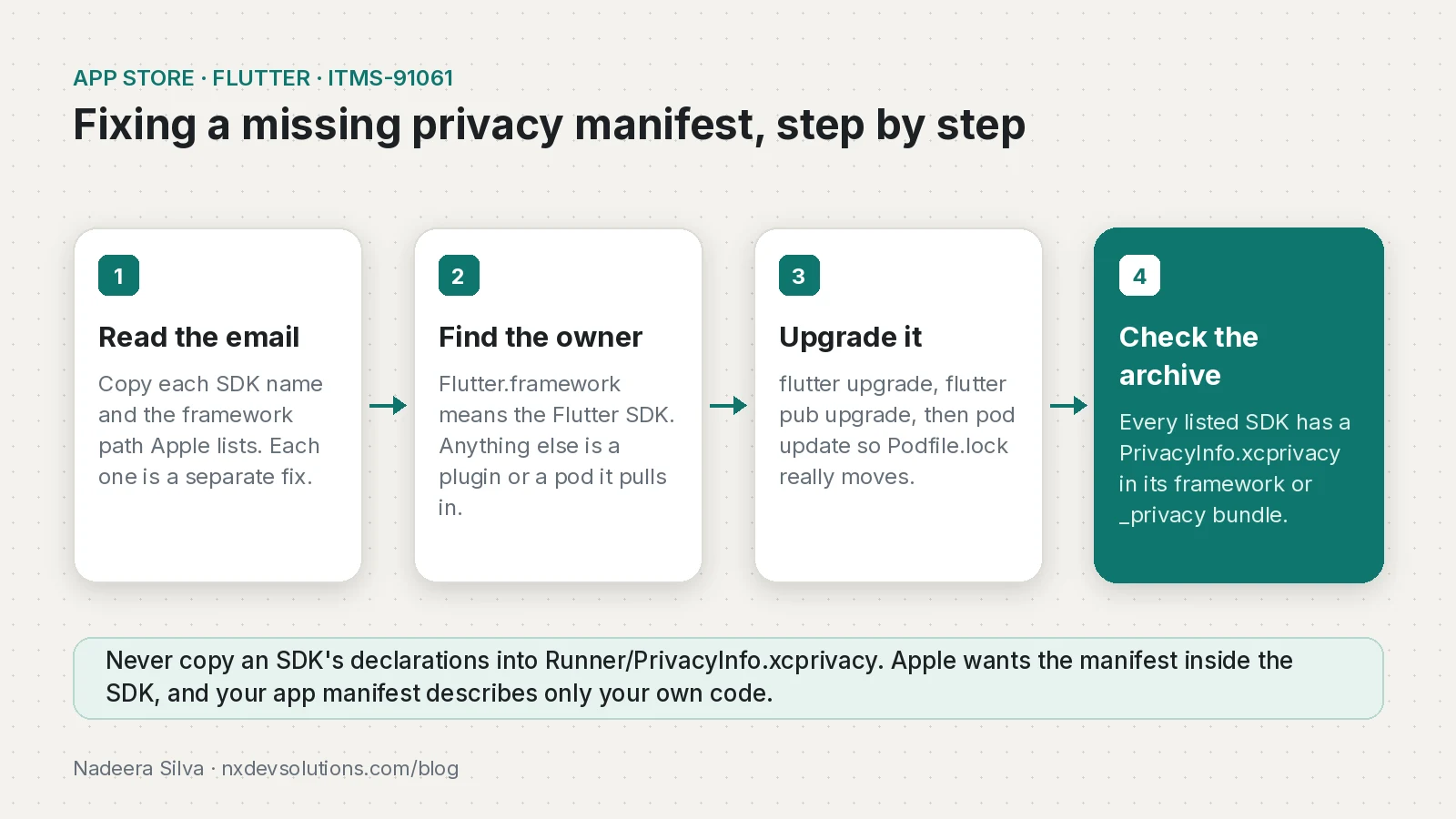
How do I fix ITMS-91061 missing privacy manifest in Flutter?
Step 1: Save the evidence
Copy every SDK name and framework path from the email into your ticket, with the build number. You will check each one off at the end.
Step 2: Find which package owns each framework
Frameworks/Flutter.framework/Fluttermeans the Flutter SDK itself. Go to step 3.- Any other path is a plugin or a pod. Find who depends on it:
# Which Dart package brings it in?
flutter pub deps --style=compact | grep -i path_provider

# Which pod version is locked, and who depends on it?
grep -n -A3 "path_provider_foundation" ios/Podfile.lock
Step 3: Upgrade Flutter, the plugins and the pods
# 1. Flutter SDK (3.19.0 or newer is required; use current stable)
flutter upgrade
flutter --version

# 2. Dart packages, including major versions if your code allows it
flutter pub outdated
flutter pub upgrade --major-versions

# 3. Native pods, so Podfile.lock actually moves
cd ios
pod repo update
pod update
cd ..

# 4. Clean build
flutter clean
flutter pub get
flutter build ipa --releaseIf Podfile.lock still shows the old native version after pod update, a plugin is pinning it. Upgrade that plugin, or as a last resort reset CocoaPods:
cd ios
pod deintegrate
rm -rf Pods Podfile.lock
pod install --repo-update
cd ..
Step 4: Replace or remove packages that never got a manifest
If the package is abandoned, upgrading will not help. Switch to a maintained alternative, or fork it and add a PrivacyInfo.xcprivacy that truly describes what that code does. If the app no longer uses the package, remove it from pubspec.yaml, because a listed SDK that is still bundled triggers the error even if you never call it.
How do I verify the fix before uploading again?
Do not wait for another Apple email. Check the built IPA yourself. This script unzips the IPA and reports, for every embedded framework, whether a PrivacyInfo.xcprivacy exists anywhere inside it (CocoaPods plugins often keep it in a <name>_privacy.bundle resource bundle):
#!/usr/bin/env bash
# Usage: ./check_privacy_manifests.sh build/ios/ipa/YourApp.ipa
set -euo pipefail
IPA="$1"
TMP=$(mktemp -d)
trap 'rm -rf "$TMP"' EXIT
unzip -q "$IPA" -d "$TMP"
APP=$(find "$TMP/Payload" -maxdepth 1 -name "*.app" | head -n 1)

if [ -f "$APP/PrivacyInfo.xcprivacy" ]; then
  echo "OK       Runner (app manifest)"
else
  echo "NONE     Runner has no PrivacyInfo.xcprivacy"
fi

for fw in "$APP"/Frameworks/*.framework; do
  [ -e "$fw" ] || continue
  name=$(basename "$fw" .framework)
  if find "$fw" -name PrivacyInfo.xcprivacy | grep -q .; then
    echo "OK       $name"
  else
    echo "MISSING  $name"
  fi
done
Every framework that Apple named in the email must show OK. A MISSING line for a framework that is not on Apple's list is not an ITMS-91061 problem, but it is worth noting for the future.
You can also open the archive in Xcode's Organizer and use Generate Privacy Report, which combines all the manifests in the app. If a framework you expected is not in the report, its manifest did not make it into the build. If you also have a manifest of your own, run plutil -lint ios/Runner/PrivacyInfo.xcprivacy on a Mac to catch a broken file before Apple does.
ITMS-91061 vs ITMS-91053 vs ITMS-91056: which one do I have?
Apple sends three privacy manifest emails that people often mix up:
| Code | What Apple found | Where to fix it |
|---|---|---|
| ITMS-91061 | A listed third-party SDK has no privacy manifest | Upgrade or replace the SDK or plugin named in the email |
| ITMS-91053 | A required reason API is used without an approved reason | Add the API category and reason to the manifest of the code that uses it (yours goes in Runner) |
| ITMS-91056 | A privacy manifest file is invalid (wrong keys or values) | The exact file path named in the email; see TN3181 |
For ITMS-91053 in your own Swift or Objective-C code, add ios/Runner/PrivacyInfo.xcprivacy in Xcode (File, New, File, App Privacy) with the matching category, for example NSPrivacyAccessedAPICategoryUserDefaults, and a reason from Apple's TN3183 list. Only declare what your own code really does.
How do I prevent it next time?
- Keep Flutter on a recent stable release and run
flutter pub outdatedat least once a month. - Commit
pubspec.lockandios/Podfile.lock, and review their diffs in pull requests. - Run
pod update(not onlypod install) when you upgrade plugins that wrap native SDKs. - Before adding a new plugin, check that its iOS side ships a
PrivacyInfo.xcprivacy, especially if it appears on Apple's list. - Run the IPA check script in CI on every release build.
- Upload a TestFlight build a few days before a planned release, so an Apple email never lands on launch day.
If your app also sells subscriptions, the same upgrade often touches the purchase plugins, so re-test the paywall afterwards. My guide to fixing in_app_purchase products not found covers what to check.
Frequently asked questions
What does ITMS-91061 Missing privacy manifest mean?
Your app includes an SDK from Apple's list of commonly used third-party SDKs, and that SDK has no PrivacyInfo.xcprivacy file inside it. Apple blocks submission until the SDK ships its own manifest.
How do I fix ITMS-91061 in a Flutter app?
Upgrade the Flutter SDK if Apple names Flutter.framework, otherwise upgrade the plugin that owns the named framework. Then run pod update so Podfile.lock picks up the new native versions, rebuild and upload again.
Which Flutter version includes a privacy manifest?
The Flutter engine manifest first shipped in Flutter 3.19.0. Using the current stable release is the safest choice.
Can I add the SDK privacy details to my own Runner PrivacyInfo.xcprivacy?
No. Apple says your app manifest must describe only your own app, and the SDK must include its own manifest. Copying its declarations does not clear ITMS-91061.
I ran flutter pub upgrade but still get ITMS-91061. Why?
CocoaPods keeps native versions pinned in ios/Podfile.lock. Run pod update in the ios folder, and if a plugin still pins an old pod, upgrade that plugin or reset CocoaPods with pod deintegrate.
What is the difference between ITMS-91061 and ITMS-91053?
ITMS-91061 means a listed SDK is missing its manifest. ITMS-91053 means code uses a required reason API without an approved reason declared in the manifest of the code that uses it.
How can I check my IPA for privacy manifests before uploading?
Unzip the IPA and look for PrivacyInfo.xcprivacy inside each framework in Payload, or open the archive in the Xcode Organizer and generate a privacy report.
When did Apple start enforcing ITMS-91061?
Apple started enforcing the third-party SDK privacy manifest requirement on 12 February 2025 for new apps and for updates that add a listed SDK.
Sources
- Third-party SDK requirements (Apple Developer)
- Adding a privacy manifest to your app or third-party SDK (Apple Developer Documentation)
- App Review forum guidance on ITMS-91061 (Apple Developer Forums)
- TN3181: Debugging an invalid privacy manifest (Apple Developer Documentation)
- TN3183: Adding required reason API entries to your privacy manifest (Apple Developer Documentation)
- Add xcprivacy privacy manifest to iOS framework (flutter/engine #48951) (GitHub, 2023-12-14)
- Flutter 3.19.0 release notes (Flutter)
- path_provider_foundation changelog (pub.dev)
- shared_preferences_foundation changelog (pub.dev)
- url_launcher_ios changelog (pub.dev)
- image_picker_ios changelog (pub.dev)
Keep reading
- No Signing Certificate iOS Distribution Found: Flutter CI FixFlutter iOS builds failing in GitHub Actions with no signing certificate found? Import the .p12 and profile, sign manually and upload to TestFlight.
- Flutter In-App Purchase Product Not Found: Fix ChecklistFlutter in_app_purchase returning notFoundIDs or an empty paywall? Work through the App Store and Google Play setup checks in the right order.
- Flutter UIScene Migration: Fix iOS 27 Launch CrashesFlutter apps built with Xcode 27 quit at launch without the UIScene lifecycle. Here's how to migrate a custom AppDelegate, Info.plist and plugins.
Comments
Share a question or note about this article.
Loading comments…