
Firebase App Check in Flutter is how you make sure the requests hitting Firestore, Storage, Cloud Functions or your own API come from your real app on a real device, and not from a script that copied your Firebase config. The setup changed in October 2026: firebase_app_check 0.5.0 removed the old activate() parameters, so a lot of copied snippets no longer compile. This guide covers the 0.5 API, Play Integrity on Android, App Attest and DeviceCheck on iOS, debug tokens for CI, safe enforcement, and how to verify App Check tokens on a backend you run yourself.
What changed in firebase_app_check 0.5
The 0.5.0 changelog has three changes that matter for an upgrade:
- Renamed parameters.
activate()no longer acceptswebProvider,androidProviderorappleProvider. UseproviderWeb,providerAndroidandproviderApple, which take provider objects such asAndroidPlayIntegrityProvider()instead of enum values.androidProviderandappleProviderhad been deprecated since 0.4.1+1. - Android. The plugin builds on Firebase Android BoM 35 and requires
minSdk 24. - Apple. It builds on Firebase Apple SDK 13 and needs macOS 11 for Swift packages. The published 0.5.1 package sets an iOS deployment target of 15.0.
0.5.1 only fixes a Gradle Groovy syntax issue. If you can't move to BoM 5 yet, the 0.4 line still gets fixes: 0.4.9 shipped on 23 October 2026 in BoM 4.20.x.
Set up Firebase App Check in Flutter with the 0.5 API
Call activate() after Firebase.initializeApp() and before any other Firebase call. This is the setup I use: real providers in release builds, the debug provider everywhere else, and an optional debug token passed in at build time for CI.
import 'package:firebase_app_check/firebase_app_check.dart';
import 'package:firebase_core/firebase_core.dart';
import 'package:flutter/foundation.dart';
import 'package:flutter/material.dart';

// CI: flutter test integration_test --dart-define=APP_CHECK_DEBUG_TOKEN=<registered token>
const _debugToken = String.fromEnvironment('APP_CHECK_DEBUG_TOKEN');

Future<void> main() async {
  WidgetsFlutterBinding.ensureInitialized();
  await Firebase.initializeApp();
  await FirebaseAppCheck.instance.activate(
    providerAndroid: kReleaseMode
        ? const AndroidPlayIntegrityProvider()
        : AndroidDebugProvider(
            debugToken: _debugToken.isEmpty ? null : _debugToken),
    providerApple: kReleaseMode
        ? const AppleAppAttestWithDeviceCheckFallbackProvider()
        : AppleDebugProvider(
            debugToken: _debugToken.isEmpty ? null : _debugToken),
    providerWeb: ReCaptchaEnterpriseProvider('your-recaptcha-enterprise-site-key'),
  );
  runApp(const MaterialApp(home: Placeholder()));
}
I didn't have a Flutter SDK on hand to compile this, so I checked every class, parameter and method in it against the published 0.5.1 source instead.
Which provider to use on each platform
If you don't pass providerApple, 0.5.1 defaults to DeviceCheck, while the package's own docs label App Attest as the recommended Apple provider. So set it explicitly.
| Provider | Dart class in 0.5 | Limits | When to use it |
|---|---|---|---|
| Play Integrity | AndroidPlayIntegrityProvider (Android default) | 10,000 standard requests per day by default, raise on request | Every production Android build, on Play or off it |
| App Attest | AppleAppAttestProvider | Apple's quotas; Apple asks large apps to roll out gradually | iOS apps where every device you support has App Attest |
| App Attest with DeviceCheck fallback | AppleAppAttestWithDeviceCheckFallbackProvider | Same as above | The safe default for iOS |
| DeviceCheck | AppleDeviceCheckProvider (Apple default) | Apple's quotas | Only if you have a reason not to use App Attest |
| reCAPTCHA Enterprise | ReCaptchaEnterpriseProvider | 10,000 assessments per month at no cost | Flutter web |
| Debug | AndroidDebugProvider, AppleDebugProvider, WebDebugProvider | Needs a token registered in the console | Emulators, simulators, CI. Never release builds |
Android: Play Integrity API setup
Two console steps catch most people. First, in Play Console open your app's App integrity page and link the Play Integrity API to the same Google Cloud project as your Firebase project. Firebase notes that you must be an Owner of that project directly; being in a group with the Owner role isn't enough. Second, register the app in Firebase under Security > App Check with the SHA-256 fingerprint of the app's signing certificate.
With Play App Signing, Google signs the APKs that reach users, so the fingerprint you need is the app signing key from the Play app signing page, not your upload key. New apps are now enrolled in quantum-ready hybrid signing by default, and Play's help page says those apps should register the fingerprints of all three keys it lists with API providers.
Play Integrity isn't limited to Play Store apps. Firebase says the provider supports apps on Google Play, outside it, or both. For apps distributed only outside Play, Firebase recommends turning off the PLAY_RECOGNIZED requirement and requiring device integrity instead. These settings live in the App Check Apps tab.
iOS: App Attest, DeviceCheck or both
App Attest checks that the request comes from your genuine app. Apple documents it from iOS 14, and some devices can't use it, which is why the fallback provider exists. For App Attest you also need to:
- add the App Attest capability in Xcode, and
- set the App Attest environment to
productionin the entitlements file. App Check doesn't accept tokens from the App Attest sandbox environment.
Debug provider for emulators and CI
Emulators, simulators and CI runners can't pass attestation, so after enforcement they get rejected. On those builds the debug provider prints a debug token in the logs (on iOS, add -FIRDebugEnabled to the scheme's launch arguments). Register that token in the console under Manage debug tokens. For CI, register one token, store it as a CI secret and pass it in with --dart-define as shown above.
Monitor App Check metrics before you enforce
Adding the package only makes your app send tokens. Nothing is rejected until you enforce. Users on older app versions send no tokens at all, so enforcing on release day locks them out.
Ship the update, then watch the App Check request metrics in the console for each product. When most traffic shows as verified, click Enforce on that product. Firebase says enforcement can take up to 15 minutes to apply. You can enforce for Cloud Firestore, Realtime Database, Cloud Storage, Authentication (in preview), Firebase AI Logic and SQL Connect, as well as some Google services such as Maps JavaScript API and Places API (New). Cloud Functions is the exception: you enforce in code with enforceAppCheck: true on callable functions, and that only covers callables, not plain HTTP functions.
Choosing a token TTL
App Check tokens live between 30 minutes and 7 days, set per app in the console. The default is 1 hour and the SDK refreshes at about half the TTL. A shorter TTL narrows the window in which a stolen token works, but every refresh is another attestation, which adds latency and uses Play Integrity or Apple quota. I leave it at 1 hour unless I have a specific reason to change it.
Protect your own backend with App Check tokens
App Check isn't limited to Firebase products. For your own API, the client sends the token in a header and the server verifies it. Firebase's docs ask you not to put the token in a URL or query string.
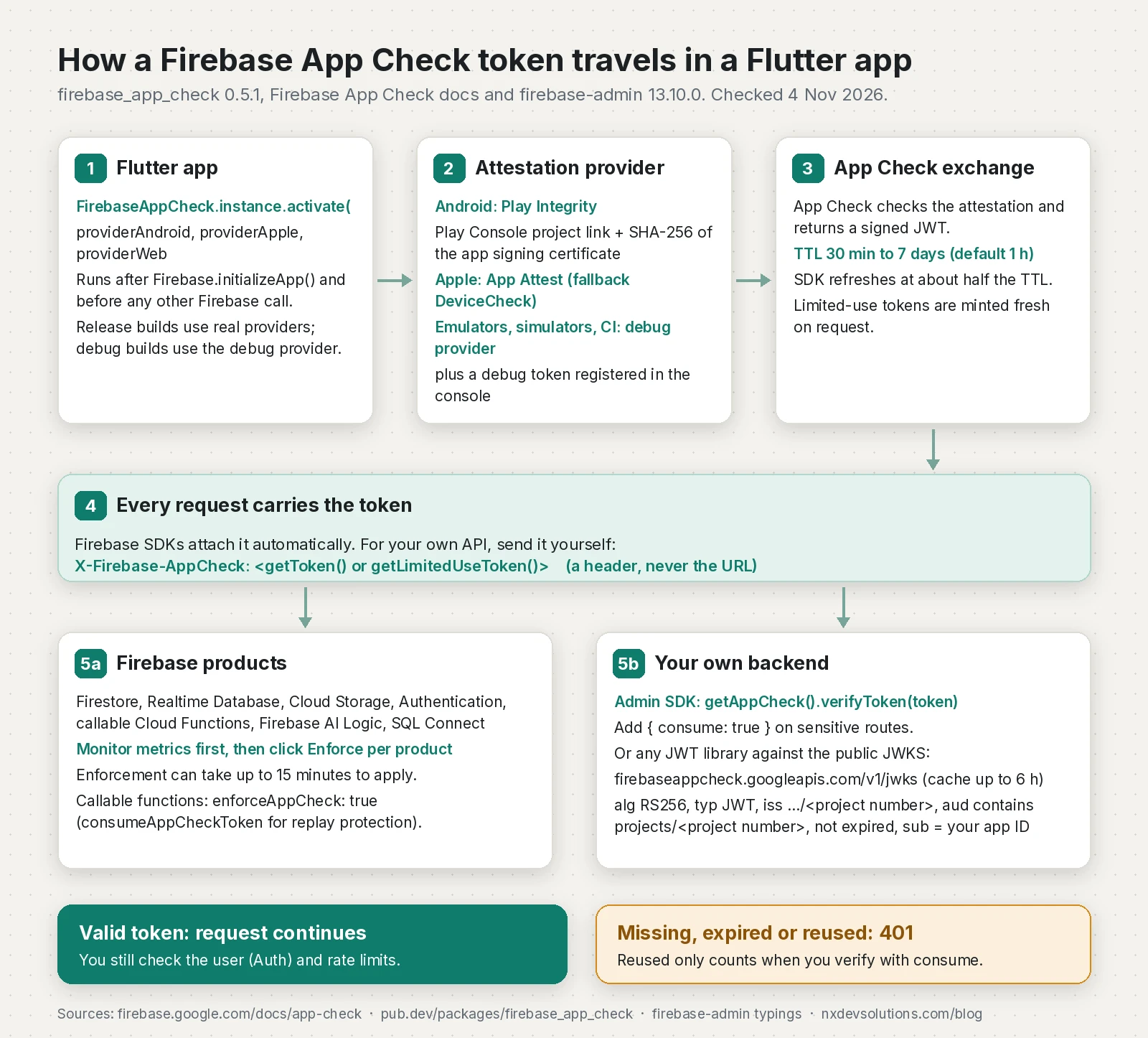
Sending the token from Dart
import 'package:firebase_app_check/firebase_app_check.dart';
import 'package:http/http.dart' as http;

final _api = Uri.parse('https://api.example.com');

// Normal call: cached session token, refreshed by the SDK when needed.
Future<http.Response> getFeed() async {
  final token = await FirebaseAppCheck.instance.getToken();
  if (token == null) throw StateError('No App Check token');
  return http.get(_api.resolve('/api/feed'), headers: {'X-Firebase-AppCheck': token});
}

// Sensitive call: a fresh limited-use token that the server consumes.
Future<http.Response> redeem(String body) async {
  final token = await FirebaseAppCheck.instance.getLimitedUseToken();
  return http.post(_api.resolve('/api/redeem'),
      headers: {'X-Firebase-AppCheck': token, 'content-type': 'application/json'},
      body: body);
}
Verifying with firebase-admin in Express
The Admin SDK's getAppCheck().verifyToken(token, options) checks the signature, issuer, audience and expiry and returns the app ID. I keep the verifier injectable so the middleware is easy to test:
import type { NextFunction, Request, RequestHandler, Response } from "express";
import { initializeApp } from "firebase-admin/app";
import { getAppCheck } from "firebase-admin/app-check";

initializeApp();
type Verify = (token: string, o?: { consume?: boolean }) =>
  Promise<{ appId: string; alreadyConsumed?: boolean }>;
const adminVerify: Verify = (t, o) => getAppCheck().verifyToken(t, o);

export function requireAppCheck(verify: Verify, opts: { consume?: boolean } = {}): RequestHandler {
  return async (req: Request, res: Response, next: NextFunction) => {
    const token = req.header("X-Firebase-AppCheck");
    if (!token) {
      res.status(401).json({ error: "missing App Check token" });
      return;
    }
    try {
      const result = await verify(token, opts.consume ? { consume: true } : undefined);
      if (opts.consume && result.alreadyConsumed) {
        res.status(401).json({ error: "App Check token already used" });
        return;
      }
      res.locals.appId = result.appId;
      next();
    } catch {
      res.status(401).json({ error: "invalid App Check token" });
    }
  };
}

// app.get("/api/feed", requireAppCheck(adminVerify), handler);
// app.post("/api/redeem", requireAppCheck(adminVerify, { consume: true }), handler);
Verifying without the Admin SDK (JWKS)
If you can't run the Admin SDK, for example on an edge runtime, any JWT library works. Firebase lists the checks: fetch the public keys from https://firebaseappcheck.googleapis.com/v1/jwks, verify the RS256 signature, check that the header typ is JWT, that iss is https://firebaseappcheck.googleapis.com/<project number>, that the token hasn't expired and that aud contains projects/<project number>. Optionally check that sub is one of your app IDs. Note that it's the project number, not the project ID. Here it is with jose; this pattern is close to the one in my Supabase JWT and JWKS post.
import type { RequestHandler } from "express";
import { createRemoteJWKSet, jwtVerify } from "jose";

export function requireAppCheckJwks(projectNumber: string, allowedAppIds: string[]): RequestHandler {
  // The endpoint sends Cache-Control max-age=21600, matching Firebase's "cache for up to 6 hours".
  const jwks = createRemoteJWKSet(new URL("https://firebaseappcheck.googleapis.com/v1/jwks"),
    { cacheMaxAge: 6 * 60 * 60 * 1000 });
  return async (req, res, next) => {
    const token = req.header("X-Firebase-AppCheck");
    if (!token) { res.status(401).end(); return; }
    try {
      const { payload } = await jwtVerify(token, jwks, {
        algorithms: ["RS256"],
        typ: "JWT",
        issuer: `https://firebaseappcheck.googleapis.com/${projectNumber}`,
        audience: `projects/${projectNumber}`,
      });
      if (!payload.sub || !allowedAppIds.includes(payload.sub)) { res.status(401).end(); return; }
      res.locals.appId = payload.sub;
      next();
    } catch {
      res.status(401).end();
    }
  };
}
I type-checked both middlewares with strict on and ran 12 tests against tokens shaped like App Check tokens, signed by a local JWKS server. Valid tokens passed. A missing header, wrong audience, wrong issuer, expiry, an unknown key, a wrong typ, an unlisted app ID and a reused consumed token all got 401, and the real firebase-admin 13.10.0 rejected tokens it didn't issue.
Replay protection with limited-use tokens
A normal session token can be replayed until it expires. For endpoints where one request matters, such as redeeming a code or starting a paid AI job, ask the client for a limited-use token and consume it on the server with verifyToken(token, { consume: true }). Then check alreadyConsumed. Without consume, the SDK doesn't check whether a token was used before.
This is still beta. It works only from the Node.js and Python Admin SDKs, adds a network round trip to every verification, and needs the service account to have the "Firebase App Check Token Verifier" role. Among standard Google services, only Firebase AI Logic supports replay protection; in Flutter you turn it on with FirebaseAI.googleAI(useLimitedUseAppCheckTokens: true) (my Genkit Dart guide covers calling Gemini through Firebase from Flutter). For callable functions, set consumeAppCheckToken: true on the server and pass HttpsCallableOptions(limitedUseAppCheckToken: true) from Dart.
What App Check does not do
- It isn't user authentication. It says the request came from your app on a real device, not who the user is. Keep Firebase Auth or your own sessions, and check them on the server too.
- It isn't a secret store. Anyone can still pull strings out of your APK or IPA. Real secrets stay on a server, as I explained in how to hide API keys in Flutter.
- It doesn't stop every attack. Firebase says App Check "prevents some, but not all" abuse, and Google calls Play Integrity one signal in a wider anti-abuse strategy. Keep rate limits and quotas on expensive endpoints.
Firebase App Check rollout checklist
- Upgrade to
firebase_app_check0.5.x and renameandroidProvider,appleProviderandwebProviderto theprovider*parameters. - Raise Android
minSdkto 24 and check your iOS deployment target is 15.0 or higher. - Set
providerAppleexplicitly; the default is DeviceCheck. - Link the Play Integrity API to your Firebase project and register the app signing key's SHA-256 fingerprints.
- Add the App Attest capability and set the entitlement environment to
production. - Register a debug token for emulators and CI and keep it out of the repo.
- Ship, watch metrics, then enforce product by product.
- Send
X-Firebase-AppCheckto your own API and verify it with the Admin SDK or the JWKS. - Use limited-use tokens with
consumeonly on endpoints that need replay protection.
Frequently asked questions
What is Firebase App Check?
Firebase App Check is a Firebase service that checks a request really comes from your genuine app on a real device before your backend serves it. It uses an attestation provider such as Play Integrity on Android or App Attest and DeviceCheck on Apple platforms, and attaches a short-lived token to each request.
Why does activate(androidProvider: ...) no longer compile?
firebase_app_check 0.5.0 removed the webProvider, androidProvider and appleProvider parameters. Use providerWeb, providerAndroid and providerApple with provider objects such as AndroidPlayIntegrityProvider(). Firebase's Flutter setup page still showed the old names on 4 November 2026.
Does Play Integrity work for Android apps that are not on Google Play?
Yes. Firebase says the Play Integrity provider supports apps distributed on Google Play, outside it, or both. For apps only distributed outside Play, Firebase recommends not requiring PLAY_RECOGNIZED and requiring device integrity instead.
Should I use App Attest or DeviceCheck in a Flutter iOS app?
Use AppleAppAttestWithDeviceCheckFallbackProvider, which uses App Attest where the device supports it and falls back to DeviceCheck. If you pass nothing, firebase_app_check 0.5 uses DeviceCheck.
How do I use App Check on an emulator or in CI?
Use the debug provider in non-release builds and register its debug token in the Firebase console under Manage debug tokens. In CI, store one registered token as a secret and pass it in at build time. Never ship a debug token in a release build.
Can I verify Firebase App Check tokens on my own server?
Yes. Send the token in the X-Firebase-AppCheck header and verify it with the Admin SDK's verifyToken, or with any JWT library using the App Check JWKS, the RS256 algorithm, the issuer for your project number and an audience containing projects/ followed by your project number.
Is App Check a replacement for Firebase Authentication?
No. App Check shows a request came from your genuine app on a real device. Authentication tells you who the user is. Use both, and keep rate limits on expensive endpoints.
Sources
- firebase_app_check changelog (0.5.0 and 0.5.1) (pub.dev (firebase.google.com), 2026-10-23)
- FirebaseAppCheck.activate API reference (pub.dev)
- FlutterFire compatible versions (Flutter BoM 5.1.0) (GitHub (firebase/flutterfire), 2026-10-22)
- Get started using App Check in Flutter apps (Firebase, 2026-11-03)
- Use App Check with the debug provider with Flutter (Firebase, 2026-11-03)
- Protect custom backend resources with App Check in Flutter projects (Firebase, 2026-11-03)
- Verify App Check tokens from a custom backend (Firebase, 2026-11-03)
- Firebase App Check overview (Firebase, 2026-11-03)
- Get started using App Check with Play Integrity on Android (Firebase, 2026-11-03)
- Get started using App Check with App Attest on Apple platforms (Firebase, 2026-11-03)
- Enable App Check enforcement (Firebase, 2026-11-03)
- Enable App Check enforcement for Cloud Functions (Firebase, 2026-11-03)
- Overview of the Play Integrity API (Android Developers, 2026-04-20)
- Use Play App Signing (Play Console Help)
- Establishing your app's integrity (App Attest) (Apple Developer)
- firebase-admin (Node.js Admin SDK) 13.10.0 (npm)
- firebase_ai package (useLimitedUseAppCheckTokens) (pub.dev (firebase.google.com))
Keep reading
- How to Hide API Keys in Flutter (and What to Do Instead)You can't hide an API key inside a Flutter app. Which keys are safe to ship, how to restrict them, and how to keep real secrets behind a proxy with App Check.
- Genkit Dart 1.0 for Flutter: Flows, Tools and Model CallsGenkit Dart 1.0 is stable. Here are the packages, typed flows and tools, and where Flutter apps should run model calls without leaking API keys.
- How to Verify a Supabase JWT in Fastify with JWKSVerify Supabase JWTs in a Fastify API with JWKS and jose, handle the legacy JWT secret, rotate keys safely, and secure Socket.IO connections too.
Comments
Share a question or note about this article.
Loading comments…