· 5 min read · Nadeera Silva
How to Verify a Supabase JWT in Fastify with JWKS
Verify Supabase JWTs in a Fastify API with JWKS and jose, handle the legacy JWT secret, rotate keys safely, and secure Socket.IO connections too.

Pactroom uses Supabase Auth in the browser and a separate Fastify API on the server. That split raises one question every Supabase project with its own backend has to answer: how do you verify a Supabase JWT on the server? This post shows how I do it with JWKS and the jose library, what to do if your project still uses the legacy JWT secret, and the details that are easy to get wrong.
Why the API must verify the token itself
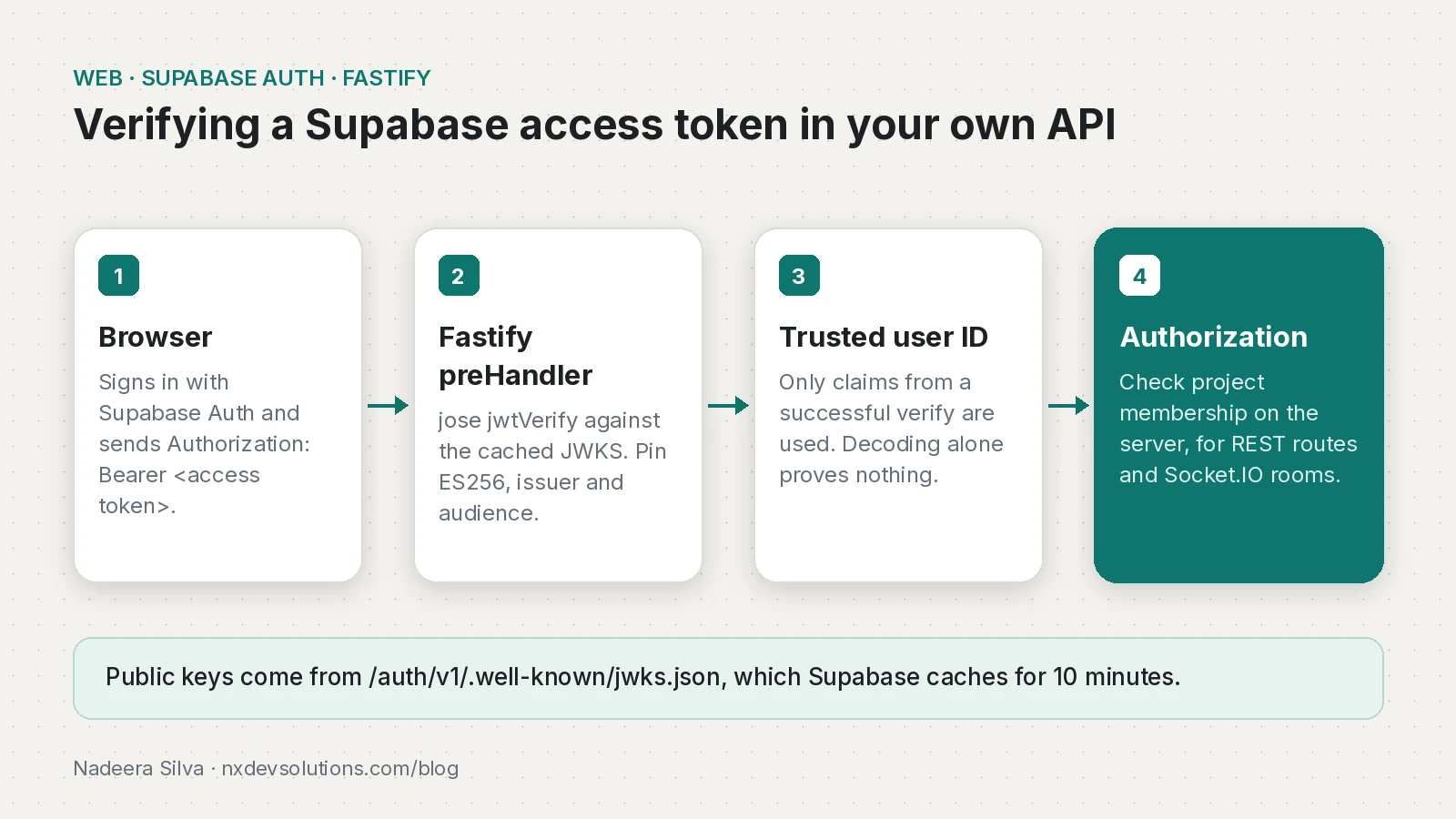
After sign-in, Supabase Auth gives the browser an access token, which it sends to the API in the Authorization header. It's tempting to decode the token and read the user ID.
The API has to check that the token was signed by your project's key, hasn't expired, and has the issuer and audience you expect. Only then is the user ID trustworthy.
Supabase JWT secret or signing keys: which do you have?
Supabase has two systems, and the right verification depends on which your project uses.
| Legacy JWT secret | JWT signing keys | |
|---|---|---|
| Algorithm | HS256 (shared secret) | Asymmetric, such as ES256 |
| Who can verify | Anyone holding the secret, or the Auth server | Anyone, with the public keys from JWKS |
| Supabase's view | "No longer recommended. Available for backward compatibility" | The recommended system |
| How to verify on your server | Call GET /auth/v1/user | Verify locally against the JWKS |
Find it in the dashboard on the JWT signing keys page. If you're still on the legacy secret, Supabase has a Migrate JWT secret button that imports the existing secret into the new system, and their docs say the migration doesn't cause downtime. After that you can add an asymmetric key and rotate to it.
What the Supabase JWKS endpoint is
A JSON Web Key Set is a public document listing the keys used to sign tokens. With signing keys, Supabase serves it at:
https://<project-ref>.supabase.co/auth/v1/.well-known/jwks.jsonPublic keys can only verify signatures, not create tokens, so the API doesn't hold any signing secret. Supabase caches this endpoint at its edge for 10 minutes, which matters during key rotation (more below).
Verify a Supabase JWT in Fastify with jose
jose (6.x at the time of writing) handles fetching, caching and matching keys by key ID:
import { createRemoteJWKSet, jwtVerify } from "jose";

const issuer = "https://<project-ref>.supabase.co/auth/v1";
const jwks = createRemoteJWKSet(new URL(`${issuer}/.well-known/jwks.json`));

export async function verifyAccessToken(token: string) {
  const { payload } = await jwtVerify(token, jwks, {
    issuer,
    audience: "authenticated",
    algorithms: ["ES256"], // whatever your signing key uses
  });
  return { userId: payload.sub as string };
}
Then a Fastify hook reads the bearer token and attaches the user. Declaring the request property keeps TypeScript happy:
import type { FastifyRequest, FastifyReply } from "fastify";

declare module "fastify" {
  interface FastifyRequest { user: { userId: string } | null }
}

app.decorateRequest("user", null);

export async function requireUser(request: FastifyRequest, reply: FastifyReply) {
  const header = request.headers.authorization ?? "";
  const token = header.startsWith("Bearer ") ? header.slice(7) : null;
  if (!token) return reply.code(401).send({ error: "Unauthorized" });
  try {
    request.user = await verifyAccessToken(token);
  } catch {
    return reply.code(401).send({ error: "Unauthorized" });
  }
}

app.get("/projects/:id", { preHandler: requireUser }, getProject);
Attaching the hook per route, rather than globally, keeps public routes such as health checks open.
Details that matter
Pin the algorithm. algorithms: ["ES256"] means the verifier only accepts what you actually use. Trusting the token header's alg has caused real JWT library vulnerabilities.
Check issuer and audience. Supabase access tokens for signed-in users carry the audience authenticated. Checking both stops tokens from another project, or for another purpose, being accepted.
Create the key set once. createRemoteJWKSet caches keys and refetches when it sees an unknown key ID. Create it at startup, not per request.
Rotate keys in two steps. Add a standby key, wait until every cache has picked it up (Supabase's JWKS edge cache is 10 minutes, plus jose's own cache), then rotate. Supabase's docs warn that rotating before your verifiers know the new key can reject valid tokens.
Authorization is a separate step. A valid token proves who the user is, not that they can open a given project. In Pactroom, project access is checked on the server for project data, separately from token verification, and the project AI relies on the same check before retrieving anything.
Socket.IO needs the same check
Pactroom's chat runs over Socket.IO, and a socket is another way in. Verify the token when the socket connects, using Socket.IO middleware, and check project membership before joining a room:
io.use(async (socket, next) => {
  try {
    const token = socket.handshake.auth.token as string;
    socket.data.user = await verifyAccessToken(token);
    next();
  } catch {
    next(new Error("Unauthorized"));
  }
});

io.on("connection", (socket) => {
  socket.on("join", async (projectId: string) => {
    if (!(await isMember(socket.data.user.userId, projectId))) return;
    socket.join(`project:${projectId}`);
  });
});
Testing it
- No token, a malformed token and an expired token all return 401.
- A token with the wrong audience or issuer is rejected.
- A valid token for a user who isn't a project member gets 403 on project routes.
- A socket without a valid token can't connect, and can't join another project's room.
These tests are cheap and catch the regressions that matter. In Pactroom they run on every push in the CI/CD pipeline. You can see how it fits the rest of the system in the Pactroom case study.
Frequently asked questions
How do I verify a Supabase JWT on my server?
With JWT signing keys, verify it against your project's JWKS with a library such as jose, checking issuer, audience and algorithm. With the legacy secret, Supabase recommends calling /auth/v1/user.
Where do I find the Supabase JWT secret?
In the dashboard's JWT settings. Supabase marks the legacy secret as no longer recommended and offers a Migrate JWT secret button to move to signing keys.
What is the Supabase JWKS endpoint?
https://<project-ref>.supabase.co/auth/v1/.well-known/jwks.json. It lists the public keys, and Supabase caches it at the edge for 10 minutes.
What audience do Supabase access tokens use?
Tokens for signed-in users carry the audience authenticated.
Can I just decode the JWT to get the user ID?
No. Anyone can create a token with any user ID. Only trust claims from a successful verification.
How do I secure Socket.IO with Supabase auth?
Verify the token in Socket.IO middleware when the socket connects, and check project membership before joining a room.
Sources
- JWT Signing Keys (Supabase)
- JSON Web Token (JWT) (Supabase)
- JWT claims reference (Supabase)
- jose (GitHub)
- Fastify hooks (Fastify)
- Socket.IO middlewares (Socket.IO)
Keep reading
- RAG with Citations on PostgreSQL and pgvector: How I Built ItHow I built RAG with citations on PostgreSQL and pgvector for Pactroom: schema, project-scoped retrieval, citation prompts and the HNSW filtering trap.
- GitHub Actions CI/CD for a Solo SaaS: Tests, SSH Deploy and Prisma MigrationsThe GitHub Actions pipeline I run for Pactroom: tests, build, SSH deploy to a VPS, prisma migrate deploy and a health check, with a workflow you can adapt.
- How to Hide API Keys in Flutter (and What to Do Instead)You can't hide an API key inside a Flutter app. Which keys are safe to ship, how to restrict them, and how to keep real secrets behind a proxy with App Check.
Comments
Share a question or note about this article.
Loading comments…