· 6 min read · Nadeera Silva
RAG with Citations on PostgreSQL and pgvector: How I Built It
How I built RAG with citations on PostgreSQL and pgvector for Pactroom: schema, project-scoped retrieval, citation prompts and the HNSW filtering trap.

Pactroom is the SaaS product I'm building: a private workspace per project, with chat, files, tasks and an AI assistant. The assistant had one hard requirement from day one. It answers only from the project's own messages and files, and it shows where every answer came from. That means RAG with citations, and I built it on PostgreSQL with pgvector. This post covers the schema, the retrieval query, how to add citations the model can't fake, and the pgvector details that catch people out.
Why RAG with citations, not a general chatbot
When a team asks "what did we decide about the pricing page?", a general model knows nothing about the project and may still answer confidently. For a project tool, the AI is only useful if:
- it knows what was actually said and shared in this project, and
- it can prove it by pointing at the exact message or file.
If people can't check an answer, they stop trusting the assistant. Citations are what make the feature usable.
pgvector on PostgreSQL: setup and schema
pgvector is a Postgres extension (0.8.7 at the time of writing). Many hosted Postgres providers include it, and for local work there's an official Docker image (pgvector/pgvector). Enable it once per database. A simplified version of the chunk table:
CREATE EXTENSION IF NOT EXISTS vector;

CREATE TABLE project_chunks (
  id          bigserial PRIMARY KEY,
  project_id  uuid   NOT NULL,
  source_type text   NOT NULL,          -- 'message' or 'file'
  source_id   uuid   NOT NULL,          -- the message or file this came from
  content     text   NOT NULL,
  embedding   vector(1536) NOT NULL     -- match your embedding model's dimensions
);

CREATE INDEX ON project_chunks USING hnsw (embedding vector_cosine_ops);
CREATE INDEX ON project_chunks (project_id);Keeping vectors next to the rest of the app data means there's no second service to sync, and every chunk carries its project ID, which matters for access control.
What gets indexed
- Chat messages, including replies, so decisions made in conversation can be found later.
- Uploaded files, such as PDFs and spreadsheets, parsed into text first.
Each item is split into chunks, embedded and stored with a reference back to its source.
The retrieval query
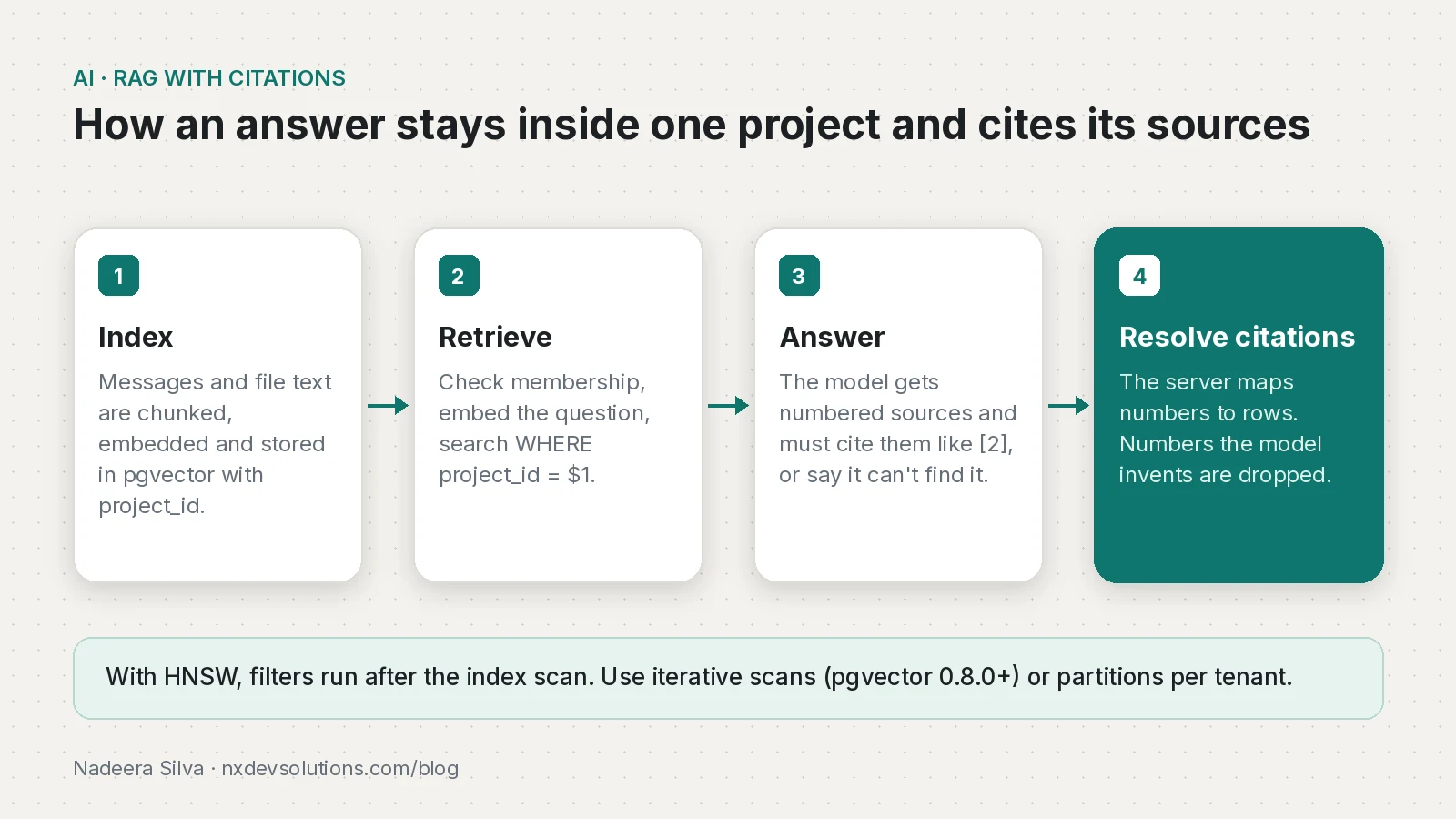
- The API checks that the user is a member of the project.
- The question is embedded with the same model used for indexing.
- A similarity search finds the closest chunks inside that project.
- The top chunks go to the model as numbered sources.
- The model answers only from those sources and cites them by number.
- The server turns each number into a link to the original message or file.
SELECT id, source_type, source_id, content
FROM project_chunks
WHERE project_id = $1
ORDER BY embedding <=> $2
LIMIT 8;
<=> is pgvector's cosine distance. The WHERE project_id = $1 filter means retrieval is scoped to one project before anything reaches the model.
How to add citations to RAG
These are the rules I'd apply to any RAG assistant:
- Number the sources in the prompt and ask for citations by number. "According to the file" is impossible to verify.
- Resolve citations in your own code. The model returns numbers; the server maps them to sources. The model can't invent a link.
- Allow "I don't know". An honest "I couldn't find that in this project" beats a guess.
- Show the source, not just the answer. A citation should open the exact message or file.
A simplified version of the prompt and the server-side mapping:
const sources = rows.map((r, i) => `[${i + 1}] ${r.content}`).join("\n\n");

const system = `Answer using only the numbered sources below.
Cite every claim with its source number in square brackets, like [2].
If the sources don't contain the answer, say you couldn't find it in this project.

${sources}`;

// after the answer is generated:
function resolveCitations(answer: string, rows: Chunk[]) {
  const used = new Set([...answer.matchAll(/\[(\d+)\]/g)].map((m) => Number(m[1])));
  return [...used]
    .filter((n) => n >= 1 && n <= rows.length) // ignore numbers the model made up
    .map((n) => ({ n, type: rows[n - 1].source_type, id: rows[n - 1].source_id }));
}
The citation list shown to the user comes from rows, which came from the database query. If the model writes [12] when only 8 sources were given, it's dropped.
Keeping the AI inside the project
Access control lives in the API, not just the interface, and that includes the AI. Project membership is checked on the server before anything is retrieved. The user behind each request is identified by verifying their Supabase JWT in Fastify, so the check starts from a trusted user ID. Requests are validated with Zod and rate limited per user, which keeps abuse and LLM costs in check.
Handling uploaded files safely
- The browser uploads files straight to storage using signed URLs, so large files never pass through the API server.
- The API then extracts text. PDFs are parsed with unpdf, and spreadsheets are parsed with checks against zip bombs, since modern spreadsheet formats are zip archives.
- Only the extracted text is chunked and embedded.
Streaming the answer
Answers stream into the UI with the Vercel AI SDK and render with Streamdown, so code blocks, maths and Mermaid diagrams display correctly while text is still arriving. Streaming makes long answers feel much faster even when total generation time is the same.
pgvector vs Pinecone or Qdrant
| pgvector | A dedicated vector database | |
|---|---|---|
| Where vectors live | Your existing Postgres | A separate service |
| Joins with app data and permissions | Plain SQL | Copy metadata across and keep it in sync |
| Hybrid search | Postgres full-text search plus vectors | Depends on the product |
| When I'd choose it | You already run Postgres | Very large collections or a team that wants a managed vector service |
For Pactroom, the main draw is access control: the project ID filter sits in the same query as the vector search.
What I'd recommend
- Start with Postgres and pgvector if you already use Postgres.
- Store the project or tenant ID on every chunk and filter on it in every query.
- Turn on iterative scans, or partition, once you add an approximate index.
- Keep citation mapping on the server.
- Test the access rules, not just the happy path. They run on every deploy in Pactroom's CI/CD pipeline.
- Make "not found" an acceptable answer in the prompt.
Pactroom is live at pactroom.app, and the full case study is on the Pactroom project page.
Frequently asked questions
How do I add citations to RAG?
Pass retrieved chunks to the model as numbered sources, ask it to cite numbers like [2], and map those numbers back to the original rows in your own code.
How do I stop a RAG model inventing citations?
Resolve citations on the server from the rows you retrieved, and drop any number outside that list. The model never produces a link itself.
Why does my pgvector query return fewer rows than LIMIT?
With HNSW or IVFFlat indexes, filtering happens after the index scan. Enable iterative scans (pgvector 0.8.0+) or partition by tenant.
Should I use pgvector or Pinecone?
If you already run Postgres, pgvector keeps vectors next to your data and permissions. A dedicated vector database makes more sense for very large collections or teams that want a managed vector service.
How do I install pgvector?
Many hosted Postgres providers include it; run CREATE EXTENSION vector. Locally you can use the pgvector/pgvector Docker image or install it from source.
Sources
- pgvector README (filtering and iterative index scans) (GitHub)
- AI SDK documentation (Vercel)
- Streamdown (Vercel)
- unpdf (GitHub)
- Table partitioning (PostgreSQL)
Keep reading
- How to Verify a Supabase JWT in Fastify with JWKSVerify Supabase JWTs in a Fastify API with JWKS and jose, handle the legacy JWT secret, rotate keys safely, and secure Socket.IO connections too.
- GitHub Actions CI/CD for a Solo SaaS: Tests, SSH Deploy and Prisma MigrationsThe GitHub Actions pipeline I run for Pactroom: tests, build, SSH deploy to a VPS, prisma migrate deploy and a health check, with a workflow you can adapt.
- Building a Next.js Portfolio Website with Firestore and an AI ChatbotHow I built my Next.js portfolio on Firebase: Firestore content with typed fallbacks, SEO metadata, a guarded AI chatbot and a contact form that checks errors.
Comments
Share a question or note about this article.
Loading comments…