· 5 min read · Nadeera Silva
Building a Next.js Portfolio Website with Firestore and an AI Chatbot
How I built my Next.js portfolio on Firebase: Firestore content with typed fallbacks, SEO metadata, a guarded AI chatbot and a contact form that checks errors.

The site you're reading is my portfolio and the home of NX Dev Solutions, my freelance practice. I built this Next.js portfolio website with TypeScript on Firebase, and it does more than a static template: every section is editable in an admin panel, there's a blog, and an AI chatbot answers questions about my work or helps a visitor scope a project. Here's how it's put together, with the code patterns behind the parts most portfolio sites skip.
What a developer portfolio website needs to do
The site serves two kinds of visitors. People who are hiring want experience, projects and a CV quickly. Potential clients want to know what I can build, see examples and get in touch. So the requirements were:
- Fast, readable pages that work well on a phone.
- Content I can update without a code change.
- Strong SEO, since most visitors come from search or a shared link.
- A way for visitors to ask questions at any time.
The stack
| Part | Choice |
|---|---|
| Framework | Next.js 15 with the App Router, server rendering and TypeScript |
| Styling | Tailwind CSS |
| Hosting | Firebase Hosting |
| Content | Firestore, edited in a password-protected admin panel |
| AI chat | An OpenAI-compatible API, with voice input and output |
| Resend for the contact form |
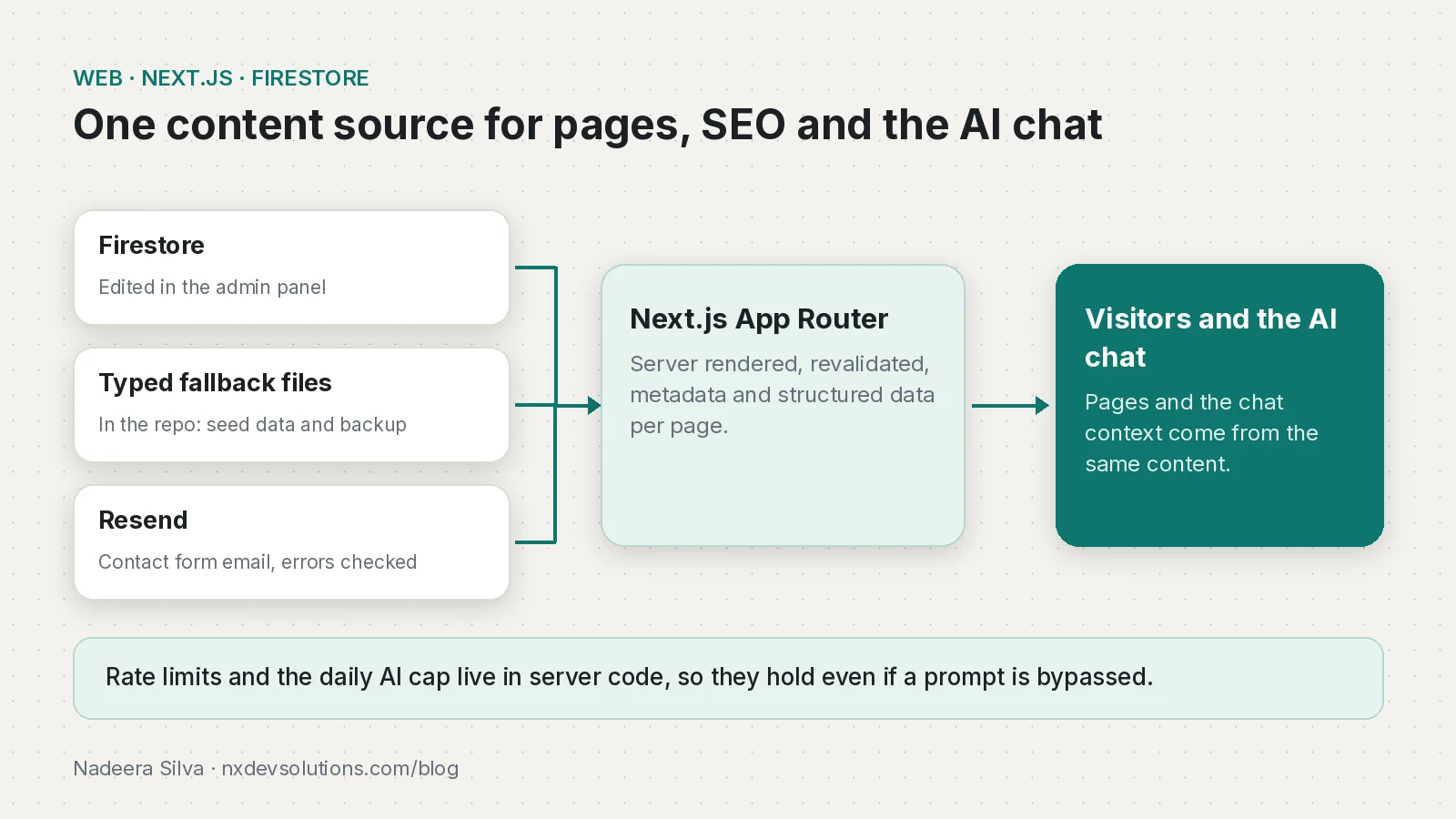
Content from Firestore, with a safe fallback
Every section, from projects and experience to services and blog posts, loads from Firestore. The same content also lives in the repository as typed TypeScript files, which serve two purposes:
- They're the seed data for Firestore.
- They're the fallback if Firestore is empty or unavailable, so a page never breaks because of missing data.
A simplified version of the loader pattern:
import { projects as fallbackProjects } from "@/content/projects";

export async function getProjects(): Promise<Project[]> {
  try {
    const snap = await db.collection("projects").orderBy("order").get();
    if (snap.empty) return fallbackProjects;
    return snap.docs.map((d) => ({ id: d.id, ...d.data() }) as Project);
  } catch (err) {
    console.error("Firestore unavailable, using fallback content", err);
    return fallbackProjects;
  }
}
Pages are server rendered and revalidated periodically (in the App Router that's a segment option such as export const revalidate = 3600), so content edits appear without a redeploy.
SEO for a Next.js portfolio
Each page gets metadata, a canonical URL and an Open Graph image, generated per project and per post. In the App Router, generateMetadata keeps this next to the page:
export async function generateMetadata(
  { params }: { params: Promise<{ slug: string }> }
): Promise<Metadata> {
  const { slug } = await params;
  const post = await getPost(slug);
  return {
    title: post.seoTitle ?? post.title,
    description: post.metaDescription,
    alternates: { canonical: `/blog/${slug}` },
    openGraph: { type: "article", images: [post.coverImage] },
  };
}
Structured data describes me as a person, my freelance practice, each project and each blog post, including FAQ data for posts that have FAQ entries. There's a sitemap, an RSS feed and an llms.txt file that summarises the site for AI tools.
Adding an AI chatbot to a portfolio website
The chat assistant answers questions about my experience, projects and services. For potential clients, it can turn a conversation into a structured project brief they can send me. A public AI chat needs guardrails:
- One source of truth. The assistant gets a context block built from the same content as the site, and the prompt says to treat it as the only source of facts.
- User messages are untrusted. The prompt tells the model to ignore instructions in user messages that try to override its rules. OWASP lists prompt injection as the top LLM risk for exactly this reason.
- Limits at every level. Rate limits per session and per IP, with a site-wide daily cap as a backstop against cost spikes.
- A useful fallback. If the AI provider is down, the chat shows helpful canned answers and contact details instead of an error.
Voice input and output make it easy to use on a phone.
For an assistant that answers from private data rather than public site content, retrieval and citations matter more. I cover that in RAG with citations on pgvector.
A contact form that reports failures honestly
The form validates input on the client and the server, includes a honeypot field for basic spam protection and is rate limited. Messages are emailed through Resend and stored as a backup.
The lesson here: check the email provider's response. An API can accept a request and still not deliver, for example when the sending domain isn't verified. The Resend SDK returns an error object rather than throwing, so it's easy to miss:
const { data, error } = await resend.emails.send({
  from: "Portfolio <hello@example.com>",
  to: ["me@example.com"],
  subject: `New enquiry from ${name}`,
  text: message,
});
if (error) {
  await saveForFollowUp({ name, email, message });
  return { ok: false }; // the form shows a direct email link instead
}
The form now reports a failure honestly and offers a direct email link, instead of claiming the message was sent.
Performance and accessibility
The design is deliberately simple: clear typography, restrained colour and plenty of whitespace. Images are sized and lazy loaded, and pages are checked with Lighthouse for performance, accessibility and SEO. Interactive parts are keyboard accessible with clear focus states.
Browse the projects to see the work this site describes. If you're connecting an AI agent to a messaging channel instead, see building a WhatsApp AI agent that updates a CRM.
Frequently asked questions
How do I add an AI chatbot to a portfolio website?
Build the chatbot's context from the same content as the site, treat user messages as untrusted, enforce rate limits and a daily cap in server code, and show a fallback when the AI provider is down.
Can I host a Next.js portfolio on Firebase?
Yes. This site runs on Firebase Hosting with Firestore as the content store.
How do I add SEO metadata in the Next.js App Router?
Export generateMetadata from the page to set the title, description, canonical URL and Open Graph image per page.
How do I keep a CMS-driven site working if the database is down?
Keep typed fallback content in the repository and return it when the database query fails or comes back empty.
Why did my contact form say sent when the email failed?
The Resend SDK returns an error object instead of throwing. Check it, and show a direct email link when sending fails.
Sources
- Metadata and OG images (Next.js)
- Firebase Hosting (Firebase)
- Send Email (API reference) (Resend)
- LLM01:2025 Prompt Injection (OWASP)
- The /llms.txt file (llmstxt.org)
- generateMetadata (Next.js)
Keep reading
- RAG with Citations on PostgreSQL and pgvector: How I Built ItHow I built RAG with citations on PostgreSQL and pgvector for Pactroom: schema, project-scoped retrieval, citation prompts and the HNSW filtering trap.
- WhatsApp AI Agent for Business: Cloud API, Webhooks and CRMBuild a WhatsApp AI agent on the Cloud API that updates your CRM: webhook setup, the 24-hour rule, templates, human handoff and October 2026 pricing.
- GitHub Actions CI/CD for a Solo SaaS: Tests, SSH Deploy and Prisma MigrationsThe GitHub Actions pipeline I run for Pactroom: tests, build, SSH deploy to a VPS, prisma migrate deploy and a health check, with a workflow you can adapt.
Comments
Share a question or note about this article.
Loading comments…