· 11 min read · Nadeera Silva
Genkit Dart 1.0 for Flutter: Flows, Tools and Model Calls
Genkit Dart 1.0 is stable. Here are the packages, typed flows and tools, and where Flutter apps should run model calls without leaking API keys.
Genkit Dart is the Dart SDK for Genkit (still widely searched as Firebase Genkit or Genkit AI), Google's open-source framework for building AI features and agents, and version 1.0 shipped as the first stable release on 8 October 2026. If you build Flutter apps, the useful part is that your prompts, tools and typed schemas can now live in Dart on both sides of the wire. The harder question is where the model call itself should run: in the app, in a Dart server flow, or behind a small proxy. This guide covers the packages and versions, flows, tools and schemas, the three placements with their tradeoffs, serving a flow and calling it from Flutter, the Developer UI, Cloud Run, and the gotchas I hit while testing.
What Genkit Dart 1.0 gives you
The Dart version reached 1.0 after a preview earlier in 2026. The announcement lists three main promises:
- One API across providers. Gemini, Anthropic Claude, OpenAI and OpenAI-compatible models are plugins. You switch models by changing the
model:argument, not your app logic. - Typed flows. A flow is a typed, observable function that you can test locally and deploy as an HTTP endpoint. Schemas are written once in Dart with the
schemanticpackage and shared by the server and the Flutter app. - Local tooling. A Developer UI for running flows, trying prompts and reading step-by-step traces.
1.0 also includes human-in-the-loop tool interrupts, generation middleware (retries, SKILL.md skills, tool approval), Dotprompt .prompt files and OpenTelemetry export. Stateful agents (defineAgent) and generative UI with A2UI are still under package:genkit/experimental.dart, so treat them as preview APIs.
Genkit Dart packages and versions
These are the versions on pub.dev on 28 October 2026. The whole 1.0.1 family was published on 21 October 2026, and every package needs Dart SDK 3.12 or newer.
| Package | Version | Status | What it is for |
|---|---|---|---|
genkit | 1.0.1 | Stable | Core: flows, tools, generate, GenkitRouter, client |
genkit_google_genai | 1.0.1 | Stable | Gemini via the Gemini Developer API |
genkit_vertexai | 1.0.1 | Stable | Gemini on Google Cloud |
genkit_anthropic | 1.0.1 | Stable | Claude models |
genkit_openai | 1.0.1 | Stable | OpenAI and OpenAI-compatible endpoints |
genkit_shelf | 1.0.1 | Stable | Mount Genkit inside an existing Shelf server |
genkit_middleware | 1.0.1 | Stable | Retry, skills and tool approval middleware |
genkit_mcp | 1.0.1 | Stable | Model Context Protocol support |
schemantic / schemantic_builder | 1.0.0 | Stable | @Schema() types and their code generator |
genkit_firebase_ai | 0.4.0 | Pre-1.0 | Client-side calls through Firebase AI Logic |
genkit_otel | 0.2.1 | Pre-1.0 | OpenTelemetry traces and metrics |
genkit_a2ui | 0.4.1 | Pre-1.0 | Generative UI for Flutter (experimental) |
The source lives in the genkit-dart GitHub repository, which is also where issues go.
Flows, tools and schemas in Genkit Dart
Here is the flow I tested. The model calls a tool to get days per screen, then returns a typed Quote. Install the packages first, adding the two dev dependencies in one command (see the gotchas for why):
dart pub add genkit schemantic
dart pub add dev:schemantic_builder dev:build_runner
Schemas are abstract classes with @Schema(). The generator creates concrete classes, each with a $schema you pass to Genkit:
import 'package:genkit/genkit.dart';
import 'package:genkit/io.dart';
import 'package:schemantic/schemantic.dart';

part 'server.g.dart';

@Schema()
abstract class $QuoteRequest {
  String get service;
  int get screens;
}

@Schema()
abstract class $Quote {
  String get service;
  int get screens;
  int get estimatedDays;
  String get summary;
}

@Schema()
abstract class $RateInput {
  String get service;
}
Run dart run build_runner build to generate server.g.dart. Then define a tool and a flow:
Future<void> main() async {
  final ai = Genkit(); // add plugins here, e.g. Genkit(plugins: [googleAI()])

  final daysPerScreen = ai.defineTool(
    name: 'daysPerScreen',
    description: 'Returns typical build days per screen for a service.',
    inputSchema: RateInput.$schema,
    fn: (input, _) async =>
        .response(input.service.toLowerCase().contains('flutter') ? 2 : 3),
  );

  final quoteFlow = ai.defineFlow(
    name: 'quote',
    inputSchema: QuoteRequest.$schema,
    outputSchema: Quote.$schema,
    fn: (req, _) async {
      final response = await ai.generate(
        model: myModel, // in my test, a fake model; see below
        prompt: 'Estimate a ${req.screens}-screen ${req.service}.',
        tools: [daysPerScreen],
        outputSchema: Quote.$schema,
      );
      return response.output!;
    },
  );

  await (GenkitRouter()..addAction(quoteFlow)).serve(); // POST /quote
}
With a real provider, myModel would be something like googleAI.gemini('gemini-flash-latest') from genkit_google_genai, which reads the key from the GEMINI_API_KEY or GOOGLE_API_KEY environment variable. In my test it was a fake model defined with ai.defineModel that asks for the tool on the first turn and returns JSON on the second. That proves the plumbing: the tool ran, the output was parsed into a Quote, and the program printed Typed result: 16 days -> About 16 working days for 8 screens.
Worth knowing:
- Tools are plain Dart functions. The model decides when to call them. A tool can return
.interrupt(...)instead of.response(...)to pause until the user confirms;generatethen finishes withFinishReason.interruptedand you resume after confirmation. - `outputSchema` does the parsing.
response.outputis a typed object, not a string you have to decode yourself. - Flows are what you deploy. Anything you add to
GenkitRouterbecomesPOST /<name>.
Genkit and Flutter: where to put model calls
This is the decision that matters most. The announcement describes three options.
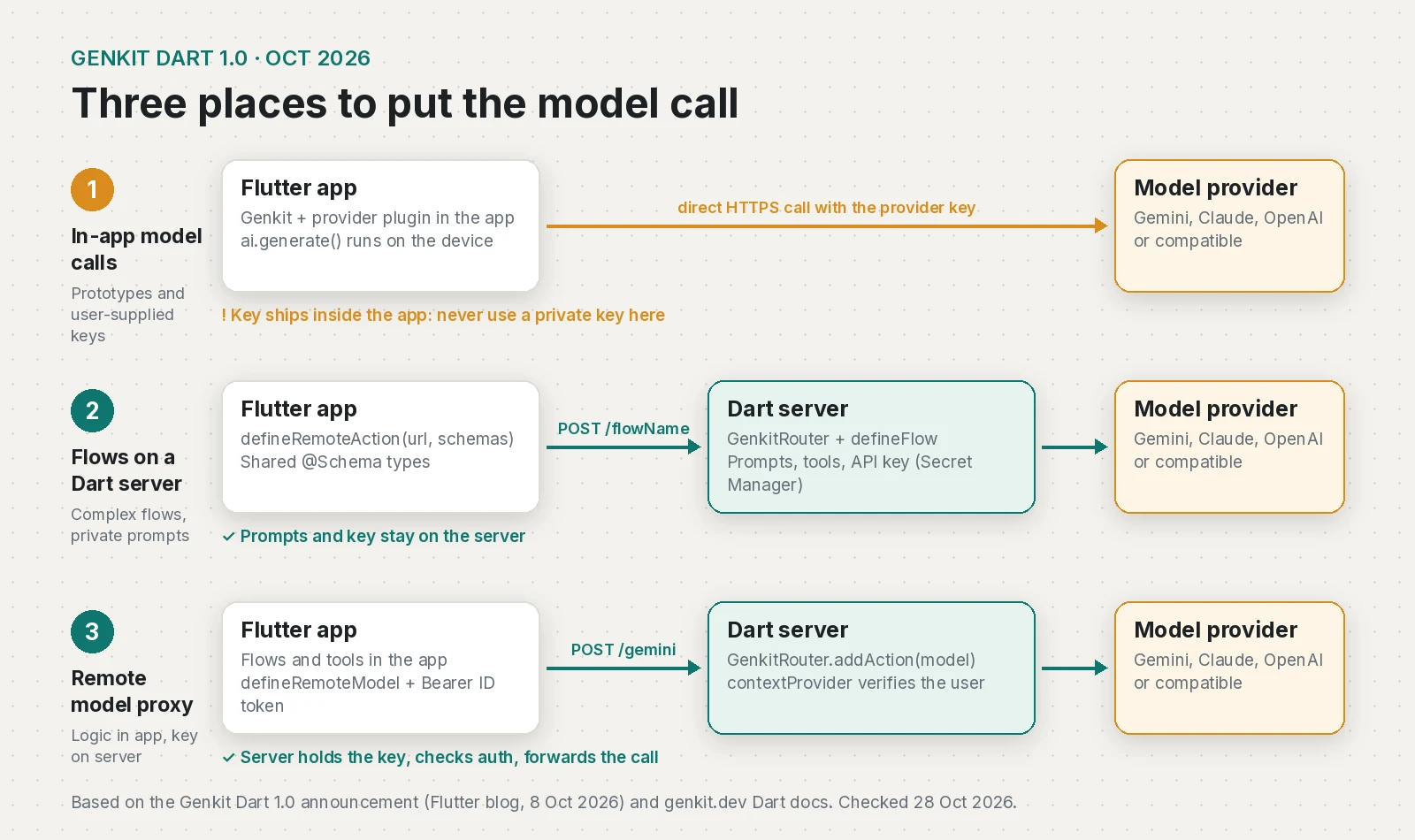
| Placement | Where the key lives | Good for | Tradeoffs |
|---|---|---|---|
| 1. In-app model calls | Inside the app, or supplied by the user | Prototypes, bring-your-own-key apps | Anyone can extract a bundled key; prompts ship in the app |
| 2. Flows on a Dart server | Server only (Secret Manager) | Production features, multi-step flows, private prompts | You run and pay for a server; app updates and server deploys need versioning |
| 3. Remote model proxy | Server only | Logic that needs device state, quick iteration in the app | Prompts and tool logic are visible in the app; the proxy must check auth and limit usage |
1. Model calls directly in Flutter
You add a provider plugin to the Flutter app and call ai.generate on the device. It is the fastest way to try an idea and suits apps where each user brings their own key. For a published app using your key, it is the wrong choice.
2. Flows on a Dart server
This is where I would start for client work. Prompts, tools and the key stay on the server, and the Flutter app only knows the flow URL and the shared schemas. Put the @Schema() classes in a small shared Dart package that both the server and the app depend on, as the announcement suggests.
3. Logic in Flutter, model calls proxied
Here the app keeps its flows and tools, but the model itself is remote. The server registers a model as an action and checks the user before every request. This is the server side from the announcement:
final genkit = GenkitRouter()
  ..addAction(
    googleAI().model('gemini-flash-latest'),
    path: '/gemini',
    // Runs before the model; throw a GenkitException to reject the request.
    contextProvider: (request) async =>
        {'user': await verifyUser(request.headers['authorization'])},
  );
await genkit.serve(port: 8080);
In the app, ai.defineRemoteModel(name: 'gemini', url: ..., headers: ...) sends a Firebase ID token (or your own session token) as a Bearer header. I did not test this placement. If you go this way, add per-user rate limits in verifyUser or in front of the service, because a valid login is all an attacker needs to spend your quota.
There is also a Firebase route: genkit_firebase_ai calls Gemini through Firebase AI Logic from the Flutter client, reading App Check and Auth from your FirebaseApp, so no raw key ships in the app. It is 0.4.0, so I would wait for 1.0 before building a client project on it.
Serving a flow with GenkitRouter and calling it from Flutter
GenkitRouter from package:genkit/io.dart turns actions into HTTP endpoints. The request body wraps the input in data and the response wraps the output in result:
curl -X POST http://localhost:3400/quote \
  -H 'Content-Type: application/json' \
  -d '{"data":{"service":"Flutter app","screens":8}}'
# {"result":{"service":"Flutter app","screens":8,"estimatedDays":16,"summary":"About 16 working days for 8 screens."}}
On the client, import package:genkit/client.dart (the lightweight client export) and define a remote action with the same schemas:
import 'package:genkit/client.dart';
import 'package:shared_models/models.dart'; // your shared @Schema package

final quote = defineRemoteAction(
  url: 'https://api.example.com/quote',
  inputSchema: QuoteRequest.$schema,
  outputSchema: Quote.$schema,
);

Future<void> loadQuote() async {
  try {
    final result = await quote(
      input: QuoteRequest(service: 'Flutter app', screens: 8),
      headers: {'Authorization': 'Bearer ${await getIdToken()}'},
    );
    print('${result.estimatedDays} days: ${result.summary}');
  } on GenkitException catch (e) {
    print('Genkit error ${e.status}: ${e.message}');
  }
}
I ran this (without the auth header) against the local server from a Dart command-line program and got From server: 16 days, About 16 working days for 8 screens. In Flutter, call it from a controller or provider instead of printing. getIdToken() stands for however your app gets its auth token; check it on the server with a contextProvider as in placement 3.
Testing flows in the Genkit Developer UI
The Developer UI runs through the Genkit CLI, which is a Node package even though your code is Dart. From the developer tools docs:
npm install -g genkit-cli
genkit start -o -- dart run bin/server.dart
The CLI starts the Telemetry API on http://localhost:4033 and the Developer UI on http://localhost:4000, where you can run each flow, see every model and tool call in the trace, and try prompts. I did not run the Developer UI for this post, so this part is from the docs.
Deploying Genkit Dart flows to Cloud Run
The Cloud Run guide is short. The key points (I have not deployed this demo):
GenkitRouter.serve()listens on all interfaces and reads thePORTenvironment variable, falling back to 3400. Cloud Run setsPORT, so you do not pass a port.- The sample Dockerfile is a multi-stage build:
dart pub get,dart run build_runner build -dto generate schema code,dart compile exe, then a minimalFROM scratchruntime image. - Store the model key in Secret Manager and map it at deploy time with
--set-secrets GOOGLE_API_KEY=google-api-key:latest. - If browser apps (Flutter web) on other origins call the service, pass
cors: const CorsOptions(allowedOrigins: [...])toserve().
Genkit Dart gotchas I hit while testing
- `schemantic` alone does not generate code. The
@Schema()generator is the separateschemantic_builderpackage. Without it,build_runnerfinished with "wrote 0 outputs" and the generated classes were missing. - Add `build_runner` and `schemantic_builder` in one command. On 28 October the newest
build_runner(2.17.1) needsbuild5.x, whileschemantic_builder1.0.0 needsbuild^4.0.4. Addingbuild_runnerfirst and thenschemantic_builderfailed to resolve. Adding both together let pub pickbuild_runner2.16.2. - Bad input returns HTTP 500, not 400. Posting
{"data":{"service":"Flutter app"}}withoutscreensreturned{"code":500,"status":"INTERNAL","message":"Internal server error"}. Validate input yourself or throw aGenkitExceptionwith a clear status if your client needs friendly errors. - Dart 3.12 is the minimum. Every 1.0.1 package requires SDK ^3.12.0, and the tool code above uses dot shorthands like
.response(...). Check your Flutter version's bundled Dart before upgrading a project.
A short checklist before shipping
- Model key only on the server, in Secret Manager or an environment variable.
- Shared
@Schema()package used by both server and app. contextProviderchecks the user on every flow and proxied model.- Rate limits per user, plus a budget alert on the provider account.
- Input validated so clients get 4xx errors, not 500s.
- Pre-1.0 packages (
genkit_firebase_ai,genkit_otel,genkit_a2ui) pinned to exact versions.
If you build agents with skills, Genkit's skills() middleware loads the same SKILL.md format I described in my Agent Skills guide, so skills you already wrote can carry over.
Frequently asked questions
What is Genkit Dart?
Genkit Dart is the Dart SDK for Genkit, Google's open-source framework for building AI features and agents (formerly branded Firebase Genkit, and often searched as Genkit AI). It gives you one API for Gemini, Claude, OpenAI and OpenAI-compatible models, plus typed flows, tools and a local Developer UI.
Is Genkit Dart 1.0 stable?
Yes. Genkit Dart 1.0 was announced as the first stable release on 8 October 2026, and the core genkit package was at 1.0.1 on 28 October 2026. Some add-ons such as genkit_firebase_ai (0.4.0) are still pre-1.0.
Can I use Firebase Genkit with Flutter?
Yes. You can call a Genkit flow on a Dart server from Flutter with defineRemoteAction, proxy model calls through a Genkit server, or call models from the app. The genkit_firebase_ai plugin routes client calls through Firebase AI Logic but is still version 0.4.0.
Where is the Genkit Dart GitHub repository?
The source code is in the genkit-ai/genkit-dart repository on GitHub, which is linked from the genkit package page on pub.dev. Issues and samples are there too.
Should I put my Gemini API key in my Flutter app?
No. A key bundled in a published app can be extracted and used by anyone. Keep it on a server, such as a Genkit Dart flow on Cloud Run with the key in Secret Manager, and have the app call that server.
Do I need Node.js to use Genkit Dart?
Not to run your app. Your flows are plain Dart. The Genkit CLI that launches the Developer UI is installed with npm, so you need Node.js only for that local tooling.
Sources
- Announcing Genkit Dart 1.0: Build production-ready agentic apps with Dart and Flutter (The Flutter Blog, 2026-10-08)
- genkit package (pub.dev, 2026-10-21)
- genkit_firebase_ai changelog (pub.dev, 2026-10-21)
- genkit-dart repository (GitHub)
- Genkit for Dart overview (Genkit Docs)
- Developer tools (Dart) (Genkit Docs)
- Deploy with Cloud Run (Dart) (Genkit Docs)
Keep reading
- How to Hide API Keys in Flutter (and What to Do Instead)You can't hide an API key inside a Flutter app. Which keys are safe to ship, how to restrict them, and how to keep real secrets behind a proxy with App Check.
- Agent Skills Guide: Write a SKILL.md That Works EverywhereWhat agent skills are, how to write a SKILL.md that loads in Claude Code, Copilot, Cursor and Codex, and how to install shared skills safely.
- LLM API Pricing Compared: Cost per Task, Not per TokenOpenAI, Claude, Gemini and DeepSeek API prices from their own pages, and a simple way to work out what one completed AI task really costs.
Comments
Share a question or note about this article.
Loading comments…