
Siri AI is now open to every iOS developer, but only through native App Intents code. On 3 November 2026 Apple announced a Siri AI Developer Preview with the iOS 27.3, iPadOS 27.3, macOS 27.3 and visionOS 27.3 betas, so any app can expose its own actions and content to the new Siri. If you build with Flutter, there is no switch to flip in Dart. You add a small Swift layer to the iOS Runner target and share data with it. This guide covers what the preview gives you, the Swift and Dart code I would start with, what to build now versus later, and the limits that decide who can use it.
What is Siri AI?
Siri AI is Apple's new, conversational version of Siri. It understands personal context and what is on screen, and it can carry out multi-step requests in natural language. Apple's news post says it already works across Calendar, Files, Mail, Maps, Notes, Reminders, Safari, Shortcuts and other Apple apps.
What changed for developers on 3 November is that third-party apps can join in properly. Until now, the new Siri understood app actions and content mainly when they fitted one of Apple's app schema domains, such as messaging or photos, plus the fixed phrases of App Shortcuts. With the preview, Siri AI can call custom actions and find custom content, as long as you expose them explicitly through App Intents.
What the Siri AI Developer Preview adds
The Bringing custom actions and content to Siri article and the ToolIntent reference describe the new pieces. All of them are marked iOS 27.3 beta.
| Piece | What it does | API |
|---|---|---|
| Tool intents | Turns an app intent into a tool Siri AI can call | @AppIntent(.tool) macro, ToolIntent protocol |
| Custom entities | Siri finds your content through the Spotlight semantic index, not only schema types | IndexedEntity, CSSearchableIndex.indexAppEntities |
| Generable entities | Siri fills an entity straight from the request without querying your app | @AppEntity(.generable), GenerableEntity |
| Skills | Markdown guidance for multi-step tasks | Skills.skillsbundle with SKILL.md files |
| Card snippets | Branded SwiftUI cards in Siri answers | CardSnippet |
| Testing | Advisor feedback and scripted Siri conversations | Siri Integration Advisor in Xcode, SiriEvaluations framework |
Two rules from the docs matter for planning. Siri can call your tools without hearing your app's name only when the app is in the foreground, has an active Live Activity, or was mentioned earlier in the same Siri conversation. While your app is in the background, the request has to name the app. And Apple says intents with side effects a person should start on purpose, such as placing and paying for an order, are not good tool candidates.
How a Flutter app adds Siri AI
Siri AI reads App Intents metadata that the Swift compiler generates at build time. Dart code can't produce that metadata, so the intents and entities have to be Swift types in the iOS target. The Flutter side only owns the data and the UI.
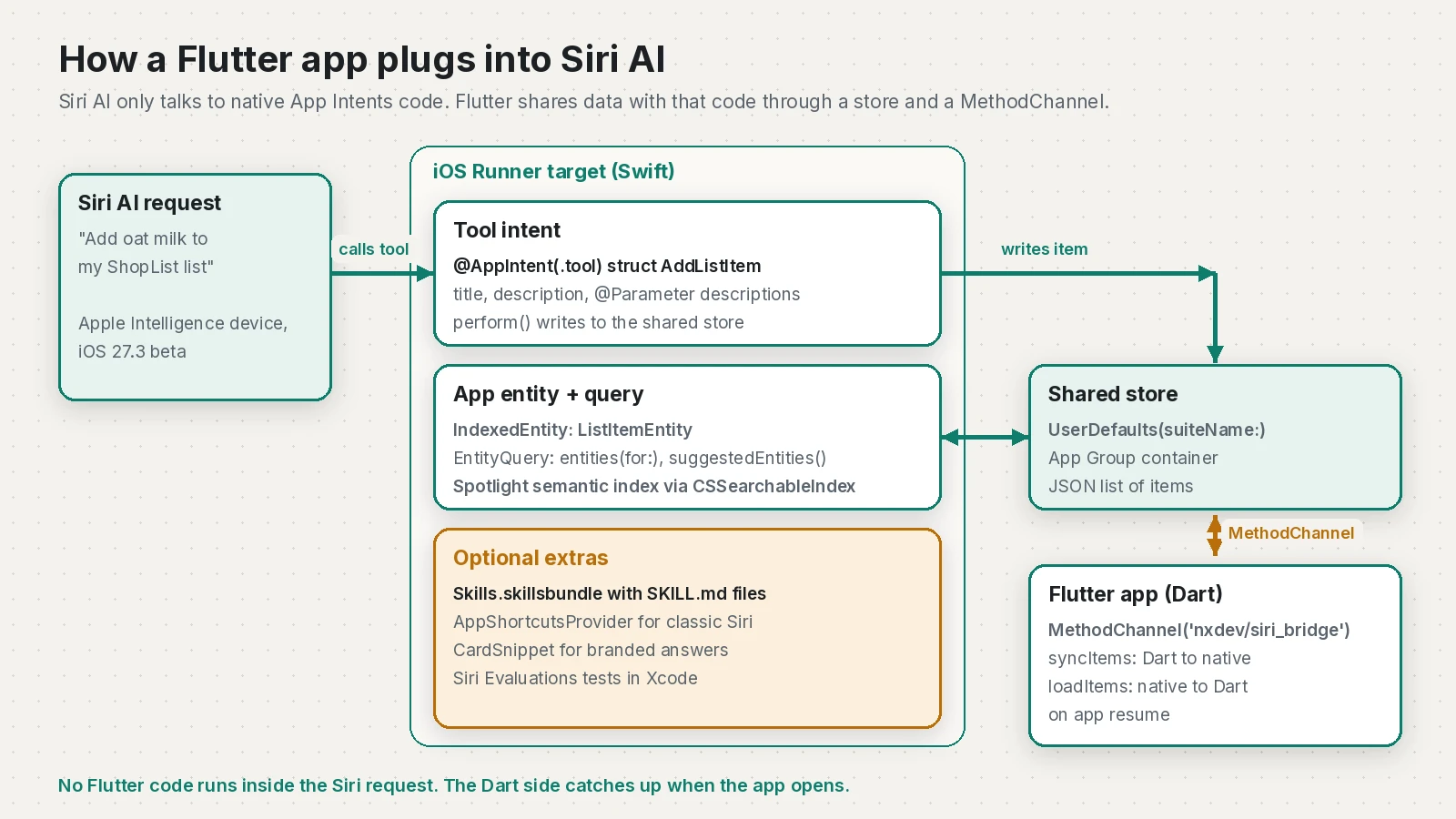
The pattern I use for this kind of bridge has four parts:
- A shared store that native code can read without the Flutter engine running. For a small list, a JSON blob in
UserDefaultsis enough. - Swift App Intents types (entity, query, tool intent) that read and write that store.
- A
MethodChannelso Dart can push its data to native and pull back anything Siri added. - A Spotlight index of your entities, so Siri AI can find them by meaning.
The example below is a shopping list app called ShopList. Siri AI gets one tool, "Add to Shopping List", and can find existing list items.
Step 1: a shared store in Swift
Add the App Groups capability to the Runner target and create a group ID that starts with group., as Apple's app groups guide describes. If your intents live only in the Runner target, plain UserDefaults.standard also works. The App Group starts paying off once you add a widget or an App Intents extension that needs the same data.
// ios/Runner/SharedStore.swift
import Foundation

struct StoredItem: Codable, Identifiable {
    let id: String
    var name: String
    var quantity: Int
    var done: Bool

    init(id: String = UUID().uuidString, name: String, quantity: Int, done: Bool = false) {
        self.id = id; self.name = name; self.quantity = quantity; self.done = done
    }

    // Conversions for the MethodChannel (Dart sends and receives maps).
    init?(map: [String: Any]) {
        guard let id = map["id"] as? String,
              let name = map["name"] as? String,
              let quantity = map["quantity"] as? Int else { return nil }
        self.init(id: id, name: name, quantity: quantity, done: map["done"] as? Bool ?? false)
    }

    var map: [String: Any] { ["id": id, "name": name, "quantity": quantity, "done": done] }
}

enum SharedStore {
    private static let key = "shoplist.items"
    private static let defaults = UserDefaults(suiteName: "group.com.example.shoplist") ?? .standard

    static func items() -> [StoredItem] {
        guard let data = defaults.data(forKey: key) else { return [] }
        return (try? JSONDecoder().decode([StoredItem].self, from: data)) ?? []
    }

    static func save(_ items: [StoredItem]) {
        if let data = try? JSONEncoder().encode(items) { defaults.set(data, forKey: key) }
    }

    static func append(_ item: StoredItem) {
        save(items() + [item])
    }
}
Step 2: the app entity and query
An app entity describes your content to the system. Conforming to IndexedEntity lets you add it to Spotlight, which Apple's Apple Intelligence and Siri AI page says is how Siri AI finds content "even when someone describes it vaguely". In the preview, Apple asks you to give every property a description as well as a title.
// ios/Runner/ListItemEntity.swift
import AppIntents
import CoreSpotlight

struct ListItemEntity: IndexedEntity {
    static let typeDisplayRepresentation: TypeDisplayRepresentation = "Shopping List Item"
    static let defaultQuery = ListItemQuery()

    var id: String

    @Property(title: "Name", description: "The product to buy, for example oat milk")
    var name: String

    @Property(title: "Quantity", description: "How many units to buy")
    var quantity: Int

    var displayRepresentation: DisplayRepresentation {
        DisplayRepresentation(title: "\(name)", subtitle: "Quantity \(quantity)")
    }

    init(item: StoredItem) {
        self.id = item.id
        self.name = item.name
        self.quantity = item.quantity
    }
}

struct ListItemQuery: EntityQuery {
    func entities(for identifiers: [ListItemEntity.ID]) async throws -> [ListItemEntity] {
        SharedStore.items()
            .filter { identifiers.contains($0.id) }
            .map(ListItemEntity.init(item:))
    }

    func suggestedEntities() async throws -> [ListItemEntity] {
        SharedStore.items()
            .filter { !$0.done }
            .map(ListItemEntity.init(item:))
    }
}

enum ShopListIndex {
    // Apple recommends a named index rather than the default one.
    static let index = CSSearchableIndex(name: "ShopList_Items")

    static func replaceAll(with items: [StoredItem]) async throws {
        try await index.deleteAllSearchableItems()
        try await index.indexAppEntities(items.map(ListItemEntity.init(item:)))
    }
}
Deleting and re-indexing everything is fine for a list of a few hundred items. For bigger data sets, index changes only and implement IndexedEntityQuery so Spotlight can ask for a reindex, as described in Making app entities available in Spotlight.
Step 3: the tool intent
This is the part that is new in iOS 27.3. The @AppIntent(.tool) macro adds ToolIntent conformance, and Siri relies on the titles and descriptions to decide when to call it and how to fill parameters. Apple's advice is to write each description "for someone who doesn't know your app" and include formats, ranges and units.
// ios/Runner/AddListItem.swift
import AppIntents

@AppIntent(.tool)
struct AddListItem: AppIntent {
    static let title: LocalizedStringResource = "Add to Shopping List"
    static let description = IntentDescription("Adds a product to the user's ShopList shopping list.")
    static let supportedModes: IntentModes = [.background]

    @Parameter(title: "Item", description: "Plain product name, for example oat milk or AA batteries")
    var name: String

    @Parameter(title: "Quantity", description: "Number of units, from 1 to 99", default: 1)
    var quantity: Int

    func perform() async throws -> some IntentResult & ReturnsValue<ListItemEntity> {
        let item = StoredItem(name: name, quantity: max(1, min(quantity, 99)))
        SharedStore.append(item)
        try await ShopListIndex.index.indexAppEntities([ListItemEntity(item: item)])
        return .result(value: ListItemEntity(item: item))
    }
}
supportedModes set to .background means the intent runs without opening the app. The system can launch your app process to run perform(), but the Flutter UI isn't on screen and your Dart code isn't involved, which is why the intent writes to the native store instead of calling into Dart.
If you still support older iOS versions, keep an AppShortcutsProvider with phrases that include \(.applicationName). App Shortcuts work on iOS 16 and later, while tool intents need the 27.3 SDK.
Step 4: the MethodChannel in AppDelegate
Flutter 3.41 and later use the UIScene lifecycle by default, so the platform channels guide now creates channels in didInitializeImplicitFlutterEngine instead of reading window at launch. If you haven't migrated yet, my Flutter UIScene migration guide covers it.
// ios/Runner/AppDelegate.swift
import Flutter
import UIKit

@main
@objc class AppDelegate: FlutterAppDelegate, FlutterImplicitEngineDelegate {

    func didInitializeImplicitFlutterEngine(_ engineBridge: FlutterImplicitEngineBridge) {
        GeneratedPluginRegistrant.register(with: engineBridge.pluginRegistry)

        let channel = FlutterMethodChannel(
            name: "nxdev/siri_bridge",
            binaryMessenger: engineBridge.applicationRegistrar.messenger()
        )

        channel.setMethodCallHandler { call, result in
            switch call.method {
            case "syncItems":
                guard let raw = call.arguments as? [[String: Any]] else {
                    result(FlutterError(code: "BAD_ARGS", message: "Expected a list of maps", details: nil))
                    return
                }
                let items = raw.compactMap(StoredItem.init(map:))
                SharedStore.save(items)
                Task { @MainActor in
                    do {
                        try await ShopListIndex.replaceAll(with: items)
                        result(nil)
                    } catch {
                        result(FlutterError(code: "INDEX_FAILED", message: error.localizedDescription, details: nil))
                    }
                }
            case "loadItems":
                result(SharedStore.items().map(\.map))
            default:
                result(FlutterMethodNotImplemented)
            }
        }
    }
}
Step 5: the Dart side
On the Dart side, write to native whenever the list changes and read back when the app resumes, because Siri may have added items while the app was closed.
// lib/siri_bridge.dart
import 'dart:io';
import 'package:flutter/services.dart';

class ShopItem {
  ShopItem({required this.id, required this.name, required this.quantity, this.done = false});

  final String id;
  final String name;
  final int quantity;
  final bool done;

  Map<String, Object> toMap() => {'id': id, 'name': name, 'quantity': quantity, 'done': done};

  factory ShopItem.fromMap(Map<Object?, Object?> m) => ShopItem(
        id: m['id'] as String,
        name: m['name'] as String,
        quantity: m['quantity'] as int,
        done: m['done'] as bool? ?? false,
      );
}

class SiriBridge {
  static const _channel = MethodChannel('nxdev/siri_bridge');

  static Future<void> syncItems(List<ShopItem> items) async {
    if (!Platform.isIOS) return;
    await _channel.invokeMethod<void>('syncItems', items.map((i) => i.toMap()).toList());
  }

  static Future<List<ShopItem>> loadItems() async {
    if (!Platform.isIOS) return const [];
    final raw = await _channel.invokeListMethod<Map<Object?, Object?>>('loadItems') ?? const [];
    return raw.map(ShopItem.fromMap).toList();
  }
}
In your state layer, call SiriBridge.loadItems() from an AppLifecycleListener(onResume: ...) and merge the result into your list, then call syncItems after every edit. If your list lives on a server, the same idea applies: the intent saves locally (or calls your API with URLSession) and the Flutter app uploads anything new on its next launch.
Is there a Flutter plugin for Siri AI?
I checked pub.dev on 11 November 2026. The app_intents package (0.21.0, published 10 November 2026) generates Swift App Intents code from Dart annotations, and its usage docs list a tool flag that adds ToolIntent conformance when you build with the 27.3 SDK. It sits behind experimental flags, and I haven't shipped an app with it, so treat it as something to evaluate. It still produces Swift, and you still need to understand the types above to debug it.
Skills for multi-step requests
A skill is a Markdown file that tells Siri AI how several of your tools fit together. Per Apple's app skills guide, you add one Skills.skillsbundle to the app target (File > New > File from Template > Skills Bundle), then one folder per skill containing a SKILL.md with name and description frontmatter and a body of up to 10,000 characters.
---
name: weekly-restock
description: Adds the items the user usually buys each week to the ShopList shopping list.
---
First find the user's shopping list items that are not done. Ask which ones they want to restock if the request is vague. Then call
the add to shopping list tool once per product, keeping the quantity the user
said or 1. Do not add an item that is already on the list and not done.
The format looks a lot like the agent skills used by coding agents, which I covered in my SKILL.md guide, but Siri reads only name, description and the body. Apple is clear that skills give guidance, not deterministic steps: Siri AI doesn't run the listed tools in order.
Siri AI availability and limits
These come from the footnotes of Apple's announcement and the Developer Preview page.
| Limit | Detail as of 11 November 2026 |
|---|---|
| Devices | Apple Intelligence-enabled devices set to a supported language |
| Languages | English, French, Japanese, Korean, Portuguese and Spanish; Traditional Chinese, Norwegian, Turkish and Vietnamese coming |
| EU | Siri AI is unavailable in the EU on iOS, iPadOS and watchOS |
| Age | Not available for users under 13 |
| Usage | Server-side Apple Intelligence features, including Siri AI, have daily limits |
| Distribution | Dev-signed builds and internal TestFlight only; not external TestFlight or App Store |
| App Store | Submission for Siri AI experiences opens in the spring; customer release "in a few months" |
What to build now and what to wait for
What I would do this month:
- Install the Xcode 27.3 beta and run the app on a device with the iOS 27.3 beta. Apple says to verify skills on a device, not in the Simulator.
- Pick two or three actions a person can ask for in one sentence and make them tool intents.
- Model your main content as
IndexedEntitytypes and index it in a named Spotlight index. - Write titles and descriptions for every intent, parameter and property, and mark sensitive properties with an authentication policy or
visibility: .internal. - Use the Siri Integration Advisor and write a few
SiriEvaluationsscenarios so behaviour changes show up when you edit metadata.
What I would wait for: branded CardSnippet polish, payment flows, and any marketing around Siri AI. The API may still change before the spring release, and EU users won't see it at all for now.
If you are also looking at agent-driven UI inside the Flutter app itself, my A2UI generative UI guide for Flutter covers that side.
Frequently asked questions
What is Siri AI?
Siri AI is Apple's new, more conversational version of Siri that understands personal context, onscreen content and natural language. Since the iOS 27.3 beta on 3 November 2026, any developer can connect their app to it through App Intents.
Does Flutter support Siri AI?
Not directly from Dart. Siri AI reads App Intents metadata compiled from Swift, so a Flutter app needs Swift intents and entities in its iOS Runner target, with a MethodChannel and shared storage to exchange data with Dart. The community app_intents package can generate that Swift code, but it is experimental for Siri AI tools.
When can apps ship Siri AI features?
Apple says Siri AI app integrations first ship to customers in a few months and App Store submission for these experiences opens in the spring. Until then the features only work in development builds and for internal TestFlight testers.
Is Siri AI available in the EU?
Not on iPhone, iPad or Apple Watch for now. Apple says Siri AI is currently unavailable in the EU on iOS, iPadOS and watchOS and that it is working with the EU to find a path forward.
Which languages and devices does Siri AI support?
It needs an Apple Intelligence-enabled device set to English, French, Japanese, Korean, Portuguese or Spanish, with Traditional Chinese, Norwegian, Turkish and Vietnamese announced as coming soon. It is not available to users under 13.
What is a Siri AI tool intent?
It is a normal App Intent marked with the @AppIntent(.tool) macro, which adds ToolIntent conformance so Siri AI can call it while handling a request. Siri uses the intent's title, description and parameter descriptions to decide when to call it and how to fill its parameters.
Sources
- Siri AI is now open to all developers (Apple Developer, 2026-11-03)
- Siri AI Developer Preview (Apple Developer Documentation)
- Bringing custom actions and content to Siri (Apple Developer Documentation)
- ToolIntent (Apple Developer Documentation)
- Orchestrating complex actions with app skills (Apple Developer Documentation)
- Apple Intelligence and Siri AI (Apple Developer Documentation)
- Making app entities available in Spotlight (Apple Developer Documentation)
- App schema domains (Apple Developer Documentation)
- Configuring app groups (Apple Developer Documentation)
- Writing custom platform-specific code (platform channels) (Flutter)
- app_intents package (pub.dev, 2026-11-10)
- flutter_intents usage docs (tool flag and 27.3 SDK) (touyou/flutter_intents on GitHub)
Keep reading
- Flutter UIScene Migration: Fix iOS 27 Launch CrashesFlutter apps built with Xcode 27 quit at launch without the UIScene lifecycle. Here's how to migrate a custom AppDelegate, Info.plist and plugins.
- Agent Skills Guide: Write a SKILL.md That Works EverywhereWhat agent skills are, how to write a SKILL.md that loads in Claude Code, Copilot, Cursor and Codex, and how to install shared skills safely.
- A2UI for Flutter: Render AI-Generated UI with a2ui_flutterA2UI lets an AI agent describe UI as JSON that your Flutter app renders from its own widget catalog. Here is a tested a2ui_flutter 0.1.0 setup.
Comments
Share a question or note about this article.
Loading comments…