· 9 min read · Nadeera Silva
A2UI for Flutter: Render AI-Generated UI with a2ui_flutter
A2UI lets an AI agent describe UI as JSON that your Flutter app renders from its own widget catalog. Here is a tested a2ui_flutter 0.1.0 setup.

Most AI features in Flutter apps still answer with a wall of text. If the model wants the user to pick a package, enter an email and confirm, you either parse its prose or hand-build a screen for every case. A2UI is Google's open protocol for this problem: the agent sends the interface as JSON data, and your app draws it with widgets you already trust. Since 4 November 2026 there is a new Flutter renderer for it, a2ui_flutter 0.1.0, which replaces the older genui package.
In this guide I explain what A2UI is, how it differs from AG-UI and A2A, and how I wired a2ui_flutter into a small Flutter app with one custom component. Every Dart snippet below comes from a project I ran through flutter analyze and flutter test on Flutter 3.47.7 today.
What is Google A2UI?
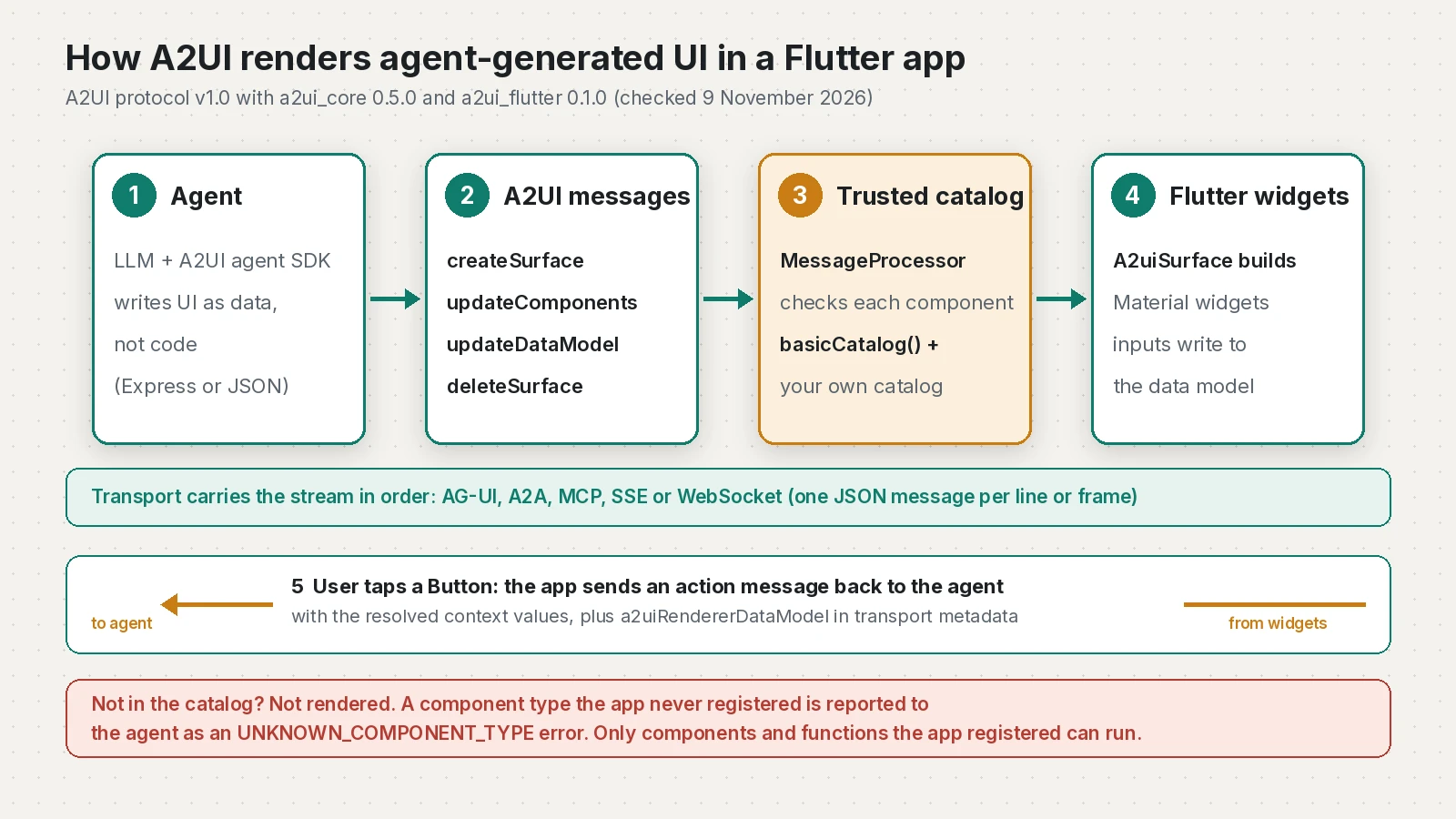
A2UI (Agent-to-User Interface) is a declarative format for generative UI. The A2UI v1.0 specification defines a stream of JSON messages from the agent to a renderer. Four of them build the screen:
createSurfaceopens a surface (a UI region) and names its default component catalog.updateComponentssends a flat list of components. Each has anid, and parents point to children by id. The one with idrootis the top of the tree.updateDataModelwrites values at a JSON Pointer path, such as/quote/email.deleteSurfaceremoves the surface.
Version 1.0 adds function call messages (callRendererFunction, callAgentFunction and their responses) and lets createSurface carry the first components and data in one message.
The important part is the catalog. Your app registers the components it supports, and the agent can only use those. The A2UI repository README puts it as "safe like data, but expressive like code". The agent never sends Dart, HTML or JavaScript.
A2UI vs AG-UI vs A2A
These three names are easy to mix up, and Google Trends shows "ag-ui" and "a2a" as rising searches next to "a2ui". They sit at different layers and often work together.
| Protocol | What it standardizes | Where it fits with A2UI |
|---|---|---|
| A2UI | The UI itself: surfaces, components, data model and user actions as JSON | The payload your Flutter app renders |
| AG-UI | An event stream between a user-facing app and an agent backend | One transport that carries A2UI messages (CopilotKit is built on it) |
| A2A | Communication between agents, originally from Google, now at the Linux Foundation | Another transport, through the A2UI extension for A2A |
| MCP | How an agent reaches tools and data | A2UI can ride in MCP tool outputs or resources |
The spec says this directly: A2UI is transport-agnostic, and AG-UI, A2A and MCP are its common bindings. The AG-UI docs add their own note that A2UI is a generative UI specification while AG-UI connects an agentic frontend to any backend. On 29 October 2026 Google and CopilotKit published a guide to running A2UI over AG-UI with CopilotKit. That stack targets React and Angular, but the same AG-UI events can feed a Flutter renderer.
Install a2ui_flutter and a2ui_core
The Flutter side is now split into packages. a2ui_core parses messages and holds surface state, a2ui_flutter renders surfaces as widgets, and a2ui_agent prompts a model and parses its reply if your app calls the model directly. The a2ui_flutter README says that together they replace genui, and the flutter/genui repository now carries the same announcement.
flutter pub add a2ui_flutter a2ui_core
# Only needed if you define custom components:
flutter pub add json_schema_builderA sample A2UI message stream
Here is the stream my agent sends for a small quote form. It uses the v1.0 basic catalog for layout and inputs, plus one custom PriceTag component from my own catalog. On the wire each message is a single line of JSONL. I have expanded the second one so it is readable.
{"version":"1.0","createSurface":{"surfaceId":"quote_1","catalogId":"https://a2ui.org/specification/v1_0/catalogs/basic/catalog.json","sendDataModel":true}}
{"version":"1.0","updateComponents":{"surfaceId":"quote_1","components":[
  {"id":"root","component":"Card","child":"body"},
  {"id":"body","component":"Column","children":["title","price","plan","email","send"]},
  {"id":"title","component":"Text","text":{"@path":"/quote/title"}},
  {"id":"price","component":"PriceTag","catalogId":"https://nxdevsolutions.com/a2ui/quote_catalog.json",
   "label":"Estimate","amount":{"@path":"/quote/amount"},"currency":"USD"},
  {"id":"plan","component":"ChoicePicker","label":"Package","variant":"mutuallyExclusive",
   "options":[{"label":"Standard","value":"standard"},{"label":"Premium","value":"premium"}],
   "value":{"@path":"/quote/plan"}},
  {"id":"email","component":"TextField","label":"Email","value":{"@path":"/quote/email"},
   "checks":[{"condition":{"@call":"email","args":{"value":{"@path":"/quote/email"}}},"message":"Enter a valid email."}]},
  {"id":"send_label","component":"Text","text":"Request quote"},
  {"id":"send","component":"Button","child":"send_label","variant":"primary",
   "action":{"event":{"name":"requestQuote","context":{"plan":{"@path":"/quote/plan"},"email":{"@path":"/quote/email"}}}},
   "checks":[{"condition":{"@call":"email","args":{"value":{"@path":"/quote/email"}}},"message":"Enter a valid email first."}]}
]}}
{"version":"1.0","updateDataModel":{"surfaceId":"quote_1","path":"/quote","value":{"title":"Flutter MVP estimate","amount":1800,"plan":["standard"],"email":""}}}
A few details from the spec that caught me out. v1.0 bindings use {"@path": ...}, while v0.9 used {"path": ...}. Component ids must be valid identifiers, so send_label works and send-label does not. The email check runs on the device, so the button stays disabled until the address is valid, with no model call. And sendDataModel: true asks the renderer to send the whole surface data model back with each action.
Render the stream in Flutter
MessageProcessor applies messages, and A2uiSurface renders one surface. This widget reads JSONL lines from any transport and sends actions and errors back through a callback:
import 'dart:async';
import 'dart:convert';

import 'package:a2ui_core/a2ui_core.dart';
import 'package:a2ui_flutter/a2ui_flutter.dart';
import 'package:a2ui_flutter/basic_catalog.dart';
import 'package:flutter/material.dart';

import 'quote_catalog.dart';

typedef SendToAgent =
    void Function(Map<String, Object?> body, Map<String, Object?> metadata);

class AgentSurfaces extends StatefulWidget {
  const AgentSurfaces({super.key, required this.jsonl, required this.send});

  final Stream<String> jsonl; // one A2UI message per line
  final SendToAgent send;

  @override
  State<AgentSurfaces> createState() => _AgentSurfacesState();
}

class _AgentSurfacesState extends State<AgentSurfaces> {
  final String version = A2uiProtocolVersion.v1_0.jsonValue;
  late final MessageProcessor<ComponentImplementation> processor;
  final List<SurfaceModel<ComponentImplementation>> surfaces = [];
  StreamSubscription<String>? lines;

  void sendToAgent(RendererToAgentMessage message) => widget.send(
    RendererToAgentMessagePayload.of(message).toJson(),
    {'a2uiRendererDataModel': ?processor.getRendererDataModel()},
  );

  @override
  void initState() {
    super.initState();
    processor = MessageProcessor<ComponentImplementation>(
      catalogs: [basicCatalog(), quoteCatalog],
      outboundListener: sendToAgent,
    );
    processor.model.onAction.subscribe(
      (action) => sendToAgent(ActionMessage(version: version, action: action)),
    );
    processor.model.onSurfaceCreated.subscribe((surface) {
      surface.onError.subscribe(
        (error) => sendToAgent(ErrorMessage(version: version, error: error)),
      );
      setState(() => surfaces.add(surface));
    });
    processor.model.onSurfaceDeleted.subscribe(
      (id) => setState(() => surfaces.removeWhere((s) => s.id == id)),
    );
    lines = widget.jsonl
        .where((line) => line.trim().isNotEmpty)
        .listen(_onLine);
  }

  void _onLine(String line) {
    try {
      processor.processMessages(jsonDecode(line));
    } on A2uiError catch (error) {
      debugPrint('A2UI rejected a message: ${error.code}: ${error.message}');
    }
  }

  @override
  void dispose() {
    lines?.cancel();
    processor.dispose();
    super.dispose();
  }

  @override
  Widget build(BuildContext context) => ListView(
    children: [
      for (final surface in surfaces)
        A2uiSurface(key: ObjectKey(surface), surface: surface),
    ],
  );
}
The basic components are Material widgets, so put this under a MaterialApp and inside a Scaffold body. When the session starts, also send processor.getRendererCapabilities(CapabilitiesOptions(versions: [A2uiProtocolVersion.v1_0])).toJson() as a2uiRendererCapabilities in the transport metadata, so the agent knows which catalogs you support.
Add a custom component to your catalog
The basic catalog has 18 components. Most real apps add their own. A v1.0 surface can mix catalogs, so the custom component lives in a catalog with its own id, and the agent names that id on the component:
import 'package:a2ui_core/a2ui_core.dart';
import 'package:a2ui_flutter/a2ui_flutter.dart';
import 'package:flutter/material.dart';
import 'package:json_schema_builder/json_schema_builder.dart';

const quoteCatalogId = 'https://nxdevsolutions.com/a2ui/quote_catalog.json';

final priceTag = ComponentImplementation(
  name: 'PriceTag',
  schema: Schema.object(
    properties: {
      'label': CommonSchemasV1.dynamicString,
      'amount': CommonSchemasV1.dynamicNumber,
      'currency': Schema.string(),
    },
    required: ['amount', 'currency'],
  ),
  builder: (context, node, props, buildChild) {
    final amount = props.number('amount') ?? 0;
    return ListTile(
      title: Text(props.string('label') ?? 'Price'),
      trailing: Text(
        '${props.string('currency') ?? ''} ${amount.toStringAsFixed(0)}',
        style: Theme.of(context).textTheme.titleLarge,
      ),
    );
  },
);

final quoteCatalog = CatalogImplementation(
  id: quoteCatalogId,
  protocolVersion: A2uiProtocolVersion.v1_0,
  components: [priceTag],
);
The agent controls the label and the number. Your widget controls the font, colour and layout, which is what keeps generated screens on brand.
What my test showed
I fed the stream above into AgentSurfaces in a widget test. Tapping the button before typing an email sent nothing, because the failing check keeps it disabled. After I typed a valid email and tapped again, the app sent this to the agent (timestamp shortened):
{"messages":[{"version":"1.0","action":{"name":"requestQuote","surfaceId":"quote_1","sourceComponentId":"send","timestamp":"2026-11-09T03:38:58Z","context":{"plan":["standard"],"email":"client@example.com"}}}]}The metadata carried a2uiRendererDataModel with the full /quote object. In a second test I sent a component of type HtmlEmbed holding a script tag. Nothing rendered, and the app reported UNKNOWN_COMPONENT_TYPE back to the agent instead.
Is A2UI safe?
Safer than letting a model write code, but not automatically safe. A2UI never executes code from the agent, and anything outside your catalogs is rejected. The README is still clear that any agent you do not control is untrusted: it could draw a screen that imitates a real one to trick users, or send layouts heavy enough to slow the app.
Keep the model call and its API key on a server, as I covered in how to hide API keys in Flutter. The agent can be built with Genkit, Google ADK or anything that can emit the messages. My Genkit Dart 1.0 guide shows one way to run the model side in Dart. For a reminder of why open-ended generated UI needs a sandbox, see the FastMCP Prefab UI vulnerability.
Make it faster with A2UI Express
The main complaint about generative UI is waiting while the model writes every brace. On 27 October 2026 the A2UI team introduced swappable inference formats. The model writes A2UI Express, a compact line-based format, and the agent SDK compiles it into normal A2UI messages. Google reports up to 3x lower latency and up to 3x fewer tokens than direct JSON. Your Flutter renderer does not change, because it still receives standard messages. In Dart, a2ui_agent 0.1.0 supports both Express and direct JSON and can stream Express replies.
Checklist before you ship A2UI in a Flutter app
- Pin
a2ui_flutteranda2ui_coreversions, and read the changelog before every upgrade while they are 0.x. - Register only the components you want the agent to use. Build a smaller catalog from
BasicComponentsif the full basic catalog is more than you need. - Advertise
a2uiRendererCapabilitiesat session start, and senda2uiRendererDataModelwith actions when it is not null. - Forward surface errors to the agent so it can correct invalid output.
- Show your own loading state until the
rootcomponent arrives. - Pass an
openUrlcallback only for trusted agents, and keep model keys on your server. - Use
{"@path": ...}bindings and identifier-style ids for v1.0. v0.9 messages need thev0_9catalog import. - Test with recorded JSONL streams, including bad ones, as in the widget test above.
Frequently asked questions
What is Google A2UI?
A2UI (Agent-to-User Interface) is an open, declarative protocol from Google for generative UI. An AI agent sends JSON messages that describe a surface, its components and its data, and the app renders them with its own trusted components.
What is the difference between A2UI and AG-UI?
A2UI describes the user interface itself as JSON. AG-UI is an event-based protocol that connects a user-facing app to an agent backend, and it is one of the transports that can carry A2UI messages. CopilotKit is built on AG-UI and supports A2UI.
How is A2UI different from A2A?
A2A (Agent2Agent) is a protocol for agents to talk to other agents. A2UI is about agents talking to a user interface. A2UI defines an extension so its messages can travel over A2A.
Is A2UI safe?
A2UI does not execute code sent by the agent. The app only renders components from catalogs it registered, and rejects anything else. You should still treat third-party agents as untrusted, because they can draw misleading screens or very heavy layouts.
Does A2UI work with Flutter?
Yes. The a2ui_flutter package renders A2UI v1.0 and v0.9 surfaces as Flutter widgets, together with a2ui_core. Version 0.1.0 was published on 4 November 2026 and replaces the older genui package.
Where is the A2UI GitHub repo?
The project lives at github.com/a2ui-project/a2ui, and the old google/A2UI address redirects there. It is Apache-2.0 licensed and includes the specification and the renderers, including the Dart and Flutter packages.
Sources
- A2UI Protocol v1.0 specification (A2UI, 2026-06-08)
- A2UI message reference (A2UI)
- a2ui_flutter 0.1.0 (pub.dev (labs.flutter.dev), 2026-11-04)
- a2ui_flutter changelog (pub.dev (labs.flutter.dev), 2026-11-04)
- a2ui_core 0.5.0 (pub.dev (labs.flutter.dev), 2026-11-04)
- a2ui_agent 0.1.0 changelog (pub.dev (labs.flutter.dev), 2026-11-04)
- a2ui-project/a2ui on GitHub (GitHub)
- flutter/genui README (redesign announcement) (GitHub (Flutter))
- Fast, reliable A2UI, with swappable inference formats (Google Developers Blog, 2026-10-27)
- Build Generative UI Apps with A2UI & CopilotKit Agents (Google Developers Blog, 2026-10-29)
- AG-UI Overview (AG-UI)
- A2A Protocol (Linux Foundation A2A project)
Keep reading
- Genkit Dart 1.0 for Flutter: Flows, Tools and Model CallsGenkit Dart 1.0 is stable. Here are the packages, typed flows and tools, and where Flutter apps should run model calls without leaking API keys.
- Google ADK 2.14 Upgrade Guide: Breaking Changes and FixesGoogle ADK for Python 2.14 changes Enum tool arguments, Vertex sessions and skill scripts. Here is what breaks, how to fix it and how to upgrade safely.
- FastMCP Vulnerability CVE-2026-120338: Check and Fix Prefab UIA CVSS 10.0 FastMCP vulnerability in prefab-ui lets Generative UI code read and write host files. Check your versions, upgrade and look for planted .pth files.
Comments
Share a question or note about this article.
Loading comments…