· 10 min read · Nadeera Silva
Gemini API Logs Requests by Default: How to Set store=false
New paid Gemini API projects now store Generate Content requests by default. Here is who is affected and how to opt out with store=false.

If you created a paid Gemini API project on or after 26 October 2026, every generateContent call it makes is now saved to your AI Studio logs unless you say otherwise. Google switched the Gemini API Generate Content default to store=true for new paid projects, to match the Interactions API. Logs hold the full prompt and response, and they stay for 55 days by default. For a client app that sends customer messages, invoices or support tickets to Gemini, that is a new copy of personal data you now have to account for. This post covers who is affected, how to check your project, and how to send store: false from Python, TypeScript, Go, Java and REST.
What changed in the Gemini API on 26 October 2026
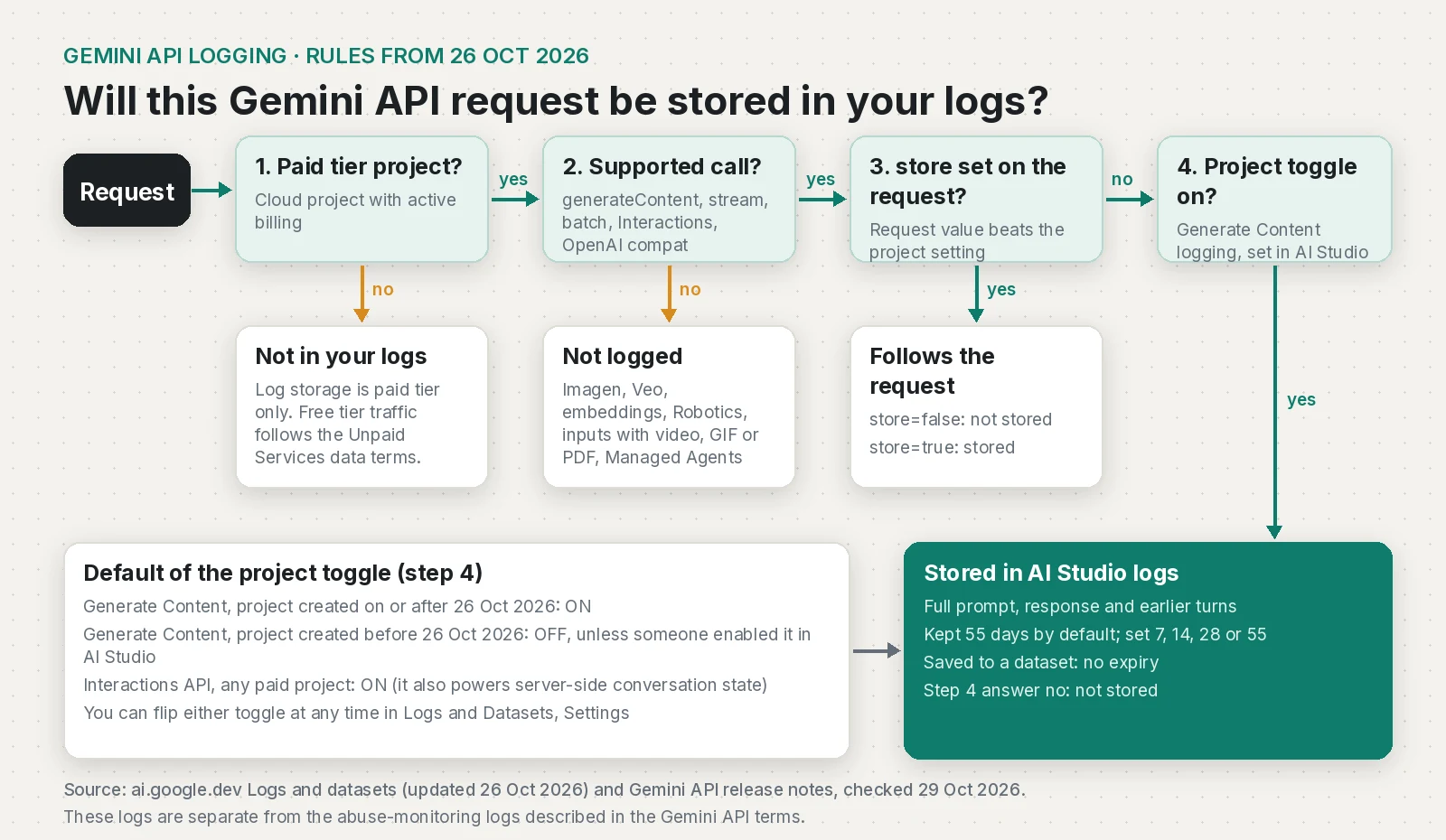
The Gemini API release notes for 26 October 2026 say that new projects using generateContent, streamGenerateContent and batchGenerateContent on the paid tier now store requests by default. Existing projects keep their current setting. The Logs and datasets guide (updated 26 October) adds the detail: projects created before that date stay at store=false for Generate Content unless someone already turned logging on in AI Studio.
Two things are easy to miss. The Interactions API already stored requests by default, because its server-side conversation state depends on it. And the guide says logging covers calls made through the OpenAI compatibility endpoint too, so switching SDKs does not get you out of it.
| Situation | Stored by default? | Notes |
|---|---|---|
| Paid project created on or after 26 Oct 2026, Generate Content | Yes | Includes stream and batch calls |
| Paid project created before 26 Oct 2026, Generate Content | No | Unless logging was already enabled in AI Studio |
| Interactions API, any paid project | Yes | Turning it off also stops automatic conversation history |
| OpenAI compatibility endpoint | Follows the project setting | Logged like native calls; no documented per-request store option |
| Free tier (no billing account) | No log storage | Log storage is a paid tier feature |
| Imagen, Veo, embeddings, Robotics, inputs with video, GIF or PDF, Managed Agents, Public Preview Agents | Not logged | Listed as unsupported for logging |
Does the Gemini API store my data now?
"Stored" here means the logs you see in AI Studio: the full prompt, the response, the context from earlier turns and, for Interactions, a link to the previous_interaction_id. These logs are private to your Cloud project. According to the data logging and sharing policy, they are separate from the abuse-monitoring logs that Google keeps for a limited period on paid traffic under the Gemini API terms. Setting store: false turns off the first kind. It does not change the second.
The same policy says prompts and responses in your logs are not used to improve Google products by default. That changes only if you share a dataset with Google, in which case it is processed under the Unpaid Services terms and human reviewers may read it.
How to check whether your project logs requests
The fastest check is the Settings panel on the Logs page in AI Studio. Pick the project from the drop-down. There are separate toggles for Generate Content and Interactions, and whatever they show is what applies to requests that do not set store.
If you want the creation date for your records, or you look after several client projects, ask Resource Manager. createTime is returned in UTC (docs):
gcloud projects describe YOUR_PROJECT_ID --format="value(createTime)"
# 2026-10-27T04:12:09.512Z -> created after the change, logging on by defaultOne more gotcha from the guide: the logs view needs at least one active API key in the project. If you deleted every key after a leak, you can't see the project's logs until you add a key again.
How to turn off Gemini API logging per request (store false)
You have two switches. The project toggle in AI Studio covers everything that does not set store. The request field covers single calls and wins over the project toggle. I use both: turn the project toggle off for client work, then set store explicitly in code, so a project someone re-enables later does not quietly start keeping customer data.
The field needs a recent SDK. According to the logs guide and each SDK's changelog, store on Generate Content arrived in the 22 October 2026 releases:
- Python
google-genai2.33.0 - JavaScript and TypeScript
@google/genai2.31.0 - Java
com.google.genai:google-genai1.79.0 - Go
google.golang.org/genai1.76.0
The pattern I use is a single wrapper that every model call goes through, with logging off unless the caller asks for it. That makes the safe choice the default and makes logging a visible decision in code review.
Python
from google import genai
from google.genai import types

client = genai.Client()  # reads GEMINI_API_KEY from the environment

def generate(prompt: str, *, keep_log: bool = False, **config):
    """Every Generate Content call goes through here. Logging is opt-in."""
    cfg = types.GenerateContentConfig(store=keep_log, **config)
    return client.models.generate_content(
        model="gemini-3.8-flash",
        contents=prompt,
        config=cfg,
    )

# generate("Summarise this support ticket: ...")            -> not stored
# generate("Eval prompt with fake data", keep_log=True)      -> stored
TypeScript
import { GoogleGenAI, type GenerateContentConfig } from "@google/genai";

const ai = new GoogleGenAI({ apiKey: process.env.GEMINI_API_KEY });

// Every Generate Content call goes through here. Logging is opt-in.
export async function generate(
  prompt: string,
  opts: { keepLog?: boolean; config?: GenerateContentConfig } = {},
) {
  return ai.models.generateContent({
    model: "gemini-3.8-flash",
    contents: prompt,
    config: { ...opts.config, store: opts.keepLog ?? false },
  });
}
Note that store is spread last, so a caller cannot switch logging on by accident through config.
Go
package main

import (
	"context"
	"fmt"
	"log"

	"google.golang.org/genai"
)

// Generate sends every Generate Content call with an explicit store value.
func Generate(ctx context.Context, c *genai.Client, prompt string, keepLog bool) (*genai.GenerateContentResponse, error) {
	return c.Models.GenerateContent(ctx, "gemini-3.8-flash", genai.Text(prompt),
		&genai.GenerateContentConfig{Store: genai.Ptr(keepLog)})
}

func main() {
	ctx := context.Background()
	client, err := genai.NewClient(ctx, nil) // reads GEMINI_API_KEY
	if err != nil {
		log.Fatal(err)
	}
	resp, err := Generate(ctx, client, "Summarise this ticket.", false)
	if err != nil {
		log.Fatal(err)
	}
	fmt.Println(resp.Text())
}
Store is a *bool, so a nil value means "use the project setting". genai.Ptr(false) is what you want.
Java
import com.google.genai.Client;
import com.google.genai.types.GenerateContentConfig;
import com.google.genai.types.GenerateContentResponse;

public final class GeminiCalls {
  private static final Client CLIENT = new Client(); // reads GEMINI_API_KEY

  // Every Generate Content call goes through here. Logging is opt-in.
  public static GenerateContentResponse generate(String prompt, boolean keepLog) {
    GenerateContentConfig config = GenerateContentConfig.builder()
        .store(keepLog)
        .build();
    return CLIENT.models.generateContent("gemini-3.8-flash", prompt, config);
  }
}
REST
The SDKs put store at the top level of the request body, next to contents, not inside generationConfig. If you call the REST API directly:
curl "https://generativelanguage.googleapis.com/v1beta/models/gemini-3.8-flash:generateContent" \
  -H "x-goog-api-key: $GEMINI_API_KEY" \
  -H "Content-Type: application/json" \
  -d '{
    "contents": [{"parts": [{"text": "Summarise this ticket."}]}],
    "store": false
  }'
I checked all of this on 29 October 2026 without calling Gemini. I installed each SDK at the minimum version and compiled the wrappers: Python built the config, tsc type-checked the TypeScript, and go build and mvn compile passed. For Python I also pointed the client at a local test server to see the request body. With store: False, "store": false was at the top level. Without it, the field was missing, so the project setting applies.
The SDK changelogs also mark store as Gemini Developer API only, and the TypeScript types say it is not supported on Gemini Enterprise Agent Platform. This change applies to Gemini API keys from AI Studio. I have not seen anything saying Firebase AI Logic or Agent Platform (Vertex AI) traffic changed, so check those products' own docs if you use them.
Retention options and datasets
If you keep logging on, for debugging or evaluation, shorten how long logs are kept. The default is 55 days. AI Studio lets you set 7, 14, 28 or 55 days per project, and expired logs are marked for deletion.
Datasets work differently. When you save logs to a dataset (to build an eval set, or to re-run prompts through the Batch API), they don't expire. You can export them as CSV, JSONL or Google Sheets, and you can choose to share them with Google. Shared datasets fall under the Unpaid Services terms, and the policy page asks you not to include personal, sensitive or confidential data. Treat a dataset like a database table of customer data, because that's often what it is.
My setup for client projects:
- Production project: Generate Content logging off,
storefalse in the wrapper, retention set to 7 days in case anything gets stored anyway. - Staging or eval project: logging on, fake or anonymised inputs only, 14 days retention, datasets named by purpose and deleted when the eval is done.
Privacy checklist for client apps on the Gemini API
- Find every place your backend calls Gemini, including background jobs and batch scripts, and send them through one wrapper.
- Upgrade to the minimum SDK versions above and set
storeexplicitly on every Generate Content call. - Turn off the Generate Content toggle in AI Studio for projects that handle personal data. Check the Interactions toggle too, and remember that turning it off stops automatic conversation history unless a request sets
store: true. - Set retention to the shortest window that fits your debugging needs.
- Strip or mask personal data (names, phone numbers, ID numbers, emails) before it reaches the prompt, especially in requests you choose to log.
- Keep the API key on your server, not in the app. If a mobile app calls Gemini directly, you lose control of every setting above. I covered the proxy pattern in how to hide API keys in Flutter.
- Write it down: update the privacy notice and any processor agreement to say whether prompts are logged, where, and for how long.
- If your gateway or proxy also logs prompts (LiteLLM, n8n, your own middleware), that is a second copy. The LiteLLM 1.107.0 incident is a reminder that gateway logs are a target too.
For Sri Lankan clients there's a date to note. The core compliance parts of the Personal Data Protection Act, No. 9 of 2022, including controller and processor duties and cross-border transfer rules, take effect on 1 January 2027 under Extraordinary Gazette No. 2498/16, as the Data Protection Authority announced. Customer prompts sitting in a 55-day log on a foreign cloud is exactly the kind of processing you will need to explain. This is not legal advice, so check the specifics with someone qualified.
Frequently asked questions
Does the Gemini API store my data?
On the paid tier, Generate Content requests are stored in your AI Studio logs by default if the project was created on or after 26 October 2026, and Interactions API requests are stored by default on all paid projects. Logs keep the full prompt and response for 55 days unless you shorten retention or set store to false.
How do I turn off Gemini API logging?
Turn off Generate Content API logging in the Settings panel of the Logs page in Google AI Studio, or set store to false on each request. The request-level value overrides the project setting.
Is the Gemini free API logged?
Log storage in AI Studio is only available on the paid tier, so free tier requests do not appear in your logs. Free tier usage is covered by the Unpaid Services terms, under which Google may use prompts and responses to improve its products, except in the EEA, Switzerland and the UK.
Which SDK version do I need to set store=false?
Setting store on Generate Content needs google-genai 2.33.0 for Python, @google/genai 2.31.0 for JavaScript and TypeScript, google-genai 1.79.0 for Java, or google.golang.org/genai 1.76.0 for Go. Older versions reject the field.
How long does Google keep Gemini API logs?
Logs are kept for 55 days by default, and you can set the retention window to 7, 14, 28 or 55 days per project. Logs saved to a dataset do not expire until you delete them.
Does store=false work on the OpenAI compatibility endpoint?
Google's OpenAI compatibility docs do not list a store option and say unlisted parameters are ignored. Calls through that endpoint are logged according to the project setting, so use the AI Studio toggle for them.
Sources
- Gemini API release notes (26 October 2026 entry) (Google AI for Developers, 2026-10-28)
- Logs and datasets (Google AI for Developers, 2026-10-26)
- Data logging and sharing (Google AI for Developers, 2026-10-26)
- Gemini API Additional Terms of Service (Google AI for Developers, 2026-04-28)
- OpenAI compatibility (Google AI for Developers, 2026-10-28)
- python-genai changelog (v2.33.0) (Google (GitHub), 2026-10-22)
- js-genai changelog (v2.31.0) (Google (GitHub), 2026-10-22)
- go-genai changelog (v1.76.0) (Google (GitHub), 2026-10-22)
- java-genai changelog (v1.79.0) (Google (GitHub), 2026-10-22)
- View and update projects (createTime) (Google Cloud)
- Data protection compliance regime takes effect on 1 Jan. 2027 (Daily FT)
Keep reading
- How to Hide API Keys in Flutter (and What to Do Instead)You can't hide an API key inside a Flutter app. Which keys are safe to ship, how to restrict them, and how to keep real secrets behind a proxy with App Check.
- LiteLLM 1.107.0 Compromised: What to Check and RotateLiteLLM 1.107.0 shipped a credential stealer on PyPI and Docker. Here is how to check exposure, clean up safely, rotate keys and pin your AI dependencies.
- LLM API Pricing Compared: Cost per Task, Not per TokenOpenAI, Claude, Gemini and DeepSeek API prices from their own pages, and a simple way to work out what one completed AI task really costs.
Comments
Share a question or note about this article.
Loading comments…