· 11 min read · Nadeera Silva
LiteLLM 1.107.0 Compromised: What to Check and Rotate
LiteLLM 1.107.0 shipped a credential stealer on PyPI and Docker. Here is how to check exposure, clean up safely, rotate keys and pin your AI dependencies.

LiteLLM 1.107.0 was not a normal release. On 21 October 2026 an attacker used stolen GitHub tokens to run LiteLLM's own release pipeline against a lookalike repository, and the result went out to PyPI and to the official Docker images. The package carried a credential stealer and a remote code loader that run whenever Python starts, even if your code never imports litellm. If you run the LiteLLM proxy or use the SDK, here is how to check for exposure, the clean-up order, what to rotate, and how I now pin AI dependencies.
What happened with LiteLLM 1.107.0
According to the canonical record, it started on 27 May, when the master key of an internal LiteLLM Agent Platform deployment was committed to a public repository and never revoked. On 10 October the attacker used it to read the platform's API, which returned a GitHub organization owner's CLI OAuth token. Throwaway CI workflows then leaked two more maintainers' tokens.
On 21 October they overrode branch protection, pointed the release workflow at Berri-AI/litellm (one hyphen away from BerriAI/litellm), approved the production gate with a second token and deleted the run records with a third. The pipeline signed and published the poisoned build as usual.
The early theory about Claude Code leaking tokens into LiteLLM logs, still quoted in some write-ups, was ruled out in the GitHub issue. The root cause was a broadly scoped token and a leaked key that was never rotated.
Timeline (UTC and Colombo time)
| Time (UTC) | Colombo (UTC+5:30) | Event |
|---|---|---|
| 27 May, 18:53 | 28 May, 00:23 | Agent Platform master key committed to a public repo, never revoked |
| 10 Oct, 21:27 | 11 Oct, 02:57 | Master key used to pull an org owner's GitHub CLI token |
| 10 Oct, 22:11 to 22:12 | 11 Oct, 03:41 to 03:42 | Throwaway workflows send two more maintainers' tokens out |
| 21 Oct, 11:39:51 to 11:40:13 | 21 Oct, 17:09 to 17:10 | Seven malicious 1.107.0 wheels uploaded to PyPI |
| 21 Oct, 11:46:56 | 21 Oct, 17:16 | Docker Hub and GHCR images published |
| 21 Oct, 12:06 | 21 Oct, 17:36 | Issue #47826 reports the compromise |
| 21 Oct, by 13:23 | 21 Oct, by 18:53 | PyPI quarantines 1.107.0 |
| 21 Oct, by 13:51 | 21 Oct, by 19:21 | Affected GHCR tags unavailable |
| 21 Oct, 14:20 | 21 Oct, 19:50 | Docker Hub tags removed or repointed to clean images |
| 24 Oct, 09:34 | 24 Oct, 15:04 | v1.106.3 released with a new image signing key |
| 25 Oct, 09:39 | 25 Oct, 15:09 | v1.106.4 released, current latest |
Some write-ups give 13:20 and 13:53 for the removals. LiteLLM's record has Docker Hub serving the bad image until 14:20, so I use that wider window.
What was affected
- PyPI:
litellm==1.107.0, all seven wheels. The sdist had no payload files but did have a tamperedpyproject.toml. - Docker Hub and GHCR: tags
v1.107.0,latest,main-latestandmain-stableforlitellm,litellm-databaseandlitellm-non_root. Thelitellmimage index digest wassha256:1bbcb1443bc962e45f5aad53fe3d2c30600e0379715fb6c664cdd3ac126c339e. - Not affected by this incident: enterprise customers on LiteLLM's private registry and the versions published before 1.107.0, according to the incident post.
Wiz estimates about 49,000 downloads from ClickPy data. It is LiteLLM's second compromise this year: OSV MAL-2026-2144 also lists 1.82.7 and 1.82.8 from March.
What the payload does
Each wheel dropped three files into the root of site-packages, outside the litellm folder:
cook.pthcontainsimport cook. Python runs that line at every interpreter start.cook.pyis an obfuscated stealer calledprivcollect. It takes SSH keys, cloud and Kubernetes credentials,.envfiles, package registry tokens, browser passwords and cookies, shell histories, AI coding tool configs and the environment of every readable process. IfDATABASE_URLis set, it dumpsLiteLLM_CredentialsTableandLiteLLM_ProxyModelTable, where the proxy keeps upstream provider keys. It also pulls instance role credentials from cloud metadata. The bundle is encrypted and POSTed tohttp://www.litellm.dev/healthcheck, a lookalike domain.sitecustomize.pystarts a background daemon on Linux and macOS that checks a GitHub file hourly for a server address, then runs Python code from it. The file only ever held test values.
The stolen keys were used. Wiz saw AWS role credentials from compromised CI runners and Kubernetes nodes being validated between 16:20 and 17:01 UTC (21:50 to 22:31 Colombo), followed by Bedrock model listing calls. That fits LLMjacking, running up someone else's model bill. My LLM API pricing comparison shows how fast that adds up.
Am I affected? Checks you can run
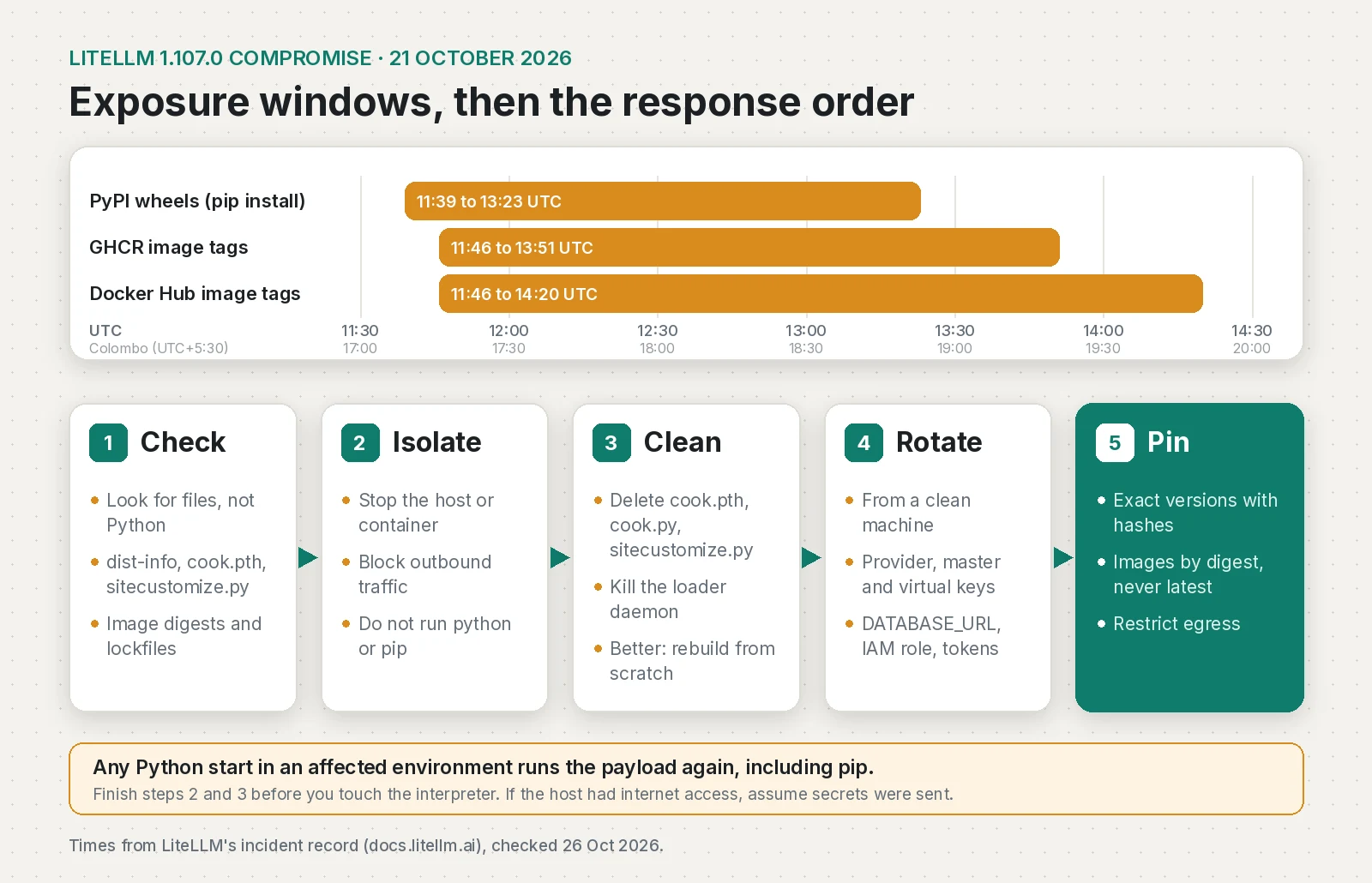
You are in scope if an unpinned install pulled LiteLLM between 11:39 and 13:23 UTC, or you pulled and ran an affected image tag between 11:46 and 14:20 UTC. CI runners, laptops and base images count too.
Python environments
Look for the files directly instead of asking pip:
# Run as root so every venv and container volume is covered
sudo find / -xdev \( -name 'litellm-1.107.0.dist-info' -o -name 'cook.pth' \
  -o -name 'cook.py' -o -name 'sitecustomize.py' \) 2>/dev/null | grep -E 'packages'
sitecustomize.py can exist for legitimate reasons, so compare hashes before you panic:
sha256sum /path/to/site-packages/{cook.pth,cook.py,sitecustomize.py} 2>/dev/null
# Malicious (Linux/macOS):  cook.pth 7f191632e7320705d154b85204f1ae546b543acbd7e8861229b76f5042b92bdb
#                           cook.py  9dd0a3926f96a37eb86cf1ee2310d9be93139cc4ebef3ef9e2efe9531390be25
#                           sitecustomize.py 34bef04fe88ac9d0aae0475630b1738681d15b94f233ac8aa46eacf5968305fa
# Windows wheel variants:   84dc8c82..., 03ac2a8b..., b6122440... (full values in Microsoft's IOC table)
Then check the host markers and look for a running loader:
ls -la /tmp/.pc_once_72129118c59f5636c0bb /tmp/remote_code_loader.lock 2>/dev/null
ls -d /tmp/.pc_sq_* /tmp/.pc_e_* 2>/dev/null
sudo lsof /tmp/remote_code_loader.lock 2>/dev/null
sudo grep -l PRIVCOLLECT_ACTIVE /proc/[0-9]*/environ 2>/dev/null
The .pc_once file is only written after a successful upload, so finding it confirms the theft. Not finding it proves nothing: temp cleanup and container restarts remove it.
Lockfiles, caches and mirrors
grep -rnE 'litellm(-|==| )?.{0,20}1\.107\.0' requirements*.txt uv.lock poetry.lock Pipfile.lock pylock.toml 2>/dev/null
grep -A1 'name = "litellm"' uv.lock poetry.lock 2>/dev/null
find ~/.cache/uv ~/.cache/pip -ipath '*litellm*1.107.0*' 2>/dev/null
Search internal mirrors and CI logs for litellm-1.107.0 and compare any file with the wheel hashes in issue #47826.
To confirm a replacement wheel, download it on a clean machine and compare with PyPI's digest:
pip download litellm==1.106.4 --no-deps --only-binary=:all: -d /tmp/ll
sha256sum /tmp/ll/*.whl
curl -s https://pypi.org/pypi/litellm/1.106.4/json | python3 -c \
  "import json,sys;[print(u['digests']['sha256'],u['filename']) for u in json.load(sys.stdin)['urls']]"
Docker images and Kubernetes
docker image ls --digests | grep -i litellm
docker image inspect --format '{{.Id}} {{json .RepoDigests}}' litellm/litellm:latest
Bad index digests start with 1bbcb1443bc9 (litellm), c00f9d92c427 (litellm-database) and 7b00e91cd2fe (litellm-non_root). The litellm amd64 and arm64 manifests were bd1aeee419ea... and 56b74573eed6.... You can look inside an image without starting it, since docker create runs nothing:
cid=$(docker create litellm/litellm:latest)
docker export "$cid" | tar -t | grep -E 'site-packages/(cook\.pth|cook\.py|sitecustomize\.py)$'
docker rm "$cid"
For clusters, list what is running by digest:
kubectl get pods -A -o jsonpath='{range .items[*]}{.metadata.namespace}/{.metadata.name}{"\t"}{range .status.containerStatuses[*]}{.imageID}{" "}{end}{"\n"}{end}' \
  | grep -E '1bbcb1443bc9|c00f9d92c427|7b00e91cd2fe|bd1aeee419ea|56b74573eed6'
Old pods may be gone, so check deploy history and pull logs too. A pull alone runs nothing; only a container that started Python did.
Clean-up order
- Isolate. Stop the container or take the host off the network, and stop anything that restarts Python (systemd units, cron, CI agents).
- Remove the startup files from the shell. Delete
cook.pth,cook.pyandsitecustomize.py(after the hash check) from every affectedsite-packages, plus matching__pycache__/cook*.pycandsitecustomize*.pyc. - Kill the loader. It is a detached
pythonprocess holding/tmp/remote_code_loader.lock, usually with its working directory set to/. - Rebuild instead of patching. Delete the venv or image and rebuild from a pinned, hash-checked lockfile. Hand-cleaning is a fallback.
- Rotate secrets from a clean machine, then review logs for use of anything the host could reach.
SP=/opt/app/.venv/lib/python3.12/site-packages   # repeat for each affected path
rm -f "$SP/cook.pth" "$SP/cook.py" "$SP/sitecustomize.py"
find "$SP" -path '*__pycache__*' \( -name 'cook*.pyc' -o -name 'sitecustomize*.pyc' \) -delete
sudo kill $(sudo lsof -t /tmp/remote_code_loader.lock)
rm -rf /opt/app/.venvCredential rotation checklist
Do this from a machine that never had the bad version:
- Every upstream provider key stored in the LiteLLM proxy DB (OpenAI, Anthropic, Bedrock, Vertex, Azure and so on), and the same keys anywhere else they live
- The LiteLLM master key and every virtual key you issued
- The
DATABASE_URLpassword LITELLM_SALT_KEYwas in the environment, so treat it as exposed. Rotating the provider keys is what protects you, since an encrypted copy of a revoked key is useless.- The instance or task IAM role (AWS, GCP service account, Azure managed identity): revoke active sessions, don't just wait for them to expire
- Kubernetes service account tokens and anything mounted under
/run/secrets - GitHub, GitLab, npm, PyPI and container registry tokens on the host, including
ghCLI tokens - SSH keys, GPG keys and TLS private keys found on the host
- AI coding tool sessions and tokens (Claude, Codex, Gemini, Cursor, Copilot)
- Browser sessions for any profile on the machine
- Any secret in the environment of any process on the host, not only the LiteLLM process
Then look for use: CloudTrail GetCallerIdentity calls from the role around install time, any use of those credentials from outside your network (Bedrock included), and usage spikes on provider dashboards. Keeping keys server-side and easy to rotate, as in my post on securing API keys in apps, makes this far less painful.
Pin AI dependencies so this can't happen silently
Most people hit here had floating versions: litellm>=1.100, FROM litellm/litellm:latest or a nightly rebuild. Here is what I use now.
Exact versions with hashes
echo "litellm==1.106.4" > requirements.in
uv pip compile requirements.in --generate-hashes -o requirements.txt
uv pip install --require-hashes -r requirements.txt
# pip-tools equivalent: pip-compile --generate-hashes requirements.in
#                       pip install --require-hashes -r requirements.txt
With hashes, a swapped file fails the install instead of running. In uv projects, uv.lock already records hashes and uv sync --locked refuses a stale lock.
A cooldown adds a second layer. This release was gone from PyPI in under two hours:
# pyproject.toml (uv 0.9.17 or newer)
[tool.uv]
exclude-newer = "7 days"
pip 26.1 and newer has the same idea with --uploaded-prior-to P7D.
Images by digest, never latest
On 26 October, Docker Hub latest and main-stable resolve to the v1.106.4 index sha256:c169fb3adc514fcf210377c203f3de406d54f10bfdacf13948a4a839db9af7de. Pin that, not the tag:
services:
  litellm:
    image: litellm/litellm:v1.106.4@sha256:c169fb3adc514fcf210377c203f3de406d54f10bfdacf13948a4a839db9af7de
Signatures alone wouldn't have helped, because the hijacked workflow signed the bad images itself. The build provenance gave it away by naming Berri-AI/litellm as the source. Since v1.106.3 images are signed with a new key from commit e82a3c6, so update cosign verify scripts and admission policies, and check the source repo too:
cosign verify --key https://raw.githubusercontent.com/BerriAI/litellm/e82a3c646908ba0a6ee0beddc4310d7a6cac4065/cosign.pub \
  ghcr.io/berriai/litellm:v1.106.4
docker buildx imagetools inspect litellm/litellm:v1.106.4 --format '{{ json .Provenance }}' | grep -o 'github.com/[A-Za-z-]*/litellm' | sort -u
LiteLLM's wheels on PyPI still have no attestations, so for the Python package, hashes are your main control.
Lock down egress and logs
Default-deny egress would have blocked both the upload to litellm.dev and the loader, and LiteLLM's security lead recommends it in the issue thread. Allowlist your model providers and database and drop the rest. I also keep request and response body logging off on proxies unless I am debugging, with secrets redacted, because a gateway that logs full bodies stores whatever passes through it. My solo SaaS CI/CD pipeline post shows where a --require-hashes install and a digest check fit.
One more date to watch: LiteLLM is shipping an embargoed vulnerability fix to enterprise customers first, with public disclosure scheduled for 27 October 2026. Plan a proxy upgrade window this week and move your digest pin once the public fix has been out for a few days.
Frequently asked questions
Which LiteLLM versions were compromised in October 2026?
Only litellm 1.107.0, published on 21 October 2026. All seven PyPI wheels and the Docker Hub and GHCR tags v1.107.0, latest, main-latest and main-stable carried the payload during the exposure window. LiteLLM says versions before 1.107.0 are not affected by this incident.
How long was LiteLLM 1.107.0 available?
The PyPI wheels were live from 11:39 to 13:23 UTC on 21 October 2026 (17:09 to 18:53 in Sri Lanka). The Docker images were affected from 11:46 UTC until 13:51 on GHCR and 14:20 on Docker Hub.
Does pulling the LiteLLM Docker image run the malware?
No. A pull only downloads and unpacks layers. The payload runs when a Python interpreter starts from the image, for example when you run the container or exec Python inside it.
Can I check for the LiteLLM malware with pip show?
Not on a suspect machine. pip is a Python program, so running it triggers the malicious cook.pth and sitecustomize.py again. Search the filesystem for litellm-1.107.0.dist-info, cook.pth and sitecustomize.py from the shell instead.
Which LiteLLM version is safe to use now?
During the incident LiteLLM advised pinning 1.106.2. Since then 1.106.3 and 1.106.4 have been released from the rebuilt pipeline with a new image signing key, and 1.106.4 is the latest release on PyPI as of 26 October 2026. Pin an exact version with hashes and pin images by digest.
What should I rotate after running LiteLLM 1.107.0?
Rotate every provider key stored in the proxy, the LiteLLM master and virtual keys, the DATABASE_URL password, the instance or task IAM role, and any other secret the host or its processes could read, such as SSH keys, Git and registry tokens and AI tool tokens. Do it from a clean machine.
Sources
- The attack chain behind the v1.107.0 LiteLLM release (LiteLLM, 2026-10-23)
- Contained: Oct 21, 2026 LiteLLM release v1.107.0 Compromised (LiteLLM, 2026-10-21)
- [SECURITY] litellm 1.107.0 compromised: cook.pth credential stealer + sitecustomize RCE loader (issue #47826) (BerriAI/litellm on GitHub, 2026-10-21)
- MAL-2026-2144: Malicious code in litellm (PyPI) (OSV, 2026-10-21)
- Inside the LiteLLM 1.107.0 supply chain compromise: Credential theft through Python startup hooks (Microsoft Security Blog, 2026-10-23)
- LiteLLM supply chain compromise: What you need to know (Datadog Security Labs, 2026-10-21)
- LiteLLM Compromised, Steals Credentials (Wiz, 2026-10-21)
- litellm release history (PyPI)
- LiteLLM v1.106.3 release notes (BerriAI/litellm on GitHub, 2026-10-24)
- LiteLLM v1.106.4 release notes (BerriAI/litellm on GitHub, 2026-10-25)
- Best practices for production: set the salt key (LiteLLM)
- Resolution: reproducible resolutions and dependency cooldowns (Astral (uv))
- pip changelog (--uploaded-prior-to) (pip)
Keep reading
- GitHub Actions CI/CD for a Solo SaaS: Tests, SSH Deploy and Prisma MigrationsThe GitHub Actions pipeline I run for Pactroom: tests, build, SSH deploy to a VPS, prisma migrate deploy and a health check, with a workflow you can adapt.
- How to Hide API Keys in Flutter (and What to Do Instead)You can't hide an API key inside a Flutter app. Which keys are safe to ship, how to restrict them, and how to keep real secrets behind a proxy with App Check.
- LLM API Pricing Compared: Cost per Task, Not per TokenOpenAI, Claude, Gemini and DeepSeek API prices from their own pages, and a simple way to work out what one completed AI task really costs.
Comments
Share a question or note about this article.
Loading comments…