· 11 min read · Nadeera Silva
DeepSeek Harness Superagent: Self-Hosted GitHub Coding Agent
DeepSeek Harness now has dsh-superagent, a self-hosted agent that turns GitHub requests into pull requests. How it works, how to install it, and the risks.
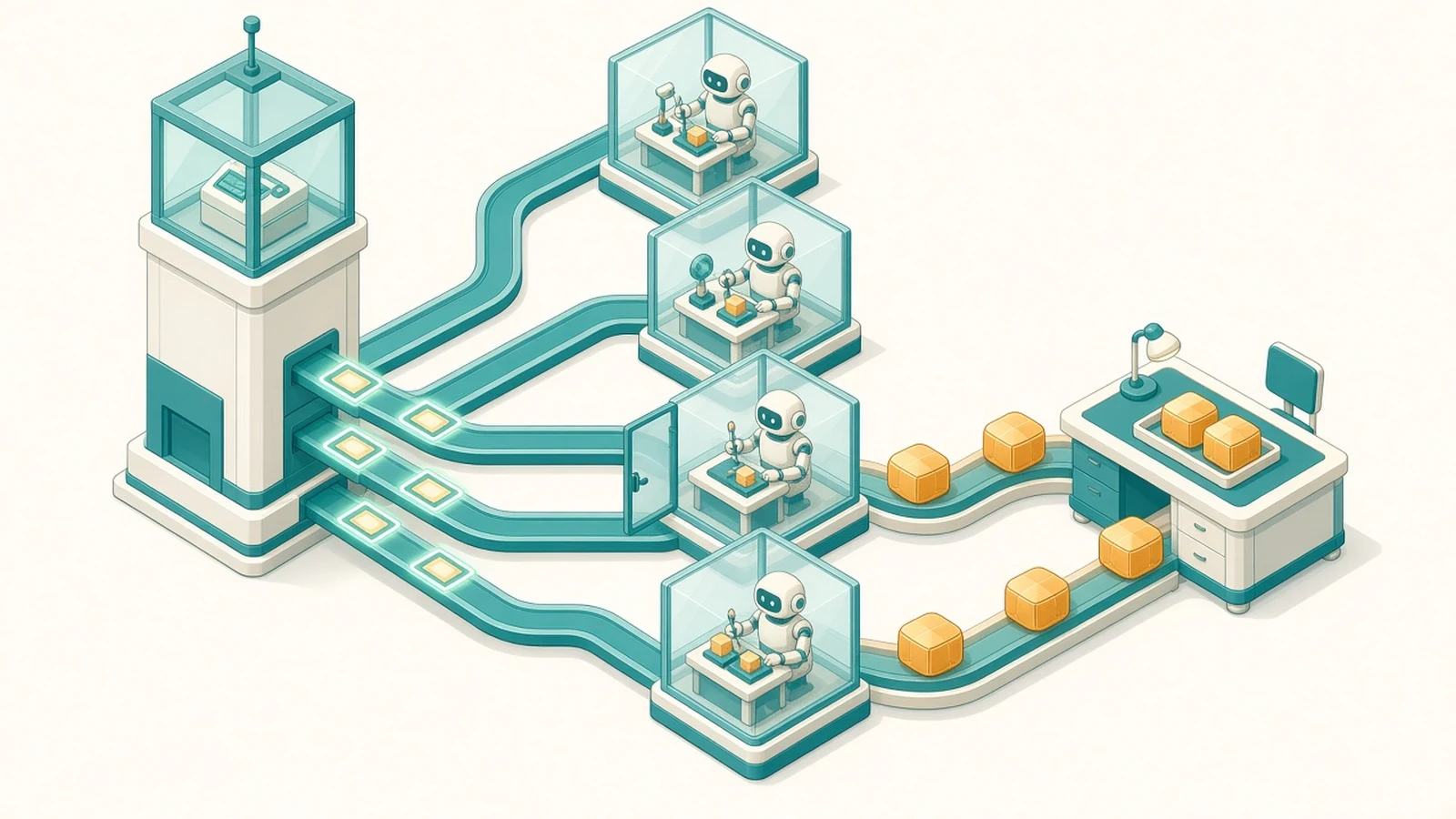
DeepSeek Harness got a lot more interesting on 31 October, when the DeepSeek Harness team published dsh-superagent: a self-hosted coding agent that watches one GitHub repository, picks up requests from people you allow, works on each one in its own session and directory, and replies with a pull request in the same thread. It is open source under MIT, but it is also labelled a research prototype, and its workers run with full access as your OS user. Here is what it is, how a request flows through it, what DeepSeek's benchmark does and does not prove, and how I installed it on a test box.
What DeepSeek Harness and dsh-superagent are
DeepSeek Harness (dsh) is DeepSeek's open-source agent harness, built on what its README calls an "everything is a plugin" architecture. npx @deepseek-ai/dsh web starts a local web UI on port 3080. It is not tied to DeepSeek models: the model settings guide covers DeepSeek keys or account login, built-in providers such as anthropic, openai, moonshotai and zai, and custom OpenAI or Anthropic compatible endpoints.
dsh-superagent is a bundle (plugin package) that turns a separate Harness profile into a long-running agent for one GitHub repository, with Feishu chat as an optional second source.
| DeepSeek Harness | dsh-superagent | |
|---|---|---|
| What it is | General agent harness with a web UI, plugins and sessions | Bundle that runs a proactive GitHub agent on top of Harness |
| Repository | deepseek-ai/deepseek-harness (since 13 Aug 2026) | deepseek-ai/dsh-superagent-prototype (31 Oct 2026) |
| Version on 3 Nov | 0.2.1-rc.5 on npm (latest), 0.2.2-alpha.2 on alpha | 0.1.0, a single commit |
| Licence | MIT | MIT |
| Status | Developer preview; the README warns of compatibility-breaking changes | "Research prototype for reference only, not an official DeepSeek product" |
| Model | Whatever provider you configure | The Harness profile's default model, unless you set one for Eval or execution |
| Where it runs | Your machine, 127.0.0.1:3080 by default | Your machine, in a separate profile (the example uses port 3082) |
How the DeepSeek Harness agent decides to work
The design comes from DeepSeek Harness's article "Exploring Super-agent Design: Towards a More Autonomous Agent System" (posted on X on 1 Nov). A long-lived Router session talks to people and dispatches work but does not do it. Worker sessions each take one task in an isolated context. In the prototype the Router is the "main Session" (dsh-superagent-router preset, small tool set) and every Ticket gets a session called worker-<ticket id>.

The panel and logs use the domain model terms everywhere:
- Trigger and Thread: one event from a Source (GitHub, polled every 60 seconds), and the Issue or PR it belongs to.
- Eval: a code gate checks the sender, then the model decides on what is left.
- Ticket and Mandate: accepted work, and an immutable record of who asked and the scope.
- Subscription: later comments reach the same worker without a new mention.
Accept modes: explicit vs proactive work
An explicit request is an allowed login addressing the agent, such as @my-agent fix the typo on the pricing page, and works in every mode. Inferred work (unaddressed messages, bots, people not on the list) follows the accept mode in the authorization doc:
| Accept mode | What happens to inferred work |
|---|---|
off | Nothing inferred becomes a candidate |
observe (default) | The model assesses it and records "would accept", but accepts nothing |
auto | A positive assessment against at least one enabled rule starts a Ticket |
The two default rules are narrow: "Copy fixes" and "Visual fixes" with a clear target. I like that the default only records what the agent would have done, so you can review those Decisions before switching to auto.
What DeepSeek's experiment shows, and what it does not
The article's benchmark fed about 300 chat and CI messages per run (about 20 real requests) to four designs, five runs each. The super-agent design finished tasks in 12.4 minutes at p50 and 15.7 at p95. A single session with a subagent tool and a neutral prompt hit 29.5 minutes at p95, because the model never delegated and kept getting interrupted.
The article is honest about the limit: "coding work was simulated by a tool that simply consumes time". It measures routing under noise, not whether the pull requests are any good, and the numbers are DeepSeek's own.
The security model, before you install anything
From the deployment doc and execution doc:
- Both the router and worker presets run with
danger-full-accessas your OS user, and workers run commands without approval. - The
ghandgitwrappers are "defaults, not a security boundary": a worker can run any program by absolute path and read your home directory. - Setup strips environment variables named like KEY, PASSWORD, SECRET or TOKEN and gives workers their own git config. That does not hide files on disk.
- DeepSeek Harness's own SAFETY.md says it has not had a security audit and recommends a disposable VM, container or dedicated environment.
As with the LiteLLM supply-chain compromise, assume anything the agent can read can leak.
How to install DeepSeek Harness and dsh-superagent
The official path is to let a coding agent follow SETUP.md with you. Below is the manual path, with what I hit on a Debian test box.
Prerequisites: Node.js 22.19+ or 24+, pnpm, git 2.32+, tmux, Python 3.8+, GitHub CLI 2.48+, a repository on github.com (GitHub Enterprise Server is not supported) and a model provider configured in Harness.
1. Give the agent its own GitHub account and CLI
The agent must be a GitHub user account with write access (not a GitHub App, because it reads the account's notifications), with its own gh config:
mkdir -p ~/.local/bin
cat > ~/.local/bin/gh-agent <<'EOF'
#!/bin/sh
GH_CONFIG_DIR="$HOME/.config/gh-agent" exec gh "$@"
EOF
chmod +x ~/.local/bin/gh-agent
gh-agent auth login            # sign in as the agent account, not yourself
gh-agent api user --jq .login  # must print the agent's login
2. Install Harness, build the bundle and create the profile
npm install -g @deepseek-ai/dsh@0.2.1-rc.5
git clone https://github.com/deepseek-ai/dsh-superagent-prototype.git dsh-superagent
cd dsh-superagent
pnpm install && pnpm build
dsh superagent --from-default-profile web --dump-config > /dev/null
dsh plugin --profile superagent add "link:$PWD"
The deployment doc pins 0.2.1-rc.3. The bundle's engines.dsh range is ^0.2.1-alpha.2, and I checked it with the semver package: it accepts rc.3, rc.5 and 0.2.1, but rejects the alpha tag's 0.2.2-alpha.2. So install from latest, not alpha.
The fifth command creates ~/.dsh/profiles/superagent from the Web template. Run it only once: on an existing profile it replaces the profile and deletes its cordis.patch.yml. Next, copy the example machine config and set an absolute state directory:
# ~/.dsh/profiles/superagent/cordis.patch.yml
- id: webserver
  config:
    host: 127.0.0.1
    port: 3082
- id: dsh-superagent
  config:
    stateDir: /home/agent/.dsh/state/superagent
3. Start it and read the setup problem
scripts/dsh-superagent start
scripts/dsh-superagent status
status exits 0 when healthy, 1 when not running, 2 when a part has an error and 3 when waiting for setup. On my fresh install the Management API said exactly what was missing (real response, trimmed):
curl -s -H 'x-orchestrator-request: 1' http://127.0.0.1:3082/orchestrator/api/state{
"setup": {
"problem": {
"place": "github",
"code": "repositoryUnset",
"values": {},
"detail": "The GitHub Source names no repository."
}
},
"load": { "running": 0, "queued": 0, "maxWorkers": 3 },
"paused": false,
"health": {
"runtime": {
"state": "paused",
"detail": "Waiting for the deployment check",
"code": "setupPending"
}
}
}The same request without the x-orchestrator-request: 1 header returned HTTP 403, as documented.
One quirk: start printed "Startup health check timed out" and status found no process, although the server was up. The script matches processes named node or dsh, and on my box ps -o ucomm showed MainThread. If status disagrees with reality, check ps -ww -eo pid,ucomm,args | grep superagent; stop will not find the process either.
4. Save settings through the Management API
Each settings block has a revision: read it, change it, send it back. Here I added one allowed login (no request becomes a Ticket until this list has someone):
api=http://127.0.0.1:3082/orchestrator/api
H='x-orchestrator-request: 1'
curl -s -H "$H" $api/settings > settings.json
jq '{value: (.blocks.policy.value | .sources = {github: {allowed: [{id: "octocat"}]}}),
     revision: .blocks.policy.revision}' settings.json > policy.json
curl -s -X PUT -H "$H" -H 'content-type: application/json' \
$api/settings/policy -d @policy.json{"saved":true,"revision":1,"policy_changed":true,"restarting":true,"context_delivery":"pending"}Resending with the old revision returned HTTP 409, {"error":"Settings changed. Reload before saving."}, so two editors cannot silently overwrite each other.
Then set the GitHub Source (repository as owner/name, cli as the path to gh-agent) and a prepare command that gives each Ticket a worktree, as in the docs:
git -C /home/agent/src/widgets fetch --no-tags "https://github.com/$DSH_SUPERAGENT_GITHUB_REPOSITORY.git" "${DSH_SUPERAGENT_GITHUB_PR_HEAD:-HEAD}:refs/dsh-superagent/$DSH_SUPERAGENT_TICKET" &&
git -C /home/agent/src/widgets worktree add -b "agent/$DSH_SUPERAGENT_NAME" "$DSH_SUPERAGENT_DIR" "refs/dsh-superagent/$DSH_SUPERAGENT_TICKET"
Then comment @<agent login> <request> on an Issue from an allowed account (a mention added by editing an Issue body is not picked up). I stopped there, because the next step needs a real agent account and model key, and I won't report results I didn't produce.
DeepSeek Harness vs Claude Code and GitHub Agentic Workflows
People search "deepseek harness vs claude code", but dsh-superagent is a different shape of tool, not a direct rival:
| dsh-superagent on DeepSeek Harness | Interactive coding agent (Claude Code style) | GitHub Agentic Workflows | |
|---|---|---|---|
| How work starts | Mentions and rules on GitHub or Feishu, always listening | You type into a session | A workflow trigger in GitHub Actions |
| Where it runs | Your machine or server, as your OS user | Your machine | GitHub Actions runners |
| Parallel tasks | Yes, one worker session per Ticket (3 by default) | One session at a time unless you manage several | One run per trigger |
| Writes to GitHub | Directly, as the agent account | Through your own git and gh | Through validated safe-outputs jobs |
| Maturity on 3 Nov | Research prototype, 0.1.0 | Product | Generally available since 28 Oct |
For a repo bot with a stricter sandbox today, GitHub Agentic Workflows is safer: its agent jobs are read-only and sandboxed by default. To study how an always-on, multi-task agent is built, dsh-superagent is the most complete open example I have seen. To extend an interactive agent with reusable instructions, Agent Skills is a smaller step.
When I would use it
I would not point it at a client's production repository yet. It fits a small internal repo with a steady trickle of well-defined requests: copy fixes, dependency bumps, test gaps. The article says the Router can often run on a lighter model while Workers need the strongest one; my GLM-5.3-Flash vs DeepSeek-V4.1-Flash comparison has prices for two cheap options.
Setup checklist
- Private test repo, dedicated agent GitHub user, separate OS account or VM.
- Install
@deepseek-ai/dshfromlatest(0.2.1-rc.x), notalpha, and keep Node at 22.19+ or 24+. - Back up
<stateDir>/orchestrator.sqlitebefore every upgrade; an older version cannot open a migrated database. - Keep the allowed list short and the accept mode on
observeuntil the recorded Decisions look right. - Leave auto-merge off, and enforce reviews with branch protection, not prompts.
- Read what the agent posts under its name, and fix noise in the prompts.
Frequently asked questions
What is DeepSeek Harness?
DeepSeek Harness (dsh) is DeepSeek's open-source agent harness with a local web UI, sessions, plugins and skills. It is in developer preview, and the npm package @deepseek-ai/dsh was at 0.2.1-rc.5 on 3 November 2026.
Is DeepSeek Harness free and open source?
Yes. Both DeepSeek Harness and dsh-superagent are MIT licensed on GitHub. You still pay for whatever model API you connect it to.
Does DeepSeek Harness only work with DeepSeek models?
No. Its model settings support a DeepSeek API key or account, built-in providers such as Anthropic, OpenAI, Moonshot and Z.ai, and custom endpoints that speak the OpenAI or Anthropic API formats. dsh-superagent uses the profile's default model unless you set another.
Is dsh-superagent an official DeepSeek product?
No. Its README calls it a research prototype for reference only, not an official DeepSeek product, and says it is not production ready. Version 0.1.0 was published as a single commit on 31 October 2026.
Can dsh-superagent merge pull requests by itself?
Not by default. Its default instructions never enable auto-merge as the agent account, and auto-merge needs a second account you name. People merge unless you change that, and branch protection should enforce reviews.
How do I install DeepSeek Harness?
Install Node.js 22.19 or newer and run npx @deepseek-ai/dsh web, which opens the web UI on 127.0.0.1:3080. dsh-superagent also needs pnpm, git 2.32+, tmux, Python 3.8+, GitHub CLI 2.48+ and a dedicated agent GitHub account.
Sources
- dsh-superagent-prototype (README, SETUP.md, docs 000 to 008) (DeepSeek Harness team (GitHub), 2026-10-31)
- 006 Deployment (deepseek-ai on GitHub)
- 002 Authorization (deepseek-ai on GitHub)
- 003 Execution (deepseek-ai on GitHub)
- DeepSeek Harness repository (deepseek-ai on GitHub)
- DeepSeek Harness SAFETY.md (deepseek-ai on GitHub)
- Configure models (DeepSeek Harness user guide) (deepseek-ai on GitHub)
- DeepSeek Harness release dsh-v0.2.1-rc.5 (deepseek-ai on GitHub, 2026-10-30)
- @deepseek-ai/dsh (npm)
- Exploring Super-agent Design: Towards a More Autonomous Agent System (DeepSeek Harness on X, 2026-11-01)
- DeepSeek Harness (DeepSeek)
- GitHub Agentic Workflows generally available (GitHub Changelog, 2026-10-28)
- gh-aw repository (GitHub)
Keep reading
- Agent Skills Guide: Write a SKILL.md That Works EverywhereWhat agent skills are, how to write a SKILL.md that loads in Claude Code, Copilot, Cursor and Codex, and how to install shared skills safely.
- GLM 5.3 Flash vs DeepSeek V4.1 Flash: API, Price, Cost per TaskGLM 5.3 Flash vs DeepSeek V4.1 Flash compared: API setup, prices with DeepSeek peak hours, context, MIT licence and a worked cost per task.
- n8n AI Agent vs Workflow: Which to Use in 2026n8n Agents are in Preview. When an n8n AI agent beats a fixed workflow for small-business automation, what it costs, and how to set one up safely.
Comments
Share a question or note about this article.
Loading comments…