A Guideline 5.1.1(v) account deletion rejection means your app lets people create an account but not delete it from inside the app. For a Flutter app on Firebase Auth, the fix is a real delete flow: confirm, sign in again, revoke Sign in with Apple tokens, delete the user's Firestore and Storage data on the server, then call user.delete(). Here is the flow I use, with tested Dart and Cloud Functions code.
Quick answer
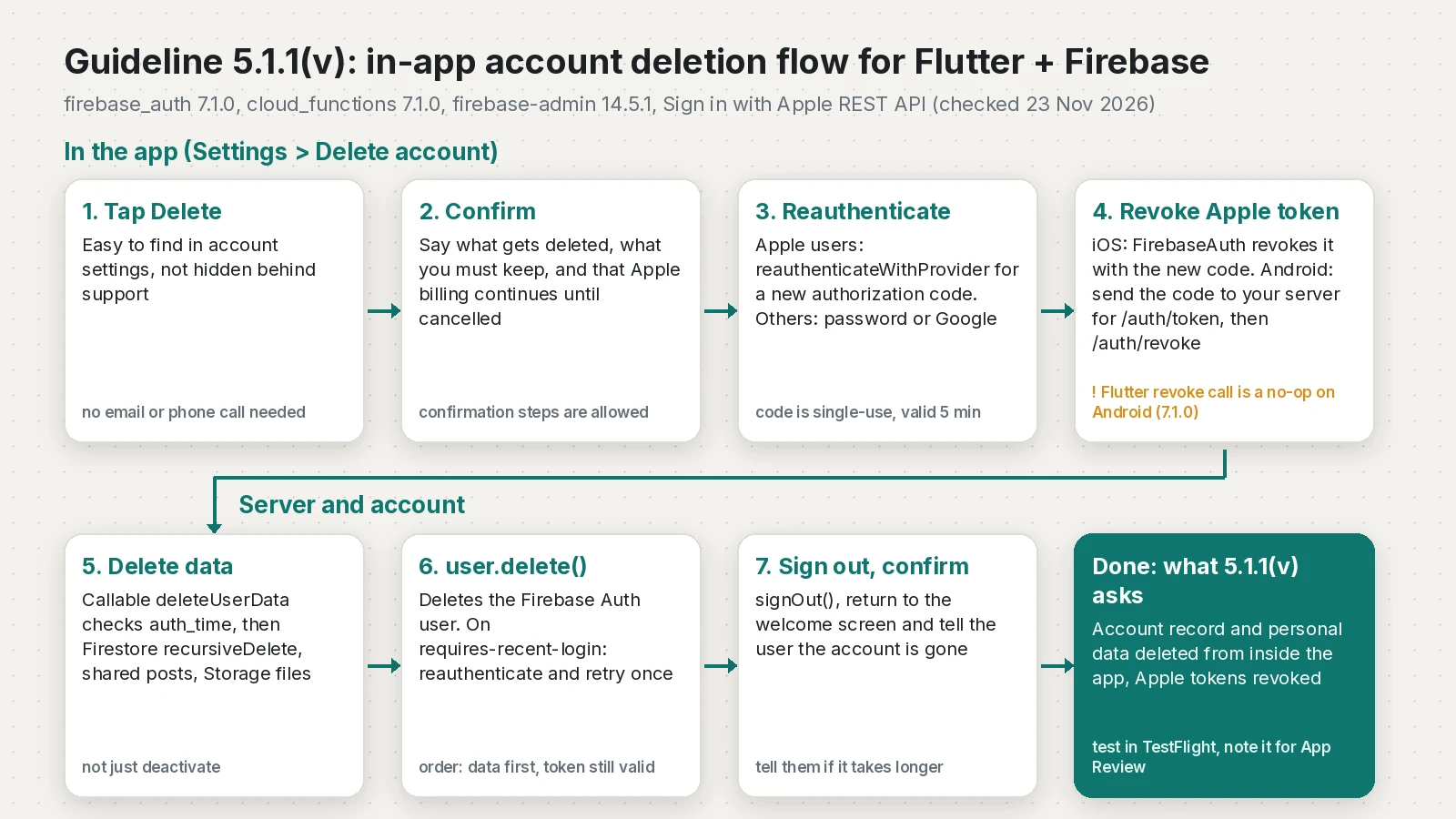
To pass Guideline 5.1.1(v), add a "Delete account" option in account settings that deletes the account and its personal data, not just deactivates it. In Flutter with Firebase, reauthenticate the user, revoke Sign in with Apple tokens with FirebaseAuth.instance.revokeTokenWithAuthorizationCode, delete their data with a callable Cloud Function, then call user.delete() and sign out.
What this means for your app or business
- The release is blocked, including urgent bug fixes, until deletion exists.
- "Deactivate" and "email us" don't count. Apple says deactivation only "is insufficient", and outside highly regulated industries you can't send people to phone, email or chat support.
- Time and cost. In my estimate, one to two days for a typical Firebase app, more if data is spread across many collections or some records must be kept by law.
- When to get help. If you offer Sign in with Apple on Android, sell subscriptions, or don't know where all your user data lives, get a developer to map it first. Each rejection costs a review cycle.
What does Guideline 5.1.1(v) say about account deletion?
Guideline 5.1.1 is "Data Collection and Storage". Part (v) says: "If your app supports account creation, you must also offer account deletion within the app." Apple's guidance adds that deleting an account "removes the account from the developer's records, along with any data associated with the account that the developer isn't legally required to maintain."
I couldn't find the rejection message itself on an Apple page, so I don't quote it here. If yours is unclear, reply in App Store Connect, as in my Guideline 2.1 post.
What does Apple accept as account deletion?
| Requirement | What Apple says | What to build |
|---|---|---|
| Easy to find | Typically in account settings | A Delete account row in Settings |
| Full deletion | Deactivating only is insufficient | Delete the account record and personal data |
| No support hoops | No phone, email or chat unless highly regulated | Self-service in the app |
| Web flow allowed | Link directly to the deletion page | A deep link, not your home page |
| Confirmation allowed | Reauthentication and confirm steps are fine | Confirm dialog plus fresh sign-in |
| Can take time | Manual deletion is fine if you say how long | Tell users when it is done |
| User content | Shared photos, posts and reviews go too | Delete content the user authored |
| Sign in with Apple | Revoke user tokens with the REST API | Revoke before deleting the user |
| Subscriptions | Tell users billing continues through Apple | Link to subscription management |
A GDPR-only flow for some countries is not enough: everyone, everywhere, must be able to delete.
Why do Flutter Firebase apps get this rejection?
- There is sign-up but no delete option.
- The button only calls
user.delete(), which removes the Auth user but leaves Firestore documents and Storage files. - Deletion fails with
requires-recent-login. The FlutterFire docs say that if "the user signed in too long ago, the action fails and throws a FirebaseAuthException with the code requires-recent-login". - Apple tokens were never revoked. Firebase "does not store user tokens" for Sign in with Apple users, so "you must ask the user to sign in again before revoking their token and deleting the account."
How do I add account deletion to a Flutter Firebase app?
Step 1: Configure Sign in with Apple token revocation
In the Firebase console, open the Apple provider and fill in the Services ID and OAuth code flow section (Team ID, key ID, private key). Revocation needs this.
Step 2: Add the delete flow in Dart
Add firebase_core, firebase_auth and cloud_functions, then:
// lib/account_deletion.dart
import 'package:cloud_functions/cloud_functions.dart';
import 'package:firebase_auth/firebase_auth.dart';
import 'package:flutter/foundation.dart';
import 'package:flutter/material.dart';

class AccountDeletionService {
  AccountDeletionService(this.promptForCredential);

  /// Returns a fresh credential for password, Google and other providers.
  final Future<AuthCredential> Function(User user) promptForCredential;
  final _auth = FirebaseAuth.instance;

  /// Apple users get a new authorization code (single-use, valid 5 minutes).
  Future<String?> _reauthenticate(User user) async {
    if (user.providerData.any((p) => p.providerId == 'apple.com')) {
      final result = await user.reauthenticateWithProvider(AppleAuthProvider());
      return result.additionalUserInfo?.authorizationCode;
    }
    await user.reauthenticateWithCredential(await promptForCredential(user));
    return null;
  }

  Future<void> deleteAccount() async {
    final user = _auth.currentUser;
    if (user == null) return;

    // 1. Fresh sign-in first, so the server check and user.delete() pass.
    final appleCode = await _reauthenticate(user);

    // 2. Revoke Sign in with Apple tokens (works on iOS and macOS).
    final isApple = defaultTargetPlatform == TargetPlatform.iOS ||
        defaultTargetPlatform == TargetPlatform.macOS;
    if (appleCode != null && isApple) {
      await _auth.revokeTokenWithAuthorizationCode(appleCode);
    }

    // 3. Delete Firestore and Storage data on the server.
    await user.getIdToken(true); // token with the new auth_time
    await FirebaseFunctions.instance.httpsCallable('deleteUserData').call<void>();

    // 4. Delete the Firebase Auth user, retrying once after reauth.
    try {
      await user.delete();
    } on FirebaseAuthException catch (e) {
      if (e.code != 'requires-recent-login') rethrow;
      await _reauthenticate(user);
      await user.delete();
    }

    // 5. delete() already signs out; this also clears other provider state.
    await _auth.signOut();
  }
}

/// Call from the "Delete account" row in your settings screen.
Future<void> confirmAndDeleteAccount(
    BuildContext context, AccountDeletionService service) async {
  final confirmed = await showDialog<bool>(
    context: context,
    builder: (ctx) => AlertDialog(
      title: const Text('Delete your account?'),
      content: const Text('This permanently deletes your account, profile, '
          'posts and uploads. If you have a subscription, billing continues '
          'through Apple until you cancel it.'),
      actions: [
        TextButton(
            onPressed: () => Navigator.pop(ctx, false),
            child: const Text('Cancel')),
        TextButton(
            onPressed: () => Navigator.pop(ctx, true),
            child: const Text('Delete account')),
      ],
    ),
  );
  if (confirmed != true || !context.mounted) return;

  final messenger = ScaffoldMessenger.of(context);
  try {
    await service.deleteAccount();
    messenger.showSnackBar(
        const SnackBar(content: Text('Your account has been deleted.')));
  } on FirebaseException catch (e) {
    messenger.showSnackBar(
        SnackBar(content: Text('Could not delete account (${e.code}).')));
  }
}
Data goes before the Auth user because the callable needs a valid ID token.
Step 3: Delete the data in a callable Cloud Function
The "Delete User Data" extension (0.1.30) can do this, but extensions.dev says Firebase Extensions shut down on 31 March 2027, so I write the function myself.
// functions/src/index.ts
import { initializeApp } from 'firebase-admin/app';
import { getFirestore } from 'firebase-admin/firestore';
import { getStorage } from 'firebase-admin/storage';
import { onCall, HttpsError } from 'firebase-functions/v2/https';
import { defineSecret, defineString } from 'firebase-functions/params';
import { revokeAppleTokens } from './apple.js';

initializeApp();

const APPLE_TEAM_ID = defineString('APPLE_TEAM_ID');
const APPLE_KEY_ID = defineString('APPLE_KEY_ID');
const APPLE_CLIENT_ID = defineString('APPLE_CLIENT_ID'); // Services ID for Android/web
const APPLE_PRIVATE_KEY = defineSecret('APPLE_PRIVATE_KEY');

export const deleteUserData = onCall({ secrets: [APPLE_PRIVATE_KEY] }, async (request) => {
  const auth = request.auth;
  if (!auth) throw new HttpsError('unauthenticated', 'Sign in first.');

  // Only accept a recent sign-in.
  const age = Math.floor(Date.now() / 1000) - auth.token.auth_time;
  if (age > 5 * 60) throw new HttpsError('failed-precondition', 'requires-recent-login');
  const uid = auth.uid;

  // Android/web clients send a fresh Apple code to revoke here.
  const data = (request.data ?? {}) as { appleAuthorizationCode?: unknown };
  if (typeof data.appleAuthorizationCode === 'string' && data.appleAuthorizationCode) {
    await revokeAppleTokens({
      teamId: APPLE_TEAM_ID.value(),
      keyId: APPLE_KEY_ID.value(),
      clientId: APPLE_CLIENT_ID.value(),
      privateKeyPem: APPLE_PRIVATE_KEY.value(),
    }, data.appleAuthorizationCode);
  }

  const db = getFirestore();
  await db.recursiveDelete(db.collection('users').doc(uid)); // doc + subcollections

  const posts = await db.collection('posts').where('authorId', '==', uid).get();
  const writer = db.bulkWriter();
  posts.docs.forEach((d) => { void writer.delete(d.ref); });
  await writer.close();

  await getStorage().bucket().deleteFiles({ prefix: `users/${uid}/` });
  return { deleted: true };
});
The Apple helper builds an ES256 client_secret JWT, swaps the code for a refresh token at /auth/token, then calls /auth/revoke.
// functions/src/apple.ts
import { createPrivateKey, sign } from 'node:crypto';

const b64url = (v: Buffer | string): string => Buffer.from(v).toString('base64url');

export interface AppleConfig { teamId: string; keyId: string; clientId: string; privateKeyPem: string; }

export function makeClientSecret(cfg: AppleConfig, now = Math.floor(Date.now() / 1000)): string {
  const header = b64url(JSON.stringify({ alg: 'ES256', kid: cfg.keyId }));
  const payload = b64url(JSON.stringify({
    iss: cfg.teamId, iat: now, exp: now + 300, aud: 'https://appleid.apple.com', sub: cfg.clientId,
  }));
  const sig = sign('sha256', Buffer.from(`${header}.${payload}`), {
    key: createPrivateKey(cfg.privateKeyPem), dsaEncoding: 'ieee-p1363',
  });
  return `${header}.${payload}.${b64url(sig)}`;
}

const postForm = (url: string, form: Record<string, string>) => fetch(url, {
  method: 'POST',
  headers: { 'content-type': 'application/x-www-form-urlencoded' },
  body: new URLSearchParams(form),
});

export async function revokeAppleTokens(cfg: AppleConfig, code: string): Promise<void> {
  const client_secret = makeClientSecret(cfg);
  const tokenRes = await postForm('https://appleid.apple.com/auth/token', {
    client_id: cfg.clientId, client_secret, code, grant_type: 'authorization_code',
  });
  if (!tokenRes.ok) throw new Error(`auth/token ${tokenRes.status}: ${await tokenRes.text()}`);
  const { refresh_token } = (await tokenRes.json()) as { refresh_token?: string };
  if (!refresh_token) throw new Error('auth/token returned no refresh_token');

  const revokeRes = await postForm('https://appleid.apple.com/auth/revoke', {
    client_id: cfg.clientId, client_secret, token: refresh_token, token_type_hint: 'refresh_token',
  });
  if (!revokeRes.ok) throw new Error(`auth/revoke ${revokeRes.status}: ${await revokeRes.text()}`);
}
Both files pass tsc --strict. In my test, a JWT signed with a throwaway P-256 key verified, and /auth/token with a fake code returned 400 invalid_grant.
How do I verify the fix before resubmitting?
- In a TestFlight build, create a test account per sign-in provider, add data and upload a file.
- Delete the account.
- In the Firebase console, confirm the Auth user,
users/{uid}, their posts and Storage folder are gone. - For Apple, open Settings, tap your name, then Sign in with Apple. Your app should be gone from the list.
- Sign in again and check you get a new, empty account.
In the App Review notes, say where the option is ("Profile > Settings > Delete account") and include a demo account, which Apple asks for when an app has a login. For upload warnings, see my TestFlight missing compliance fix.
How do I prevent account deletion rejections?
- Put Delete account in account settings, and delete data, not just set a flag.
- List every collection and Storage path with user data, and update the function when you add one.
- Delete shared user content, or say what you must keep by law.
- Revoke Apple tokens on every platform where you offer Sign in with Apple.
- Tell subscribers billing continues and link to https://apps.apple.com/account/subscriptions/.
- Cover guest and anonymous accounts too.
- Test deletion in every TestFlight build that touches auth.
Google Play's account deletion requirements ask for an in-app path plus a web link, entered in the Data safety form, where users can request deletion without reinstalling. A rejection for looking like a template is a different problem, covered in my Guideline 4.3 post.
Frequently asked questions
What is Guideline 5.1.1(v) in the App Store Review Guidelines?
It is the Account Sign-In part of Guideline 5.1.1, Data Collection and Storage. It says that if your app supports account creation, you must also offer account deletion within the app.
What is the App Store account deletion requirement?
Apps that let people create an account must let them start deleting it inside the app. Deletion has to remove the account record and the associated personal data you are not legally required to keep, and only offering to deactivate the account is not enough.
Can I ask users to email support to delete their account?
Only apps in highly regulated industries, such as banking or healthcare, may add customer service steps. Other apps should not require a phone call, email, chat or other support flow.
Can account deletion happen on my website instead of in the app?
Yes. If people need to visit a website to finish deleting their account, Apple asks you to link directly to the page where they complete it, rather than to a general page.
How do I delete a Firebase user in Flutter?
Call delete() on FirebaseAuth.instance.currentUser. If it throws a FirebaseAuthException with the code requires-recent-login, reauthenticate the user and call delete() again, and delete the user's Firestore and Storage data separately because delete() only removes the Auth account.
How do I revoke a Sign in with Apple token when a user deletes their account?
Ask the user to sign in with Apple again to get a fresh authorization code, then call FirebaseAuth.instance.revokeTokenWithAuthorizationCode on iOS. On a server you exchange the code at Apple's auth/token endpoint for a refresh token and send it to auth/revoke.
Does Google Play also require account deletion?
Yes. If users can create an account in your app, Google Play requires an in-app way to request account deletion and a web link where users can request deletion without reinstalling the app, declared in the Data safety form.
What about users with active subscriptions?
Tell them billing continues through Apple and ask them to cancel before deleting, for example with a link to the App Store subscriptions page. You may offer to schedule deletion for when the subscription ends, as long as immediate deletion is also available.
Sources
- App Review Guidelines (5.1.1 Data Collection and Storage) (Apple Developer, 2026-10-16)
- 5.1.1(v) - Offering account deletion in your app (Apple Developer)
- Revoke tokens (Apple Developer Documentation)
- Generate and validate tokens (Apple Developer Documentation)
- Creating a client secret (Apple Developer Documentation)
- Manage your apps with Sign in with Apple (Apple Support, 2026-09-14)
- Manage Users in Firebase (Flutter) (Firebase, 2026-11-18)
- Federated identity and social sign-in (Flutter): Revoke Apple auth tokens (Firebase, 2026-11-18)
- Authenticate Using Apple (Apple platforms): Token revocation (Firebase, 2026-11-20)
- Delete User Data extension (Firebase Extensions Hub)
- Understanding Google Play's app account deletion requirements (Play Console Help)
- firebase_auth on pub.dev (pub.dev, 2026-11-16)
- cloud_functions on pub.dev (pub.dev, 2026-11-16)
- sign_in_with_apple on pub.dev (pub.dev, 2026-08-27)
- firebase-admin on npm (npm)
- firebase-functions on npm (npm)
Keep reading
- Guideline 2.1 Information Needed: How to Get ApprovedWhat App Store Guideline 2.1 Information Needed asks for on a new app, how to reply without a new build, and how it differs from App Completeness.
- Guideline 4.3 Design Spam: Fix White-Label App RejectionsWhat Apple's Guideline 4.3(a) and 4.3(b) spam rejections mean, and how to fix them by merging white-label apps, using 4.2.6, or replying and appealing.
- TestFlight Missing Compliance: Fix It Once in Info.plistStop TestFlight builds stalling on Missing Compliance: choose the right ITSAppUsesNonExemptEncryption value, fix stuck builds and guard it in CI.
Comments
Share a question or note about this article.
Loading comments…