· 10 min read · Nadeera Silva
Node 26 LTS: How to Upgrade from Node 22 or 24
Node 26 becomes Active LTS on 28 October 2026. Compare Node 22, 24 and 26, then upgrade a Fastify or Express API with Prisma, Docker and CI.

Node 26 LTS starts on 28 October 2026, six days from when I'm writing this. At the same time Node 24 has just moved into Maintenance and Node 22 has about six months left before end of life. If you run a Node backend, that raises a practical question: do you move to 24, wait for 26, or leave things alone for now? This guide gives you a decision table, what actually changed between 22, 24 and 26, and an upgrade plan for a typical Fastify or Express API with Prisma, deployed with systemd and nginx or Docker, and tested in GitHub Actions.
Node 26 LTS dates, and where 22 and 24 stand
The official schedule.json gives these dates:
| Line | Codename | Active LTS from | Maintenance from | End of life |
|---|---|---|---|---|
| Node 22 | Jod | 2024-10-29 | 2025-10-21 | 2027-04-30 |
| Node 24 | Krypton | 2025-10-28 | 2026-10-20 | 2028-04-30 |
| Node 26 | not named yet | 2026-10-28 | 2027-10-20 | 2029-04-30 |
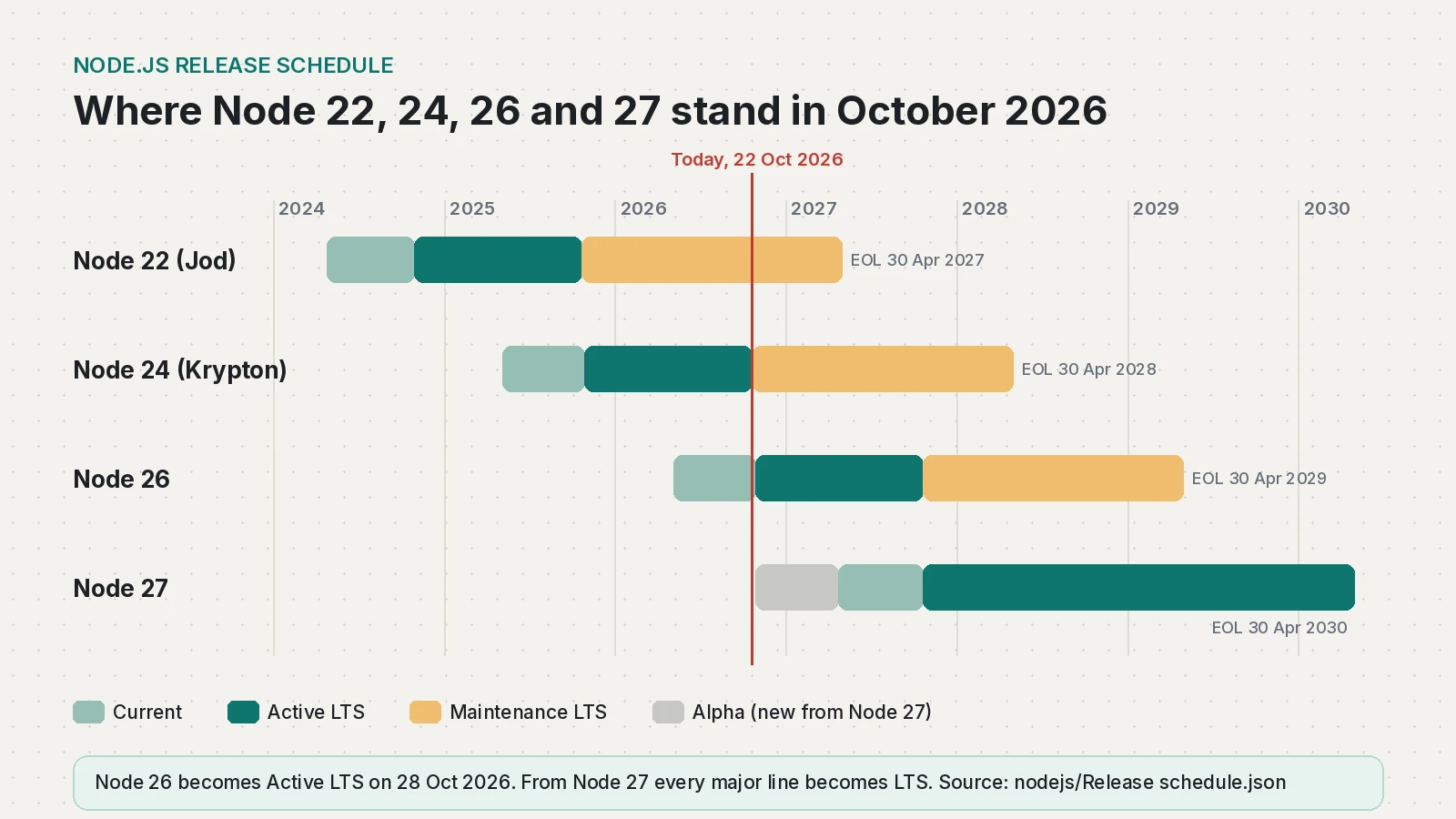
A few things follow from this:
- Node 22 end of life is 30 April 2027. It only gets critical and security fixes now. After that date there are no fixes at all.
- Node 24 entered Maintenance on 20 October 2026. It is still a safe production choice until April 2028, but new features will mostly land in 26.
- Node 20 is already end of life (30 April 2026). If you are still on it, skip straight to the plan below.
- Node 25 was never an LTS line. Odd-numbered releases up to 26 got six months as "Current" and then ended. Node 25 reached end of life on 1 June 2026.
The nodejs.org releases page puts it plainly: production apps should only run Active LTS or Maintenance LTS releases. Node 26 is Current until 28 October, so it becomes a normal production choice from next week.
Node 24 vs Node 26: what actually changed
If you are on 22, moving to 26 means taking the breaking changes from 23, 24, 25 and 26 at once. Most of them are clean-ups of APIs that were deprecated for years, so a typical API server written in the last few years is often fine. The ones worth checking:
Engine and bundled tools (from the official release index):
- Node 22.23.4 ships V8 12.4 and npm 10.9.9.
- Node 24.22.1 ships V8 13.6 and npm 11.19.1.
- Node 26.12.1 ships V8 14.6 and npm 11.20.0.
New in Node 26 (release notes): the Temporal date and time API is enabled by default, Undici (the engine behind fetch) moves to 8.x, and V8 14.6 adds Map.prototype.getOrInsert() and Iterator.concat().
Removed or deprecated in Node 26:
http.Server.prototype.writeHeader()is removed. UsewriteHead().- The legacy
_stream_readable,_stream_writable,_stream_duplex,_stream_transform,_stream_passthroughand_stream_wrapmodules are removed. Import fromnode:streaminstead. --experimental-transform-typesis removed.module.register()is now runtime-deprecated, so any loader that calls it will print a warning.- In crypto, GCM decryption with a short auth tag now needs an explicit
authTagLength(DEP0182), and passing aCryptoKeytonode:cryptofunctions is runtime-deprecated (DEP0203). NODE_MODULE_VERSIONis 147, so native addons must be rebuilt or have prebuilt binaries for Node 26.
Removed in Node 25 (which you skip, but still inherit), from the 25.0.0 notes: SlowBuffer, fs.F_OK and friends on the fs object (use fs.constants.F_OK), and the recursive option for fs.rmdir (use fs.rm).
Which Node LTS should you run? A decision table
| Your situation | Do this | Why |
|---|---|---|
| On Node 22, a key dependency does not support 24+ yet | Stay on 22 for now, with a date to move | Supported until 30 April 2027, security fixes only |
| On Node 22, want the smallest jump this month | Move to 24 | Maintenance LTS until 30 April 2028 |
| On Node 24, everything works | Plan 26 for November or December | 24 is safe until 2028, so there is no rush |
| Starting a new project | Use 26 from 28 October | Longest support window, until 30 April 2029 |
| On Node 20 or 25 | Upgrade now, to 24 or 26 | Both are already end of life |
My own rule for client backends: if I'm touching the runtime anyway, I go to the newest LTS line once its main dependencies list it as supported, so the next forced upgrade is as far away as possible.
Check your dependencies first
For the stack in this post, the dependency picture on 22 October 2026 is good:
- Fastify 5 lists Node 20, 22, 24 and 26 in its LTS table. The upcoming Fastify 6 targets 24 and 26.
- Express 5.3.0 declares
node >= 18in its package.json. - Prisma ORM 7 docs list Node
^20.19.0,^22.12.0or^24.0.0, and say Prisma tests all Active and Maintenance LTS releases. The@prisma/client7.10.1 package declares>=24.0for its newest range, and the Prisma 8 release candidates declare^22.18.0 || ^24.11.0 || >=26.0.0. Expect the docs table to add 26 once it is LTS, and run your own tests before then.
Run this from your project root, after npm ci, to list what your installed packages declare:
// scripts/engines.cjs: list every installed package that declares engines.node
const fs = require("fs");
const path = require("path");
const out = [];
(function walk(dir) {
  if (!fs.existsSync(dir)) return;
  for (const name of fs.readdirSync(dir)) {
    if (name.startsWith(".")) continue;
    const p = path.join(dir, name);
    if (name.startsWith("@")) { walk(p); continue; }
    try {
      const pkg = JSON.parse(fs.readFileSync(path.join(p, "package.json"), "utf8"));
      if (pkg.engines && pkg.engines.node) out.push([`${pkg.name}@${pkg.version}`, pkg.engines.node]);
    } catch {}
    walk(path.join(p, "node_modules"));
  }
})("node_modules");
for (const [name, range] of out.sort()) console.log(name.padEnd(45), range);
Run it with node scripts/engines.cjs. Look for upper bounds such as <23 or ^20 || ^22. Those packages will still often install with a warning, but they are the ones to test hardest or replace.
How to upgrade your Node version, step by step
1. Pin the version in the repo
Put the major version in .nvmrc and declare the range in package.json. nvm and fnm both read .nvmrc, and fnm can also resolve engines.node.
26{
"engines": {
"node": "^24.11.0 || ^26.0.0"
}
}Locally, install and switch:
nvm install 26 --reinstall-packages-from=current
nvm use 26
node -v2. Test on all target versions in GitHub Actions
Run the suite on your current version and the new one side by side until you switch. This uses actions/setup-node v7, the same action as my CI/CD pipeline for a solo SaaS:
name: test
on: [push, pull_request]
jobs:
  test:
    runs-on: ubuntu-latest
    strategy:
      fail-fast: false
      matrix:
        node: [22, 24, 26]
    steps:
      - uses: actions/checkout@v7
      - uses: actions/setup-node@v7
        with:
          node-version: ${{ matrix.node }}
          cache: npm
      - run: npm ci
      - run: npx prisma generate
      - run: npm test
        env:
          NODE_OPTIONS: --trace-deprecation
--trace-deprecation prints a stack trace for each deprecation warning, so you can see whether the call is in your code or in a dependency. Once all three are green, drop 22 from the matrix and switch your deploy job to node-version-file: .nvmrc.
3. Run a quick check script on the server or image
This prints what the runtime is, so you can confirm a deploy really picked up the new version:
// scripts/check-node.mjs
const [major] = process.versions.node.split(".").map(Number);
console.log({
  node: process.versions.node,
  lts: process.release.lts ?? "not LTS (Current)",
  v8: process.versions.v8,
  abi: process.versions.modules,
  temporal: typeof globalThis.Temporal !== "undefined",
});
if (major < 24) {
  console.error("Node", major, "is below the supported range for this app");
  process.exit(1);
}
Then search your code for the removed APIs listed above:
rg -n "_stream_(readable|writable|duplex|transform|passthrough|wrap)|\.writeHeader\(|SlowBuffer|fs\.(F|R|W|X)_OK|module\.register\(|experimental-transform-types" \
  --glob '!node_modules' .
4. Docker: change the base image tag
FROM node:26-bookworm-slim AS build
WORKDIR /app
COPY package*.json ./
COPY prisma ./prisma
RUN npm ci
COPY . .
RUN npx prisma generate && npm run build

FROM node:26-bookworm-slim
WORKDIR /app
# Prisma's Linux requirements include OpenSSL, which slim images do not ship
RUN apt-get update && apt-get install -y --no-install-recommends openssl \
  && rm -rf /var/lib/apt/lists/*
ENV NODE_ENV=production
COPY --from=build /app/package*.json ./
COPY --from=build /app/node_modules ./node_modules
COPY --from=build /app/dist ./dist
COPY --from=build /app/prisma ./prisma
USER node
CMD ["node", "dist/server.js"]
Both stages use the same tag, so native modules built in the first stage match the runtime in the second. The node:26-* tags already exist on Docker Hub.
5. systemd and nginx: check which binary the service runs
nginx does not care about the Node version, but systemd does. Check the service's ExecStart:
systemctl cat api.service | grep ExecStart
readlink -f "$(command -v node)"
If ExecStart points at a version-specific path such as ~/.nvm/versions/node/v24.x/bin/node, installing Node 26 changes nothing until you edit the unit. Install 26 alongside 24, run npm ci in a fresh release directory, point the unit at the new binary, then systemctl daemon-reload && systemctl restart api and hit your health check. Keep the old version installed for a quick rollback. If your API verifies tokens with node:crypto or jose, as in my Supabase JWT and Fastify post, include an authenticated request in that smoke test.
Node 26 LTS upgrade checklist
- Confirm today's dates in schedule.json; Node 26 LTS is due on 28 October 2026.
- Pick a target from the decision table and write the date down.
- Check
enginesranges of Fastify or Express, Prisma and anything with native code. - Add
.nvmrcand anengines.noderange. - Run CI on 22, 24 and 26 with
--trace-deprecation. - Search for removed APIs (
writeHeader,_stream_*,SlowBuffer,fs.F_OK). - Rebuild
node_moduleson the target version; never copy it across. - Pin
node:26-...in Docker instead ofnode:lts. - Update the systemd
ExecStartpath and keep the old binary for rollback. - Deploy, run the check script and health check, watch logs for deprecation warnings.
- Set a reminder before 30 April 2027 for anything still on Node 22.
Frequently asked questions
What is the current Node.js LTS version?
On 22 October 2026 the newest LTS line is Node 24 (Krypton), now in Maintenance, and Node 22 (Jod) is also still supported. Node 26 becomes the Active LTS line on 28 October 2026.
When does Node 26 become LTS?
The official Node.js schedule lists 28 October 2026 for Node 26 to enter Active LTS. It moves to Maintenance on 20 October 2027 and reaches end of life on 30 April 2029.
When does Node 22 reach end of life?
Node 22 reaches end of life on 30 April 2027. It has been in Maintenance since 21 October 2025, so it only receives critical bug and security fixes until then.
Should I use Node 24 or Node 26?
For new projects and upgrades from late October 2026, Node 26 gives the longest support window. Node 24 is a fine choice if a key dependency does not support 26 yet, since it is supported until 30 April 2028.
Is Node 25 an LTS version?
No. Up to Node 26, only even-numbered releases became LTS. Node 25 was a Current release for six months and reached end of life on 1 June 2026.
How do I upgrade my Node version?
Pin the new major in .nvmrc, install it with nvm or fnm, run your tests on the old and new versions in CI, then rebuild node_modules and switch your Docker base image or systemd service to the new binary. Keep the old version installed so you can roll back.
Sources
- Node.js Release schedule (schedule.json) (Node.js on GitHub)
- Node.js Release Working Group README (Node.js on GitHub)
- Node.js 26.0.0 (Current) (Node.js, 2026-05-05)
- Node.js 25.0.0 (Current) (Node.js, 2025-10-15)
- Evolving the Node.js Release Schedule (Node.js, 2026-03-10)
- Node.js Releases (Node.js)
- Node.js release index (dist/index.json) (Node.js)
- Deprecated APIs (Node.js Documentation)
- Fastify LTS (Fastify on GitHub)
- Prisma ORM system requirements (Prisma Documentation)
- express package (npm)
- actions/setup-node (GitHub)
- nvm README (nvm-sh on GitHub)
- fnm commands (fnm on GitHub)
- node official image (Docker Hub)
Keep reading
- GitHub Actions CI/CD for a Solo SaaS: Tests, SSH Deploy and Prisma MigrationsThe GitHub Actions pipeline I run for Pactroom: tests, build, SSH deploy to a VPS, prisma migrate deploy and a health check, with a workflow you can adapt.
- How to Verify a Supabase JWT in Fastify with JWKSVerify Supabase JWTs in a Fastify API with JWKS and jose, handle the legacy JWT secret, rotate keys safely, and secure Socket.IO connections too.
- pgvector 0.8.7 Security Fix: Upgrade, Then Pick HNSW or IVFFlatpgvector 0.8.7 fixes a high-severity IVFFlat bug. Check your version, upgrade on Docker or Supabase, and choose between HNSW and IVFFlat.
Comments
Share a question or note about this article.
Loading comments…