· 12 min read · Nadeera Silva
n8n 3.0 Beta: Breaking Changes and a Safe Docker Upgrade
n8n 3.0 beta is out and stable lands in early December. Here is what breaks, the Docker tag trap, and a backup-first upgrade plan for self-hosted n8n.

n8n 3.0 is the first major n8n release since 2.0 (December 2025), and it is mostly removals and safer defaults rather than new features. The beta came out on 27 October 2026 and the stable release is planned for early December. If you self-host n8n on Docker, as I do for client automations, what matters is which workflows break, which environment variables change, and the fact that the upgrade is one way. This guide covers the dates, who is affected, the breaking changes that matter, and a staging-first upgrade plan with Docker Compose files and commands to back up, test and restore.
n8n 3.0 release date and support timeline
| Line | Status on 28 Oct 2026 | What happens next |
|---|---|---|
| 3.x | 3.0.0 beta, released 27 Oct 2026 | Stable 3.x in early December 2026 (no exact day announced) |
| 2.x | Current stable is 2.45.4, beta is 2.46.0 | Security and critical fixes for 12 months after 3.x stable; new features go to 3.x only |
| 1.x | Still receiving patches (1.123.88 shipped 26 Oct) | Support ends 31 December 2026; no direct path to 3.x |
The changes apply to Community, Cloud and Enterprise editions alike. n8n's FAQ says credentials and execution history carry over, and downtime is a short restart.
Who is affected by the n8n 3.0 upgrade
- npm and npx installs. Self-hosted n8n 3.0 requires Docker. Installing with npm or
npx n8nis no longer supported, and there is no runnable 3.0n8npackage on npm (the npmlatesttag is still 2.45.4). The quick replacement is the one-line setup (curl -fsSL https://get.n8n.io | sh). - Docker Compose users. You can keep your own compose file. Check the volume mounts, the task runner image tag and the environment variables listed below.
- Kubernetes and Helm. The deployment method is not affected, but the node and environment variable changes still apply.
The Docker tag trap: beta and next are not 3.0
n8n says to install the beta "like any other beta release", but on Docker Hub on 28 October the beta and next tags had the same digest as 2.46.0, and latest was 2.45.4. Pin the version explicitly:
image: n8nio/n8n:3.0.0If you run external task runners, pin n8nio/runners to 3.0.0 as well. The task runner docs say the runners image version must match the n8n image version.
n8n 3.0 breaking changes that matter most
The full list, with a fix for each item, is in n8n's breaking changes docs. These are the groups I would check first.
Removed nodes and their replacements
Workflows that still use a removed node fail.
| Removed in 3.0 | Use instead |
|---|---|
| Function | Code node, Run Once for All Items |
| Function Item | Code node, Run Once for Each Item |
| Item Lists | Split Out, Aggregate, Sort, Limit, Remove Duplicates or Summarize |
| Cron, Interval | Schedule Trigger |
| HTML Extract | HTML node, Extract HTML Content |
| Read Binary File(s), Write Binary File | Read/Write Files from Disk |
| Read PDF | Extract from File, Extract From PDF |
| Workflow Trigger | n8n Trigger |
| Legacy OpenAI, OpenAI Assistant, OpenAI Model | OpenAI node (Assistant resource), OpenAI Chat Model |
| Legacy HTTP Request Tool | HTTP Request node on the Agent's Tool input |
| Manual Chat Trigger | Chat Trigger |
| AI Agent v1 (ReAct, SQL, Plan and Execute and other modes) | Latest AI Agent (Tools Agent); for SQL use a Postgres or MySQL tool |
| LangChain Code, Motorhead, Zep, SerpApi, Orbit | No direct replacement |
AI Transform nodes become Code nodes with the same JavaScript. $getPairedItem is gone too, so use $('Node').item, .itemMatching(i) or .pairedItem(i). If you built agents on the older AI Agent modes, my post on when to use an n8n AI Agent versus a plain workflow covers how the current Tools Agent fits.
Behaviour changes in nodes that still exist
- Always Output Data on If and Switch now adds the empty item only when all outputs are empty.
- Gmail Trigger v1 to v1.3 now behave like v1.4: at most 10 emails per poll by default (50 max), drafts are skipped unless Include Drafts is on, and sent or scheduled emails no longer trigger.
- Edit Image v1 and v1.1 are removed, and v2 can give slightly different output.
- Chat Trigger WebSocket frames are now JSON with a
typefield, so embedded chat needs@n8n/chat1.31.0 or later.
Security defaults
- Encryption key rotation is on by default. Old data stays readable.
- The Slack API credential now requires a signing secret. Workflows with a Slack Trigger fail to publish, and the trigger returns 401, until you add it. Add it before you upgrade.
- With SSRF protection enabled and
defaultin the block list, four more ranges are blocked:::/128,100.64.0.0/10,2002::/16and64:ff9b::/96. The100.64.0.0/10range includes Tailscale-style addresses. Allow what you need withN8N_SSRF_ALLOWED_IP_RANGESorN8N_SSRF_ALLOWED_HOSTNAMES. - Unverified community packages are off by default (
N8N_UNVERIFIED_PACKAGES_ENABLED=false), so installed unverified nodes stop loading. - Compression node limits drop from 2 GiB to 256 MiB decompressed and from 5000 to 1000 zip entries.
Environment variable and storage changes
| Setting | 2.x | 3.0 | What to do |
|---|---|---|---|
N8N_RUNNERS_TASK_TIMEOUT | 300 seconds | 60 seconds | Set it explicitly if Code node tasks run longer than a minute |
~/.n8n/binaryData | Storage folder | Renamed to ~/.n8n/storage on first start | Remount a binaryData volume at /home/node/.n8n/storage or set N8N_STORAGE_PATH |
N8N_DEFAULT_BINARY_DATA_MODE=default | In-memory | Invalid, switches to filesystem | Set filesystem, s3, azure or database and check disk space |
OFFLOAD_MANUAL_EXECUTIONS_TO_WORKERS | Optional | Removed, manual runs always go to workers in queue mode | Remove it and review worker memory |
N8N_DB_PING_TIMEOUT | Supported | Removed | Use DB_PING_TIMEOUT_MS |
N8N_PRE_EXECUTE_ERROR_CREATES_EXECUTION | Supported | Removed | Remove it; the old behaviour can't be kept |
| Chat Hub | On | Off by default | Add chat-hub to N8N_ENABLED_MODULES if you still use it |
Planned changes that were reverted
Two removals listed earlier were reverted in the 3.0.0 release, so they are not breaking changes: the "Any workflow" sub-workflow caller policy is still only deprecated, and Execute Sub-workflow keeps its "Run once for each item" mode.
Use the Migration Report before you upgrade
Every instance on 2.39 or later has Settings > Migration Report, and the latest 2.x has the newest rules. The migration tool docs list impact levels from Upgrade blocked and Executions will fail down to Behavior changes and Capability removed. Admins also see an Instance issues tab.
Some issues have a Migrate button, for example Cron to Schedule Trigger. Each fix is saved as a new workflow version, and the published version keeps running until you publish it. You can mark idle workflows as "won't fix" and export a CSV. Fix the highest impact first, then press Refresh and confirm nothing is unresolved.
How to upgrade n8n in Docker Compose safely
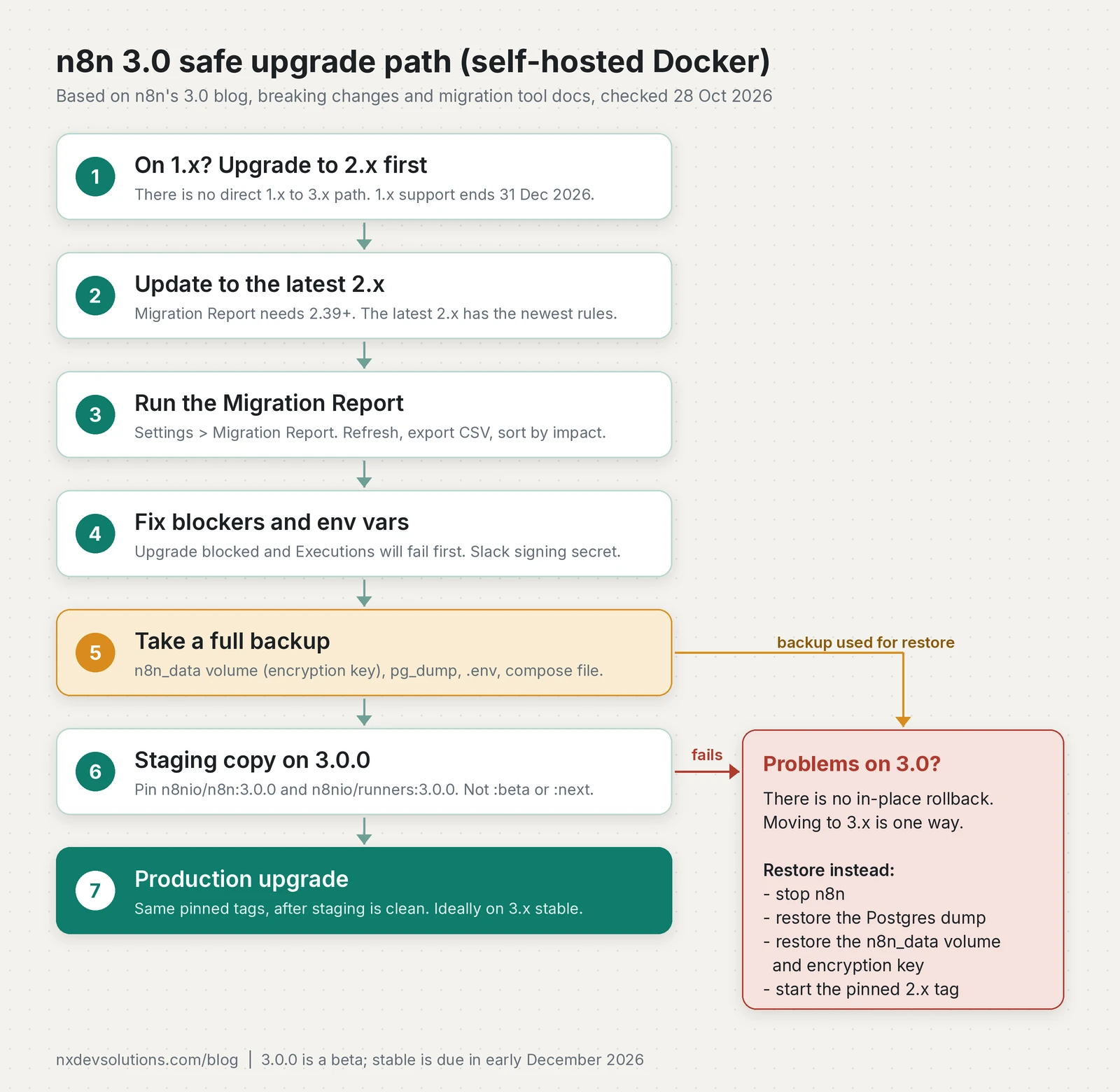
This plan assumes a Compose project with n8n, Postgres and a named n8n_data volume.
Step 1: Update to the latest 2.x and clear the report
Pin the latest 2.x tag (2.45.4 stable on 28 October) and pull it. This is also how you update n8n in Docker Compose generally:
cd /path/to/n8n
# set image: n8nio/n8n:2.45.4 in compose.yml first
docker compose pull
docker compose up -d
docker compose logs -f n8n   # watch for deprecation warnings
Then work through the Migration Report.
Step 2: Take a full backup
The backup docs define a complete backup as the .n8n folder (in Docker, the n8n_data volume at /home/node/.n8n, which holds the config file with the credential encryption key), plus the external database, plus any S3 or Azure storage and custom node folders. A CLI export:workflow --backup is not enough on its own, because it leaves out users, executions, variables and the key.
mkdir -p backup-pre3
docker volume ls | grep n8n_data          # find the real name, e.g. n8n_n8n_data
docker compose stop n8n
docker compose exec -T postgres pg_dump -U n8n -Fc n8n > backup-pre3/n8n.dump
docker run --rm -v n8n_n8n_data:/data -v "$PWD/backup-pre3":/backup alpine \
  tar czf /backup/n8n_data.tgz -C /data .
cp compose.yml .env backup-pre3/
docker compose start n8n
Replace the user, database and volume names with yours. If you set N8N_ENCRYPTION_KEY yourself, store a copy of it somewhere other than the server. Without that key a restored database can't decrypt your credentials. As in my LiteLLM 1.107.0 response guide, pin exact tags and keep a backup you have tested.
Step 3: Restore into a staging copy on 3.0.0
Use a separate Compose project with its own name, port and volumes:
# compose.staging.yml
name: n8n-staging
services:
  postgres:
    image: postgres:16   # use the same major version as production
    environment:
      POSTGRES_USER: n8n
      POSTGRES_PASSWORD: ${POSTGRES_PASSWORD}
      POSTGRES_DB: n8n
    volumes:
      - db_data:/var/lib/postgresql/data
  n8n:
    image: n8nio/n8n:3.0.0
    ports:
      - "15678:5678"
    environment:
      DB_TYPE: postgresdb
      DB_POSTGRESDB_HOST: postgres
      DB_POSTGRESDB_DATABASE: n8n
      DB_POSTGRESDB_USER: n8n
      DB_POSTGRESDB_PASSWORD: ${POSTGRES_PASSWORD}
      N8N_RUNNERS_MODE: external
      N8N_RUNNERS_BROKER_LISTEN_ADDRESS: 0.0.0.0
      N8N_RUNNERS_AUTH_TOKEN: ${N8N_RUNNERS_AUTH_TOKEN}
      N8N_RUNNERS_TASK_TIMEOUT: "300"   # only if you relied on the old 5 minute default
    volumes:
      - n8n_data:/home/node/.n8n
    depends_on:
      - postgres
  runners:
    image: n8nio/runners:3.0.0   # must match the n8n version
    environment:
      N8N_RUNNERS_TASK_BROKER_URI: http://n8n:5679
      N8N_RUNNERS_AUTH_TOKEN: ${N8N_RUNNERS_AUTH_TOKEN}
    depends_on:
      - n8n
volumes:
  db_data:
  n8n_data:
Add your own N8N_ENCRYPTION_KEY if production sets one. Then restore the backup into the empty staging volumes before n8n starts:
docker compose -f compose.staging.yml create
docker compose -f compose.staging.yml start postgres
docker compose -f compose.staging.yml exec -T postgres \
  pg_restore -U n8n -d n8n --no-owner < backup-pre3/n8n.dump
docker run --rm -v n8n-staging_n8n_data:/data -v "$PWD/backup-pre3":/backup alpine \
  tar xzf /backup/n8n_data.tgz -C /data
docker compose -f compose.staging.yml up -d
docker compose -f compose.staging.yml logs -f n8nWatch the logs for the storage rename and startup errors, then run your key workflows by hand: long Code nodes, Edit Image, Gmail Trigger, If and Switch, and HTTP calls to private addresses.
Step 4: Upgrade production
When staging is clean, repeat the backup on production, change the tags to n8nio/n8n:3.0.0 and n8nio/runners:3.0.0 (or the stable 3.x tag once it ships) and run docker compose pull && docker compose up -d. For client systems I would wait for the stable release in early December and use the beta only on staging. If you deploy with CI, keep the tag in the repository, as in my solo SaaS CI/CD pipeline.
Rollback means restoring the backup
There is no downgrade command. If 3.0 fails in production, put the 2.x tag back and restore both parts of the backup:
docker compose down
# set image back to n8nio/n8n:2.45.4 (and the matching runners tag) in compose.yml
docker compose up -d postgres
docker compose exec -T postgres dropdb -U n8n n8n
docker compose exec -T postgres createdb -U n8n n8n
docker compose exec -T postgres pg_restore -U n8n -d n8n --no-owner < backup-pre3/n8n.dump
docker run --rm -v n8n_n8n_data:/data -v "$PWD/backup-pre3":/backup alpine \
  sh -c "find /data -mindepth 1 -delete && tar xzf /backup/n8n_data.tgz -C /data"
docker compose up -d
Anything that ran on 3.0 after the backup is lost, so keep the production window short.
n8n 3.0 upgrade checklist
- On 1.x: upgrade to the latest 2.x first, before 31 December 2026.
- On npm or npx: move to Docker before you plan the 3.0 upgrade.
- Update to the latest 2.x and open Settings > Migration Report.
- Fix Upgrade blocked and Executions will fail items first, then Refresh until nothing is unresolved.
- Add the signing secret to every Slack API credential used by a Slack Trigger.
- Set old defaults explicitly if you depend on them, and remove the variables 3.0 drops.
- Check for a volume mounted at
/home/node/.n8n/binaryData. - Back up the
n8n_datavolume, the Postgres database,.env, the compose file and the encryption key. - Pin
n8nio/n8n:3.0.0andn8nio/runners:3.0.0, never:betaor:next. - Test a restored staging copy, then upgrade production, ideally on 3.x stable.
Frequently asked questions
When is the n8n 3.0 release date?
The n8n 3.0.0 beta was released on 27 October 2026. n8n says the stable 3.x release follows in early December 2026, without an exact day.
Can I roll back from n8n 3.0 to 2.x?
No. n8n says moving to 3.x is one way. Going back means stopping n8n and restoring the full backup you took before upgrading, including the database and the .n8n folder with the encryption key, then starting your pinned 2.x image.
Does n8n 3.0 still support npm installs?
No. Self-hosted n8n 3.0 requires Docker, and installing with npm or npx n8n is no longer supported. The one-line setup script is n8n's quick replacement, and Kubernetes and Helm deployments are not affected.
How do I update n8n in Docker Compose?
Set an exact image tag in your compose file, run docker compose pull, then docker compose up -d and check the logs. For 3.0, pin n8nio/n8n:3.0.0 and n8nio/runners:3.0.0, because the beta and next tags still pointed at 2.46.0 on 28 October 2026.
Do I have to go through 2.x to upgrade from n8n 1.x to 3.0?
Yes. There is no direct path from 1.x to 3.x, so upgrade to the latest 2.x first and run the Migration Report there. Support for 1.x ends on 31 December 2026.
What happens to n8n 2.x after 3.0 is stable?
After the stable 3.x release, 2.x gets security and critical bug fixes for 12 months. New features ship on 3.x only.
Sources
- Introducing n8n 3.0 (n8n blog, 2026-10-27)
- v3.0 Breaking changes (n8n Docs)
- v3.0 Migration tool (n8n Docs)
- n8n@3.0.0 release (n8n-io/n8n on GitHub, 2026-10-27)
- Announcing n8n version 3.0 (coming soon) (n8n Community, 2026-10-23)
- n8nio/n8n image tags (Docker Hub)
- n8nio/runners image tags (Docker Hub)
- n8n package and dist-tags (npm)
- Back up and restore (n8n Docs)
- Set up task runners (n8n Docs)
- Install with Docker (n8n Docs)
- Install using Docker Compose (n8n Docs)
- One-line setup (n8n Docs)
- Rotate encryption keys (n8n Docs)
Keep reading
- n8n AI Agent vs Workflow: Which to Use in 2026n8n Agents are in Preview. When an n8n AI agent beats a fixed workflow for small-business automation, what it costs, and how to set one up safely.
- LiteLLM 1.107.0 Compromised: What to Check and RotateLiteLLM 1.107.0 shipped a credential stealer on PyPI and Docker. Here is how to check exposure, clean up safely, rotate keys and pin your AI dependencies.
- GitHub Actions CI/CD for a Solo SaaS: Tests, SSH Deploy and Prisma MigrationsThe GitHub Actions pipeline I run for Pactroom: tests, build, SSH deploy to a VPS, prisma migrate deploy and a health check, with a workflow you can adapt.
Comments
Share a question or note about this article.
Loading comments…