· 12 min read · Nadeera Silva
Kimi K3.1 Pro API Guide: Pricing, Code and Claude Comparison
How to call Kimi K3.1 Pro through its OpenAI and Anthropic-compatible APIs, what a real agent task costs, and how it compares with Claude 5.5.

Kimi K3.1 Pro is Moonshot AI's new flagship model, released on 23 October 2026. If you build AI features for clients, the useful questions are practical: what the API calls look like, what a real task costs, how it compares with Claude, and whether the "open weights" part is real yet. This guide answers them from Moonshot's docs and pricing pages, with independent Artificial Analysis numbers next to Moonshot's claims. I run a small dev studio in Colombo building AI agents, Flutter apps and SaaS, and this is what I'd check before moving client work to it.
What Kimi K3.1 Pro is
Moonshot describes K3.1 Pro as Kimi K3 with much more reinforcement learning, and its "most capable 3T-class open-weight model to date" (Moonshot blog). Artificial Analysis lists it at 2.8T total and 104B active parameters. It ships with a faster sibling, K3.1 Pro Highspeed, which Moonshot says runs 2 to 3 times faster.
The facts that matter when you write code, from the K3.1 Pro quickstart:
- Model IDs:
kimi-k3.1-proandkimi-k3.1-pro-highspeed. - Context window: 1,048,576 tokens.
max_completion_tokensdefaults to 131,072 and can go up to 1,048,576. - Thinking is always on. You control depth with
reasoning_effort:low,highormax. The default ismax, which is the slowest and most token-hungry setting. - Fixed sampling:
temperature1.0,top_p0.95,n1 and both penalties are fixed. The docs say to leave them out of requests. - Inputs: text, images as base64 or an uploaded
ms://file (public image URLs are not supported), and video through the Files API. - Features: strict JSON Schema output, partial mode, tool calling and dynamic tool loading. The built-in web search is "not recommended for production workflows in the near term".
- Access: the model unlocks after a top-up of at least $1, and your total top-up sets your rate-limit tier (limits page).
Kimi K3.1 Pro pricing, Highspeed and caching
Prices are in USD per million tokens, excluding tax, from the Kimi API pricing page as of 27 October 2026. They are flat across the whole 1M context, with no long-context surcharge.
| Model | Input | Output | Cache hit | Cache write (5m) | Cache write (1h) |
|---|---|---|---|---|---|
| kimi-k3.1-pro | $2.00 | $10.00 | $0.20 | $2.00 | $4.00 |
| kimi-k3.1-pro-highspeed | $4.00 | $20.00 | $0.20 | $4.00 | $8.00 |
| kimi-k3 (previous) | $3.00 | $15.00 | $0.30 | $3.00 | $6.00 |
Caching is automatic with a 5-minute TTL. Writes are billed once; hits are billed at the hit price and renew the entry. A partial cache block is billed as a normal input miss (caching guide). Moonshot's own example shows the 1-hour tier coming out cheaper after two hits, so use 1h when calls to the same prefix come more than 5 minutes apart. If you still run K2 models, they close to new users on 31 October 2026 and retire by the end of December 2026.
What one agent task costs
Here is a worked example for one run of a support or coding agent. My assumptions:
- 8 model calls in the run, 200,000 input tokens in total across them.
- 170,000 of those are cache hits (system prompt, tool definitions, earlier turns), 20,000 are new 5-minute cache writes, and 10,000 are uncached.
- 40,000 output tokens, including reasoning. Reasoning tokens are billed as output.
Cost = hits × hit price + writes × write price + uncached × input price + output × output price. With token counts in millions, K3.1 Pro comes to 0.17 × $0.20 + 0.02 × $2 + 0.01 × $2 + 0.04 × $10 = $0.034 + $0.040 + $0.020 + $0.400 = $0.494.
| Model | Cache hits | Cache writes | Uncached input | Output | Per task | Per 1,000 tasks |
|---|---|---|---|---|---|---|
| Kimi K3.1 Pro | $0.034 | $0.040 | $0.020 | $0.400 | $0.494 | $494 |
| Kimi K3.1 Pro Highspeed | $0.034 | $0.080 | $0.040 | $0.800 | $0.954 | $954 |
| Claude Sonnet 5.5 | $0.017 | $0.050 | $0.020 | $0.400 | $0.487 | $487 |
| Claude Opus 5.5 | $0.034 | $0.100 | $0.040 | $0.800 | $0.974 | $974 |
Claude prices are from Anthropic's pricing page, checked on 27 October 2026.
At the same token counts, K3.1 Pro is not cheaper than Claude Sonnet 5.5: input and output list prices are identical, and Highspeed sits at Opus 5.5 prices. The real difference is how many tokens each model spends. The tokenizers differ, and Artificial Analysis calls K3.1 Pro "very verbose", with 150M output tokens on its index against a median of 81M (model page). Compare billed usage on your own prompts, using the cost-per-completed-task method from my LLM API pricing comparison.
How a request reaches the model
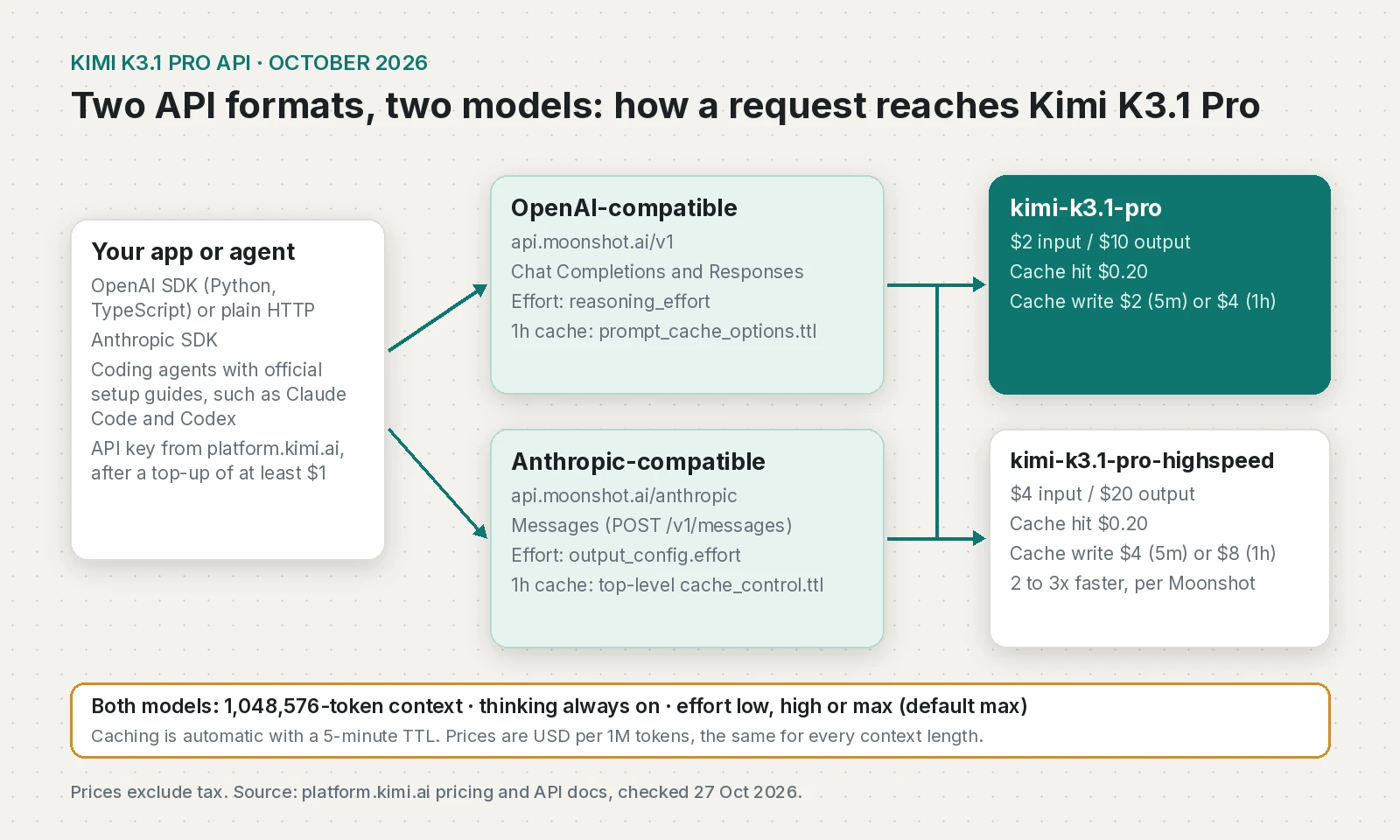
Moonshot exposes the same models through two API formats, so most existing code needs only a base URL and model ID change.
Calling the Kimi API with the OpenAI SDK
The quickstart uses the OpenAI Python SDK pointed at https://api.moonshot.ai/v1. Create a key on the API keys page and keep it on your server, never in a mobile or web client. This example sets effort, asks for the 1-hour cache tier and prints the cache counters:
import os
from pathlib import Path
from openai import OpenAI

client = OpenAI(
    api_key=os.environ["MOONSHOT_API_KEY"],
    base_url="https://api.moonshot.ai/v1",
)

# Stable content first, so the prefix can be cached between calls
SYSTEM_PROMPT = Path("support-playbook.md").read_text(encoding="utf-8")

completion = client.chat.completions.create(
    model="kimi-k3.1-pro",
    reasoning_effort="high",  # low | high | max (default max)
    max_completion_tokens=8000,
    messages=[
        {"role": "system", "content": SYSTEM_PROMPT},
        {"role": "user", "content": "A customer was charged twice for one order. What do I do?"},
    ],
    # Kimi-specific field, so it goes through extra_body
    extra_body={"prompt_cache_options": {"mode": "implicit", "ttl": "1h"}},
)

message = completion.choices[0].message
print(message.content)

usage = completion.usage
details = usage.prompt_tokens_details
print("input:", usage.prompt_tokens,
      "cache hit:", getattr(details, "cached_tokens", 0),
      "cache write:", getattr(details, "cache_write_tokens", 0),
      "output:", usage.completion_tokens)
Against a local mock server, openai 3.39.0 sent reasoning_effort and prompt_cache_options at the top level, as the caching guide shows. Moving from K2? Remove the old thinking setting, per the reasoning effort guide.
Tool calling in TypeScript
Tool calling follows the OpenAI format. The one rule that is easy to break: send the complete assistant message back, not only content.
import OpenAI from "openai";

const client = new OpenAI({
  apiKey: process.env.MOONSHOT_API_KEY,
  baseURL: "https://api.moonshot.ai/v1",
});

const tools: OpenAI.Chat.ChatCompletionTool[] = [
  {
    type: "function",
    function: {
      name: "get_order_status",
      description: "Look up the status of an order by its ID",
      parameters: {
        type: "object",
        properties: { order_id: { type: "string" } },
        required: ["order_id"],
      },
    },
  },
];

async function getOrderStatus(orderId: string) {
  // Replace with your real database or API call
  return { order_id: orderId, status: "shipped", eta: "2026-10-30" };
}

const messages: OpenAI.Chat.ChatCompletionMessageParam[] = [
  { role: "system", content: "You are the support agent for an online store." },
  { role: "user", content: "Where is my order A-1042?" },
];

for (let step = 0; step < 5; step++) {
  const completion = await client.chat.completions.create({
    model: "kimi-k3.1-pro",
    reasoning_effort: "high",
    messages,
    tools,
  });

  const message = completion.choices[0].message;
  // Push the whole message back: Kimi needs reasoning_content and tool_calls
  messages.push(message);

  if (!message.tool_calls?.length) {
    console.log(message.content);
    break;
  }

  for (const call of message.tool_calls) {
    if (call.type !== "function") continue;
    const args = JSON.parse(call.function.arguments);
    const result = await getOrderStatus(args.order_id);
    messages.push({
      role: "tool",
      tool_call_id: call.id,
      content: JSON.stringify(result),
    });
  }
}
This type-checks with openai 6.49.0 and TypeScript 7.0.2 in an ES module, and against the mock server the second request carried reasoning_content back untouched.
Using the Anthropic-compatible endpoint
If your code or tools already speak the Anthropic Messages format, Moonshot's Messages API accepts it at https://api.moonshot.ai/anthropic. It supports kimi-k3.1-pro, kimi-k3.1-pro-highspeed and kimi-k3. Two differences from Claude: effort is output_config.effort with low, high or max, and the cache TTL goes in a top-level cache_control object. cache_control markers inside messages are ignored.
import os
import anthropic

client = anthropic.Anthropic(
    auth_token=os.environ["MOONSHOT_API_KEY"],  # sent as Authorization: Bearer
    base_url="https://api.moonshot.ai/anthropic",
)

response = client.messages.create(
    model="kimi-k3.1-pro",
    max_tokens=8000,
    system="You review pull requests for a Flutter and Node.js team.",
    messages=[{"role": "user", "content": "Review this diff for bugs: ..."}],
    extra_body={
        "output_config": {"effort": "high"},  # low | high | max
        "cache_control": {"type": "ephemeral", "ttl": "1h"},  # top level only
    },
)

for block in response.content:
    if block.type == "text":
        print(block.text)

print(response.usage)
I used auth_token because the endpoint expects a Bearer token, like the ANTHROPIC_AUTH_TOKEN setting in Moonshot's Claude Code guide. Responses start with thinking blocks, so read blocks by type and pass them back unchanged, signature included. Here usage.input_tokens excludes cache reads and writes, while Chat Completions' prompt_tokens is the total, so don't mix the two in one cost dashboard. If you are coming from Claude, my Sonnet 5.5 migration notes cover the same block-handling habits.
Benchmarks: Moonshot's claims vs Artificial Analysis
Moonshot's numbers come from its own runs, mostly with the Claude Code harness at max effort. Artificial Analysis runs its own. Neither tests your workload.
| Measure | Moonshot (vendor-reported) | Artificial Analysis |
|---|---|---|
| Terminal-Bench 4.0 | 65.7%, vs Claude Opus 5.5 66.4% and GPT-6 Astra 58.2% | 67%, highest of any model they ran; Claude Sonnet 5.5 64%; Kimi K3 13% |
| Overall | Not given | Intelligence Index 55, 4th behind Opus 5.5 (58), Sonnet 5.5 (56) and Muse Wonder Full (56) |
| Hallucination | Internal Kimi Hallu Bench Hard: claim-level rate 23.4% (K3) to 8.3% | AA-Omniscience hallucination rate 53% to 44% |
| Speed | Highspeed 2 to 3x faster than standard | Standard model: 44.4 output tokens per second, 2.98 s to first token on Kimi's API |
| Cost to run | Not given | $2.11 per Intelligence Index task on the model page today ($1.98 in the launch article) |
Sources: Moonshot blog, Artificial Analysis launch article (23 October 2026) and model page. Anthropic reports 70.6% for Sonnet 5.5 on Terminal-Bench 4.0, so vendor numbers from different harnesses don't line up. The API quickstart also shows different hallucination figures (23.35% to 6.85%) and unfilled placeholder text, so I quote the blog.
Open weights, the licence and the cyber-filtered checkpoint
Two details matter if you plan around self-hosting. First, the release is deliberately weaker at cyber work. For the open-weight release, Moonshot removed cyber-related data from mid-training and the RL environments. On its internal exploit-development benchmark, an unfiltered checkpoint solved 90.5% of tasks at pass@3; the released K3.1 Pro reaches 81.0%, which Moonshot says is behind frontier proprietary models that have been public for at least three months. For normal coding this shouldn't matter; for security research, expect a weaker model by design.
Second, there is no K3.1 licence yet. Moonshot's Hugging Face organisation shows Kimi K3 as the latest model today. For reference, the Kimi K3 licence is MIT-style with two conditions: model-as-a-service operators with more than $20M in revenue over 12 months need a separate agreement, and products with over 100M monthly active users or $20M monthly revenue must show "Kimi K3" in the UI. Don't assume K3.1 will match. At 2.8T parameters self-hosting is a multi-GPU-server job, so for a small team open weights mostly means more hosting providers. If you need downloadable weights today, Muse Spark Open is already out.
Kimi K3.1 vs Claude Opus 5.5: when I would pick it
On published numbers, K3.1 Pro is close to Opus 5.5 on agentic coding at half the Opus token price. Where I'd try it:
- Agentic coding where you want results near Opus 5.5 at Sonnet prices. Test it on your tasks first.
- Agent runs where a background job can wait, since the standard model is slow (44 tokens per second per Artificial Analysis).
- A second provider for fallback, since both API formats make it a config change.
Where I wouldn't, yet:
- Latency-sensitive chat, unless Highspeed's doubled price still works for you.
- Client work with personal or confidential data, until the data terms below are cleared.
Try-it checklist
- Top up at least $1, create a key, and store it server-side as
MOONSHOT_API_KEY. - Change the base URL and model ID; remove
temperature,top_p,nand the penalty fields. - Set
reasoning_effort(oroutput_config.effort) explicitly. Start withhigh, then testlowfor simple calls. - Send the complete assistant message back in tool loops, including
reasoning_contentor thinking blocks. - Put stable content first, and pick the
1hcache only when calls are more than 5 minutes apart. - Log billed
usageper task, and remember the Messages API countsinput_tokensdifferently. - Run 20 to 50 of your own tasks against your current model; compare cost and time per completed task.
- Clear the data terms with the client, or request ZDR, before real user data goes through it.
- Recheck on 4 November for the weights and the K3.1 licence.
Frequently asked questions
How much does Kimi K3.1 Pro cost?
On the Kimi API, kimi-k3.1-pro costs $2 per million input tokens, $10 per million output tokens and $0.20 per million cache-hit tokens, with cache writes at $2 (5-minute) or $4 (1-hour). The Highspeed version costs $4 input and $20 output. Prices exclude tax, are the same at every context length, and were checked on 27 October 2026.
Is Kimi K3.1 Pro open source?
Moonshot calls it an open-weight model and says the full weights will be released by 4 November 2026. As of 27 October 2026 the weights and the K3.1 licence are not published, so today it is only available through the API and Kimi apps. The earlier Kimi K3 uses a modified MIT licence with conditions for very large commercial users.
How do I get a Kimi API key and use the API?
Sign up on platform.kimi.ai, top up at least $1 to unlock K3.1 Pro, and create a key on the API keys page. Then use the OpenAI SDK with the base URL https://api.moonshot.ai/v1 and the model kimi-k3.1-pro, or the Anthropic SDK with https://api.moonshot.ai/anthropic.
Kimi K3.1 Pro vs Claude Opus 5.5: which is better?
Moonshot reports 65.7% on Terminal-Bench 4.0 against 66.4% for Claude Opus 5.5, and Artificial Analysis ranks K3.1 Pro 4th on its Intelligence Index at 55 against 58 for Opus 5.5. K3.1 Pro costs half as much per token, but Artificial Analysis measured it as slow and verbose, so compare cost and quality on your own tasks.
What is the Kimi K3.1 Pro context window?
Kimi K3.1 Pro has a 1,048,576-token context window. Output defaults to 131,072 tokens through max_completion_tokens and can be raised up to 1,048,576, and pricing does not change with context length.
Sources
- Introducing Kimi K3.1 Pro (Moonshot AI (Kimi blog), 2026-10-23)
- Kimi K3.1 Pro quickstart (Kimi API Platform docs, 2026-10-23)
- Model Inference Pricing Explanation (Kimi API Platform docs)
- Best Practices for context caching (Kimi API Platform docs)
- Reasoning Effort (Kimi API Platform docs)
- Messages API (Kimi API Platform docs)
- Use Kimi in Claude Code (Kimi API Platform docs)
- Recharge and Rate Limiting (Kimi API Platform docs)
- Terms of Service for Kimi OpenPlatform (Moonshot AI, 2026-07-30)
- Kimi OpenPlatform Privacy Policy (Moonshot AI, 2025-04-30)
- What is Zero Data Retention (ZDR)? (Kimi API Platform docs)
- Kimi K3.1 Pro launches at 4th on the Intelligence Index (Artificial Analysis, 2026-10-23)
- Kimi K3.1 Pro: Intelligence, Performance and Price Analysis (Artificial Analysis)
- Pricing (Claude Platform Docs)
- Introducing Claude Sonnet 5.5 (Anthropic, 2026-09-28)
- Kimi K3 License (Hugging Face (moonshotai))
- moonshotai models (Hugging Face)
Keep reading
- LLM API Pricing Compared: Cost per Task, Not per TokenOpenAI, Claude, Gemini and DeepSeek API prices from their own pages, and a simple way to work out what one completed AI task really costs.
- Claude Sonnet 5.5 vs Opus and Haiku 5.5, and How to MigrateClaude Sonnet 5.5 compared with Opus 5.5 and Haiku 5.5 on price, limits and use cases, plus the five breaking changes when migrating from Sonnet 5.
- Muse Spark Open Developer Guide: API, Pricing, Local SetupHow to call Meta's Muse Spark Open, what it costs on each provider, how to use it in OpenCode, and what hardware you need to run it yourself.
Comments
Share a question or note about this article.
Loading comments…